[Test] XCP-ng 7.5.0 Windows PV-Drivers and Management Agent
-
@borzel Thank you, yes XCP-ng is installed on the server and the Server Essentials 2016 is installed in a vm. I have Xen Orchestra Community version installed too and the Windows Update tools are switched on. I know that the there shouldn't be any relation between the RAID type and vm's but I have tried 2 x sets of disks, 4 x 2TB Seagate EXOS and 4 x 3TB Toshiba desktop types and the RAID 10 failed. I have now used the same controller with the Toshiba drives running in RAID 1 and it is fine, the total size is less that approx 4TB or 6TB that the 2 sets of disks. Windows Server 2016 Standard was ok. I just wondered if Windows Essentials Server 2016 used different disk drivers than the Standard server. This topic seemed to be discussing an issue with Windows 10 disk drivers ....
-
@dlkcon there is no difference with or without disk drivers inside a vm. If your SR does work for one vm it works also for other vms, no matter what OS or drivers are used inside that VM.
If a VM boots on server A and not on Server B than the Server is faulty or the VM got corrupt during the transfer.
Did you check your RAID-controller? Maybe it is faulty with RAID10?
Do you have any logfiles? Screenshots?
-
I have just reinstated the RAID 10, downloaded a new copy of the installation ISO for Essential Server 2016 and done a clean install. After it restarts it halts during the reboot, where do I find the relevant log files you want to see, perhaps they will be better than a screen shot.
I have also installed Server 2016 Standard and it is fine, it reboots and I can login and download updates, it is currently prompting me to reboot after the XenServer PV Host adaptor has been loaded.
I note that the driver used on the installation is avago-megaraid-sas-07.701.18.00+rc1-1.el7.centos.x86_64.rpm, but there appears to be a newer version on the Broadcom website 07.706.03.00-1 but its a bit beyond me as to how to install it, none of the rpm files in the downloaded file are similar in wording to the one installed with XCP-ng.
-
In my attempt to update the disk driver I crashed the installation and reconfigured the disk sets in the RAID 10 and reinstalled XCP-ng. I was able to install both Essentials and Standard Server 2016, all working downloaded updates rebooted the vm's and server.. I copied the vm from my old HP (also installed with XCP-ng 7.5) with XCP-ng center and it too has worked all day. I decided to copy the SQL vm across to the new server using XCP-ng center but a message showed up to say that ('name of new server' you attempted to copy a VDI to or from an SR that doesn't support migration). I shut down the Essentials vm and rebooted the new server, I still couldn't copy the SQL vm from from the old server and now both the copied Essentials + clean install Essentials vm will not boot although the Standard Server 2016 will still boot with no issues.
-
@dlkcon that's (maybe) at all not releated to our PV-Drivers. Please open a new thread, so we all can discuss your issue there

-
Hello @all there in the World,
I'm currently on analysing why the PV-driver install over Citrix-Drivers is not working.
I have a test-VM from someone (Windows Server 2012 R2) on which Windows does not accept the test signed driver's.
I did some tests but don't know why it's not working
(I perfectly followed MS instructions at https://docs.microsoft.com/en-us/windows-hardware/drivers/install/signing-drivers-during-development-and-test)
In
C:\Windows\Inf\setupapi.logyou can find the linesFile 'C:\Windows\system32\DRIVERS\xen.sys' pruned from copy. VerfiyTrustFailed for C:\Windows\system32\xen.sys.The test-signature is valid:
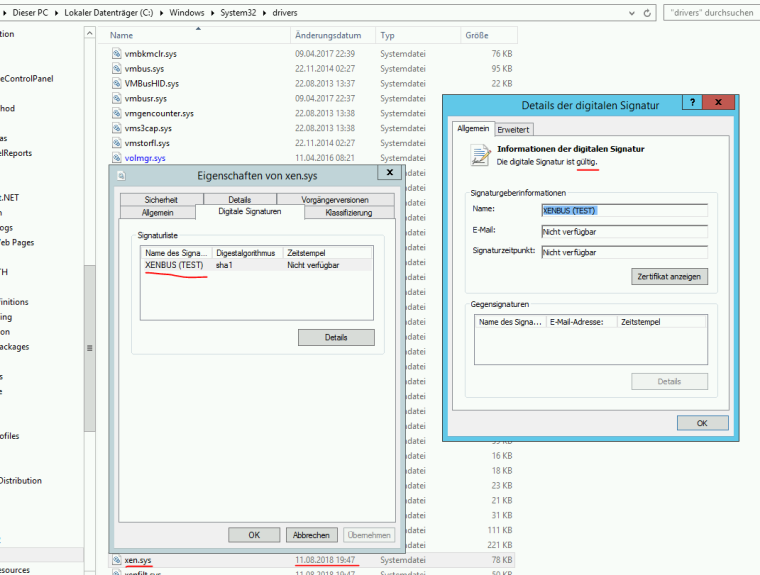

Has someone a clue? I'm lost in Windowspace

-
Additional Info: I did update the Test-Windows to latest Windows Updates... still no luck

The worst thing is, that even the Citrix XenServer 7.5 PV-Drivers can not be installed. It seems to be a general issue. -
It seems to be an issue here: https://github.com/xcp-ng/win-xenbus/blame/master/src/coinst/coinst.c#L1067
I was able to get the XCP-ng PV-Drivers installed, but just with some ugly bad tricks (removing co-installer from
xenbus.infand manual copying .sys files toC:\Windows\system32\drivers)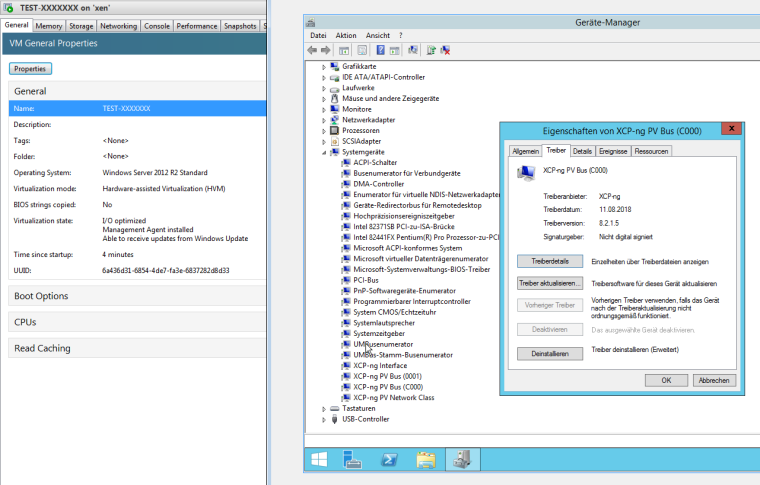
-
-
The case is solved.
Here is an updated entry in our Troubleshooting Guide:
Cause a) There can be leftovers from old Citrix XenServer Client Tools.-> https://github.com/xcp-ng/xcp/wiki/Troubleshooting#the-management-agent-installer-was-executed-but-the-pv-drivers-are-not-installed-in-the-device-manager
Hello! It looks like you're interested in this conversation, but you don't have an account yet.
Getting fed up of having to scroll through the same posts each visit? When you register for an account, you'll always come back to exactly where you were before, and choose to be notified of new replies (either via email, or push notification). You'll also be able to save bookmarks and upvote posts to show your appreciation to other community members.
With your input, this post could be even better 💗
Register Login