Need Help Understanding Resource Sets
-
Good-day Folks,
I need some help understanding the
Resource Setquotas in Xen Orchestra. I've read through the official documentation but couldn't find anything that addresses what I'm seeing.So, it's my understanding that the quotas that can be set in a
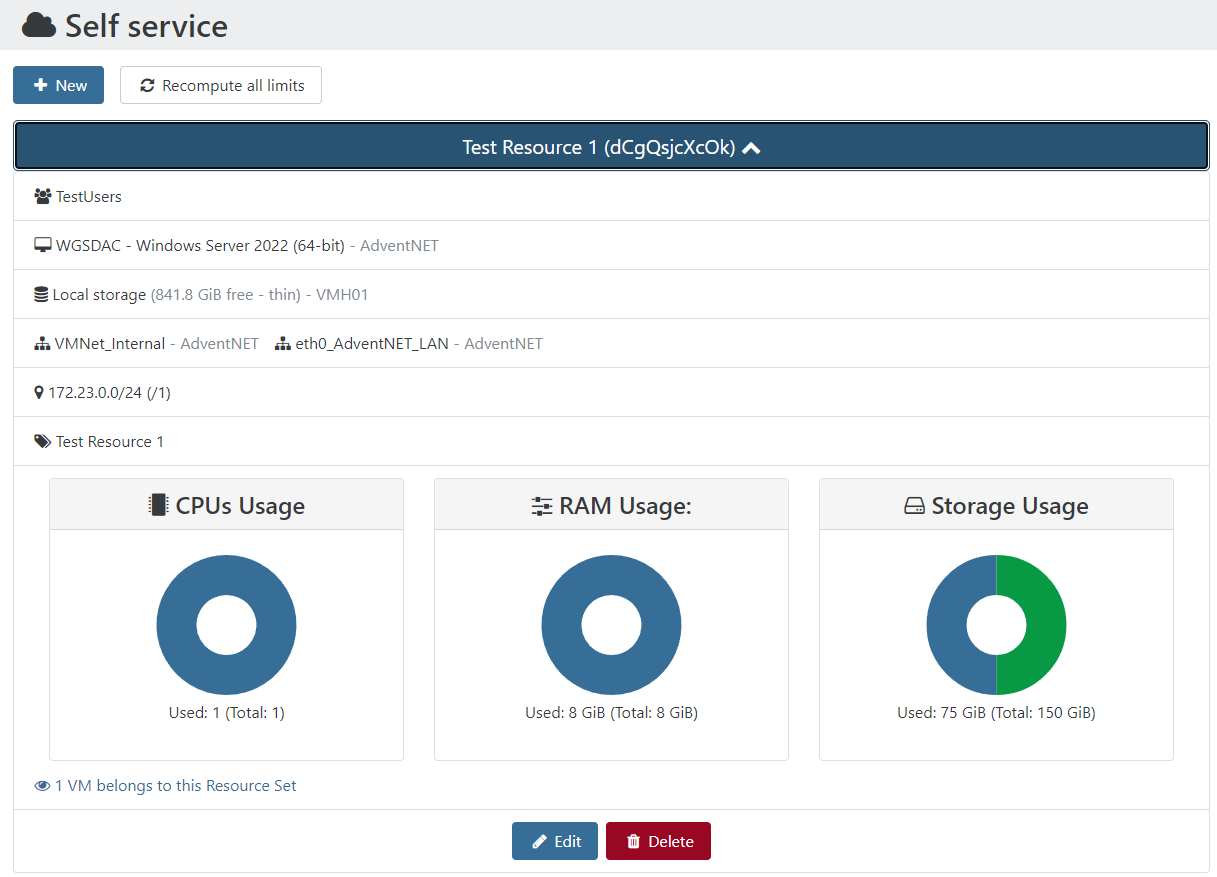
Resource Setare global and not per VM created - is this correct? If so, then I'm not understanding why I am unable to create a snapshot when it seems I have the resources available to do so. Essentially, as you may gleam from the screenshot below, I created aResource Setto have a limit of8 GiB RAM,150 GiB Storage, and1 vCPU. With these limits, I thought I should be able to create a snapshot of the VM I created using thisResource Set. Unfortunately, an attempt to snapshot this VM, results in the following error message:not enough resources in resource setIt appears my understanding of the quotas may be incorrect and would appreciate some input from the community, thank you.
-
@kagbasi-ngc Take a look at this KB article. Also see this prior thread -- https://xcp-ng.org/forum/topic/5902/permissions-for-users-to-be-able-to-snapshot
-
@Danp Aaah, thanks for pointing me to these resources. After reading, I thought it best to simply increase the quotas in my resource set definition to accommodate.
I felt having to modify the config file was too clunky. This seems like something that should be exposed in the UI when defining the resource set.
-
@kagbasi-ngc You can go to Settings > Logs to display the details of that resources error message. It should say something such as this:
vm.snapshot
{
  "id": "7f3d5995-3ab8-bfd5-ec72-c36e98d8cc70"
}
{
  "code": 24,
  "data": [
    {
      "resourceSet": "UXh2bwwr9Lo",
      "resourceType": "cpus",
      "available": 0,
      "requested": 4
    }
  ],
  "message": "not enough resources in resource set",
From my tests, you need to have free cpu, ram and storage of the same amount of the VM. So, to be able to snapshot that VM you would need 2 cpus and 16 GiB of ram in the resource.
-
@ecoutinho Thanks for chiming in. I managed to figure out the math, but thanks nonetheless.

Hello! It looks like you're interested in this conversation, but you don't have an account yet.
Getting fed up of having to scroll through the same posts each visit? When you register for an account, you'll always come back to exactly where you were before, and choose to be notified of new replies (either via email, or push notification). You'll also be able to save bookmarks and upvote posts to show your appreciation to other community members.
With your input, this post could be even better 💗
Register Login