XCP-ng
    • Categories
    • Recent
    • Tags
    • Popular
    • Users
    • Groups
    • Register
    • Login

    VM Failing to Reboot

    Scheduled Pinned Locked Moved Unsolved Management
    92 Posts 4 Posters 26.2k Views 3 Watching
    Loading More Posts
    • Oldest to Newest
    • Newest to Oldest
    • Most Votes
    Reply
    • Reply as topic
    Log in to reply
    This topic has been deleted. Only users with topic management privileges can see it.
    • D Offline
      dinhngtu Vates 🪐 XCP-ng Team @Guest
      last edited by

      @kagbasi-ngc I think for that it'd be more appropriate to contact our support team, which will be able to help you directly on your infrastructure. I'd also like to keep any troubleshooting information on the forum in case someone runs into a similar problem.

      Non-inbox drivers mean drivers with "Inbox : No" as seen in your screenshot.

      ? 1 Reply Last reply Reply Quote 0
      • ? Offline
        A Former User @dinhngtu
        last edited by

        @dinhngtu Roger that, agreed.

        I just got back to the lab, so I'm gonna try and remove those non-inbox drivers and see what happens.

        ? 1 Reply Last reply Reply Quote 0
        • ? Offline
          A Former User @Guest
          last edited by

          @dinhngtu Unfortunately, I don't have good news. I removed all the non-inbox drivers, one by one (rebooting after removing each one), yet still the VM is crashing with the same BSOD message.

          D 1 Reply Last reply Reply Quote 0
          • D Offline
            dinhngtu Vates 🪐 XCP-ng Team @Guest
            last edited by

            @kagbasi-ngc Could the VM get into Safe Mode?

            ? 1 Reply Last reply Reply Quote 0
            • ? Offline
              A Former User @dinhngtu
              last edited by

              @dinhngtu Yes, it does. There is no Last Known Good State option however.

              D 1 Reply Last reply Reply Quote 0
              • D Offline
                dinhngtu Vates 🪐 XCP-ng Team @Guest
                last edited by dinhngtu

                @kagbasi-ngc The fact that your VM still boots in Safe Mode means that there's still some drivers blocking Windows from booting in normal mode. Please enable boot logging by running bcdedit /store bcd /set {default} bootlog yes then post the boot logs of normal mode versus safe mode. This log is found at C:\Windows\ntbtlog.txt.

                Could you send another copy of your SYSTEM hive?

                ? 1 Reply Last reply Reply Quote 0
                • ? Offline
                  A Former User @dinhngtu
                  last edited by

                  @dinhngtu Just to clarify, the VM isn't booting into Safe Mode; I have to trigger it by smashing the F8 key at boot. It boots normally then goes to the BSOD.

                  I will get the logs for you shortly. Do you want me to drop them in the same location you sent earlier?

                  D 1 Reply Last reply Reply Quote 0
                  • D Offline
                    dinhngtu Vates 🪐 XCP-ng Team @Guest
                    last edited by dinhngtu

                    @kagbasi-ngc Just to confirm, if you use the F8 menu it boots into Safe Mode without getting a BSOD, right? Please upload the SYSTEM hive to the same location.

                    ? 1 Reply Last reply Reply Quote 0
                    • ? Offline
                      A Former User @dinhngtu
                      last edited by

                      @dinhngtu Yes, it does. The only time I get the BSOD is if I allow the VM to boot normally without interfering.

                      ? 1 Reply Last reply Reply Quote 0
                      • ? Offline
                        A Former User @Guest
                        last edited by

                        @dinhngtu So I managed to enable the boot logging, allowed the VM to do a normally boot to BSOD, then I booted with Hiren's, however, I'm not seeing the log file at C:\Windows.

                        D 1 Reply Last reply Reply Quote 0
                        • D Offline
                          dinhngtu Vates 🪐 XCP-ng Team @Guest
                          last edited by dinhngtu

                          @kagbasi-ngc You might need the debugger in normal mode. Attach the debugger right at boot time and run the following command (beware the exact spelling):

                          sxe -c "lm1mna (poi(rdx));g" ld
                          

                          Click Go until Windows loads completely or until you get a VM crash in Windbg, then paste the entire Windbg output.

                          ? 1 Reply Last reply Reply Quote 0
                          • ? Offline
                            A Former User @dinhngtu
                            last edited by

                            @dinhngtu sorry for the delayed response, having trouble getting the debugger to reattach. I've re-input all the boot parameters, yet still, no data is being piped to the debug port on the host.

                            Do you think perhaps the removal of the drivers we did yesterday has removed the VM's ability to talk to the host?

                            D 1 Reply Last reply Reply Quote 0
                            • D Offline
                              dinhngtu Vates 🪐 XCP-ng Team @Guest
                              last edited by

                              @kagbasi-ngc It shouldn't, the debugger drivers are built into Windows. If you're having issues with attaching the debugger, you can get into the F8 menu, start attaching WinDbg then choose Debugging mode in the F8 menu to start the guest. This should give WinDbg the correct timing to attach to the guest.

                              ? 1 Reply Last reply Reply Quote 0
                              • ? Offline
                                A Former User @dinhngtu
                                last edited by

                                @dinhngtu thanks for the pointers, but nothing I'm doing seems to be working. The debugger seems to have connected to the host successful, but the VM isn't transmitting any data to the debugport.

                                D 1 Reply Last reply Reply Quote 0
                                • D Offline
                                  dinhngtu Vates 🪐 XCP-ng Team @Guest
                                  last edited by

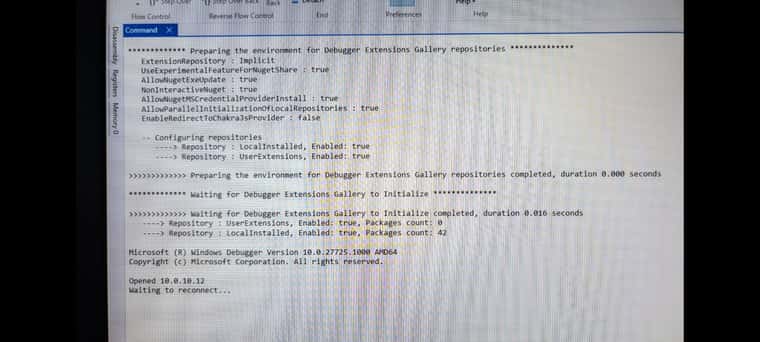
                                  @kagbasi-ngc Does it get stuck at "Waiting to reconnect..."? Do you get anything when telnet-ing to the VM's serial port?

                                  ? 2 Replies Last reply Reply Quote 0
                                  • ? Offline
                                    A Former User @dinhngtu
                                    last edited by

                                    @dinhngtu Yes (see image below). I'm on my way back to the office now, should be there in about 45 mins and will try telnet to the host tcp port 7001 and see what I get.
                                    1000235726.jpg

                                    1 Reply Last reply Reply Quote 0
                                    • ? Offline
                                      A Former User @dinhngtu
                                      last edited by

                                      @dinhngtu said in VM Failing to Reboot:

                                      Do you get anything when telnet-ing to the VM's serial port?

                                      Sorry for the delayed response. I just attempted to telnet to the VM's serial port on the host, while watching IPTables, and here's the behavior I observed:

                                      • The PuTTY telnet session remains open while the VM is powered up and attempting to boot.

                                      • As soon as the BSOD is encountered and the VM powers off, the telnet session window terminates.

                                      • While watching IPTables, I can see the pkts count increment by 5 each time I attempt a connection.

                                      Given the above observations, I'm convinced that the host is setup correctly, but it's the VM that is not dumping any data to the serial console on the host.

                                      This is the IPTables rule I was watching:

                                      Chain	xapi-INPUT (1 references)
                                       pkts	bytes	target		prot	opt	in	out	source		destination
                                         70	3636	ACCEPT		tcp	--	*	*	0.0.0.0/0	0.0.0.0/0	ctstate NEW tcp dpt:7001
                                      
                                      D 1 Reply Last reply Reply Quote 0
                                      • D Offline
                                        dinhngtu Vates 🪐 XCP-ng Team @Guest
                                        last edited by

                                        @kagbasi-ngc Could you check bcdedit /store bcd /enum all (you can do this from Safe Mode, just do bcdedit /enum all) to see if the debugger settings are still there? For reference, it should look like:

                                        Windows Boot Loader
                                        -------------------
                                        identifier              {current}
                                        ...
                                        debug                   Yes
                                        
                                        ...
                                        
                                        Debugger Settings
                                        -----------------
                                        identifier              {dbgsettings}
                                        debugtype               Serial
                                        debugport               1
                                        baudrate                115200
                                        
                                        ? 2 Replies Last reply Reply Quote 0
                                        • ? Offline
                                          A Former User @dinhngtu
                                          last edited by

                                          @dinhngtu Checking now.

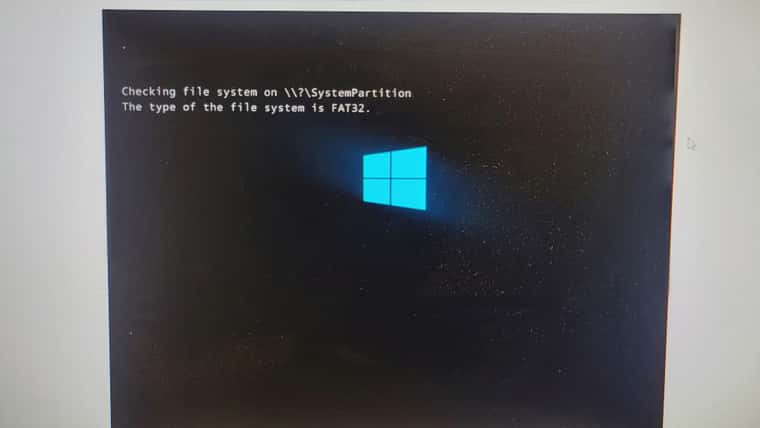
                                          As soon as I selected Safe Mode with Command Prompt, the following came up. So I'm waiting for it to finish.
                                          1000235776.jpg

                                          1 Reply Last reply Reply Quote 0
                                          • ? Offline
                                            A Former User @dinhngtu
                                            last edited by

                                            @dinhngtu said in VM Failing to Reboot:

                                            @kagbasi-ngc Could you check bcdedit /store bcd /enum all (you can do this from Safe Mode, just do bcdedit /enum all) to see if the debugger settings are still there? For reference, it should look like:

                                            Here you go. As far as I can tell, the settings are there.

                                            Firmware Boot Manager
                                            ---------------------
                                            identifier              {fwbootmgr}
                                            displayorder            {869b8842-cfa5-11ef-88bd-6690debbc340}
                                                                    {bootmgr}
                                                                    {4953fce7-d2e8-11ef-9050-806e6f6e6963}
                                                                    {68f8db89-dac7-11ef-b603-806e6f6e6963}
                                                                    {869b8841-cfa5-11ef-88bd-6690debbc340}
                                                                    {869b8846-cfa5-11ef-88bd-6690debbc340}
                                                                    {cc338294-d2fd-11ef-904b-806e6f6e6963}
                                                                    {869b8844-cfa5-11ef-88bd-6690debbc340}
                                            timeout                 0
                                            
                                            Windows Boot Manager
                                            --------------------
                                            identifier              {bootmgr}
                                            device                  partition=S:
                                            path                    \EFI\Microsoft\Boot\bootmgfw.efi
                                            description             Windows Boot Manager
                                            locale                  en-US
                                            inherit                 {globalsettings}
                                            bootshutdowndisabled    Yes
                                            default                 {default}
                                            resumeobject            {869b8847-cfa5-11ef-88bd-6690debbc340}
                                            displayorder            {default}
                                            toolsdisplayorder       {memdiag}
                                            timeout                 30
                                            
                                            Firmware Application (101fffff)
                                            -------------------------------
                                            identifier              {4953fce7-d2e8-11ef-9050-806e6f6e6963}
                                            description             UEFI Misc Device 2
                                            
                                            Firmware Application (101fffff)
                                            -------------------------------
                                            identifier              {68f8db89-dac7-11ef-b603-806e6f6e6963}
                                            description             UEFI Misc Device 3
                                            
                                            Firmware Application (101fffff)
                                            -------------------------------
                                            identifier              {869b8841-cfa5-11ef-88bd-6690debbc340}
                                            description             UiApp
                                            
                                            Firmware Application (101fffff)
                                            -------------------------------
                                            identifier              {869b8842-cfa5-11ef-88bd-6690debbc340}
                                            description             UEFI Misc Device
                                            
                                            Firmware Application (101fffff)
                                            -------------------------------
                                            identifier              {869b8844-cfa5-11ef-88bd-6690debbc340}
                                            description             UEFI PXEv6 (MAC:7E30B1BB2307)
                                            
                                            Firmware Application (101fffff)
                                            -------------------------------
                                            identifier              {869b8846-cfa5-11ef-88bd-6690debbc340}
                                            description             EFI Internal Shell
                                            
                                            Firmware Application (101fffff)
                                            -------------------------------
                                            identifier              {cc338294-d2fd-11ef-904b-806e6f6e6963}
                                            description             UEFI PXEv4 (MAC:7E30B1BB2307)
                                            
                                            Windows Boot Loader
                                            -------------------
                                            identifier              {default}
                                            device                  partition=C:
                                            path                    \windows\system32\winload.efi
                                            description             Windows Server
                                            locale                  en-US
                                            inherit                 {bootloadersettings}
                                            recoverysequence        {ad69be4c-cf8c-11ef-9047-6690debbc340}
                                            displaymessageoverride  Recovery
                                            recoveryenabled         Yes
                                            isolatedcontext         Yes
                                            allowedinmemorysettings 0x15000075
                                            osdevice                partition=C:
                                            systemroot              \windows
                                            resumeobject            {869b8847-cfa5-11ef-88bd-6690debbc340}
                                            nx                      OptOut
                                            bootlog                 Yes
                                            
                                            Windows Boot Loader
                                            -------------------
                                            identifier              {ad69be4c-cf8c-11ef-9047-6690debbc340}
                                            device                  ramdisk=[\Device\HarddiskVolume4]\Recovery\WindowsRE\Winre.wim,{ad69be4d-cf8c-11ef-9047-6690debbc340}
                                            path                    \windows\system32\winload.efi
                                            description             Windows Recovery Environment
                                            locale                  en-US
                                            inherit                 {bootloadersettings}
                                            displaymessage          Recovery
                                            osdevice                ramdisk=[\Device\HarddiskVolume4]\Recovery\WindowsRE\Winre.wim,{ad69be4d-cf8c-11ef-9047-6690debbc340}
                                            systemroot              \windows
                                            nx                      OptIn
                                            bootmenupolicy          Standard
                                            winpe                   Yes
                                            
                                            Resume from Hibernate
                                            ---------------------
                                            identifier              {869b8847-cfa5-11ef-88bd-6690debbc340}
                                            device                  partition=C:
                                            path                    \windows\system32\winresume.efi
                                            description             Windows Resume Application
                                            locale                  en-US
                                            inherit                 {resumeloadersettings}
                                            recoverysequence        {ad69be4c-cf8c-11ef-9047-6690debbc340}
                                            recoveryenabled         Yes
                                            isolatedcontext         Yes
                                            allowedinmemorysettings 0x15000075
                                            filedevice              partition=C:
                                            custom:21000026         partition=C:
                                            filepath                \hiberfil.sys
                                            debugoptionenabled      No
                                            
                                            Windows Memory Tester
                                            ---------------------
                                            identifier              {memdiag}
                                            device                  partition=S:
                                            path                    \EFI\Microsoft\Boot\memtest.efi
                                            description             Windows Memory Diagnostic
                                            locale                  en-US
                                            inherit                 {globalsettings}
                                            badmemoryaccess         Yes
                                            
                                            EMS Settings
                                            ------------
                                            identifier              {emssettings}
                                            bootems                 Yes
                                            
                                            Debugger Settings
                                            -----------------
                                            identifier              {dbgsettings}
                                            debugtype               Serial
                                            debugport               1
                                            baudrate                115200
                                            
                                            RAM Defects
                                            -----------
                                            identifier              {badmemory}
                                            
                                            Global Settings
                                            ---------------
                                            identifier              {globalsettings}
                                            inherit                 {dbgsettings}
                                                                    {emssettings}
                                                                    {badmemory}
                                            
                                            Boot Loader Settings
                                            --------------------
                                            identifier              {bootloadersettings}
                                            inherit                 {globalsettings}
                                                                    {hypervisorsettings}
                                            
                                            Hypervisor Settings
                                            -------------------
                                            identifier              {hypervisorsettings}
                                            hypervisordebugtype     Serial
                                            hypervisordebugport     1
                                            hypervisorbaudrate      115200
                                            
                                            Resume Loader Settings
                                            ----------------------
                                            identifier              {resumeloadersettings}
                                            inherit                 {globalsettings}
                                            
                                            Device options
                                            --------------
                                            identifier              {ad69be4d-cf8c-11ef-9047-6690debbc340}
                                            description             Windows Recovery
                                            ramdisksdidevice        partition=\Device\HarddiskVolume4
                                            ramdisksdipath          \Recovery\WindowsRE\boot.sdi
                                            
                                            D 1 Reply Last reply Reply Quote 0

                                            Hello! It looks like you're interested in this conversation, but you don't have an account yet.

                                            Getting fed up of having to scroll through the same posts each visit? When you register for an account, you'll always come back to exactly where you were before, and choose to be notified of new replies (either via email, or push notification). You'll also be able to save bookmarks and upvote posts to show your appreciation to other community members.

                                            With your input, this post could be even better 💗

                                            Register Login
                                            • First post
                                              Last post