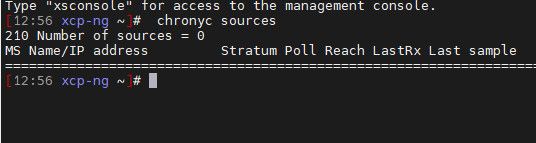
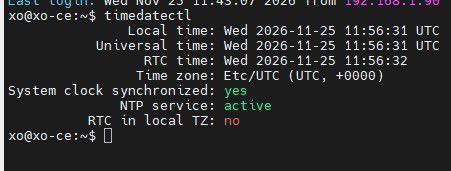
add a server <your-ntp-server> iburst
I am sorry for being stupid, I don't understand Linux at all, but where should I add it?
edit: nevermind, I got it.
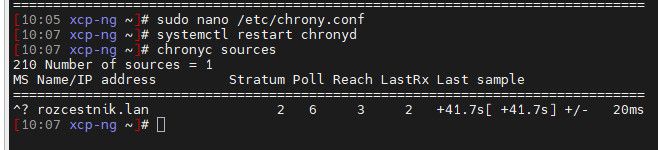
I guess it should work now.
add a server <your-ntp-server> iburst
I am sorry for being stupid, I don't understand Linux at all, but where should I add it?
edit: nevermind, I got it.
I guess it should work now.
These two playbooks do what ya need, but change your ntp servers to match.
cat /inventory/group_vars/all.yml
---
ntp_servers:
  - 10.100.20.248 # <replace-with-your-ntp-sources>
  - 10.100.20.249 # <replace-with-your-ntp-sources>
cat playbooks/configure-ntp.yml --- - name: Configure NTP via chrony on Linux targets hosts: rocky gather_facts: true tasks: - name: Install chrony package ansible.builtin.dnf: name: chrony state: present - name: Configure chrony NTP servers ansible.builtin.copy: dest: /etc/chrony.conf owner: root group: root mode: "0644" content: | {% for server in ntp_servers %} server {{ server }} iburst {% endfor %} driftfile /var/lib/chrony/drift makestep 1.0 3 rtcsync notify: Restart chronyd - name: Ensure chronyd service is started and enabled ansible.builtin.systemd: name: chronyd state: started enabled: true handlers: - name: Restart chronyd ansible.builtin.systemd: name: chronyd state: restarted - name: Configure NTP via w32time on Windows targets hosts: windows gather_facts: false tasks: - name: Ensure Windows Time service is running and automatic ansible.windows.win_service: name: w32time state: started start_mode: auto - name: Configure w32time manual NTP peers ansible.windows.win_shell: | $peers = "{{ ntp_servers | join(' ') }}" w32tm /config /manualpeerlist:"$peers" /syncfromflags:MANUAL /reliable:yes /update Restart-Service w32time w32tm /resync /rediscover changed_when: true
[21:57 xcp-ng ~]# cat /inventory/group_vars/all.yml
cat: /inventory/group_vars/all.yml: No such file or directory
[21:57 xcp-ng ~]#
Sorry this forum is weird, it says I need reputation to post links. I cannot put the screenshots here 
What can I do about this? This happens after every server reboot. I couldn't find any time settings for VMs, and I assumed time was sychronized automatically. Well apparently it doesn't....
@coolsport00 Yes I can see the appeal, but for a server sitting in the corner of the living room that basically only hosts a NAS, torrent seedbox and an all around appliances management platform, two hosts sounds like a complete overkill and a headache, haha.
@julienXOvates That is the answer I was looking for! Can't give you karma unfortunately.
@jr-m4 Yes, it's a very basic home server.
So what does that update actually update? Is there a changelog or something? I don't understand the point of it.
Could anyone explain what "rolling pool update" is and why would I want or need it?
It's a greyed out button in the patches section and apparently I cannot use it while any VMs are running, but XO is a VM, so how am I supposed to install this?
Thank you.
@poddingue Thank you for the analysis. I'd give you a rep if I could 
That second one is exactly what you saw: the delay lands on the next VM to start, not on the one you set it on. I quoted the confusing one and then said it explained your behaviour, which it does not really.
I am really puzzled by this because it makes absolutely no sense whatsoever. I mean why would you design it like that? When I open a VM's settings and find start delay in there, it makes perfect sense to assume it delays start of the one I am messing around with. It makes even less sense for the feature to even exist in the first place when you consider there is no way to set the order in which VMs start.
I am surprised noone ever brought this up and it wasn't changed. It's pretty basic functionality I took for granted when I moved over from ESXi. For example, I have TrueNAS VM and also a torrent seedbox, and the seedbox absolutely has to start after the NAS has fully booted up, otherwise the share it connects to is unavailable. Well it just doesn't work here and everytime I reboot the server (thankfully that doesn't happen often) I have to remember to restart the seedbox VM manually once.
@poddingue I found it in a google search.
Supposedly
xe vm-param-set other-config:auto_poweron_delay=<Delay_In_Seconds> uuid=<VM_UUID>
I have no idea whether this is AI hallucinating or whether this was relevant to older releases or what.
But when you wrote it explained the behaviour what did you mean? I don't understand. The setting doesn't delay the start of the VM I am setting it on? Because from what I could see it seemed like it delayed the start of the next VM instead.
I removed the start-delay parameter from one of the VMs (only this one has it) and now it works again.
I don't get it.
No idea how to achieve a startup delay for a specific VM though. There's also "auto_poweron_delay" and I don't understand what the difference from "start-delay" is.
I have no idea what happened. I simply restarted my home server after some time and two out of the four VMs simply didn't start despite being configured to do so in XO-CE.
I googled up some thread where someone suggested flipping the autostart setting off and on via the console, which I did, but the VMS still refuse to autostart. They do start manually just fine.
I have also set every VM's autostart to disabled and then disabled the pool-wide autostart setting, rebooted the server, re-enabled everything, rebooted, and it's still not working
Can anyone tell me what to do here, what to check? I don't really understand this system or Linux in general, everything I do is by copying what I find on internet or by trial and error.
I literally changed nothing about the server and it's just not working all of a sudden
@olivierlambert Well ok, it's just that last time I tried to ask about stuff I was politely told off because I used the installation script instead of paying (that's not the literal formulation but it's basically what the person responding meant).
I know nothing about any blogs, I just check the main xcp website (FFS I am not even allowed to post links, what a forum...) from time to time, so I have no idea. I just updated the admin interfce for the first time since moving over from ESXi, and was puzzled why it looked the same as the "castrated" lite version when previously (which means v5, apparently) it was full of features. I had no idea it wasn't a completed product.
TL;DR: I am just an idiot who installed this few months ago and has no idea about the details. shrug
I probably am not allowed to post here because I don't use the paid version and use the one installed by the Gihub script mentioned somewhere instead, but maybe someone will explain this to me anyway.
Why does XO 6 look exactly the same as XO Lite? v5 looks like a real admin interface, but v6 gives me pre-alpha something vibes. Why did you change perfectly nice and user-friendly interface into this abomination? I also don't see half of the settings of v5. Is this maybe not finished after all?
@olivierlambert So this is official support forum where I am not allowed to ask this?