Installation fails on MINISFORUM MS-A2 , AMD Ryzen 7 7745HX (8C/16T up to 5,1 GHz), 32 Go DDR5, 1 to SSD, PCIe x16, 2X 10G SFP+, 2X 2,5G LAN
-
Hi,
I'm struggling to install latest XCP-ng on a MINISFORUM MS-A2 , AMD Ryzen 7 7745HX. Installation fails and host constently reboots after GRUB install mode. I have made all BIOS changes possible to avoid any issue :- SVM activated
- IOMMU activated
- Secure boot desactivated
- NVMe RAID desactivated
- SR-IOV desactivated
- nomodeset added but still fails
- debug kernel tested but still fails
- safe mode tested but still fails
I saw that AMD Ryzen are not in HCL ... or is this a driver issue ?
Many thanks,
RNO
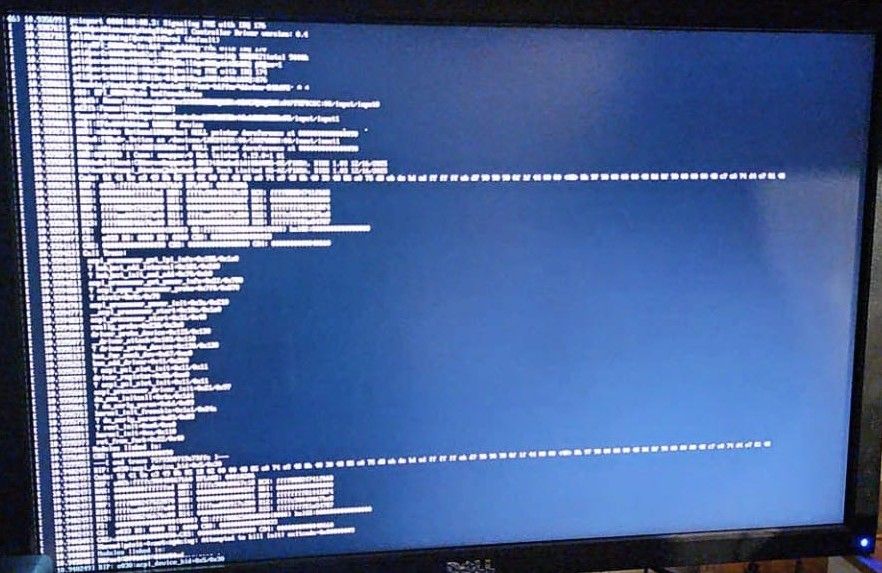
-
Hi RN0, and thanks for photographing the panic on your first post here, because that is what made it findable.

The last line reads acpi_device_hid, which looks like the same crash someone else hit on an MS-A2 last year: https://xcp-ng.org/forum/topic/10972/xcp-ng-8-3-lts-install-on-minisforum-ms-a2-7945hx .What got them past the installer was a BIOS change rather than a boot flag: disabling Global C-State Control under Advanced > AMD CBS > CPU Common Options worked for one of them, and another got through by turning off PSS Support instead.
That might be why nomodeset and safe mode made no difference for you, since neither touches ACPI.
There is a kernel fix for it now too, and once installed and updated they put the BIOS setting back to Auto and it kept working. So I do not think this is an HCL or driver problem, though I am not deep enough in ACPI to promise that, and someone who knows the kernel side better will correct me if I have misread your screenshot.
-
@poddingue, that is true, my first post here. I'll try to play with these BIOS settings again. and keep you posted. Cheers


Hello! It looks like you're interested in this conversation, but you don't have an account yet.
Getting fed up of having to scroll through the same posts each visit? When you register for an account, you'll always come back to exactly where you were before, and choose to be notified of new replies (either via email, or push notification). You'll also be able to save bookmarks and upvote posts to show your appreciation to other community members.
With your input, this post could be even better 💗
Register Login