CPU Features
-
If you have an old pool and want to upgrade, attaching new hardware.
You can get the following.Once all the old servers are removed, how can you check that the CPUs are working at their best?
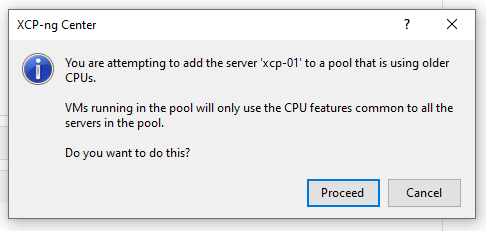
Thanks in advance.
-
@churchers
anyone able to answer this one? -
I don't know how it behaves in this case. I think it might stay with the same feature as before removing the older hosts from the pool. You can check the CPU features before and after with:
xe pool-param-get uuid=<POOL UUID> param-name=cpu_infoExample output:
features_hvm_host: 1fcbfbff-f7ba2223-2d93fbff-00000403-00000001-00000281-00000000-00000000-00001000-9c000400-00000000-00000000-00000000-00000000-00000000; features_hvm: 1fcbfbff-f7ba2223-2d93fbff-00000403-00000001-00000281-00000000-00000000-00001000-9c000400-00000000-00000000-00000000-00000000-00000000; features_pv_host: 1fc9cbf5-f6b82203-2991cbf5-00000003-00000001-00000201-00000000-00000000-00001000-8c000400-00000000-00000000-00000000-00000000-00000000; features_pv: 1fc9cbf5-f6b82203-2991cbf5-00000003-00000001-00000201-00000000-00000000-00001000-8c000400-00000000-00000000-00000000-00000000-00000000; socket_count: 4; cpu_count: 80; vendor: GenuineIntel

Hello! It looks like you're interested in this conversation, but you don't have an account yet.
Getting fed up of having to scroll through the same posts each visit? When you register for an account, you'll always come back to exactly where you were before, and choose to be notified of new replies (either via email, or push notification). You'll also be able to save bookmarks and upvote posts to show your appreciation to other community members.
With your input, this post could be even better 💗
Register Login