-
@peter_webbird We've already had feedback on CBT and LINSTOR/DRBD, we don't necessarily recommend enabling it. We have a blocking dev card regarding a bug with LVM lvchange command that may fail on CBT volumes used by a XOSTOR SR. We also have other issues related to migration with CBT.
-
@ronan-a @dthenot @Team-Storage
Guys, Can you please clarify which method to use for installing XOSTOR in XCP-ng 8.3 ?
Simple :
yum install xcp-ng-linstor
yum install xcp-ng-release-linstor
./install --disks /dev/nvme0n1 --thin
Or the script in the first post ?
Or Some other script ? -
@gb.123 Hello,
The instruction in the first post are still the way to go
-
@dthenot said in XOSTOR hyperconvergence preview:
@gb.123 Hello,
The instruction in the first post are still the way to goI'm curious about that as well but the first post says that the installation script is only compatible with 8.2 and doesn't mention 8.3. Is that still the case or is the installation script now compatible with 8.3 as well? If not, is there an installation script that is compatible with 8.3?
I know that using XO is the recommended method for installation but I'm interested in an installation script as I would like to try to integrate XOSTOR installation into an XCP-ng installation script I already have which runs via PXE boot.
-
@JeffBerntsen That's why I meant, the way to install written in the first post still work in 8.3, the script still work as expected also, it basically only create the VG/LV needed on hosts before you create the SR.
-
@dthenot said in XOSTOR hyperconvergence preview:
@JeffBerntsen That's why I meant, the way to install written in the first post still work in 8.3, the script still work as expected also, it basically only create the VG/LV needed on hosts before you create the SR.
Got it. Thanks!
-
Hello,
I plan to install my XOSTOR cluster on a pool of 7 nodes with 3 replicas, but not all nodes at once because disks are in use.
consider:- node1
- node2
- node ...
- node 5
- node 6
- node 7.
with 2 disks on each
- sda: 128GB for the OS
- sdb: 1TB for local sr ( for now
 )
)
I emptied node 6 & 7.
so, here is what i plan to do:
- On ALL NODES: setup linstor packages
Run the install script on node 6 & 7 to add their disks
so:node6# install.sh --disks /dev/sdb node7# install.sh --disks /dev/sdbThen, configure the SR and the linstor plugin manager as the following
xe sr-create \
    type=linstor name-label=pool-01 \
    host-uuid=XXXX \
    device-config:group-name=linstor_group/thin_device device-config:redundancy=3 shared=true device-config:provisioning=thin
Normally, i should have a linstor cluster running of 2 nodes ( 2 satellite and one controller randomly placed ) with only 2 disks and then, only 2/3 working replicas.
The cluster SHOULD be usable ( i'm right on this point ? )
The next step, would be to move VM from node 5 on it to evacuate node 5. and then add it to the cluster by the following
node5# install.sh --disks /dev/sdb
node5# xe host-call-plugin \
  host-uuid=node5-uuid \
  plugin=linstor-manager \
  fn=addHost args:groupName=linstor_group/thin_device
That should deploy satelite on node 5 and add the disk.
I normally should have 3/3 working replicas and can start to deploy others nodes progressively.
I'm right on the process ?
aS mentionned in the discord, i will post my feedbacks and results from my setup once i finalized it. ( maybe thought a blog post somewhere ).
Thanks to provide xostor in opensource, it's clearly the missing piece for this virtualization stack in opensource ( vs proxmox )
-
 H henri9813 referenced this topic on
-
I have amazing news!
After the upgrade to xcp-ng 8.3, I retested velero backup, and it all just works

Completed Backup
jonathon@jonathon-framework:~$ velero --kubeconfig k8s_configs/production.yaml backup describe grafana-test
Name:         grafana-test
Namespace:    velero
Labels:       objectset.rio.cattle.io/hash=c2b5f500ab5d9b8ffe14f2c70bf3742291df565c
              velero.io/storage-location=default
Annotations:  objectset.rio.cattle.io/applied=H4sIAAAAAAAA/4SSQW/bPgzFvwvPtv9OajeJj/8N22HdBqxFL0MPlEQlWmTRkOhgQ5HvPsixE2yH7iji8ffIJ74CDu6ZYnIcoIMTeYpcOf7vtIICji4Y6OB/1MdxgAJ6EjQoCN0rYAgsKI5Dyk9WP0hLIqmi40qjiKfMcRlAq7pBY+py26qmbEi15a5p78vtaqe0oqbVVsO5AI+K/Ju4A6YDdKDXqrVtXaNqzU5traVVY9d6Uyt7t2nW693K2Pa+naABe4IO9hEtBiyFksClmgbUdN06a9NAOtvr5B4DDunA8uR64lGgg7u6rxMUYMji6OWZ/dhTeuIPaQ6os+gTFUA/tR8NmXd+TELxUfNA5hslHqOmBN13OF16ZwvNQShIqpZClYQj7qk6blPlGF5uzC/L3P+kvok7MB9z0OcCXPiLPLHmuLLWCfVfB4rTZ9/iaA5zHovNZz7R++k6JI50q89BXcuXYR5YT0DolkChABEPHWzW9cK+rPQx8jgsH/KQj+QT/frzXCdduc/Ca9u1Y7aaFvMu5Ang5Xz+HQAA//8X7Fu+/QIAAA
              objectset.rio.cattle.io/id=e104add0-85b4-4eb5-9456-819bcbe45cfc
              velero.io/resource-timeout=10m0s
              velero.io/source-cluster-k8s-gitversion=v1.33.4+rke2r1
              velero.io/source-cluster-k8s-major-version=1
              velero.io/source-cluster-k8s-minor-version=33

Phase:  Completed


Namespaces:
  Included:  grafana
  Excluded:  <none>

Resources:
  Included cluster-scoped:    <none>
  Excluded cluster-scoped:    volumesnapshotcontents.snapshot.storage.k8s.io
  Included namespace-scoped:  *
  Excluded namespace-scoped:  volumesnapshots.snapshot.storage.k8s.io

Label selector:  <none>

Or label selector:  <none>

Storage Location:  default

Velero-Native Snapshot PVs:  true
Snapshot Move Data:          true
Data Mover:                  velero

TTL:  720h0m0s

CSISnapshotTimeout:    30m0s
ItemOperationTimeout:  4h0m0s

Hooks:  <none>

Backup Format Version:  1.1.0

Started:    2025-10-15 15:29:52 -0700 PDT
Completed:  2025-10-15 15:31:25 -0700 PDT

Expiration:  2025-11-14 14:29:52 -0800 PST

Total items to be backed up:  35
Items backed up:              35

Backup Item Operations:  1 of 1 completed successfully, 0 failed (specify --details for more information)
Backup Volumes:
  Velero-Native Snapshots: <none included>

  CSI Snapshots:
    grafana/central-grafana:
      Data Movement: included, specify --details for more information

  Pod Volume Backups: <none included>

HooksAttempted:  0
HooksFailed:     0
Completed Restore
jonathon@jonathon-framework:~$ velero --kubeconfig k8s_configs/production.yaml restore describe restore-grafana-test --details
Name:         restore-grafana-test
Namespace:    velero
Labels:       objectset.rio.cattle.io/hash=252addb3ed156c52d9fa9b8c045b47a55d66c0af
Annotations:  objectset.rio.cattle.io/applied=H4sIAAAAAAAA/3yRTW7zIBBA7zJrO5/j35gzfE2rtsomymIM45jGBgTjbKLcvaKJm6qL7kDwnt7ABdDpHfmgrQEBZxrJ25W2/85rSOCkjQIBrxTYeoIEJmJUyAjiAmiMZWRtTYhb232Q5EC88tquJDKPFEU6GlpUG5UVZdpUdZ6WZZ+niOtNWtR1SypvqC8buCYwYkfjn7oBwwAC8ipHpbqC1LqqZZWrtse228isrLqywapSdS0z7KPU4EQgwN+mSI8eezSYMgWG22lwKOl7/MgERzJmdChPs9veDL9IGfSbQRcGy+96IjszCCiyCRLQRo6zIrVd5AHEfuHhkIBmmp4d+a/3e9Dl8LPoCZ3T5hg7FvQRcR8nxt6XL7sAgv1MCZztOE+01P23cvmnPYzaxNtwuF4/AwAA//8k6OwC/QEAAA
              objectset.rio.cattle.io/id=9ad8d034-7562-44f2-aa18-3669ed27ef47

Phase:                       Completed
Total items to be restored:  33
Items restored:              33

Started:    2025-10-15 15:35:26 -0700 PDT
Completed:  2025-10-15 15:36:34 -0700 PDT

Warnings:
  Velero:     <none>
  Cluster:    <none>
  Namespaces:
    grafana-restore:  could not restore, ConfigMap:elasticsearch-es-transport-ca-internal already exists. Warning: the in-cluster version is different than the backed-up version
                      could not restore, ConfigMap:kube-root-ca.crt already exists. Warning: the in-cluster version is different than the backed-up version

Backup:  grafana-test

Namespaces:
  Included:  grafana
  Excluded:  <none>

Resources:
  Included:        *
  Excluded:        nodes, events, events.events.k8s.io, backups.velero.io, restores.velero.io, resticrepositories.velero.io, csinodes.storage.k8s.io, volumeattachments.storage.k8s.io, backuprepositories.velero.io
  Cluster-scoped:  auto

Namespace mappings:  grafana=grafana-restore

Label selector:  <none>

Or label selector:  <none>

Restore PVs:  true

CSI Snapshot Restores:
  grafana-restore/central-grafana:
    Data Movement:
      Operation ID: dd-ffa56e1c-9fd0-44b4-a8bb-8163f40a49e9.330b82fc-ca6a-423217ee5
      Data Mover: velero
      Uploader Type: kopia

Existing Resource Policy:   <none>
ItemOperationTimeout:       4h0m0s

Preserve Service NodePorts:  auto

Restore Item Operations:
  Operation for persistentvolumeclaims grafana-restore/central-grafana:
    Restore Item Action Plugin:  velero.io/csi-pvc-restorer
    Operation ID:                dd-ffa56e1c-9fd0-44b4-a8bb-8163f40a49e9.330b82fc-ca6a-423217ee5
    Phase:                       Completed
    Progress:                    856284762 of 856284762 complete (Bytes)
    Progress description:        Completed
    Created:                     2025-10-15 15:35:28 -0700 PDT
    Started:                     2025-10-15 15:36:06 -0700 PDT
    Updated:                     2025-10-15 15:36:26 -0700 PDT

HooksAttempted:   0
HooksFailed:      0

Resource List:
  apps/v1/Deployment:
    - grafana-restore/central-grafana(created)
    - grafana-restore/grafana-debug(created)
  apps/v1/ReplicaSet:
    - grafana-restore/central-grafana-5448b9f65(created)
    - grafana-restore/central-grafana-56887c6cb6(created)
    - grafana-restore/central-grafana-56ddd4f497(created)
    - grafana-restore/central-grafana-5f4757844b(created)
    - grafana-restore/central-grafana-5f69f86c85(created)
    - grafana-restore/central-grafana-64545dcdc(created)
    - grafana-restore/central-grafana-69c66c54d9(created)
    - grafana-restore/central-grafana-6c8d6f65b8(created)
    - grafana-restore/central-grafana-7b479f79ff(created)
    - grafana-restore/central-grafana-bc7d96cdd(created)
    - grafana-restore/central-grafana-cb88bd49c(created)
    - grafana-restore/grafana-debug-556845ff7b(created)
    - grafana-restore/grafana-debug-6fb594cb5f(created)
    - grafana-restore/grafana-debug-8f66bfbf6(created)
  discovery.k8s.io/v1/EndpointSlice:
    - grafana-restore/central-grafana-hkgd5(created)
  networking.k8s.io/v1/Ingress:
    - grafana-restore/central-grafana(created)
  rbac.authorization.k8s.io/v1/Role:
    - grafana-restore/central-grafana(created)
  rbac.authorization.k8s.io/v1/RoleBinding:
    - grafana-restore/central-grafana(created)
  v1/ConfigMap:
    - grafana-restore/central-grafana(created)
    - grafana-restore/elasticsearch-es-transport-ca-internal(failed)
    - grafana-restore/kube-root-ca.crt(failed)
  v1/Endpoints:
    - grafana-restore/central-grafana(created)
  v1/PersistentVolume:
    - pvc-e3f6578f-08b2-4e79-85f0-76bbf8985b55(skipped)
  v1/PersistentVolumeClaim:
    - grafana-restore/central-grafana(created)
  v1/Pod:
    - grafana-restore/central-grafana-cb88bd49c-fc5br(created)
  v1/Secret:
    - grafana-restore/fpinfra-net-cf-cert(created)
    - grafana-restore/grafana(created)
  v1/Service:
    - grafana-restore/central-grafana(created)
  v1/ServiceAccount:
    - grafana-restore/central-grafana(created)
    - grafana-restore/default(skipped)
  velero.io/v2alpha1/DataUpload:
    - velero/grafana-test-nw7zj(skipped)
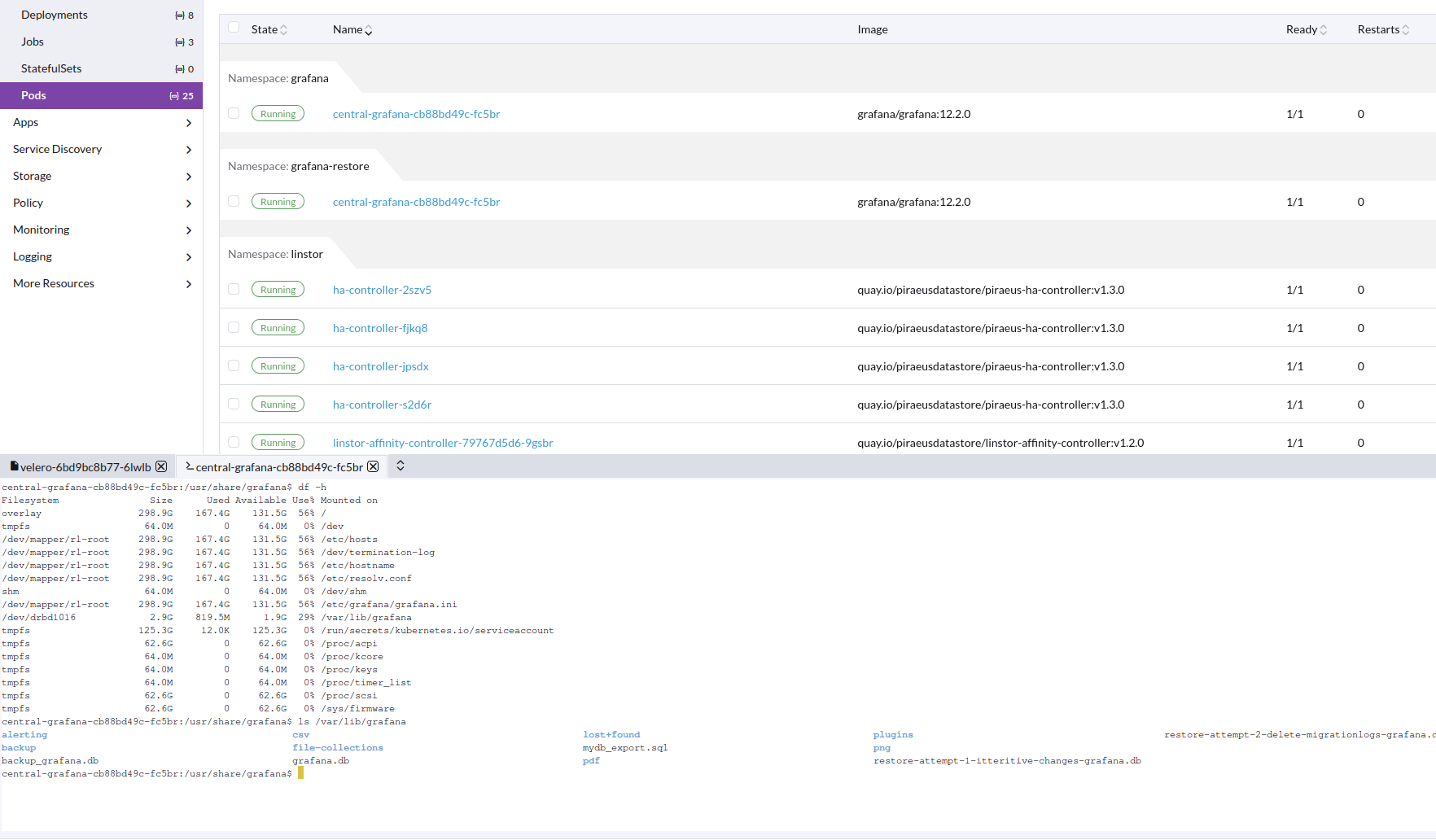
Image of working restore pod, with correct data in PV
Velero installed from helm: https://vmware-tanzu.github.io/helm-charts
Version: velero:11.1.0
Values--- image: repository: velero/velero tag: v1.17.0 # Whether to deploy the restic daemonset. deployNodeAgent: true initContainers: - name: velero-plugin-for-aws image: velero/velero-plugin-for-aws:latest imagePullPolicy: IfNotPresent volumeMounts: - mountPath: /target name: plugins configuration: defaultItemOperationTimeout: 2h features: EnableCSI defaultSnapshotMoveData: true backupStorageLocation: - name: default provider: aws bucket: velero config: region: us-east-1 s3ForcePathStyle: true s3Url: https://s3.location # Destination VSL points to LINSTOR snapshot class volumeSnapshotLocation: - name: linstor provider: velero.io/csi config: snapshotClass: linstor-vsc credentials: useSecret: true existingSecret: velero-user metrics: enabled: true serviceMonitor: enabled: true prometheusRule: enabled: true # Additional labels to add to deployed PrometheusRule additionalLabels: {} # PrometheusRule namespace. Defaults to Velero namespace. # namespace: "" # Rules to be deployed spec: - alert: VeleroBackupPartialFailures annotations: message: Velero backup {{ $labels.schedule }} has {{ $value | humanizePercentage }} partialy failed backups. expr: |- velero_backup_partial_failure_total{schedule!=""} / velero_backup_attempt_total{schedule!=""} > 0.25 for: 15m labels: severity: warning - alert: VeleroBackupFailures annotations: message: Velero backup {{ $labels.schedule }} has {{ $value | humanizePercentage }} failed backups. expr: |- velero_backup_failure_total{schedule!=""} / velero_backup_attempt_total{schedule!=""} > 0.25 for: 15m labels: severity: warningAlso create the following.
apiVersion: snapshot.storage.k8s.io/v1
kind: VolumeSnapshotClass
metadata:
  name: linstor-vsc
  labels:
    velero.io/csi-volumesnapshot-class: "true"
driver: linstor.csi.linbit.com
deletionPolicy: Delete
We are using Piraeus operator to use xostor in k8s
https://github.com/piraeusdatastore/piraeus-operator.git
Version: v2.9.1
Values:--- operator: resources: requests: cpu: 250m memory: 500Mi limits: memory: 1Gi installCRDs: true imageConfigOverride: - base: quay.io/piraeusdatastore components: linstor-satellite: image: piraeus-server tag: v1.29.0 tls: certManagerIssuerRef: name: step-issuer kind: StepClusterIssuer group: certmanager.step.smThen we just connect to the xostor cluster like external linstor controller.
-
Hello,
I got my whole xostor destroyed, i don't know how precisely.
I found some errors in sattelite
Error context:
        An error occurred while processing resource 'Node: 'host', Rsc: 'xcp-volume-e011c043-8751-45e6-be06-4ce9f8807cad''
ErrorContext:
  Details:     Command 'lvcreate --config 'devices { filter=['"'"'a|/dev/md127|'"'"','"'"'a|/dev/md126p3|'"'"','"'"'r|.*|'"'"'] }' --virtualsize 52543488k linstor_primary --thinpool thin_device --name xcp-volume-e011c043-8751-45e6-be06-4ce9f8807cad_00000' returned with exitcode 5.

Standard out:


Error message:
  WARNING: Remaining free space in metadata of thin pool linstor_primary/thin_device is too low (98.06% >= 96.30%). Resize is recommended.
  Cannot create new thin volume, free space in thin pool linstor_primary/thin_device reached threshold.
of course, i checked, my SR was not full
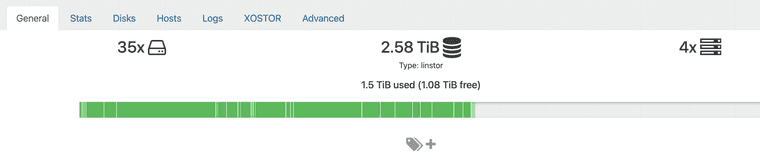
And the controller crashed, and i couldn't make it works.
Here is the error i got
==========

Category:                           RuntimeException
Class name:                         IllegalStateException
Class canonical name:               java.lang.IllegalStateException
Generated at:                       Method 'newIllegalStateException', Source file 'DataUtils.java', Line #870

Error message:                      Reading from nio:/var/lib/linstor/linstordb.mv.db failed; file length 2293760 read length 384 at 2445540 [1.4.197/1]
So i deduce the database was fucked-up, i tried to open the file as explained in the documentation, but the linstor schema was "not found" in the file, event if using
cati see data about it.for now, i leave xostor and i'm back to localstorage until we know what to do when this issue occured with a "solution path".
-
@henri9813 said in XOSTOR hyperconvergence preview:
of course, i checked, my SR was not full
The visual representation of used space is for informational purposes only; it's an approximation that takes into account replication, disks in use, etc. For more information: https://docs.xcp-ng.org/xostor/#how-a-linstor-sr-capacity-is-calculated
We plan to display a complete view of each physical disk space on each host someday to provide a more detailed overview. In any case, if you use "lvs"/"vgs" on each machine, you should indeed see the actual disk space used.
-
-
@ronan-a said in XOSTOR hyperconvergence preview:
@peter_webbird We've already had feedback on CBT and LINSTOR/DRBD, we don't necessarily recommend enabling it. We have a blocking dev card regarding a bug with LVM lvchange command that may fail on CBT volumes used by a XOSTOR SR. We also have other issues related to migration with CBT.
Is the problem still occurring on latest XCP-ng / XOSTOR version ? Not being able to use CBT on XOSTOR is a big issue for backup/replication.
-
Any update from someone ? Not having the ability to enable CBT on XOSTOR is really complicated to make replication / DR scenarios.
At least to know if this is work in progress or not. If it's not we'll need to pause our PoC and post-pone production schedule waiting for significant update.
-
@snk33 In fact we have limitations with CBT and XOSTOR. And this won't be resolved until we get back into SMAPIv3.
Not being able to use CBT on XOSTOR is a big issue for backup/replication.
Using it is more likely to cause problems than improve your situation. What bothers you about not using CBT here?
-
@ronan-a we need to have CBT to use 3rd party backup & replication solution such as Veeam.
On the other hand, XOSTOR with VHD disk might be ok using Xen Orchestra backup & replication features but it needs more testing on our end to make sure it works good enough.
One big question is about the snapshot chain. Coming from VMware world where keeping snapshots may impact I/O performances, we're not very comfortable with it.Also, we need to find solution for low-RPO replication. On our VMware infrastructure we use Zerto DR for this but XOA being more like Veeam using snapshots, low-RPO will be tough to achieve (unless making snapshots doesn't affect performances at all ?).



Hello! It looks like you're interested in this conversation, but you don't have an account yet.
Getting fed up of having to scroll through the same posts each visit? When you register for an account, you'll always come back to exactly where you were before, and choose to be notified of new replies (either via email, or push notification). You'll also be able to save bookmarks and upvote posts to show your appreciation to other community members.
With your input, this post could be even better 💗
Register Login