Slow Windows S2019 VM after tools reinstalled
-
I had bluescreen issues with citrix pv drivers (9.2.2) and reinstalled them completely. Some repairs seem not to fix the issue and digging deeper I also found xeniface driver to be stucked on a older version (8.x). So I removed everything manually (service, files, registry, upperfilters). I first installed 9.1.5 of the citrix tools and had a very slow performing vm since that. Inbeteen I changed to the xcp drivers (will full manual remove again) with no change.
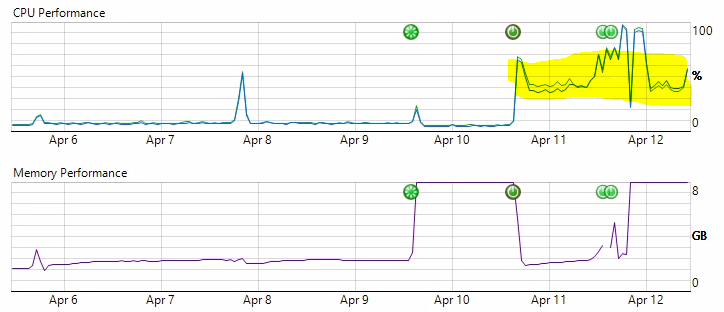
You can see the vm really working well until the 10th of April. Here I reinstalled the drivers and got nearly full cpu load since that. Network and storage perform well or nearly as expexted on tests but cpu's feels more than emulated. Just for your questions, on the 9th of April I updated the citrix drivers which leaded to the bluescreens but cpu working normal.
I did an inplace upgrade of the os with no change and have no faulty drivers. CPUs show up right in the device manager.
With that in mind I may have 2-3 other vms on different installations which also have more slowlyness and high cpu than they should have. A similar vm on the same host is still running well.Anyone has an idea?
Hello! It looks like you're interested in this conversation, but you don't have an account yet.
Getting fed up of having to scroll through the same posts each visit? When you register for an account, you'll always come back to exactly where you were before, and choose to be notified of new replies (either via email, or push notification). You'll also be able to save bookmarks and upvote posts to show your appreciation to other community members.
With your input, this post could be even better 💗
Register Login