XCP-ng
    • Categories
    • Recent
    • Tags
    • Popular
    • Users
    • Groups
    • Register
    • Login
    1. Home
    2. carloum70
    3. Posts
    C
    Offline
    • Profile
    • Following 0
    • Followers 0
    • Topics 5
    • Posts 24
    • Groups 0

    Posts

    Recent Best Controversial
    • RE: Error while scanning disk

      @poddingue https://github.com/vatesfr/xen-orchestra/issues/9779

      carloum70-lab created this issue in vatesfr/xen-orchestra

      open File level restore error: Error while scanning disk #9779

      posted in Backup
      C
      carloum70
    • RE: Error while scanning disk

      Is there some update? Can this issue be reproduced?

      posted in Backup
      C
      carloum70
    • RE: Error while scanning disk

      @ataxyanetwork I managed to install XOA (Current version: 6.2.2 - XOA build: 20251219) and did some more testing.

      I am experiencing the same issue when trying to restore from an existing backup.

      When I create a new backup job, I can perform a filelevel restore without any problems. However, when I rerun the job, I am no longer able to restore from the most recent backup. It only works with the initial backup.

      Can you also reproduce this ?

      posted in Backup
      C
      carloum70
    • RE: Error while scanning disk

      @AtaxyaNetwork This is not going to work because our nodes don't have access to the internet.
      If it works using XOA, what conclusion can we draw? Migrate to XOA ?

      posted in Backup
      C
      carloum70
    • RE: Error while scanning disk

      @AtaxyaNetwork Thank you for the quick response.
      "Are you running an XO source with LVM for the OS ?" --> no

      You did the restore using XOA instead of XO from source ?
      To Install XOA I have to install a new instance and import the config of my current XO ?
      I will test this tomorrow.

      posted in Backup
      C
      carloum70
    • RE: Error while scanning disk

      @AtaxyaNetwork Sorry forgot to add this to my topic.

      XOA - commit 3ed8c
      VM's are based on Debain13
      UEFI
      Backup mode: Delta backup

      ~# lsblk -f 
      NAME              FSTYPE      FSVER    LABEL UUID                                   FSAVAIL FSUSE% MOUNTPOINTS
      xvda                                                                                               
      ├─xvda1           vfat        FAT32          0E7D-17B9                               965.3M     1% /boot/efi
      ├─xvda2           ext4        1.0            bf2a2e01-b9ff-4b93-a824-ba7562461c15      1.3G    20% /boot
      ├─xvda3           LVM2_member LVM2 001       v2o7yJ-51Hc-sO1m-ubrj-YCvP-7Zo2-zOjxzZ                
      │ ├─vgdata-lvroot ext4        1.0            d0e71b5a-5404-4b18-9249-eb222a6d346d     22.6G     6% /
      │ ├─vgdata-lvhome ext4        1.0            5aa25f3d-708d-4708-8405-a97391e2e989      4.3G     0% /home
      │ └─vgdata-lvvar  ext4        1.0            e82f5584-810b-40e2-a6e6-ed05805146db      3.5G    30% /var
      └─xvda4           swap        1              6124f717-58cf-47a8-b268-4c99dcd495d0                  [SWAP]
      
      posted in Backup
      C
      carloum70
    • Error while scanning disk

      Hi all,

      First of all, I am aware that there are still issues with file-level restores and LVM. However, for some unknown reason, I am now encountering a new error when selecting the disk during the restore procedure.- Error while scanning disk

      Apr 16 11:08:34 dacsvm-xoa xo-server[3124716]: 2026-04-16T09:08:34.366Z xo:api WARN admin | backupNg.listPartitions(...) [214ms] =!> Error: Command failed: vgchange -an vgdata
      Apr 16 11:08:34 dacsvm-xoa xo-server[3124716]: File descriptor 23 (/var/lib/xo-server/data/leveldb/LOG) leaked on vgchange invocation. Parent PID 3124716: node
      Apr 16 11:08:34 dacsvm-xoa xo-server[3124716]: File descriptor 24 (/var/lib/xo-server/data/leveldb/LOCK) leaked on vgchange invocation. Parent PID 3124716: node
      Apr 16 11:08:34 dacsvm-xoa xo-server[3124716]: File descriptor 25 (/var/lib/xo-server/data/leveldb/000379.log) leaked on vgchange invocation. Parent PID 3124716: node
      Apr 16 11:08:34 dacsvm-xoa xo-server[3124716]: File descriptor 28 (/var/lib/xo-server/data/leveldb/MANIFEST-000377) leaked on vgchange invocation. Parent PID 3124716: node
      Apr 16 11:08:34 dacsvm-xoa xo-server[3124716]: File descriptor 37 (/dev/fuse) leaked on vgchange invocation. Parent PID 3124716: node
      Apr 16 11:08:34 dacsvm-xoa xo-server[3124716]:   WARNING: Not using device /dev/loop0 for PV v2o7yJ-51Hc-sO1m-ubrj-YCvP-7Zo2-zOjxzZ.
      Apr 16 11:08:34 dacsvm-xoa xo-server[3124716]:   WARNING: PV v2o7yJ-51Hc-sO1m-ubrj-YCvP-7Zo2-zOjxzZ prefers device /dev/xvda3 because device is used by LV.
      Apr 16 11:08:34 dacsvm-xoa xo-server[3124716]:   Logical volume vgdata/lvroot contains a filesystem in use.
      Apr 16 11:08:34 dacsvm-xoa xo-server[3124716]:   Can't deactivate volume group "vgdata" with 3 open logical volume(s)
      

      Is this also a known issue ?
      Do you have an estimate for when LVM support will be available? This is currently a deal breaker for us, as our infrastructure (running on XCP-ng) is becoming increasingly business-critical.
      If this is not supported in the near future, we may need to consider alternative backup solutions.

      XOA - commit 3ed8c
      VM's are based on Debain13
      Backup mode: Delta backup

      Regards,
      Carlo

      posted in Backup
      C
      carloum70
    • RE: OIDC login - Internal Server Error

      Thanks for the reply's! This really helps.

      I added the

      console.log('OIDC profile:', JSON.stringify(profile, null, 2))
      

      and then tried with the following:

      username field: email
      scope: email

      logging:

      mrt 30 12:34:57 vm-xoa xo-server[2747568]: OIDC profile: {
      mrt 30 12:34:57 vm-xoa xo-server[2747568]:   "id": "38882f04f015223135313da0b919cb3d67bf4fbc@sram.surf.nl"
      mrt 30 12:34:57 vm-xoa xo-server[2747568]: }
      mrt 30 12:34:57 vm-xoa xo-server[2747568]: Cannot read properties of undefined (reading '0')
      

      username field: uid
      scope: uid

      logging:

      mrt 30 12:35:54 vm-xoa xo-server[2747568]: OIDC profile: {
      mrt 30 12:35:54 vm-xoa xo-server[2747568]:   "id": "38882f04f015223135313da0b919cb3d67bf4fbc@sram.surf.nl"
      mrt 30 12:35:54 vm-xoa xo-server[2747568]: }
      mrt 30 12:35:54 vm-xoa xo-server[2747568]: Expected values to be strictly equal:
      mrt 30 12:35:54 vm-xoa xo-server[2747568]: + actual - expected
      mrt 30 12:35:54 vm-xoa xo-server[2747568]: + 'undefined'
      mrt 30 12:35:54 vm-xoa xo-server[2747568]: - 'string'
      

      So it seems that in both cases we only receive the "sub" from the scope openid from surf. Which is here named "id". Is this translated by xo?

      Then I applied the patch from @olivierlambert . Therafter we were able to login by using "id" as Username field, "sub" returned an error. The user 38882f04f015223135313da0b919cb3d67bf4fbc@sram.surf.nl was then created.

      If I use email or uid we get now better logging:

      mrt 30 12:41:14 vm-xoa xo-server[2747760]: Could not find username: field "uid" is missing from the OIDC profile. Ensure the required scopes are configured and granted by your identity provider.
      mrt 30 12:42:27 vm-xoa xo-server[2747760]: Could not find username: field "email" is missing from the OIDC profile. Ensure the required scopes are configured and granted by your identity provider.
      

      We will check if we have to enable/allow additional claims from the authentication provider to be available and let you now.

      posted in Advanced features
      C
      carloum70
    • RE: OIDC login - Internal Server Error

      @HeMaN

      We would like to know that too.

      It seems that xo is receiving something, but not what it is expecting. But unfortunately we cannot see what it receives.

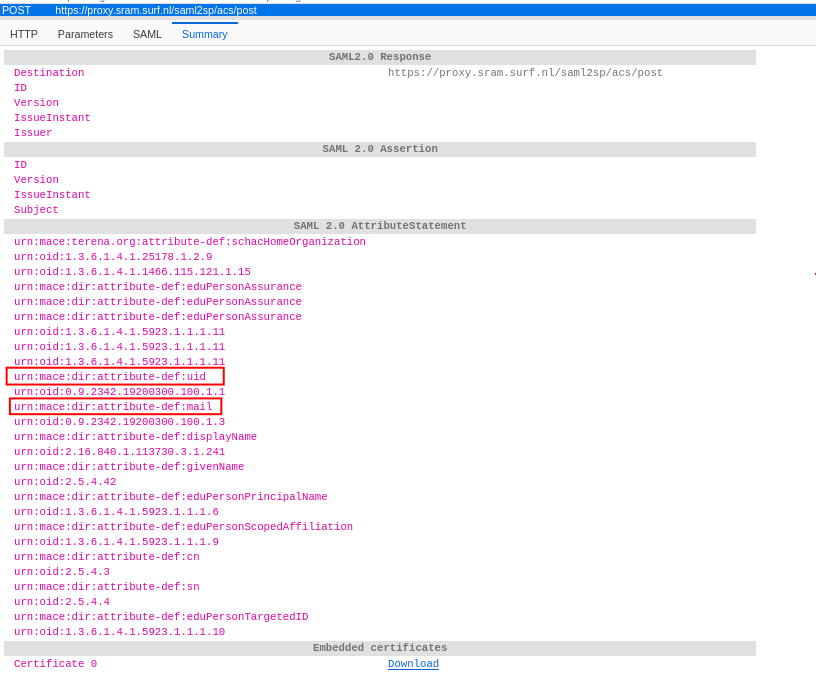
      With a saml tracer plugin I can see data that my browser exchanges with Surf and there are the field that are used/needed, like the uid and the mail.

      browser-reply.png

      But from my understanding xo requests its own data from surf based on token from the web session.

      posted in Advanced features
      C
      carloum70
    • RE: OIDC login - Internal Server Error

      We are running Xen Orchestra with commit c3dcb and the auth-oidc (v0.4.2) plugin.

      The users that login are unique and not yet present as local users.

      The OICD provider is SURF with SRAM: https://www.surf.nl/en/services/identity-access-management/surf-research-access-management

      They support the following attributes/scopes: https://servicedesk.surf.nl/wiki/spaces/IAM/pages/74226142/Attributes+in+SRAM

      There are some IPs that need to be accessable: https://servicedesk.surf.nl/wiki/spaces/IAM/pages/74226067/IP+addresses#IPaddresses-OIDC . Outgoing traffic from the server to port 443 is open and works.

      We did try several settings for the Username field and scopes.

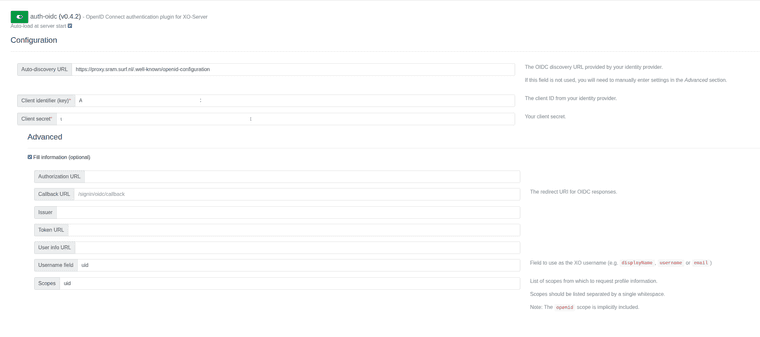
      For example the following:

      plugin.png

      This should create a user R123456789

      The logging shows the following:

      mrt 27 09:29:48 vm-xoa xo-server[2641104]: Expected values to be strictly equal:
      mrt 27 09:29:48 vm-xoa xo-server[2641104]: + actual - expected
      mrt 27 09:29:48 vm-xoa xo-server[2641104]: + 'undefined'
      mrt 27 09:29:48 vm-xoa xo-server[2641104]: - 'string'
      

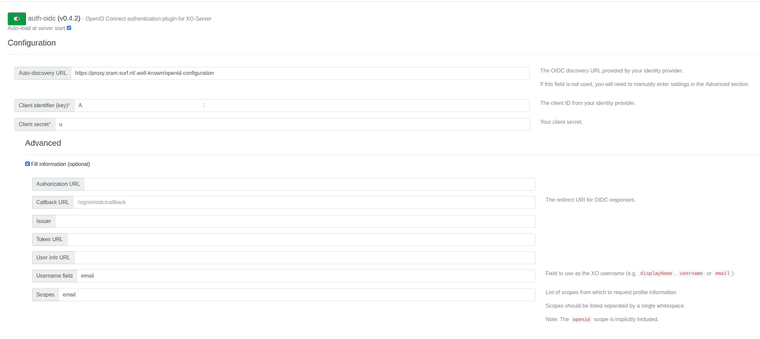
      If we change it to:

      plugin-2.png

      The following shows up:

      mrt 27 09:32:21 vm-xoa xo-server[2641104]: Cannot read properties of undefined (reading '0')
      

      I hope this helps to understand the problem. Thanks.

      posted in Advanced features
      C
      carloum70
    • OIDC login - Internal Server Error

      We are trying to use the OIDC auth plugin to enable login to our Xen Orchestra without local accounts.

      We registered a client with our identity provider and got a client id, client secret and the auto-discovery url. That we used to configure the plugin.

      However, if we login we get redirected back from the identity provider to the XO callback url and receive then an "Internal Server Error"

      The callback URL is as follow:

      https://xoa.domain.com/signin/oidc/callback?state=STRING&scope=profile+openid&code=STRING&iss=https://identity-provider.url&client_id=XXXXX

      In the log file we see then the following 4 lines:

      mrt 25 12:29:25 vm-xoa xo-server[2618522]: Expected values to be strictly equal:
      mrt 25 12:29:25 vm-xoa xo-server[2618522]: + actual - expected
      mrt 25 12:29:25 vm-xoa xo-server[2618522]: + 'undefined'
      mrt 25 12:29:25 vm-xoa xo-server[2618522]: - 'string'
      

      If we change both the username field and the scope to email, we get the same Internal Server Error, but with a different single log line:

      mrt 25 13:18:04 vm-xoa xo-server[2618522]: Cannot read properties of undefined (reading '0')
      

      Because we are getting redirected back from our identity provider to Xen Orchestra we guess that the issue is not there. We also get in the browser a SAML response with the userdata.

      Running a wireshark on the server shows also traffic between Xen Orchestra and the identity provider, but unfortunately we cannot look in the contents of that traffic stream.

      Setting the log level to debug does unfortunately not produce more (error) output.

      We are running Xen Orchestra with commit c3dcb and the auth-oidc (v0.4.2) plugin

      Is there an other way to figure out what is going wrong?

      posted in Advanced features
      C
      carloum70
    • RE: Unable to configure Network IP inside the VM throgh API

      What is the output of the following command:

      cloud-init schema --system
      
      posted in Infrastructure as Code
      C
      carloum70
    • RE: Unable to configure Network IP inside the VM throgh API

      I am using terraform to setup a VM but it's the same approach for cloud-init:
      cloud_config

      #cloud-config
      preserve_hostname: false
      hostname: ${hostname} 
      create_hostname_file: true
      users:
        - name: ansible
          groups:
            - sudo
          sudo:
            - ALL=(ALL) NOPASSWD:ALL
          shell: /bin/bash
          ssh_authorized_keys:
            - "ssh-ed25519 somekeyl"
            - "ssh-ed25519 otherkey"
      

      network_config:

      #cloud-config
      network:
        version: 1
        config:
          - type: physical
            name: enX0
            subnets:
              - type: static
                address: ${ip_address}
                netmask: ${netmask}
                gateway: ${gateway}
                dns_nameservers:
      %{ for dns_server in dns ~}
                  - ${dns_server}
      %{ endfor ~}
      

      Maybe a silly question: Your template supports cloud-init ?

      posted in Infrastructure as Code
      C
      carloum70
    • RE: Unable to configure Network IP inside the VM throgh API

      @amititre331
      If you want to configure ip settings using cloud-init you have to use the option network_config instead of cloud_config.

      Unbrand_CreateVmBody_{
      memory	
      name_description	[...]
      name_label*	[...]
      clone	[...]
      gpuGroup	[...]
      vgpuType	[...]
      autoPoweron	[...]
      vifs	[...]
      copyHostBiosStrings	[...]
      template*	[...]
      affinity	[...]
      vdis	[...]
      install	{...}
      cloud_config	[...]
      network_config	string
      boot	[...]
      destroy_cloud_config_vdi	[...]
      }
      

      By the way, do not share your tokens on the internet 😉

      posted in Infrastructure as Code
      C
      carloum70
    • RE: Terraform and disk migrations

      This approach isn’t entirely foolproof since I can’t use a wildcard, and I don’t know how many disks will be attached to the VM. For now, it will never exceed two disks, so I can explicitly include both in the ignore_changes statement. That’s an acceptable solution for us. Thanks for your support.

      posted in Infrastructure as Code
      C
      carloum70
    • Terraform and disk migrations

      Hi all,

      I have a general question about the Terraform provider.

      At the moment, all my VMs are managed by Terraform, so far, so good. However, there’s one feature I’m missing. Terraform doesn’t seem to support disk migration. When I change the sr_id in the xenorchestra_vm resource, I get the following error:

      Error: disk update action 'disk migration Update (Sr ID update)' not handled
      

      I’m aware that I can use "ignore_changes = [disk]", but in that case, I lose the ability to modify the disk size through Terraform.

      I’m not really happy with the idea of managing my VMs partly in Terraform and partly in XO. Another possible workaround is to set "ignore_changes = all", using Terraform only to create or remove systems, and handling all other changes through XO or Ansible.

      How are you handling this situation?

      posted in Infrastructure as Code
      C
      carloum70
    • RE: destroy_cloud_config_vdi_after_boot

      Here is a full logging (xensource.log) the moment terraform creates the vm (carlo111).
      I really hope someone can give me some clues. Because this is a showstopper.
      Debug-terraform2.txt

      posted in Infrastructure as Code
      C
      carloum70
    • RE: destroy_cloud_config_vdi_after_boot

      I am still troubleshooting this case.

      I created 2 new templates:
      Template1 based on a default debian13-netinstall iso image
      Template2: based on a debian cloud-init raw file: https://cdimage.debian.org/images/cloud/trixie/latest/debian-13-generic-amd64.raw

      Running terraform with template1 runs fine. A vm is created with a disk.
      Running terraform with template2 --> vm is created without a disk.
      Manually creating a vm using template2 runs also fine.

      [21:33 dacshyp002 ~]# xe vbd-list vm-uuid=a6b4c48d-16c0-a333-fa90-c8b4b13d6c2a
      uuid ( RO)             : 06552805-ddfa-7f80-a55e-9d878d626ad2
                vm-uuid ( RO): a6b4c48d-16c0-a333-fa90-c8b4b13d6c2a
          vm-name-label ( RO): debian13-generic-cloud-tmpl
               vdi-uuid ( RO): 5c793847-b331-4f65-be71-9463c68e09c8
                  empty ( RO): false
                 device ( RO): xvdb
      

      I can't reproduce the problem at my homelab. There are some differences at home:

      • running xoa in a container (commit 82891)
      • all vdi's are stored on local storage (at work we are using iscsi luns)
      • just one xcp-ng server
      posted in Infrastructure as Code
      C
      carloum70
    • RE: destroy_cloud_config_vdi_after_boot

      Looking at the debug logging I can see the VDI and VBD are created but also removed during the setup of the VM. At this point I am not using cloud-init.
      Creation of VDI and VBD:

      Oct 29 11:57:18 dacshyp002 xapi: [ info||67090 :::80|OpaqueRef:973e5688-b5a7-d197-cb55-95834b9abec6|mux] VDI.create dbg:OpaqueRef:973e5688-b5a7-d197-cb55-95834b9abec6 sr:589dad4d-2391-c2a9-589c-d34a9a7757ea vdi_info:{"sm_config":{},"sharable":false,"persistent":true,"physical_utilisation":0,"virtual_size":32212254720,"cbt_enabled":false,"read_only":false,"snapshot_of":"","snapshot_time":"19700101T00:00:00Z","is_a_snapshot":false,"metadata_of_pool":"","ty":"user","name_description":"","name_label":"debiancloud.vhd","content_id":"","vdi":""}
      
      Oct 29 11:57:18 dacshyp002 xapi: [debug||67090 HTTPS 172.28.4.10->:::80|VBD.create R:9725689f8e64|vbdops] VBD.create (device = 0; uuid = 2f57bc16-c913-ecd5-dce4-9261a7a0e6ed; ref = OpaqueRef:9549bde7-4ff8-dda0-703b-6efbf7397155)
      

      Some seconds later I see the following:

      Oct 29 11:57:29 dacshyp002 xapi: [debug||68871 HTTPS 172.28.4.10->:::80|VBD.unplug R:b9f5584469dd|audit] VBD.unplug: VBD = '2f57bc16-c913-ecd5-dce4-9261a7a0e6ed' Oct 29 11:57:30 dacshyp002 xapi: [debug||67090 HTTPS 172.28.4.10->:::80|VBD.destroy R:cf37a355d7de|audit] VBD.destroy: VBD = '2f57bc16-c913-ecd5-dce4-9261a7a0e6ed' 
      Oct 29 11:57:30 dacshyp002 xapi: [debug||67090 HTTPS 172.28.4.10->:::80|VBD.destroy R:cf37a355d7de|xapi_vbd_helpers] VBD.destroy (uuid = 2f57bc16-c913-ecd5-dce4-9261a7a0e6ed; ref = OpaqueRef:9549bde7-4ff8-dda0-703b-6efbf7397155)
      

      During the proces I checked all VDI's on my storage :

      while true; do echo '==================================='; xe vdi-list sr-uuid=589dad4d-2391-c2a9-589c-d34a9a7757ea | grep name-label; sleep 1; done
      
      ===================================
                name-label ( RW): debiancloud.vhd
                name-label ( RW): dacsvm002-osdisk
                name-label ( RW): dacsvm03-dhcp01-osdisk
                name-label ( RW): dacsvm01-osdisk
                name-label ( RW): debiancloud.vhd
                name-label ( RW): debiancloud.vhd
                name-label ( RW): Debian Bookworm 12_uruva
                name-label ( RW): sebas-vm-disk
                name-label ( RW): dacsvm01-osdisk
      ...
      ===================================
                name-label ( RW): debiancloud.vhd
                name-label ( RW): dacsvm002-osdisk
                name-label ( RW): dacsvm03-dhcp01-osdisk
                name-label ( RW): dacsvm01-osdisk
                name-label ( RW): debiancloud.vhd
                name-label ( RW): debiancloud.vhd
                name-label ( RW): debiancloud.vhd
                name-label ( RW): Debian Bookworm 12_uruva
                name-label ( RW): sebas-vm-disk
                name-label ( RW): dacsvm01-osdisk
      ...
      ===================================
                name-label ( RW): debiancloud.vhd
                name-label ( RW): dacsvm002-osdisk
                name-label ( RW): dacsvm03-dhcp01-osdisk
                name-label ( RW): dacsvm01-osdisk
                name-label ( RW): debiancloud.vhd
                name-label ( RW): debiancloud.vhd
                name-label ( RW): Debian Bookworm 12_uruva
                name-label ( RW): sebas-vm-disk
                name-label ( RW): dacsvm01-osdisk
      
      posted in Infrastructure as Code
      C
      carloum70
    • RE: destroy_cloud_config_vdi_after_boot

      Update:
      I tried to create a vm using a basic terraform config and using another template. Still the same problem, vm created without a disk.

      tofu apply  -var-file="carlo111.tfvars"
      
      OpenTofu used the selected providers to generate the following execution plan. Resource actions are indicated with
      the following symbols:
        + create
      
      OpenTofu will perform the following actions:
      
        # module.vm.xenorchestra_vm.vm will be created
        + resource "xenorchestra_vm" "vm" {
            + auto_poweron                        = false
            + clone_type                          = "full"
            + core_os                             = false
            + cpu_cap                             = 0
            + cpu_weight                          = 0
            + cpus                                = 2
            + destroy_cloud_config_vdi_after_boot = false
            + exp_nested_hvm                      = false
            + hvm_boot_firmware                   = "uefi"
            + id                                  = (known after apply)
            + ipv4_addresses                      = (known after apply)
            + ipv6_addresses                      = (known after apply)
            + memory_max                          = 2126512128
            + memory_min                          = (known after apply)
            + name_label                          = "carlo111"
            + power_state                         = "Running"
            + start_delay                         = 0
            + template                            = "3dbf5448-0337-40e1-ebfc-f3f47e2cb0dd"
            + vga                                 = "std"
            + videoram                            = 8
      
            + disk {
                + name_label = "carlo111-osdisk"
                + position   = (known after apply)
                + size       = 32212254720
                + sr_id      = "589dad4d-2391-c2a9-589c-d34a9a7757ea"
                + vbd_id     = (known after apply)
                + vdi_id     = (known after apply)
              }
      
            + network {
                + device         = (known after apply)
                + ipv4_addresses = (known after apply)
                + ipv6_addresses = (known after apply)
                + mac_address    = (known after apply)
                + network_id     = "d4ddcfb0-6d3e-d267-b200-d7d1fec1edc8"
              }
          }
      
      Plan: 1 to add, 0 to change, 0 to destroy.
      
      Do you want to perform these actions?
        OpenTofu will perform the actions described above.
        Only 'yes' will be accepted to approve.
      
        Enter a value: yes
      
      module.vm.xenorchestra_vm.vm: Creating...
      module.vm.xenorchestra_vm.vm: Still creating... [10s elapsed]
      module.vm.xenorchestra_vm.vm: Creation complete after 14s [id=95b3b0c6-ac8e-fe4b-2f55-ba0d8ff04005]
      
      [20:09 dacshyp002 ~]# xe vbd-list vm-uuid=95b3b0c6-ac8e-fe4b-2f55-ba0d8ff04005
      [20:25 dacshyp002 ~]# 
      

      main.tf

      resource "xenorchestra_vm" "vm" {
        name_label = var.vm_name
        template   = var.template_uuid
        cpus       = var.cpus
        memory_max = var.memory * 1024 * 1024
        hvm_boot_firmware = "uefi"
        clone_type = "full"
      
        disk {
          sr_id      = var.sr_uuid
          name_label = "${var.vm_name}-osdisk"
          size       = var.disk_size * 1024 * 1024 * 1024
        }
      
        network {
          network_id = var.network_id
        }
      }
      

      I don't know if it is related, I see the following errors during the creation of the vm:

      Oct 28 20:44:07 dacshyp002 xapi: [error||458 |xapi events D:20adbb444ff6|xenops] events_from_xapi: missing from the cache: [ 532cad38-f1ae-433b-b7ac-e0399613fe24 ]
      Oct 28 20:44:07 dacshyp002 xapi: [error||458 |xapi events D:20adbb444ff6|xenops] events_from_xapi: extra items in the cache: [ 95b3b0c6-ac8e-fe4b-2f55-ba0d8ff04005 ]
      
      [20:44 dacshyp002 log]# xe vm-list uuid=532cad38-f1ae-433b-b7ac-e0399613fe24
      uuid ( RO)           : 532cad38-f1ae-433b-b7ac-e0399613fe24
           name-label ( RW): Control domain on host: dacshyp002
          power-state ( RO): running
      
      
      [20:45 dacshyp002 log]# xe vm-list uuid=1c210250-1f89-b0e3-c1e6-f7bee976e94c
      uuid ( RO)           : 95b3b0c6-ac8e-fe4b-2f55-ba0d8ff04005
           name-label ( RW): carlo111
          power-state ( RO): running


      Manually creating the vm using the same template is not a problem.

      posted in Infrastructure as Code
      C
      carloum70