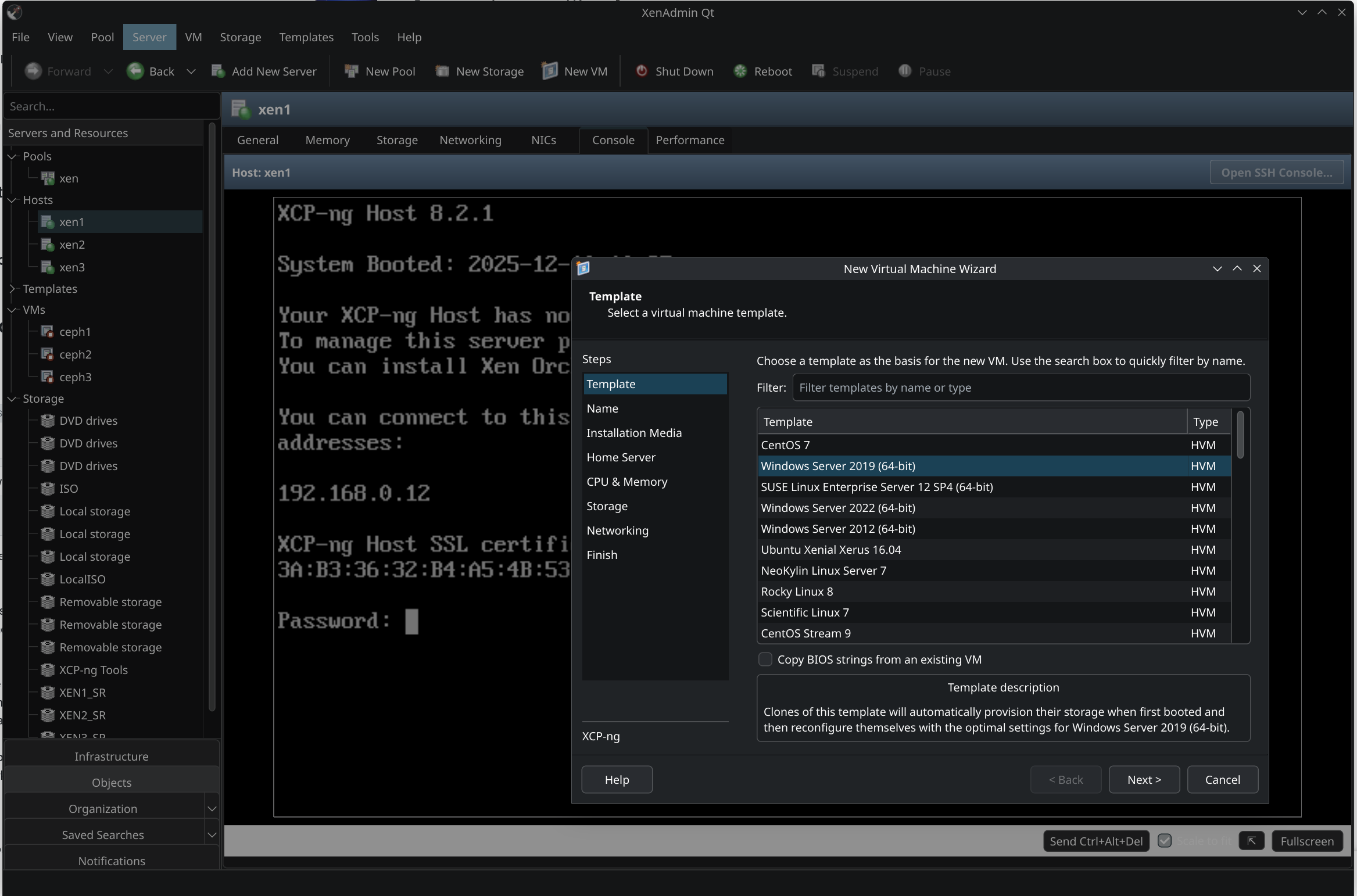
New project - XenAdminQt - a cross-platform GNU/Linux, macOS, Windows native thick client
-
@benapetr Thank you for the continued improvements - have been tracking every newly tagged build. Just one potential request as double-(left)-clicking on a VM (in the tree-view) does not start the VM (like in xenadmin) - just a time saving feature I miss in everyday use (per using on Linux).
-
@benapetr One of the things I've noticed during my initial testing is that there is a problem in how VM templates are handled compared to xenadmin. Here are my observations:
- Built in templates are shown with yellow icons in the tree view (if enabled with View -> Templates) and this seems to work as expected.
- User made templates are also shown with yellow icon in the tree view which is wrong. They should be shown with blue icon and sorted before any built in templates.
- VM snapshots are shown as VM templates with blue icons in the tree view. They should not be shown at all in the tree view. Additionally, they are shown under a host instead of a pool compared to other templates.
- New VM dialog does not show VM template icons at all so it is hard to distinguish if they are builtin or user created or snapshots (which can be used as VM templates too). Snapshots are not shown in the list at all.
- New VM dialog also does not sort the templates by name nor group per type (builtin, user, snapshot) so it is hard to find what you need.
If I get some extra time, I will add some screenshots for comparison.
-
@bvitnik no need for screenshot these are clear, I will fix them all soon
-
@benapetr Great. Thanks!
-
-
@benapetr One of the things I've noticed during my initial testing is that there is a problem in how VM templates are handled compared to xenadmin. Here are my observations:
- Built in templates are shown with yellow icons in the tree view (if enabled with View -> Templates) and this seems to work as expected.
- User made templates are also shown with yellow icon in the tree view which is wrong. They should be shown with blue icon and sorted before any built in templates.
- VM snapshots are shown as VM templates with blue icons in the tree view. They should not be shown at all in the tree view. Additionally, they are shown under a host instead of a pool compared to other templates.
- New VM dialog does not show VM template icons at all so it is hard to distinguish if they are builtin or user created or snapshots (which can be used as VM templates too). Snapshots are not shown in the list at all.
- New VM dialog also does not sort the templates by name nor group per type (builtin, user, snapshot) so it is hard to find what you need.
If I get some extra time, I will add some screenshots for comparison.
all fixed
-
@benapetr Really great - thanks for implementing the other double-click actions at the same time - looking forward to the coming release(s)!
-
@benapetr Do you have some way or script to quickly iterate build->test workflow locally? That is without building a package, then installing on a system then testing. I'm running Debian based system.
-
@bvitnik yes it's very easy to build on debian, you need to install the qt packages:
sudo apt-get install qt6-base-dev build-essential freerdp2-dev libwinpr2-dev mesa-common-dev libglu1-mesa-dev libegl1-mesa-dev libxkbcommon-dev libegl1 libxkbcommon0 qt6-charts-dev libssl-dev zlib1g-dev
# then clone the repo
git clone https://github.com/benapetr/XenAdminQt
cd XenAdminQt
mkdir release
cd release
qmake6 ../src
make -j $(nproc)
built binary will be in xenadmin-ui dir
-
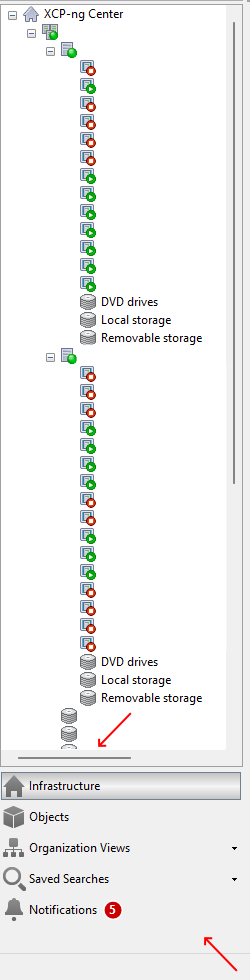
@benapetr In case it's helpful, two other quality of life things I noticed are that there is not yet a horizontal scroll bar available in the tree view (which is helpful when there are longer names and one wants to preserve screen real-estate) and that there is no way yet to compress the categories under the tree view into one horizontal line of icons (in order to save vertical space and see more of the tree view at once - as in xenadmin).
Redacted screenshot below (though not showing the 'compressed' icons).

Hello! It looks like you're interested in this conversation, but you don't have an account yet.
Getting fed up of having to scroll through the same posts each visit? When you register for an account, you'll always come back to exactly where you were before, and choose to be notified of new replies (either via email, or push notification). You'll also be able to save bookmarks and upvote posts to show your appreciation to other community members.
With your input, this post could be even better 💗
Register Login