iscsi shows "No Storage Repositories Detected"
-
I have a nasty problem of my own creation. I hope the community can help me as I have a lot of data stored in this iscsi repository.
It all started because my hardware RAID had failed on my Dell PowerEdge R630. I decided to restart the server. It didn't fix the problem, of course. But the server did work with just one 1 remaining drive. Thinking that I need to rebuilt the RAID array, I put two new SSDs in and proceeded to format them to use Software RAID (after setting HBA & ACHI on then PowerEdge). No problem...the reinstall went well.
Now, when I tried to reattach the iScsi repository, it showed me that there was "No Storage Repository Detected".
I then went to the Terminal in XCP-NG to run the following command to see if the iscsi repository was still available (I didn't reformat the repository)
[17:31 xenserver-tiger ~]# iscsiadm -m discovery -t sendtargets -p 192.168.1.5
192.168.1.5:3260,1 iqn.2005-10.org.freenas.ctl:scuzzy-ng2
172.16.0.1:3260,1 iqn.2005-10.org.freenas.ctl:scuzzy-ng2
[17:31 xenserver-tiger ~]#
That would tell me that the repository still exists (I think)
I've tried every thing that I can think of to reconnect them. I do not want to lose all my VMs that are inside that iScsi repository.
Is there a way to reattach them from the Terminal?
Other things d
-
 P poddingue marked this topic as a question
-
From your discovery output, the target still seems to be there, which is a good start. The docs have a section for the SR part: https://docs.xcp-ng.org/storage/manage-srs#reattach-a-forgotten-sr (with
xe sr-probejust below it to find the IQN and LUN, though I haven't tried it on iSCSI myself).
Before you go further, though, there's something Olivier explained in a similar thread: the VM definitions (name, CPU, RAM, which disks) live in the host's database, not on the SR, so after a reinstall the disks can come back, but the VMs as they were only return with a metadata backup; otherwise it means recreating them and attaching the disks (https://xcp-ng.org/forum/post/93504).
Did you have an XCP-ng metadata backup job in XO, or one from the host console? Also, from what I read in the LVM storage driver, creating a new SR on that LUN would wipe it, so I'd be careful not to click through anything that offers to create one. Your post got cut off at "Other things d", could you tell us what else you tried?
@Team-Storage, could someone check I haven't steered okynnor wrong here? -
@poddingue Thank you so much for reassuring me that my SR is still intact. I wasn't sure.
I'm getting quite desperate because all my VMs are down for more than 24hours...
I do have metadata backup from XO (sadly XO was one of the VMs that are sitting in the SR). I also have a metadata backup created from XSCONSOLE.
So to get things going, I was going to restore the metadata saved by xsconsole. When I did it, it complained of two things:
"This MAC seed is already in use by a VM in the pool" and "Error code: VDI_CONTENT_ID_MISSING "
it sounds like I need to delete the MAC addresses, which I took as I need to delete all entries for each VM currency showing in xsconsole. So I did. Nothing. Next, I tried to do it by running
xe vm-param-remove uuid=<existing-vm-uuid> param-name=other-config param-key=mac_seed.nothing, It didn't work.
I then tried to take the backup metafiles and put them into a new machine with a fresh install of xcp-ng. It's the exact same hardware! Yet, the restore complained that the ethernet names don't match. I could try to rename them all from ETH1-ETH5 to ETH6-ETH9. But after doing that, will I see the same problems I did above? After all there's no SR for iSCSI that can be reattached.
Or, will be easier to just get the XOA appliance?
A negative comment is that the old XOA was great but this one seems to be quite feature missing. Is there a way to get the XOA appliance please? -
@okynnor Quick and simple to get going, https://github.com/Jarli01/xenorchestra_installer
Just import your XO metadata backup and then you should be able to administer the environment again.
-
@DustinB Wowsers! Thank you
 ...I got my metadata back!
I got a new problem...when I try to turn on my VMs, they are reporting
NO_HOSTS_AVAILABLE()Also, while iSCSI is listed under Storage, and reports usage and free space, it's showing as disconnected.
I suspect that the fact that iSCSI is disconnected leads me to believe that the VMs are not starting.
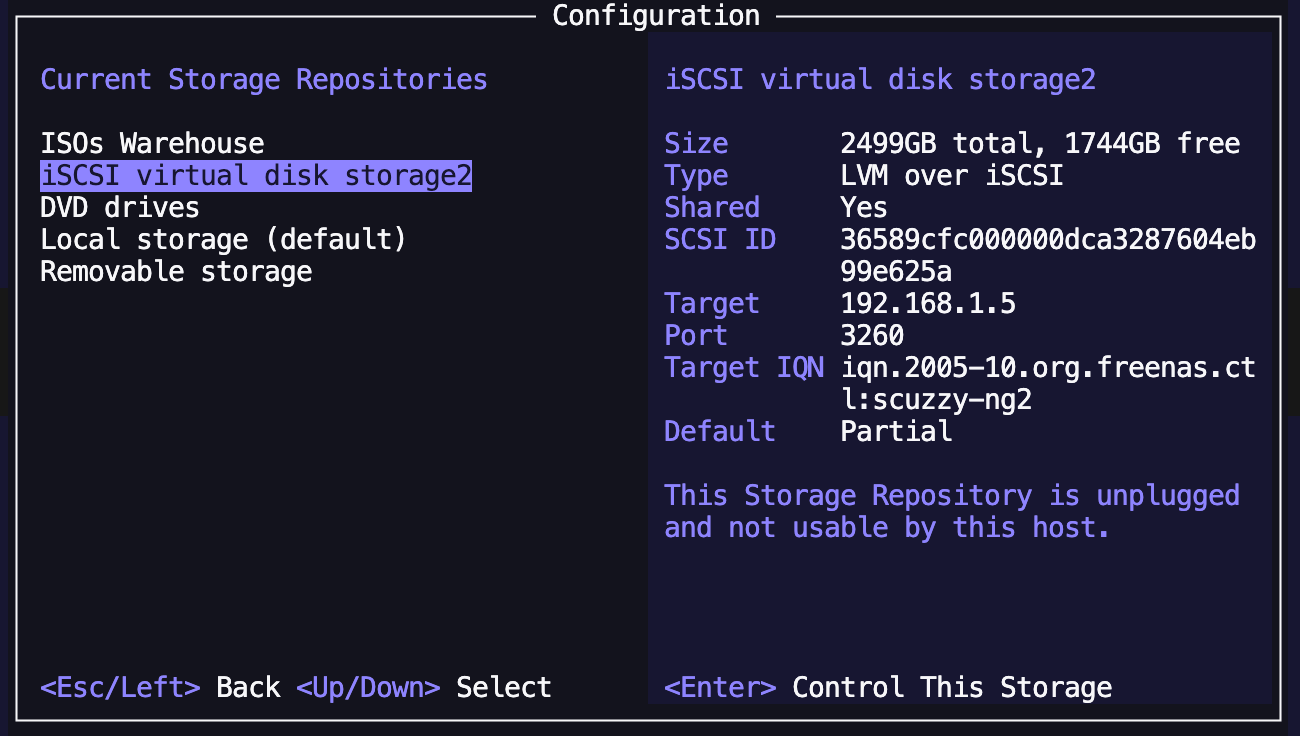
When I look into the iScsi repository under XSCONSOLE, it's saying
This Storage Repository is unplugged and not usable by this host.When I look at the iSCSI setup under TrueNAS Scale, it's showing as running.
I'm on a roll thanks you guys...just need one more push!
-
I have since tried a little more digging, The error seems to suggest that the block drive SR is not available/file not found?
The iscsi block drive is sitting inside a TrueNAS scale server snapshot backups too.But let me know if I"m doing this correctly as per the command below to try to use the
xe pbd-plugcommand to solve this issue or not:
[15:25 xenserver-tiger ~]# xe sr-list name-label="iSCSI virtual disk storage2"
uuid ( RO)                : 7f968d45-56dd-a6aa-83d2-bd33dd2a8e5f
          name-label ( RW): iSCSI virtual disk storage2
    name-description ( RW):
                host ( RO): xenserver-tiger
                type ( RO): lvmoiscsi
        content-type ( RO): user


[15:27 xenserver-tiger ~]# xe pdb-list sr-uuid=7f968d45-56dd-a6aa-83d2-bd33dd2a8e5f
Unknown command: pdb-list
For usage run: 'xe help'
[15:28 xenserver-tiger ~]# xe pbd-list sr-uuid=7f968d45-56dd-a6aa-83d2-bd33dd2a8e5f
uuid ( RO)                  : d4050fae-ec84-efac-62a1-d3d62b4fb879
             host-uuid ( RO): 3986c16a-a9e0-4ebf-83a0-4438d8bd5916
               sr-uuid ( RO): 7f968d45-56dd-a6aa-83d2-bd33dd2a8e5f
         device-config (MRO): SCSIid: 36589cfc000000dca3287604eb99e625a; targetIQN: iqn.2005-10.org.freenas.ctl:scuzzy-ng2; target: 192.168.1.5; port: 3260
    currently-attached ( RO): false


[15:28 xenserver-tiger ~]# xe pbd-plug uuid=d4050fae-ec84-efac-62a1-d3d62b4fb879
Error code: SR_BACKEND_FAILURE_47
Error parameters: , The SR is not available [opterr=no such volume group: VG_XenStorage-7f968d45-56dd-a6aa-83d2-bd33dd2a8e5f],
[15:29 xenserver-tiger ~]# tail -n 50 /var/log/SMlog | grep -i -E "error|exception|47|opterr"
Nov 20 15:29:46 xenserver-tiger SM: [70710][MainThread] FileNotFoundError: [Errno 2] No such file or directory: '/dev/disk/by-scsid/36589cfc000000dca3287604eb99e625a'
Nov 20 15:29:46 xenserver-tiger SM: [70710][MainThread] ): EXCEPTION <class 'FileNotFoundError'>, [Errno 2] No such file or directory: '/dev/disk/by-scsid/36589cfc000000dca3287604eb99e625a'
Nov 20 15:29:46 xenserver-tiger fairlock[3380]: /run/fairlock/devicemapper sent '70710 - 10994.070830647'
Nov 20 15:29:46 xenserver-tiger SM: [70710][MainThread] Error in SR.after_master_attach Input/output error
Nov 20 15:29:46 xenserver-tiger SM: [70710][MainThread] ***** generic exception: sr_attach: EXCEPTION <class 'xs_errors.SROSError'>, The SR is not available [opterr=no such volume group: VG_XenStorage-7f968d45-56dd-a6aa-83d2-bd33dd2a8e5f]
Nov 20 15:29:46 xenserver-tiger SM: [70710][MainThread]     opterr='no such volume group: %s' % self.vgname)
Nov 20 15:29:46 xenserver-tiger SM: [70710][MainThread] ***** LVM over iSCSI: EXCEPTION <class 'xs_errors.SROSError'>, The SR is not available [opterr=no such volume group: VG_XenStorage-7f968d45-56dd-a6aa-83d2-bd33dd2a8e5f]
Nov 20 15:29:46 xenserver-tiger SM: [70710][MainThread]     opterr='no such volume group: %s' % self.vgname)

Hello! It looks like you're interested in this conversation, but you don't have an account yet.
Getting fed up of having to scroll through the same posts each visit? When you register for an account, you'll always come back to exactly where you were before, and choose to be notified of new replies (either via email, or push notification). You'll also be able to save bookmarks and upvote posts to show your appreciation to other community members.
With your input, this post could be even better 💗
Register Login