XCP-ng
    • Categories
    • Recent
    • Tags
    • Popular
    • Users
    • Groups
    • Register
    • Login

    Xscontainer

    Scheduled Pinned Locked Moved Advanced features
    32 Posts 7 Posters 12.8k Views 7 Watching
    Loading More Posts
    • Oldest to Newest
    • Newest to Oldest
    • Most Votes
    Reply
    • Reply as topic
    Log in to reply
    This topic has been deleted. Only users with topic management privileges can see it.
    • kiuK Offline
      kiu @stormi
      last edited by

      @stormi OK, thanks. I will try your solution on a small lab.

      1 Reply Last reply Reply Quote 0
      • kiuK Offline
        kiu @stormi
        last edited by

        @stormi I tried to do it but I don't think I succeeded. Could you send me a more specific doc of what you are doing?

        thanks 🙂

        1 Reply Last reply Reply Quote 0
        • stormiS Offline
          stormi Vates 🪐 XCP-ng Team
          last edited by stormi

          UPDATE 2024-03-19: DON'T DO THIS. We won't support any XCP-ng hosts where system packages have been overriden with pip.

          I think these are the steps that worked for me:

          yum install xscontainer
          yum install python2-pip --enablerepo=epel
          pip2 install --upgrade "pip < 21"
          pip2 install --upgrade "cryptography == 2.5"
          pip2 install --upgrade "paramiko < 3"
          

          As this is done outside a virtualenv (I've tried inside a virtualenv, but I think xscontainer runs stuff outside of it, so it didn't work), this will overwrite the contents of RPMs you installed, so, again, only for testing.

          I also had to remove the former host key from the VM metadata:

           xe vm-param-remove uuid=... param-name=other-config param-key=xscontainer-sshhostkey
          
          kiuK 1 Reply Last reply Reply Quote 1
          • kiuK Offline
            kiu @stormi
            last edited by

            @stormi Thanks, I just tried that and it still doesn't work 😞

            1 Reply Last reply Reply Quote 0
            • stormiS Offline
              stormi Vates 🪐 XCP-ng Team
              last edited by

              Well, I tried it myself on a freshly installed pool, and this worked. Can you elaborate on what doesn't work?

              kiuK 1 Reply Last reply Reply Quote 0
              • kiuK Offline
                kiu @stormi
                last edited by

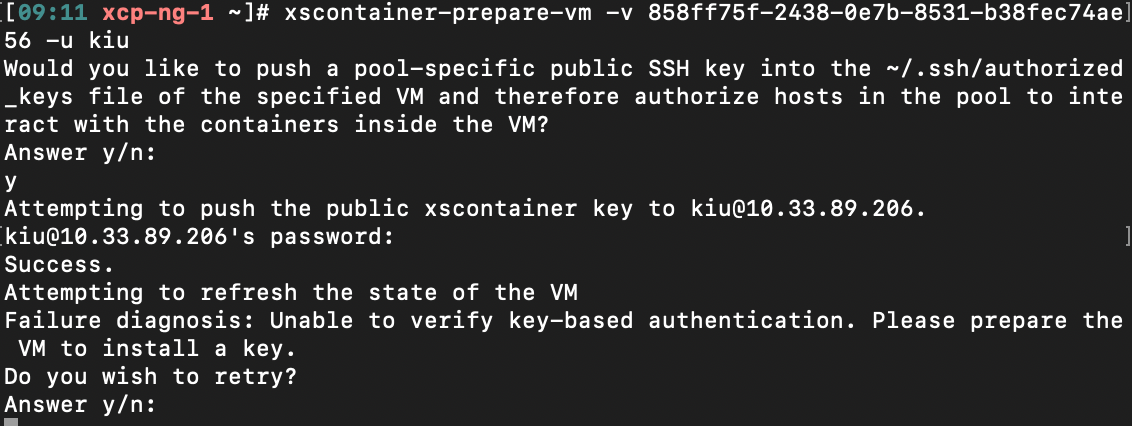
                @stormi I still have the same problem, the key does not want to install and asks me if I want to try again.

                1 Reply Last reply Reply Quote 0
                • stormiS Offline
                  stormi Vates 🪐 XCP-ng Team
                  last edited by

                  What's the exact error message?

                  kiuK 1 Reply Last reply Reply Quote 0
                  • kiuK Offline
                    kiu @stormi
                    last edited by olivierlambert

                    @stormi

                    Would you like to push a pool-specific public SSH key into the ~/.ssh/authorized_keys file of the specified VM and therefore authorize hosts in the pool to interact with the containers inside the VM?
                    Answer y/n: 
                    y
                    Attempting to push the public xscontainer key to USER@IP.
                    ID@IP's password: 
                    Success.
                    Attempting to refresh the state of the VM
                    Failure diagnosis: Unable to find ncat inside the VM. Please install ncat. 
                    Do you wish to retry?
                    Answer y/n:
                    
                    kiuK 1 Reply Last reply Reply Quote 0
                    • kiuK Offline
                      kiu @kiu
                      last edited by

                      My server is up to date

                      1 Reply Last reply Reply Quote 0
                      • stormiS Offline
                        stormi Vates 🪐 XCP-ng Team
                        last edited by

                        It's not the same error. Your VM is missing a required package : ncat, as the error message says.

                        kiuK 1 Reply Last reply Reply Quote 0
                        • kiuK Offline
                          kiu @stormi
                          last edited by

                          @stormi My bad. Ok I installed the nmap-ncat package under rockylinux and works perfectly now 🙂 Thank you 🙂

                          1 Reply Last reply Reply Quote 1
                          • F foxy82 referenced this topic on
                          • FinallfF Offline
                            Finallf
                            last edited by

                            @olivierlambert @stormi
                            Is there any solution for this, I'm researching how to use xcp-ng + XO to build and manage docker.
                            When I read about Xscontainer I was excited because it seemed like the best option.
                            I have a small server and would like to know what would be a clean and transparent solution to achieve this.

                            I've read a lot and I'm still confused.

                            Below is everything I researched and read on the subject:
                            https://xcp-ng.org/forum/topic/3232/docker-on-xcp-ng?page=1
                            https://xcp-ng.org/blog/2021/09/14/runx-next-generation-secured-containers/
                            https://www.youtube.com/watch?v=qOZk8xpIRpQ
                            http://oinformata.eti.br/wp/xcp-ng-8-0-debian10-docker/
                            https://doc.rmbinformatica.com.br/ajuda/redes-e-infraestrutura/xen-server/configurando-o-xenserver-para-monitoramento-de-containers-docker

                            1 Reply Last reply Reply Quote 0
                            • codycryptoC Offline
                              codycrypto
                              last edited by

                              I found another workaround (one-step solution) for the "Unable to verify key-based authentication error" without having to mess with any of the python packaging.

                              Adding

                              PubkeyAcceptedKeyTypes +ssh-rsa
                              

                              To your /etc/ssh/sshd_config file will make the VM accept the older authentication

                              J 1 Reply Last reply Reply Quote 1
                              • J Offline
                                johnnyorange @codycrypto
                                last edited by

                                @codycrypto this worked! thank you so much!

                                codycryptoC 1 Reply Last reply Reply Quote 0
                                • codycryptoC Offline
                                  codycrypto @johnnyorange
                                  last edited by

                                  @johnnyorange Glad I could help! Took me weeks to figure that out lol....I would caution using that in production though, not sure the security implications for accepting the older key type.

                                  1 Reply Last reply Reply Quote 1
                                  • olivierlambertO olivierlambert moved this topic from Xen Orchestra on

                                  Hello! It looks like you're interested in this conversation, but you don't have an account yet.

                                  Getting fed up of having to scroll through the same posts each visit? When you register for an account, you'll always come back to exactly where you were before, and choose to be notified of new replies (either via email, or push notification). You'll also be able to save bookmarks and upvote posts to show your appreciation to other community members.

                                  With your input, this post could be even better 💗

                                  Register Login
                                  • First post
                                    Last post