Build from sources error -- EISDIR: illegal operation on a directory, read
-
Debian 11
Following directions from :
https://xen-orchestra.com/docs/installation.html#from-the-sources
Everything looks fine until I get to "yarn start".
then :xo@XO-Source:~/xen-orchestra/packages/xo-server$ yarn start yarn run v1.22.22 $ node dist/cli.mjs ✖ EISDIR: illegal operation on a directory, read Error: EISDIR: illegal operation on a directory, read error Command failed with exit code 1. info Visit https://yarnpkg.com/en/docs/cli/run for documentation about this command. xo@XO-Source:~/xen-orchestra/packages/xo-server$I have tried installing as both a limited user "xo", and as root... same error.
It appears to be a error where a directory is found rather that a file...
Any ideas what log files / config files I should be looking at ??? -
Well.... yes...
 I was copying it, but I was also dropping a copy in the /etc/xo-server/config.toml directory as well....apparently i was trying to get ahead of the game.
As soon as I removed the /etc/xo-server/config.toml path and sample.config.toml file, everything loaded.

-
What does
node -vreturn? -
@Danp
V20.12.2 -
From our docs
 --
--XO requires Node.js 18.
-
root@XO-SourceBuild:/home/xo/xen-orchestra/packages/xo-server# yarn start yarn run v1.22.22 $ node dist/cli.mjs ✖ EISDIR: illegal operation on a directory, read Error: EISDIR: illegal operation on a directory, read error Command failed with exit code 1. info Visit https://yarnpkg.com/en/docs/cli/run for documentation about this command. root@XO-SourceBuild:/home/xo/xen-orchestra/packages/xo-server# node -v v18.20.2 root@XO-SourceBuild:/home/xo/xen-orchestra/packages/xo-server# -
Well, at least we've rules out Node being the issue.

Did you forget to create the
config.tomlfile?Now you have to create a config file for xo-server:
cd packages/xo-server mkdir -p ~/.config/xo-server cp sample.config.toml ~/.config/xo-server/config.toml -
Well.... yes...
I was copying it, but I was also dropping a copy in the /etc/xo-server/config.toml directory as well....apparently i was trying to get ahead of the game.As soon as I removed the /etc/xo-server/config.toml path and sample.config.toml file, everything loaded.
-
 O olivierlambert marked this topic as a question on
-
O olivierlambert has marked this topic as solved on
-
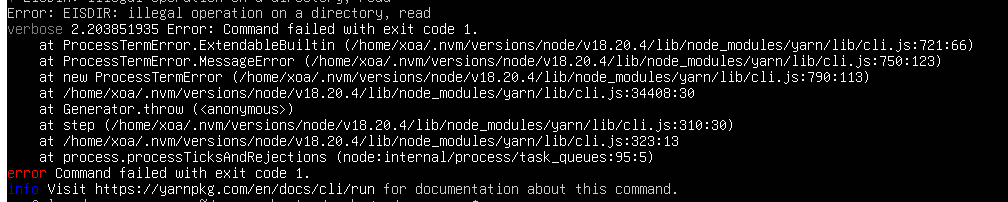
I know this is an old topic and was resolved, however I am seeing a similar issue but my node version is right and I have NOT copied the sample config file to /etc/xo-server/config.toml, only to my .config/xo-server/ directory.
Specifically seeing this picture below, I'm sure I'm doing something wrong and just fumbling but I've followed the docs a few times.
-
@planedrop Ignore me, I did make a dumb mistake, all is working now.


Hello! It looks like you're interested in this conversation, but you don't have an account yet.
Getting fed up of having to scroll through the same posts each visit? When you register for an account, you'll always come back to exactly where you were before, and choose to be notified of new replies (either via email, or push notification). You'll also be able to save bookmarks and upvote posts to show your appreciation to other community members.
With your input, this post could be even better 💗
Register Login