PV tools ISO not shown since 8.3
-
Coming from here: https://github.com/xcp-ng/xcp-ng-org/pull/566
All installations stopped listing the PV tools ISO.
It has always been a "separate SR", that could be selected as "CD ROM". With the installation of 8.3 - no matter of Upgrade or fresh installatin - it's not showing up anymore.The thread shows, that the images are still included, but neither XO Lite nor XCP-ng Center shows them:
# xe sr-list is-tools-sr=true
uuid ( RO)                : 7521974c-9c5c-a13a-ea73-f7bb75f6c493
          name-label ( RW): XCP-ng Tools
    name-description ( RW): XCP-ng Tools ISOs
                host ( RO): xcp-xxx
                type ( RO): iso
        content-type ( RO): iso

# xe vdi-list sr-uuid=7521974c-9c5c-a13a-ea73-f7bb75f6c493
uuid ( RO)                : f80266a9-3df9-4656-a86b-3e872254488f
          name-label ( RW): guest-tools.iso
    name-description ( RW):
             sr-uuid ( RO): 7521974c-9c5c-a13a-ea73-f7bb75f6c493
        virtual-size ( RO): 25679872
            sharable ( RO): false
           read-only ( RO): true

uuid ( RO)                : 95596409-0716-4dae-8fd7-a6a0b2a9eb00
          name-label ( RW): Old version of guest-tools.iso
    name-description ( RW):
             sr-uuid ( RO): 7521974c-9c5c-a13a-ea73-f7bb75f6c493
        virtual-size ( RO): 20066304
            sharable ( RO): false
           read-only ( RO): true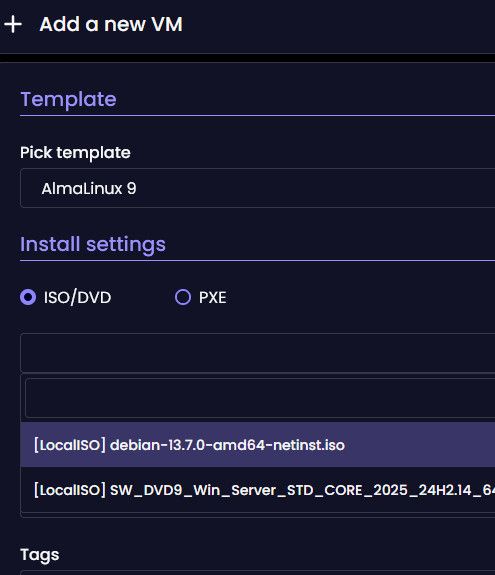
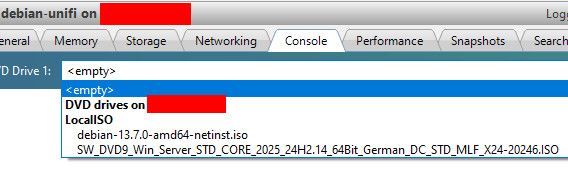
So it seems to be a bug.
-
@cg Does it show up in XO? I noticed it doesn't show in "Add a new VM" in XO Lite either.
In a pinch, this command should work:
xe vm-cd-insert vm=... cd-name=guest-tools.isoI haven't tried XCP-ng Center.
-
Hi @cg
I believe there is something else happening here:
-
The ISO not being shown when creating a new VM is expected since it isn't a bootable ISO
-
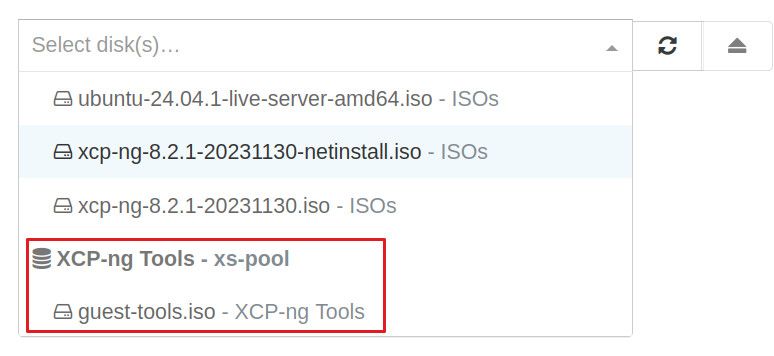
The ISO is visible for me when I check with XOA v5 UI
-

Hello! It looks like you're interested in this conversation, but you don't have an account yet.
Getting fed up of having to scroll through the same posts each visit? When you register for an account, you'll always come back to exactly where you were before, and choose to be notified of new replies (either via email, or push notification). You'll also be able to save bookmarks and upvote posts to show your appreciation to other community members.
With your input, this post could be even better 💗
Register Login