PV tools ISO not shown since 8.3
-
Coming from here: https://github.com/xcp-ng/xcp-ng-org/pull/566
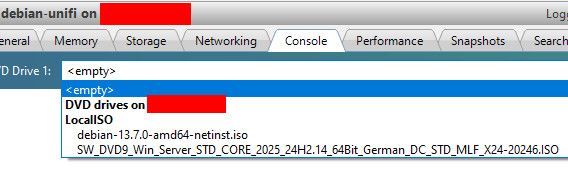
All installations stopped listing the PV tools ISO.
It has always been a "separate SR", that could be selected as "CD ROM". With the installation of 8.3 - no matter of Upgrade or fresh installatin - it's not showing up anymore.The thread shows, that the images are still included, but neither XO Lite nor XCP-ng Center shows them:
# xe sr-list is-tools-sr=true
uuid ( RO)                : 7521974c-9c5c-a13a-ea73-f7bb75f6c493
          name-label ( RW): XCP-ng Tools
    name-description ( RW): XCP-ng Tools ISOs
                host ( RO): xcp-xxx
                type ( RO): iso
        content-type ( RO): iso

# xe vdi-list sr-uuid=7521974c-9c5c-a13a-ea73-f7bb75f6c493
uuid ( RO)                : f80266a9-3df9-4656-a86b-3e872254488f
          name-label ( RW): guest-tools.iso
    name-description ( RW):
             sr-uuid ( RO): 7521974c-9c5c-a13a-ea73-f7bb75f6c493
        virtual-size ( RO): 25679872
            sharable ( RO): false
           read-only ( RO): true

uuid ( RO)                : 95596409-0716-4dae-8fd7-a6a0b2a9eb00
          name-label ( RW): Old version of guest-tools.iso
    name-description ( RW):
             sr-uuid ( RO): 7521974c-9c5c-a13a-ea73-f7bb75f6c493
        virtual-size ( RO): 20066304
            sharable ( RO): false
           read-only ( RO): true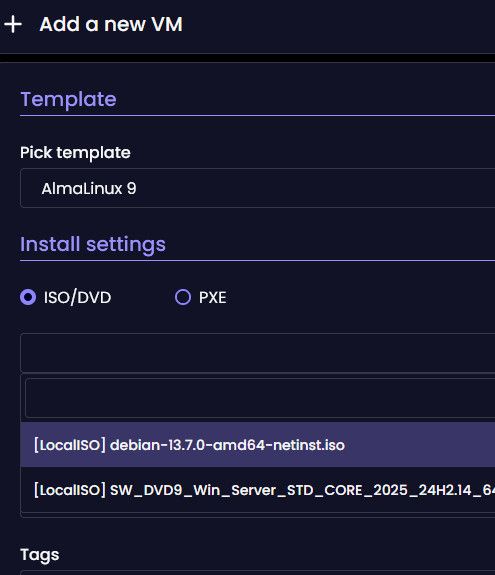
So it seems to be a bug.
-
@cg Does it show up in XO? I noticed it doesn't show in "Add a new VM" in XO Lite either.
In a pinch, this command should work:
xe vm-cd-insert vm=... cd-name=guest-tools.isoI haven't tried XCP-ng Center.
-
Hi @cg
I believe there is something else happening here:
-
The ISO not being shown when creating a new VM is expected since it isn't a bootable ISO
-
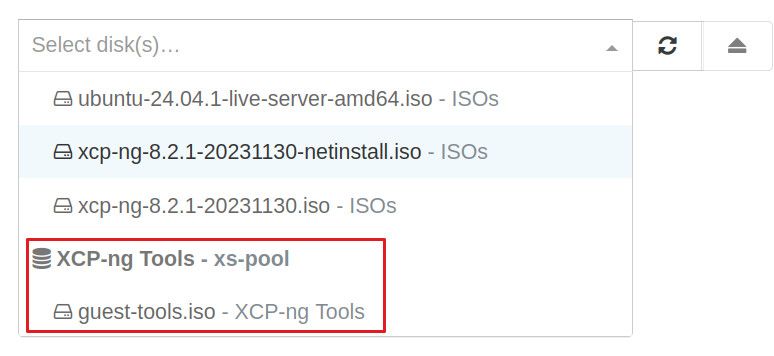
The ISO is visible for me when I check with XOA v5 UI
-
-
 P poddingue marked this topic as a question
-
@Danp That is interesting. Indeed XO5 does show it.
I didn't know that XO6 VM creation wizzard filters ISOs.Do we have someone from XCP-ng Center here in the Forum to find out why it's not seeing the repo at all?
XO Lite (XO 6) looks good, but yet lacks too much functionality and it even completely broke on an updated XOA. It never stops loading data after showing initial dashboard.I should create a new thread for "how to replace XOA with never version" on XCP-ng. As once it's created, there's no option to replace it (and by that configure network and keeping the link on the server working).
-
I didn't know that XO6 VM creation wizzard filters ISOs.
I wasn't aware that it was visible in the XO5 new VM screen. IIRC, it wasn't always like that and that special SR should probably be excluded on that screen.
I should create a new thread for "how to replace XOA with never version" on XCP-ng. As once it's created, there's no option to replace it (and by that configure network and keeping the link on the server working).
I'm not sure what you mean by this, unless you are referring to the XOA deploy option from within XO Lite.
Can you elaborate?
-
The "problem" is: If I delete that VM, XCP-ng doesn't regonize that and by thus it also doesn't offer to deploy a new XOA, instead the link then points to an not existing IP-address (website).
@Danp said:
I wasn't aware that it was visible in the XO5 new VM screen. IIRC, it wasn't always like that and that special SR should probably be excluded on that screen.I didn't check "new VM" screen in XO5, I just checked it under a running VM.
That isn't yet implemented with XO6, so there's no other way to see or modify the loaded image for the drive, than at the "create new vm" page. I don't see a notification/info that creating a new VM only shows images which are bootable. I assumed "scan SR" only gives a file list (filtered by filename extention) from that directory without any further checks.
(but as you posted as screenshot yourself, you probably have found it there too)I'm not sure what you mean by this, unless you are referring to the XOA deploy option from within XO Lite.
Can you elaborate?
Exactly, I meant the deployment and by that the link from XCP-ng server to the XOA appliance.
Via button or CLI, you can deploy an XOA appliance, which is then recognized by the server.
But (from what I see) the web-gui only updates XOA itself, not the underlying Debian, so every now and then it makes sense to deploy a new one to lift it to the current Debian stable.
As I'm only using basic/free functions, I simply have to add the server(s) and my account again. -
If I delete that VM, XCP-ng doesn't regonize that and by thus it also doesn't offer to deploy a new XOA, instead the link then points to an not existing IP-address (website).
See https://xcp-ng.org/forum/topic/11824/redeploy-xoa-via-button/3?_=1795517283339 for a prior discussion on this topic.
I don't see a notification/info that creating a new VM only shows images which are bootable.
The XCP-ng Tools SR is flagged as the system provided tools SR (is-tools-sr=true), and AFAIK this is why its contents are excluded when creating a new VM.

Hello! It looks like you're interested in this conversation, but you don't have an account yet.
Getting fed up of having to scroll through the same posts each visit? When you register for an account, you'll always come back to exactly where you were before, and choose to be notified of new replies (either via email, or push notification). You'll also be able to save bookmarks and upvote posts to show your appreciation to other community members.
With your input, this post could be even better 💗
Register Login