Turned off network boot for XOA in advanced and now broken
-
It appears that I broke Xen Orchestra by toggling off "Network Boot" in the advanced options of the VM. I have restarted the entire host multiple times and all the VM's come up except Xen Orchestra (xoa).
I am able to ssh into root @ dom0. What file or command can I modify to re-enable network boot for the Xen Orchesta VM?
uuid ( RO) : e44ffb7e-334d-06e7-dd88-c25b580a69ae name-label ( RW): xoa power-state ( RO): halted -
I don't see the connection between boot order and your issue

Just
xe vm-start uuid=e44ffb7e-334d-06e7-dd88-c25b580a69aeand then double check you have power on boot enabled. -
I have triedd running:
xe vm-start uuid=e44ffb7e-334d-06e7-dd88-c25b580a69aeThe command, completes and I see the following for a little bit:
[11:55 localhost ~]# xe vm-list uuid=e44ffb7e-334d-06e7-dd88-c25b580a69ae
uuid ( RO)           : e44ffb7e-334d-06e7-dd88-c25b580a69ae
     name-label ( RW): XOA
    power-state ( RO): running
However after about 15 seconds, it reverts to:
[11:55 localhost ~]# xe vm-list uuid=e44ffb7e-334d-06e7-dd88-c25b580a69ae
uuid ( RO)           : e44ffb7e-334d-06e7-dd88-c25b580a69ae
     name-label ( RW): XOA
    power-state ( RO): halted
Is there a way to view the logs and inspect what is causing this? The reason I suspect it's the network boot toggle, is this is the only setting I changed. XOA has been running fine for nearly 6 months before this.
-
Deploy another XOA and look at the console boot of this one

-
So sorry, but how do I deploy another XOA? The web form https://xen-orchestra.com/#!/xoa won't work as I don't expose XCP-NG to the public. Is there a command to deploy another XOA from the dom0 host of XCP-NG?
-
It doesn't matter if XCP-ng is exposed to the public: if your browser can access it on the private IP, it will work. Your browser is acting as a "bridge" between the host and XOA file to download.
edit: and if you can't, there's a deploy script using CLI on your host:
curl -sS https://xoa.io/deploy | bash -
@olivierlambert said in Turned off network boot for XOA in advanced and now broken:
curl -sS https://xoa.io/deploy | bash
I was able to create a fresh new xoa instance using the web interface installer. When I tried to start my existing (broken) xoa again it tries to start, but then went to halted. I went into the console and see:
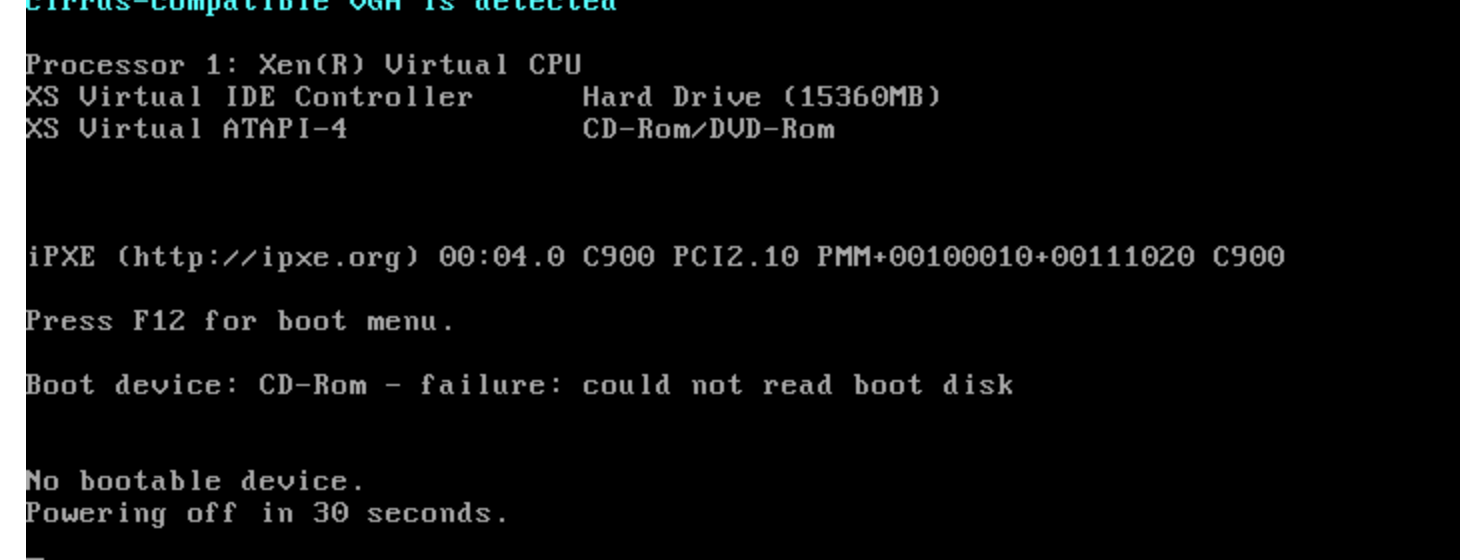
Any ideas now?
-
Nevermind I got it back up. Somehow the disk boot was turned off in boot order. Either I made an error when I changed it and turned off disk instead of network, or perhaps some sort of UI bug in XOA. The most likely thing is that I made an error and toggled off disk instead of network.
Thank you so much for the help and assistance, I really appreciate it.
-
No problem, happy to help

Hello! It looks like you're interested in this conversation, but you don't have an account yet.
Getting fed up of having to scroll through the same posts each visit? When you register for an account, you'll always come back to exactly where you were before, and choose to be notified of new replies (either via email, or push notification). You'll also be able to save bookmarks and upvote posts to show your appreciation to other community members.
With your input, this post could be even better 💗
Register Login