Nvidia Quadro P400 not working on Ubuntu server via GPU/PCIe passthrough
-
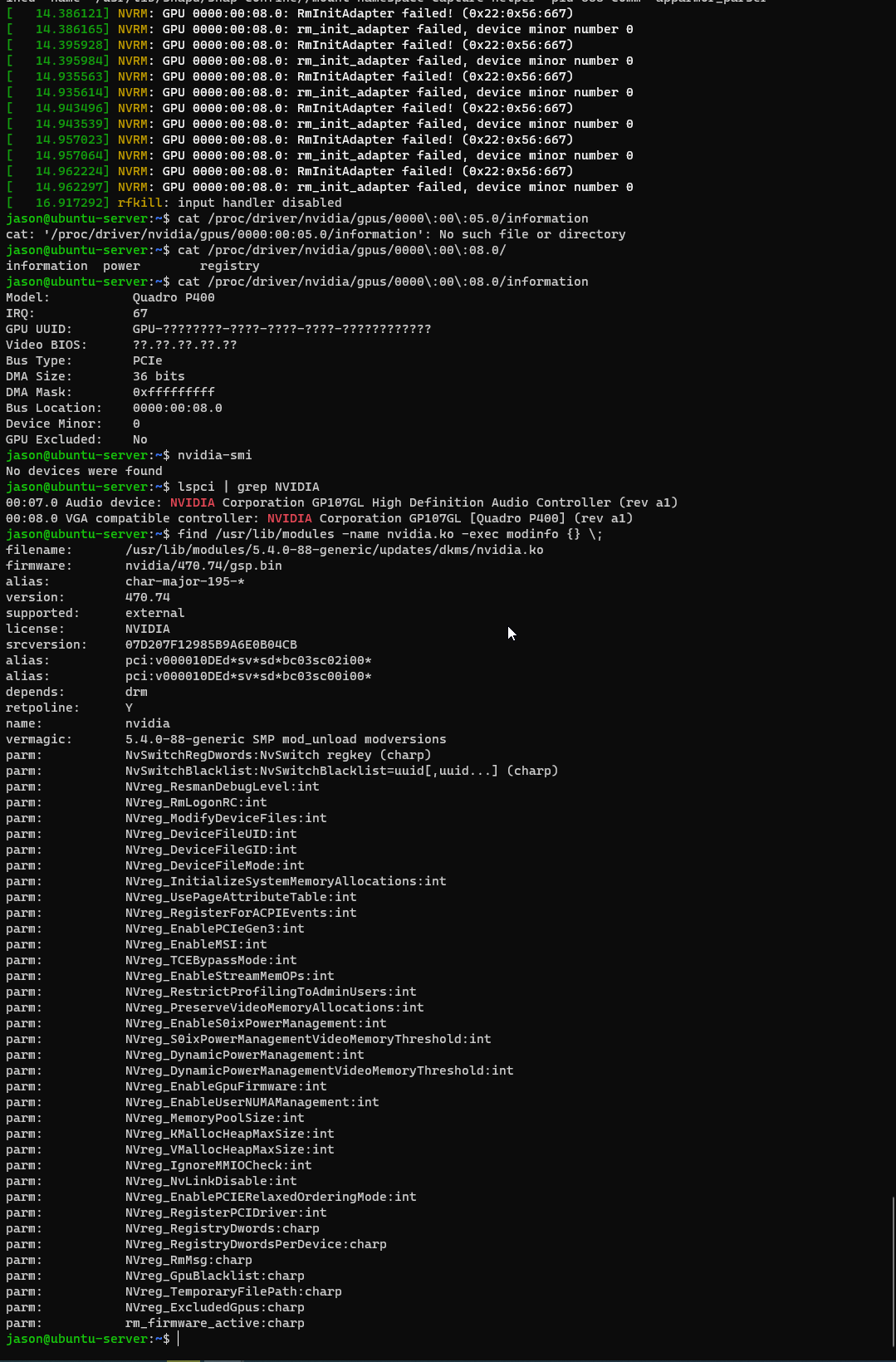
CentOS8/RockyLinux 8.5 apparently has the same issue. I believe it has something to do with the passthrough handled by XCP-NG for some reason...
-
I'm having the exact same problem on my R630 with a E5-2620V3. Tested on Ubuntu 20.04. Tried using the latest drivers (470) as well as the future build (495) with the same results of no device being found when running nvidia-smi. Card has been confirmed working on a baremetal windows machine as well as inside a proxmox VM. Happy to do anything needed to help get this figured out.
-
Same error message?
-
@olivierlambert yes I'm getting this
[ 5.091321] NVRM: loading NVIDIA UNIX x86_64 Kernel Module 470.82.00 Thu Oct 14 10:24:40 UTC 2021 [ 46.870183] NVRM: GPU 0000:00:05.0: RmInitAdapter failed! (0x22:0x56:667) [ 46.870225] NVRM: GPU 0000:00:05.0: rm_init_adapter failed, device minor number 0 [ 46.877175] NVRM: GPU 0000:00:05.0: RmInitAdapter failed! (0x22:0x56:667) [ 46.877214] NVRM: GPU 0000:00:05.0: rm_init_adapter failed, device minor number 0 [ 53.426603] NVRM: GPU 0000:00:05.0: RmInitAdapter failed! (0x22:0x56:667) [ 53.426701] NVRM: GPU 0000:00:05.0: rm_init_adapter failed, device minor number 0 [ 53.433752] NVRM: GPU 0000:00:05.0: RmInitAdapter failed! (0x22:0x56:667) [ 53.433830] NVRM: GPU 0000:00:05.0: rm_init_adapter failed, device minor number 0 [ 412.663599] NVRM: GPU 0000:00:05.0: RmInitAdapter failed! (0x22:0x56:667) [ 412.663716] NVRM: GPU 0000:00:05.0: rm_init_adapter failed, device minor number 0 [ 412.671452] NVRM: GPU 0000:00:05.0: RmInitAdapter failed! (0x22:0x56:667) [ 412.671554] NVRM: GPU 0000:00:05.0: rm_init_adapter failed, device minor number 0 -
Okay thanks for the feedback.
-
Well I went back to Proxmox now and it works just fine on a Ubuntu VM. The passthrough works as expected... So I have no idea in what is going on within XCP-NG, as it should work as well?
-
At this point, you best option is to ask on Xen devel mailing list. I have the feeling it's a very low level problem on Xen itself.
In the meantime, I'll try to get my hand on a P400 for our lab.
-
@olivierlambert Did you manage to replicate the issue or have found similar issues?
Because I am actually wanting to upgrade again to XCP-NG as I am a bit tired of having 'quorum' in proxmox which forces me to have 3 hosts up a time when using only 1 or 2 ...
-
I still need to get the card, I have not managed yet.
Not sure to understand your quorum issue on ProxMox?
-
@olivierlambert Well what I have with the quorum issue is that I have 3 machines to have quorum, while I believe in XCP-NG I can even have one machine turned on with the VM's on that particular machine without having to have quorum and be able to use the VM's.
In Proxmox when I don't have quorum I cannot use the VM's except when I do this on one host 'pvecm expected 1' which is actually a dangerous command if I am not mistaken...
So this is why I would like to migrate to XCP-NG only the PCI GPU passthrough keeps me back...
-
Could my issue be that I have done this on a R620 where the PCI riser has a max of 75Watt? That the P400 draws more power?
because now I have the P400 in a different machine where the card can draw more power without issues and it also works without issues. -
So you mean in a different hardware, now it works with XCP-ng?
What's the other machine?
-
Well not at the moment, I have not tried it on a different hardware machine with XCP-NG.
I have however currently been using the 'different' hardware machine with Proxmox and the card works great with PCI passthrough'ing the Quadro P400. So I might try this tomorrow with XCP-NG on this machine...
If this does not work, I am really wondering what makes this not working on XCP-NG...
-
That's the information I need indeed (to be able to know if it's a hardware problem vs software)
-
I reinstalled XCP-NG on a different machine (self build server), and have passedthrough the Quadro P400 to my Plex VM.
The Kernel driver is installed like shown here:
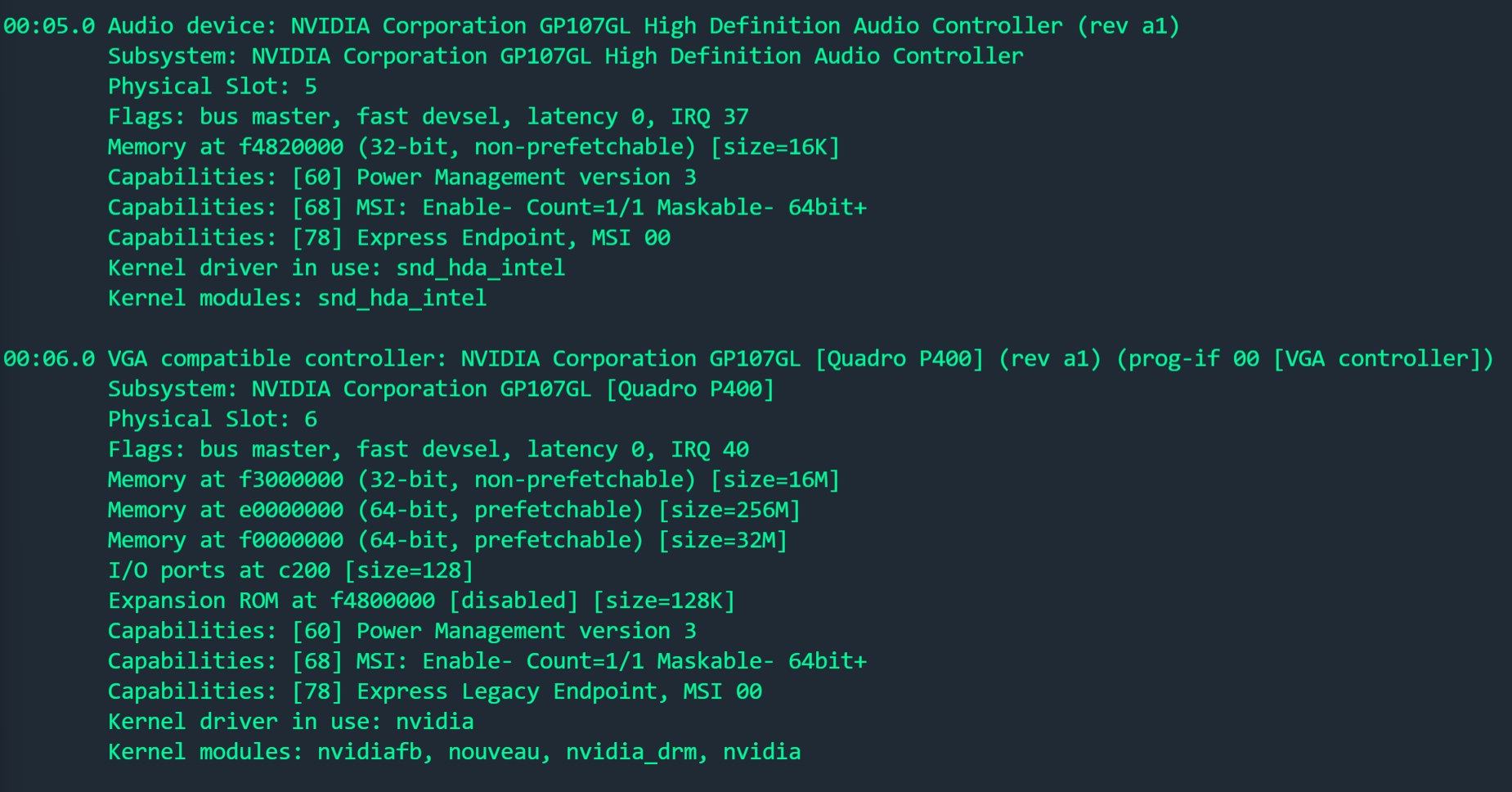
Only when executing nvidia-smi, this happens:

The PCI device has been passed through with succes and everything went fine upon here. Still wondering what the issue could be here... As I did the same on Proxmox without any modifications.
I also followed this tutorial:
https://drive.google.com/drive/folders/1JlKe-SUeEUvNhTS3-z7En_ypWnYwx_K2Which is from Craftcomputing (credits to him).
The only thing we dont do from the tutorial which has to be done on proxmox is the last step '-Hide VM identifiers from nVidia-'.EDIT:
Well after some more debugging, this came back:[ 3.869646] [drm] [nvidia-drm] [GPU ID 0x00000006] Loading driver [ 3.869648] [drm] Initialized nvidia-drm 0.0.0 20160202 for 0000:00:06.0 on minor 1 [ 3.875046] ppdev: user-space parallel port driver [ 3.915702] Adding 4194300k swap on /swap.img. Priority:-2 extents:5 across:4620284k SSFS [ 4.284521] Decoding supported only on Scalable MCA processors. [ 4.439623] Decoding supported only on Scalable MCA processors. [ 4.499267] Decoding supported only on Scalable MCA processors. [ 8.103242] snd_hda_intel 0000:00:05.0: azx_get_response timeout, switching to polling mode: last cmd=0x004f0015 [ 8.355892] input: HDA NVidia HDMI/DP,pcm=3 as /devices/pci0000:00/0000:00:05.0/sound/card0/input6 [ 8.355940] input: HDA NVidia HDMI/DP,pcm=7 as /devices/pci0000:00/0000:00:05.0/sound/card0/input7 [ 8.355978] input: HDA NVidia HDMI/DP,pcm=8 as /devices/pci0000:00/0000:00:05.0/sound/card0/input8 [ 8.356014] input: HDA NVidia HDMI/DP,pcm=9 as /devices/pci0000:00/0000:00:05.0/sound/card0/input9 [ 8.356049] input: HDA NVidia HDMI/DP,pcm=10 as /devices/pci0000:00/0000:00:05.0/sound/card0/input10 [ 8.356085] input: HDA NVidia HDMI/DP,pcm=11 as /devices/pci0000:00/0000:00:05.0/sound/card0/input11 [ 8.427430] alua: device handler registered [ 8.428989] emc: device handler registered [ 8.430986] rdac: device handler registered [ 8.506988] EXT4-fs (xvda2): mounted filesystem with ordered data mode. Opts: (null) [ 25.789595] NVRM: GPU 0000:00:06.0: RmInitAdapter failed! (0x22:0x56:667) [ 25.789622] NVRM: GPU 0000:00:06.0: rm_init_adapter failed, device minor number 0 [ 25.794920] NVRM: GPU 0000:00:06.0: RmInitAdapter failed! (0x22:0x56:667) [ 25.794943] NVRM: GPU 0000:00:06.0: rm_init_adapter failed, device minor number 0 [ 38.508573] NVRM: GPU 0000:00:06.0: RmInitAdapter failed! (0x22:0x56:667) [ 38.508614] NVRM: GPU 0000:00:06.0: rm_init_adapter failed, device minor number 0 [ 38.514513] NVRM: GPU 0000:00:06.0: RmInitAdapter failed! (0x22:0x56:667) [ 38.514542] NVRM: GPU 0000:00:06.0: rm_init_adapter failed, device minor number 0 [ 1254.128346] NVRM: GPU 0000:00:06.0: RmInitAdapter failed! (0x22:0x56:667) [ 1254.128378] NVRM: GPU 0000:00:06.0: rm_init_adapter failed, device minor number 0 [ 1254.134808] NVRM: GPU 0000:00:06.0: RmInitAdapter failed! (0x22:0x56:667) [ 1254.134834] NVRM: GPU 0000:00:06.0: rm_init_adapter failed, device minor number 0I think something goes wrong between the VM and XCP-NG, maybe the hiding of the GPU to DOM0?
EDIT 2:
This topic on the forum has the same issue: https://xcp-ng.org/forum/topic/4406/is-nvidia-now-allows-geforce-gpu-pass-through-for-windows-vms-on-linux/7?_=1640695038223EDIT 3:
I also made a thread on the Nvidia forums to see if they know anything:
https://www.nvidia.com/en-us/geforce/forums/geforce-graphics-cards/5/479893/xcp-ng-ubuntu-vm-error-quadro-p400/ -
Hi,
FYI, I just ordered a card for our lab, so we'll be able to try to reproduce the issue on our side

-
@olivierlambert Great let me know how it goes! As I have bought an WX2100 but unfortunately this one cannot be used for transcoding in plex... So I have to get back to Proxmox again with the Quadro P400.
-
Now back on Proxmox, although I also had some RMINIT errors on here, but these were related to the Hypervisor which were resolved pretty quick.
Also on Proxmox I have to change some Grub parameters and such, isn't this something that has to be done on Xen as well? And then on hypervisor level?
-
Like what parameter exactly? I think Xen doesn't support yet hiding the hypervisor information.
-
Parameters such as these in /etc/default/grub:
GRUB_CMDLINE_LINUX_DEFAULT="quiet amd_iommu=on"
GRUB_CMDLINE_LINUX="textonly video=astdrmfb video=efifb:off"Also someone replied to the topic I created on Nvidia forums:
https://forums.developer.nvidia.com/t/xcp-ng-ubuntu-vm-error-quadro-p400/199084

Hello! It looks like you're interested in this conversation, but you don't have an account yet.
Getting fed up of having to scroll through the same posts each visit? When you register for an account, you'll always come back to exactly where you were before, and choose to be notified of new replies (either via email, or push notification). You'll also be able to save bookmarks and upvote posts to show your appreciation to other community members.
With your input, this post could be even better 💗
Register Login