VM, missing disk
-
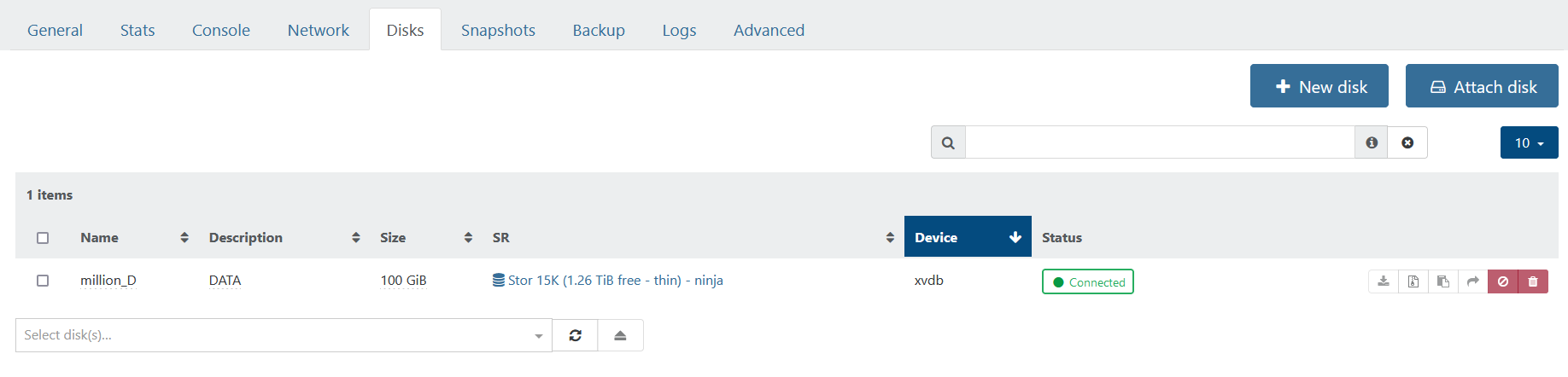
@Danp For me the disk tab for the Vm is the first screenshot of the first post:
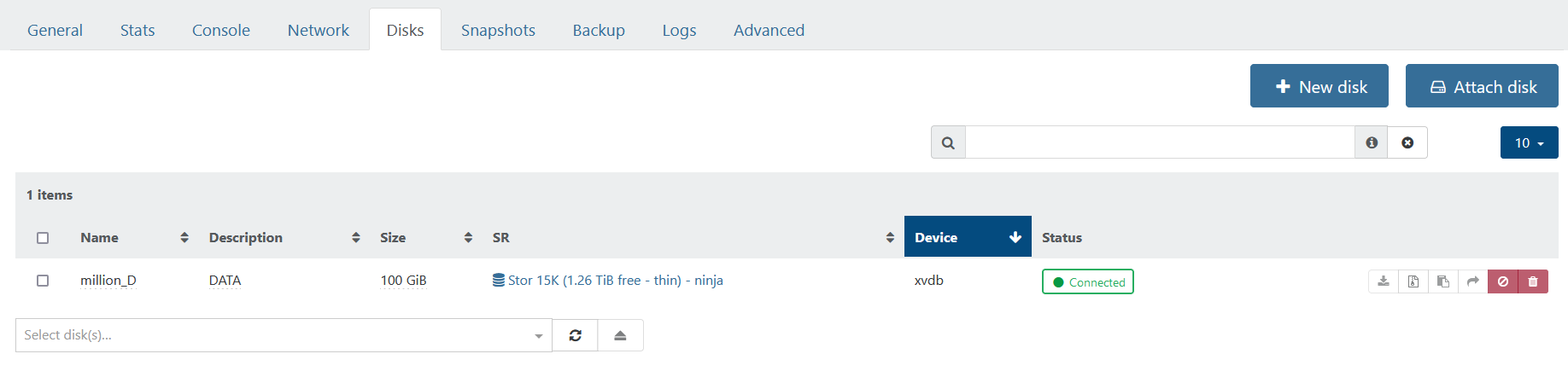
And yes apparently he as at least two SR
Stor 15k adn Stor 10k
Unfortunately from there and without taking a look directly i'm a bit confused on what can be done perhaps he should try backuping the VM and restoring it? -
@MRisberg OIC. I got confused when looking at this earlier. My suspicion is that the
is-a-snapshotparameter has been erroneously set on the VDI. -
@Danp Perhaps, but it will require to look at the chain in the host to see if your right to see if there is an child to this VDI.
-
@Danp said in VM, missing disk:
@MRisberg OIC. I got confused when looking at this earlier. My suspicion is that the
is-a-snapshotparameter has been erroneously set on the VDI.Interesting. Do you know of a way to check what parameters have been set for a VDI on the host?
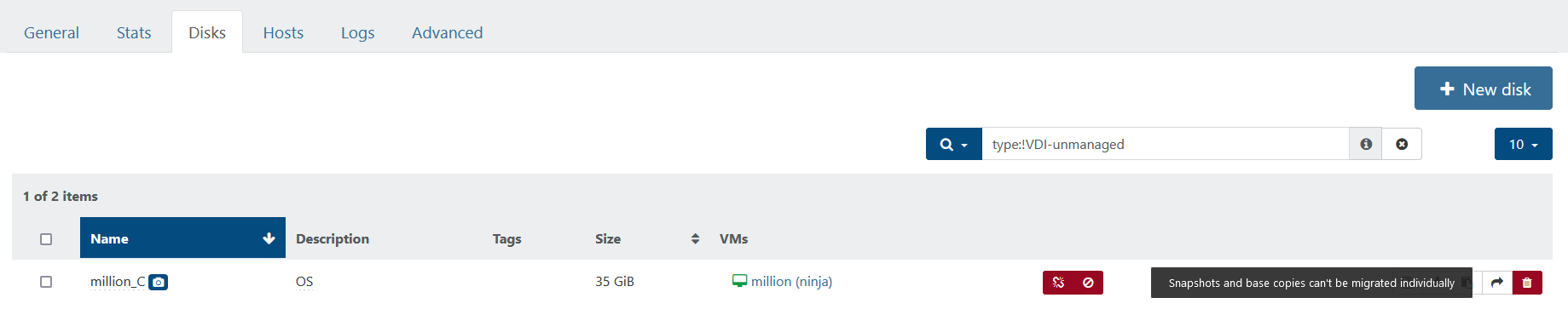
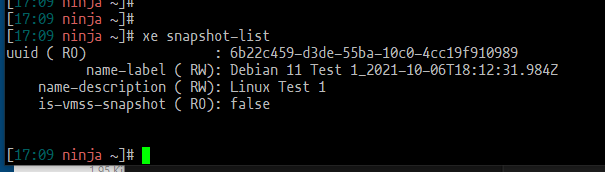
Running the xe snapshot-list command did not return XVDA or million_C as having a snapshot, although XO indicates this with the camera icon.
Edit: Also, how did you get "is-a-snapshot" show up highlighted as in your post? Looked nice

-
@MRisberg said in VM, missing disk:
Do you know of a way to check what parameters have been set for a VDI on the host?
xe vdi-param-list uuid=<Your UUID here>Also, how did you get "is-a-snapshot" show up highlighted as in your post?
With the appropriate Markdown syntax (see Inline code with backticks).
-
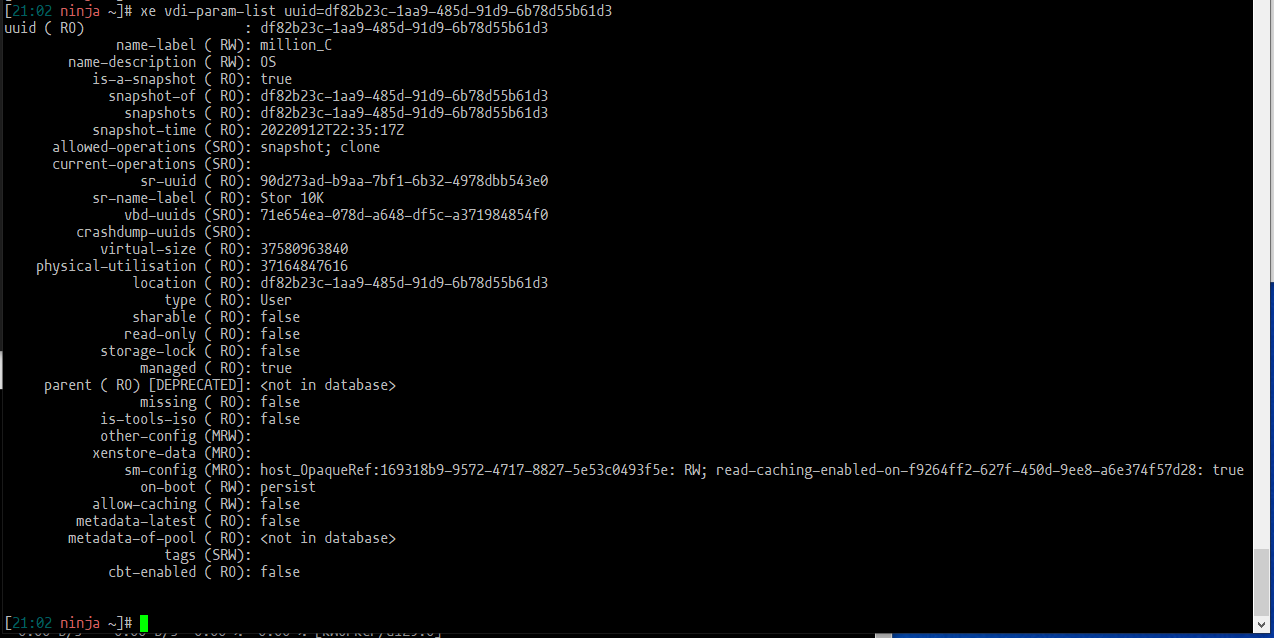
Interesting, and a bit strange that XVDA (million_C) is-a-snapshot ( RO): true when earlier I wasn't able to list it as a snapshot at all. Oh, maybe the command makes a difference between VM snapshot and a VDI snapshot. Still learning. It returned:
XVDA:
XVDB:
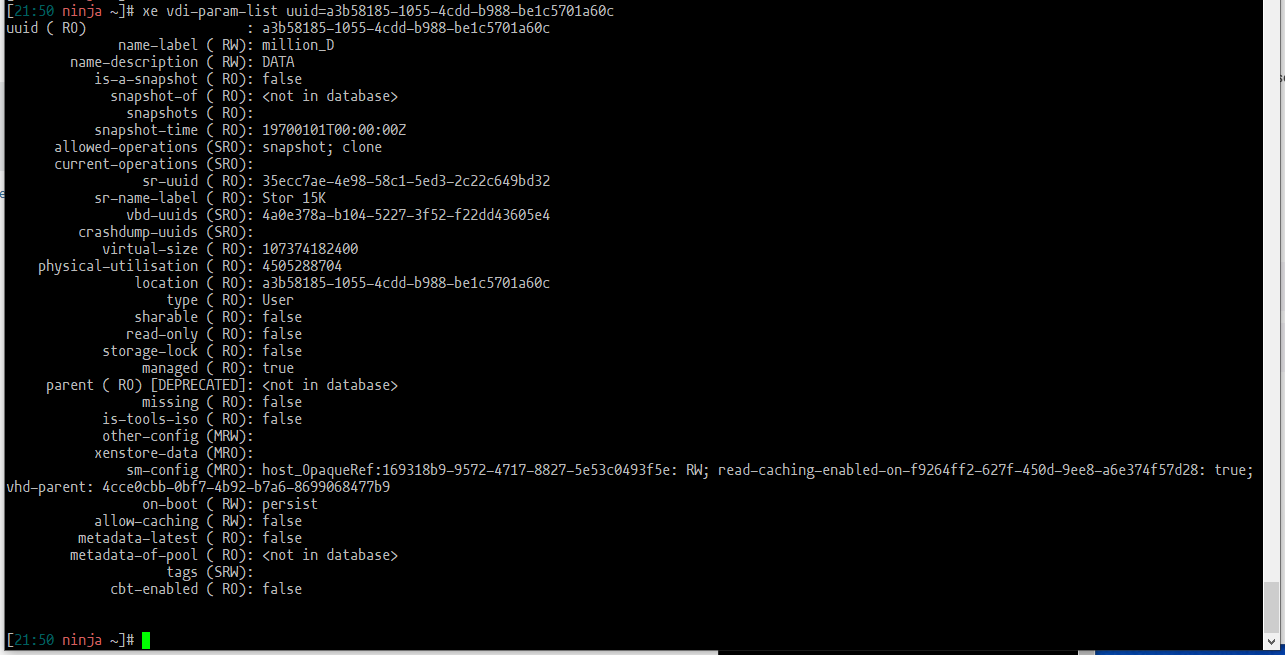
Obviously there are some differences regarding the snapshot info but also million_C is missing info regarding vhd-parent. Not that I understand yet what that means.
Thank you. -
@MRisberg I will defer to others on advising you on how to fix your situation. If the VM's contents are important, then I would be sure to make multiple backups in case of a catastrophic event. You should be able to export the to an XVA so that it can be reimported if needed.
-
I appreciate your effort to help.
Seems like this is an odd one. Maybe the backup / restore strategy is the most efficient way forward here, as long as the backup sees both drives. -
@MRisberg You take no risk at trying it you can keep the VM and restore it with another name.
-
While troubleshooting something else, backups also struggling, me and my friend found out that the host doesn't seem to coalesce successfully on the SR Stor 15K:
Sep 22 22:27:16 ninja SMGC: [1630] In cleanup
Sep 22 22:27:16 ninja SMGC: [1630] SR 35ec ('Stor 15K') (44 VDIs in 5 VHD trees):
Sep 22 22:27:16 ninja SMGC: [1630]         *3fc6e297(40.000G/85.000K)
Sep 22 22:27:16 ninja SMGC: [1630]         *4cce0cbb(100.000G/88.195G)
Sep 22 22:27:16 ninja SMGC: [1630]         *81341eac(40.000G/85.000K)
Sep 22 22:27:16 ninja SMGC: [1630]         *0377b389(40.000G/85.000K)
Sep 22 22:27:16 ninja SMGC: [1630]         *b891bcb0(40.000G/85.000K)
Sep 22 22:27:16 ninja SMGC: [1630]
Sep 22 22:27:16 ninja SMGC: [1630] *~*~*~*~*~*~*~*~*~*~*~*~*~*~*~*~*~*~*~*~*
Sep 22 22:27:16 ninja SMGC: [1630]          ***********************
Sep 22 22:27:16 ninja SMGC: [1630]          *  E X C E P T I O N  *
Sep 22 22:27:16 ninja SMGC: [1630]          ***********************
Sep 22 22:27:16 ninja SMGC: [1630] gc: EXCEPTION <class 'util.SMException'>, Parent VDI 6b13ce6a-b809-4a50-81b2-508be9dc606a of d36a5cb0-564a-4abb-920e-a6367741                            574a not found
Sep 22 22:27:16 ninja SMGC: [1630]   File "/opt/xensource/sm/cleanup.py", line 3379, in gc
Sep 22 22:27:16 ninja SMGC: [1630]     _gc(None, srUuid, dryRun)
Sep 22 22:27:16 ninja SMGC: [1630]   File "/opt/xensource/sm/cleanup.py", line 3264, in _gc
Sep 22 22:27:16 ninja SMGC: [1630]     _gcLoop(sr, dryRun)
Sep 22 22:27:16 ninja SMGC: [1630]   File "/opt/xensource/sm/cleanup.py", line 3174, in _gcLoop
Sep 22 22:27:16 ninja SMGC: [1630]     sr.scanLocked()
Sep 22 22:27:16 ninja SMGC: [1630]   File "/opt/xensource/sm/cleanup.py", line 1606, in scanLocked
Sep 22 22:27:16 ninja SMGC: [1630]     self.scan(force)
Sep 22 22:27:16 ninja SMGC: [1630]   File "/opt/xensource/sm/cleanup.py", line 2357, in scan
Sep 22 22:27:16 ninja SMGC: [1630]     self._buildTree(force)
Sep 22 22:27:16 ninja SMGC: [1630]   File "/opt/xensource/sm/cleanup.py", line 2313, in _buildTree
Sep 22 22:27:16 ninja SMGC: [1630]     "found" % (vdi.parentUuid, vdi.uuid))
Sep 22 22:27:16 ninja SMGC: [1630]
Sep 22 22:27:16 ninja SMGC: [1630] *~*~*~*~*~*~*~*~*~*~*~*~*~*~*~*~*~*~*~*~*
Sep 22 22:27:16 ninja SMGC: [1630] * * * * * SR 35ecc7ae-4e98-58c1-5ed3-2c22c649bd32: ERROR
Maybe my problem is related to the host rather than XO? Back to troubleshooting .. and any input is appreciated.
-
@MRisberg That's mostly the issue apparently you lost a VDI from a chain there.
So the fact that the disk is now seen as a snashop can come from there yes.
But solving coalesce issue is not easy, how much do you love this VM? -
@Darkbeldin
I actually solved the coalesce issue yesterday. After removing a certain VDI (not related) and a coalesce lock file, SR Stor 15K managed to process the coalesce backlog. After that the backups started to process again.Due to poor performance I choose to postpone exporting or backing up the million VM. When I do, I'll see if I can restore it with both XVDA and XVDB.
I'll copy the important contents from the million VM before I do anything. That way I can improvise and dare to move forward in anyway i need to - even if I'll have to reinstall the VM. But first I always try to make an attempt at resolving the problem rather than just throwing away and redo from start. That way I learn more about the platform.
-
@MRisberg Just wondering.. Where is the lock file? I might try that in the future for myself..
-
@Anonabhar Lock file should be at the root of the SR mount directory.
-
For me it was here:
On my (only) host:/run/sr-mount/35ecc7ae-4e98-58c1-5ed3-2c22c649bd32
(where 35ecc etc is one of my SRs)There was a file named
coalesce_followed by a VDI UUID.I moved this file out of the directory, rather than deleting it .. moving slowly.
-
After export and import I can actually see a reference to both drives. Although they seem to be disconnected.
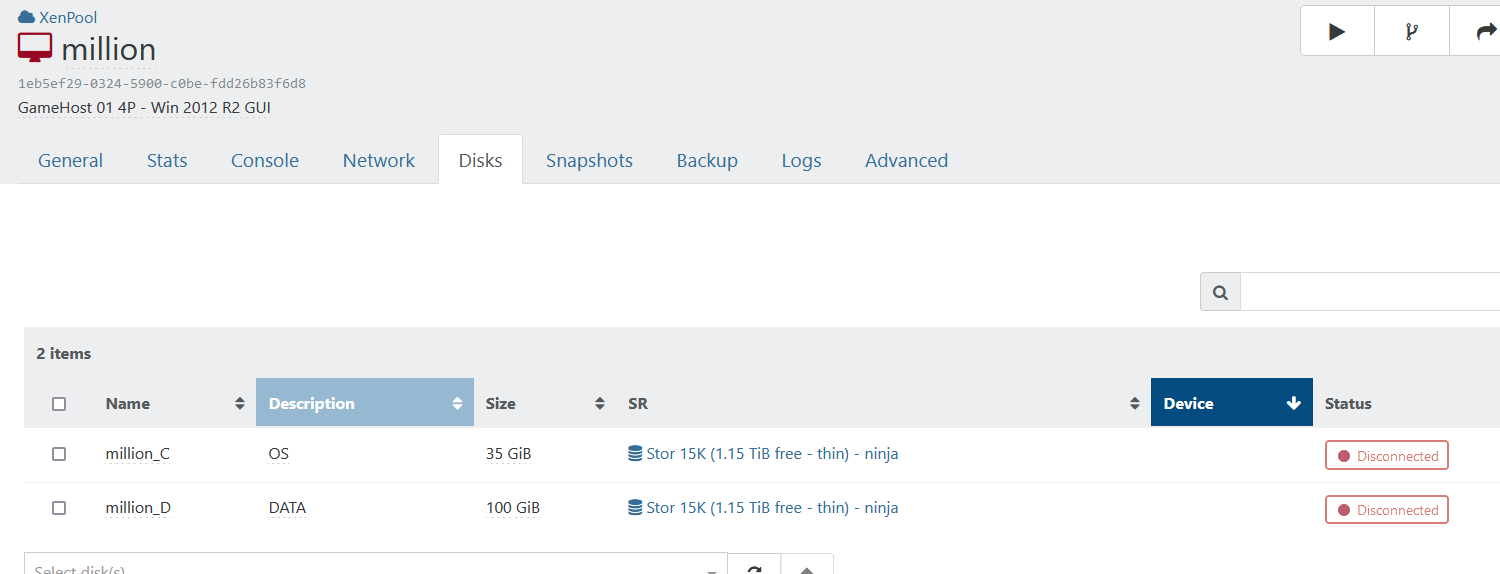
I'll see what I can do about it.
-
@MRisberg That's normal behavior when the VM isn't running.
-
Thanks, yes of course. I got excited about fixing my problems and reported too early
Well, the VM has been working fine since the
export/import. I can see both drives.Although the VM running fine, since the last post I had to address two related VDIs that had been connected to the Control Domain. One being million_D and the other million_D (with a camera icon). These probably ended up here because of a aborted / faulty snapshot or backup. I
disconnectedthem .. checked a few things ... and thenforgotthem. Everything is running fine now.For future googlers: During the problem solving, I found out some pretty helpful info using
tail -f /var/log/SMlog.
To me, this issue is solved. Thank you all for the feedback.
-
S stevezemlicka referenced this topic on



Hello! It looks like you're interested in this conversation, but you don't have an account yet.
Getting fed up of having to scroll through the same posts each visit? When you register for an account, you'll always come back to exactly where you were before, and choose to be notified of new replies (either via email, or push notification). You'll also be able to save bookmarks and upvote posts to show your appreciation to other community members.
With your input, this post could be even better 💗
Register Login