XO Remote mount.nfs: access denied by server while mounting
-
Hello. I hope this is the correct place to post.
I have an NFS share (OpenMediaVault) which I can see when I use showmount -e 192.168.11.60 and indeed I can seemingly mount it.
However when I try to add it as a remote it fails with error :
remote.test
{
  "id": "729c5b06-a016-4beb-8189-763aec47c2dd"
}
{
  "shortMessage": "Command failed with exit code 32: mount -o  -t nfs 192.168.11.60:/Backups /run/xo-server/mounts/729c5b06-a016-4beb-8189-763aec47c2dd",
  "command": "mount -o  -t nfs 192.168.11.60:/export/Backups /run/xo-server/mounts/729c5b06-a016-4beb-8189-763aec47c2dd",
  "escapedCommand": "mount -o \"\" -t nfs \"192.168.11.60:/Backups\" \"/run/xo-server/mounts/729c5b06-a016-4beb-8189-763aec47c2dd\"",
  "exitCode": 32,
  "stdout": "",
  "stderr": "mount.nfs: access denied by server while mounting 192.168.11.60:/Backups",
  "failed": true,
  "timedOut": false,
  "isCanceled": false,
  "killed": false,
  "message": "Command failed with exit code 32: mount -o  -t nfs 192.168.11.60:/Backups /run/xo-server/mounts/729c5b06-a016-4beb-8189-763aec47c2dd
mount.nfs: access denied by server while mounting 192.168.11.60:/Backups",
  "name": "Error",
  "stack": "Error: Command failed with exit code 32: mount -o  -t nfs 192.168.11.60:/Backups /run/xo-server/mounts/729c5b06-a016-4beb-8189-763aec47c2dd
mount.nfs: access denied by server while mounting 192.168.11.60:/Backups
    at makeError (/home/node/xen-orchestra/node_modules/execa/lib/error.js:60:11)
    at handlePromise (/home/node/xen-orchestra/node_modules/execa/index.js:118:26)
    at NfsHandler._sync (/home/node/xen-orchestra/@xen-orchestra/fs/src/_mount.js:64:7)"
}
Does a remote mount NFS differently to say an ISO SR?
-
@daninmanchester said in XO Remote mount.nfs: access denied by server while mounting:
"stderr": "mount.nfs: access denied by server while mounting 192.168.11.60:/Backups",
Would appear to be a rights issue to me.
-
@Danp I thought as much and have been playing with the settings without success. I don't know a lot about NFS.
I'm using the following options at present, but have tried with various users and groups, etc.
rw,all_squash,insecure,async,no_subtree_check,anongid=100,crossmnt
-
@daninmanchester Run the "showmount" comand against your NFS server to see if you have access permissions. https://www.thegeekdiary.com/showmount-command-examples-in-linux/
-
@tjkreidl verified they can be seen :
Export list for 192.168.11.60:
/export/Backups 192.168.11.0/24
/export/Everyone 192.168.11.0/24
/export 192.168.11.0/24 -
@daninmanchester What does showmount list for the server exports? Is the local 192.168.X.X subnet properly exported from the NFS server? Check the /etc/exports files on the NFS server and make sure that directory is listed. BTW, do you have any sort of multipathing implemented?
-
I don't touch things manually, it's done through OMV. This is the exports file. I don't have any multipathing as far as I know. It's not something I've set up.
# This file is auto-generated by openmediavault (https://www.openmediavault.org) # WARNING: Do not edit this file, your changes will get lost. # /etc/exports: the access control list for filesystems which may be exported # to NFS clients. See exports(5). /export/Everyone 192.168.11.0/24(fsid=94a977de-432c-4653-9870-a1cd0a83110d,ro,subtree_check,insecure,crossmnt) /export/Backups 192.168.11.0/24(fsid=bb941285-c5d8-492d-9b49-43a2dc30557c,rw,all_squash,insecure,async,no_subtree_check,anongid=100,crossmnt) # NFSv4 - pseudo filesystem root /export 192.168.11.0/24(ro,fsid=0,root_squash,no_subtree_check,hide) /export 192.168.11.70(ro,fsid=0,root_squash,no_subtree_check,hide) -
@daninmanchester Hmmm...maybe an NFS V3 vs. V4 support issue? Could you provide the full output of "showmount -e 192.168.11.60" ?
-
@tjkreidl what version should I be using or can I force XO to use a particular version?
It doesn't output any more than I shared last time :
bash-5.1# showmount -e 192.168.11.60
Export list for 192.168.11.60:
/export/Backups 192.168.11.0/24
/export/Everyone 192.168.11.0/24
/export 192.168.11.0/24
bash-5.1#It just occurred to me, I'm running XO in a docker not direct on the host. Do I need some network config to enable NFS?
-
@daninmanchester Have you read this info?
-
@Danp said in XO Remote mount.nfs: access denied by server while mounting:
@daninmanchester said in XO Remote mount.nfs: access denied by server while mounting:
"stderr": "mount.nfs: access denied by server while mounting 192.168.11.60:/Backups",
Would appear to be a rights issue to me.
@tjkreidl verified they can be seen :
Export list for 192.168.11.60:
/export/Backups 192.168.11.0/24
/export/Everyone 192.168.11.0/24
/export 192.168.11.0/24do you need to add "/export" (/export/Backups ) to be able to find the right path?
-
@HeMaN Yes, if I recall correctly, in the /etc/exports file. the full path should be specified and then "exportfs -a" should be issued to refresh the export list.
I just noticed your error message doesn't include the /export directory in front:
mount.nfs: access denied by server while mounting 192.168.11.60:/Backups -
@Danp no, I hadn't seen that. but I think I have now done this without any change to my issue. One thing that wasn't 100% clear is where sudoers should be on docker.
/etc/sudoers?
-
@tjkreidl I have tried various flavors.
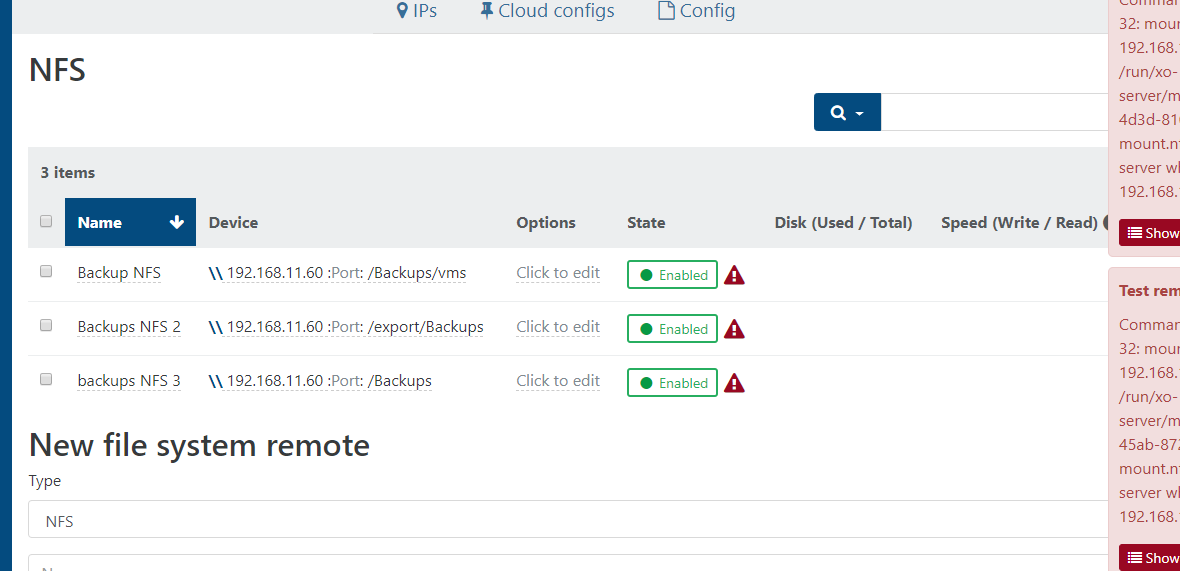
-
Well .... I'm totally baffled.
I've tried reapplying permissions.
forcing the server UID/GID
forcing the client UID/GID.
NOACLs
Squashing.One thing I can say, is that it is working on my host so it must be something about my XO setup trying to talk to it. which may well still be permissions.
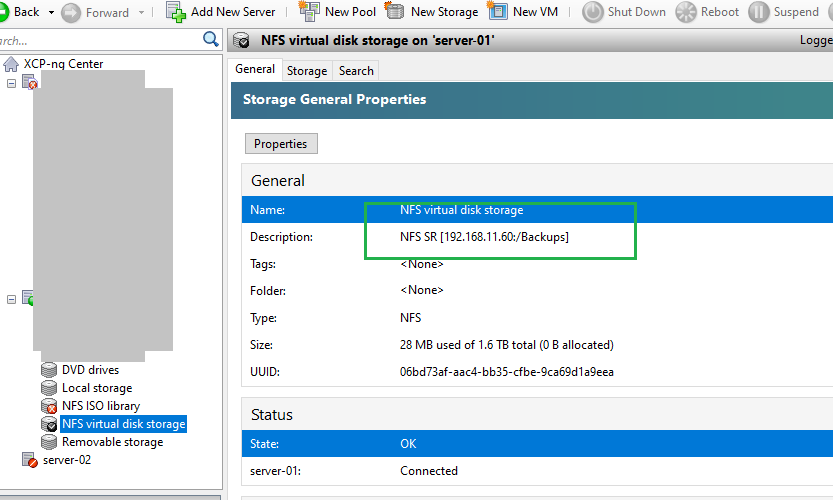
-
okay, so I further narrowed it down. on the host machine I can mount. it is only within the docker container it is the issue. either at the command line or at XO. This leads me to believe this is a docker related problem not XO.
Sorry to have taken up your time, but thanks very much for your help!
At least i have a clear direction to google now. -
What is the IP address of the host that is running XO?
The docker container will need the SYS_ADMIN capability to do NFS mounts.
-
@daninmanchester I would think Docker is involved, as well. I was going to suggest to create a "standard" test VM ans see if you can connect storage to it. If so, that would put the blame on something specific to the VM that has that Docker container.
-
@mjtbrady That seems right, because the Docker instanceis independent and internal to the VM that otherwise is part of the XCP-ng networking structure and wouldn't have the necessary access permissions on it's own.
-
Could this be due to a missing package (nfs-common)?



Hello! It looks like you're interested in this conversation, but you don't have an account yet.
Getting fed up of having to scroll through the same posts each visit? When you register for an account, you'll always come back to exactly where you were before, and choose to be notified of new replies (either via email, or push notification). You'll also be able to save bookmarks and upvote posts to show your appreciation to other community members.
With your input, this post could be even better 💗
Register Login