XCP-ng
    • Categories
    • Recent
    • Tags
    • Popular
    • Users
    • Groups
    • Register
    • Login

    Epyc VM to VM networking slow

    Scheduled Pinned Locked Moved Compute
    264 Posts 29 Posters 215.5k Views 30 Watching
    Loading More Posts
    • Oldest to Newest
    • Newest to Oldest
    • Most Votes
    Reply
    • Reply as topic
    Log in to reply
    This topic has been deleted. Only users with topic management privileges can see it.
    • J Offline
      JamesG @probain
      last edited by

      These latest 8.3 update speeds are still slower than a 13 year-old Xeon E3 1230.

      1 Reply Last reply Reply Quote 1
      • S Offline
        Seneram
        last edited by

        I can unfortunately share that from ongoing ticket investigations in this, It is far more deeply rooted than something that a patch of going from one major kernel to another will "just fix" There are multiple leads being investigated and multiple vendors involved.

        1 Reply Last reply Reply Quote 0
        • olivierlambertO Offline
          olivierlambert Vates 🪐 Co-Founder CEO
          last edited by

          I'd like to check something to see if it's coherent with our tests, by using 2x similar VMs (4vCPUs/4G RAM):

          • iperf monothread speed on a "fresh" Debian 10 install (4.19 kernel)
          • the same bench with 5.10.0 kernel from backports (add deb http://deb.debian.org/debian buster-backports main contrib non-free in your source list and then apt install linux-image-5.10, don't forget to reboot to be on that kernel)

          Do you see a performance diff between those?

          J 1 Reply Last reply Reply Quote 0
          • J Offline
            john.c @olivierlambert
            last edited by

            @olivierlambert said in Epyc VM to VM networking slow:

            I'd like to check something to see if it's coherent with our tests, by using 2x similar VMs (4vCPUs/4G RAM):

            • iperf monothread speed on a "fresh" Debian 10 install (4.19 kernel)
            • the same bench with 5.10.0 kernel from backports (add deb http://deb.debian.org/debian buster-backports main contrib non-free in your source list and then apt install linux-image-5.10, don't forget to reboot to be on that kernel)

            Do you see a performance diff between those?

            FYI, getting a Debian 10 backports or non-backports packages are going to now be extremely difficult. The Debian Linux 10 LTS has reached EOL. Now currently in ELTS from the beginning of this month until 30/06/2029, though covering only a subset of the packages.

            https://www.debian.org/News/2024/20240615

            1 Reply Last reply Reply Quote 0
            • olivierlambertO Offline
              olivierlambert Vates 🪐 Co-Founder CEO
              last edited by

              I had no issue to test it quickly. The thing is for the sake of testing and try to identify a potential regression, not for production usage or whatnot.

              1 Reply Last reply Reply Quote 0
              • olivierlambertO Offline
                olivierlambert Vates 🪐 Co-Founder CEO
                last edited by olivierlambert

                I identified a specific regression in a Debian kernel build since 5.10, we are investigating the "why" (starting from this exact build: https://snapshot.debian.org/package/linux/5.10.92-1/)

                1 Reply Last reply Reply Quote 2
                • P Offline
                  probain
                  last edited by

                  @olivierlambert
                  Would it be possible for you to either offer a ISO to download? Or maybe seed one? I really want to help test this. But I'm getting lost with how Debian provides their legacy images and this jig-boo (intentionally misspelled) 😞

                  olivierlambertO 1 Reply Last reply Reply Quote 0
                  • G Offline
                    G-Ork @alex821982
                    last edited by

                    May someone could graph their vm.
                    Comparing a slow vm with a full speed could bring light into darknes.

                    https://www.brendangregg.com/Articles/Linux_Kernel_Performance_Flame_Graphs.pdf

                    1 Reply Last reply Reply Quote 0
                    • olivierlambertO Offline
                      olivierlambert Vates 🪐 Co-Founder CEO @probain
                      last edited by

                      @probain Debian 10 is available in the XOA Hub.

                      P 1 Reply Last reply Reply Quote 1
                      • P Offline
                        probain @olivierlambert
                        last edited by probain

                        @olivierlambert
                        I wasn't aware. Thanks! Downloading for doing a test, right away

                        Test done:

                        				Run1	Run2	Run3
                        Sender:   Debian10 kernel 4.19	4.81Gb	4.81Gb	4.83Gb
                        Reveiver: Debian10 kernel 4.19
                        
                        Sender:   Debian10 kernel 5.10	5.13Gb	5.02Gb	5.12Gb
                        Reveiver: Debian10 kernel 4.19
                        
                        Sender:   Debian10 kernel 5.10	4.98Gb	5.02Gb	4.97Gb
                        Reveiver: Debian10 kernel 5.10
                        

                        sender runs 'iperf -c <IP-to-receiver> -t 60'

                        Kernel 4.19 = 4.19.0-6-amd64
                        Kernel 5.10 = 5.10.0-0.deb10.24-amd64

                        CPU 4 cores (AMD EPYC 7302P)
                        RAM 4GB

                        Created from XOA-hub

                        1 Reply Last reply Reply Quote 0
                        • olivierlambertO Offline
                          olivierlambert Vates 🪐 Co-Founder CEO
                          last edited by olivierlambert

                          Thanks @probain , now can you try iperf -s in the Dom0 and iperf -c <IP dom0> in the Debian guest?

                          P 1 Reply Last reply Reply Quote 0
                          • P Offline
                            probain @olivierlambert
                            last edited by

                            @olivierlambert
                            vm -> dom0 results in "no route to host": firewall?

                            Results will be shown for dom0 -> vm. Listed by each kernel installed on vm.

                            Just as earlier. VM is installed via XOA Hub, with 4 CPU and 4GB RAM. Host CPU running on AMD EPYC 7302P.

                            VM kernel ver.	Run1	Run2	Run3
                            kernel 4.19.0	8.47Gb	8.82Gb	8.43Gb
                            kernel 5.10.0	7.12Gb	7.07Gb	7.11Gb
                            
                            1 Reply Last reply Reply Quote 0
                            • olivierlambertO Offline
                              olivierlambert Vates 🪐 Co-Founder CEO
                              last edited by

                              yes disable the fw first (only in a testing lab obviously) with iptables -F

                              P 1 Reply Last reply Reply Quote 0
                              • P Offline
                                probain @olivierlambert
                                last edited by probain

                                @olivierlambert how do I restore the iptables again afterwards? Other than reboot ofc 😋

                                Update: Tests done

                                vm -> dom0
                                
                                		Run1	Run2	Run3
                                kernel 4.19.0	5.84Gb	5.77Gb	5.85Gb
                                kernel 5.10.0	1.25Gb	1.26Gb	1.28
                                

                                Specs are just as previous post.

                                G 1 Reply Last reply Reply Quote 0
                                • olivierlambertO Offline
                                  olivierlambert Vates 🪐 Co-Founder CEO
                                  last edited by

                                  Thanks so at least it confirms something we are also spotting in here. We found the exact commit.

                                  L 1 Reply Last reply Reply Quote 1
                                  • G Offline
                                    G-Ork
                                    last edited by

                                    Here are the opterons with dropped firewall:

                                    source destination OS Kernel Speed Average
                                    vm dom debian 10 4.19.0-6-amd64 6.57 Gbits/sec
                                    dom vm debian 10 4.19.0-6-amd64 1.79 Gbits/sec
                                    vm dom truenas 6.6.20 2.01 Gbits/sec
                                    dom vm truenas 6.6.20 1.82 Gbits/sec
                                    host vm debian 10 4.19.0-6-amd64 5.32 Gbits/sec
                                    host vm truenas 6.6.20 1.92 Gbits/sec
                                    host dom debian 4.19.0+1 8.97 Gbits/sec
                                    1 Reply Last reply Reply Quote 0
                                    • G Offline
                                      G-Ork @probain
                                      last edited by

                                      @probain said in Epyc VM to VM networking slow:

                                      I restore the iptables again afterwards? Other than reboot

                                      this worked for me

                                      action command
                                      save iptables-save > firewall.conf
                                      flush iptables -F
                                      restore cat firewall.conf | iptables-restore
                                      1 Reply Last reply Reply Quote 1
                                      • P probain referenced this topic on
                                      • S Offline
                                        sluflyer06
                                        last edited by sluflyer06

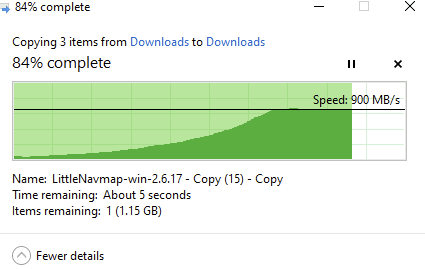
                                        Here's a little test I just ran between VM's over SMB on my Threadripper 7960x build on a Supermicro H13SRA-TF motherboard, def not too bad, these VM's are on different SR's.
                                        dada79bd-02ac-4045-81a8-ab424d9d320f-image.png

                                        S 1 Reply Last reply Reply Quote 0
                                        • S Offline
                                          Seneram @sluflyer06
                                          last edited by

                                          @sluflyer06 This test does not say anything other than that you have a 10G nic and we already knew that the limit for latest gen amd's are just above 10G. If you insert an 25 G nic then you can only use half of that capacity likely and for some of us that are using this in actual datacenters that is a pretty critical issue.even more so when it seems the limit is shared per host so that 4 VMs running on same host if the limit is 12gbit means you get 3 gbit per vm. And when you realize lots of us may have 20-40 VMs per server that all use a decent portion of network it is suddenly really scary whenn you realize that is 300-600 mbit per server.

                                          Or even worse when you realize that for those that have earlier gens of amd platform where the limit is 2-4 gbit ish.. now you re looking at 100-200 mbit per vm which suddenly is not very unobtainable for even a smaller provider during peak use times.

                                          It is great that the issue is not triggered for you as your bottleneck is elsewhere, but it is a very serious issue for several of us.

                                          With that said, Vates is handling it as good as anyone could request and i thank them for the attention given and the dedication to solving it.

                                          It is a NASTY bug and very situational for it to have been discovered.

                                          S 1 Reply Last reply Reply Quote 0
                                          • S Offline
                                            sluflyer06 @Seneram
                                            last edited by

                                            @Seneram ah well excuse my ignorance then, I thought people said the limits were much lower. I can see what you are saying and the big issue with that.

                                            1 Reply Last reply Reply Quote 0

                                            Hello! It looks like you're interested in this conversation, but you don't have an account yet.

                                            Getting fed up of having to scroll through the same posts each visit? When you register for an account, you'll always come back to exactly where you were before, and choose to be notified of new replies (either via email, or push notification). You'll also be able to save bookmarks and upvote posts to show your appreciation to other community members.

                                            With your input, this post could be even better 💗

                                            Register Login
                                            • First post
                                              Last post