Intel iGPU passthough
-
No output just need the Intel quick sync.
-
@xerxist Yes, QS for the VM but there are times when having a local display of the console comes in handy. That's why I haven't done mine.
-
This post is deleted! -
@bullerwins said in Intel iGPU passthough:
@olivierlambert I tried but getting this error when turning on the VM
INTERNAL_ERROR(xenopsd internal error: (Failure
"Error from xenguesthelper: Populate on Demand and PCI Passthrough are mutually exclusive"))Not sure what it means
EDIT: after googleing it seems that static and dynamic memory has to be the same:
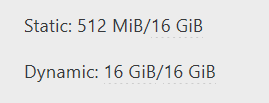
@bullerwins thanks for this. I had to restore a VM from a backup and while it was down changed the dynamic value. This certainly saved me some time. I was positive it had to do with remapping the UID on the VM or something on the host side of it. anyways, thanks.
-
 G gskger referenced this topic on
-
I followed this post and it worked for me.
One thing to note in my testing, if I had a monitor / HDMI dummy plug hooked up the transcoding worked reliably.
When I unplugged it I found activity would be present on the iGPU but the video in plex would play/pause constantly then eventually stop. -
@scawtydont Thanks for keeping us posted. Dummy plug is still a thing it seems

-
I'm also trying to pass through my Intel iGPU to a VM, but running into issues. It does work on Debian, however not on Fedora Server which I'd like to use. I have tried changing to BIOS mode, even plugged in a dummy HDMI plug, but nothing helped. SELinux is disabled on Fedora to rule out any issues related to that. I even tried using XCP-NG Center which was suggested in an older post, but that didn't help either: https://xcp-ng.org/forum/topic/6211/intel-gpu-passthrough-question/3
I also posted this on the Fedora forum with further details: https://discussion.fedoraproject.org/t/intel-igpu-in-containers/176029
Are there any other things I could try to investigate this further?
-
@vhaelan Hello. What's the output of rpm -qa | grep intel-gpu-firmware ?
-
@ovicz said in Intel iGPU passthough:
rpm -qa | grep intel-gpu-firmware
Hello @ovicz, I see the following:
intel-gpu-firmware-20251021-1.fc43.noarch -
@vhaelan Is the intel graphics module loaded ?
lsmod | grep i915
i915 5373952 24
drm_buddy 32768 2 xe,i915
ttm 135168 3 drm_ttm_helper,xe,i915
i2c_algo_bit 20480 2 xe,i915
drm_display_helper 331776 2 xe,i915
cec 106496 3 drm_display_helper,xe,i915
video 81920 2 xe,i91sudo dmesg | grep i915
[ 5.855595] i915 0000:00:08.0: [drm] Found alderlake_p/alderlake_n (device ID 46d1) integrated display version 13.00 stepping D0
[ 5.858477] i915 0000:00:08.0: [drm] VT-d active for gfx access
[ 5.858739] i915 0000:00:08.0: [drm] Using Transparent Hugepages
[ 5.859307] i915 0000:00:08.0: Invalid PCI ROM header signature: expecting 0xaa55, got 0x4556
[ 5.859312] i915 0000:00:08.0: [drm] Failed to find VBIOS tables (VBT)
[ 5.860012] i915 0000:00:08.0: vgaarb: VGA decodes changed: olddecodes=io+mem,decodes=none:owns=io+mem
[ 5.878556] i915 0000:00:08.0: [drm] Finished loading DMC firmware i915/adlp_dmc.bin (v2.20)
[ 7.806109] i915 0000:00:08.0: [drm] [ENCODER:204:DDI A/PHY A] failed to retrieve link info, disabling eDP
[ 7.843768] i915 0000:00:08.0: [drm] GT0: GuC firmware i915/tgl_guc_70.bin version 70.49.4
[ 7.843776] i915 0000:00:08.0: [drm] GT0: HuC firmware i915/tgl_huc.bin version 7.9.3
[ 7.849282] i915 0000:00:08.0: [drm] GT0: HuC: authenticated for all workloads
[ 7.850868] i915 0000:00:08.0: [drm] GT0: GUC: submission enabled
[ 7.850874] i915 0000:00:08.0: [drm] GT0: GUC: SLPC enabled
[ 7.851225] i915 0000:00:08.0: [drm] GT0: GUC: RC enabled
[ 7.852797] i915 0000:00:08.0: [drm] Protected Xe Path (PXP) protected content support initialized
[ 7.854314] i915 0000:00:08.0: [drm] Registered 3 planes with drm panic
[ 7.854318] [drm] Initialized i915 1.6.0 for 0000:00:08.0 on minor 1Also see in /etc/default/grub if there is NOMODESET in GRUB_CMDLINE_LINUX line.
That's from my Fedora 43 vm with passthrough enabled.