Intel iGPU passthough
-
In my testing of this, iGPU passthru works fine in Linux but in Windows the device will show an error in the device manager, disable/enabling the drive in the device manager will allow it to work, until next reboot.
-
@bullerwins @xerxist @flakpyro
What are you using for display output on the host since you're passing the iGPU to the VM?
-
@CJ Im running server grade hardware that has remote lights out management with iKVM support. Otherwise yeah you would lose access to the display output.
-
No output just need the Intel quick sync.
-
@xerxist Yes, QS for the VM but there are times when having a local display of the console comes in handy. That's why I haven't done mine.
-
This post is deleted! -
@bullerwins said in Intel iGPU passthough:
@olivierlambert I tried but getting this error when turning on the VM
INTERNAL_ERROR(xenopsd internal error: (Failure
"Error from xenguesthelper: Populate on Demand and PCI Passthrough are mutually exclusive"))Not sure what it means
EDIT: after googleing it seems that static and dynamic memory has to be the same:
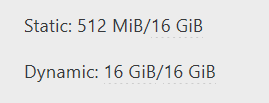
@bullerwins thanks for this. I had to restore a VM from a backup and while it was down changed the dynamic value. This certainly saved me some time. I was positive it had to do with remapping the UID on the VM or something on the host side of it. anyways, thanks.
-
 G gskger referenced this topic on
-
I followed this post and it worked for me.
One thing to note in my testing, if I had a monitor / HDMI dummy plug hooked up the transcoding worked reliably.
When I unplugged it I found activity would be present on the iGPU but the video in plex would play/pause constantly then eventually stop. -
@scawtydont Thanks for keeping us posted. Dummy plug is still a thing it seems

-
I'm also trying to pass through my Intel iGPU to a VM, but running into issues. It does work on Debian, however not on Fedora Server which I'd like to use. I have tried changing to BIOS mode, even plugged in a dummy HDMI plug, but nothing helped. SELinux is disabled on Fedora to rule out any issues related to that. I even tried using XCP-NG Center which was suggested in an older post, but that didn't help either: https://xcp-ng.org/forum/topic/6211/intel-gpu-passthrough-question/3
I also posted this on the Fedora forum with further details: https://discussion.fedoraproject.org/t/intel-igpu-in-containers/176029
Are there any other things I could try to investigate this further?
-
@vhaelan Hello. What's the output of rpm -qa | grep intel-gpu-firmware ?
-
@ovicz said in Intel iGPU passthough:
rpm -qa | grep intel-gpu-firmware
Hello @ovicz, I see the following:
intel-gpu-firmware-20251021-1.fc43.noarch -
@vhaelan Is the intel graphics module loaded ?
lsmod | grep i915
i915 5373952 24
drm_buddy 32768 2 xe,i915
ttm 135168 3 drm_ttm_helper,xe,i915
i2c_algo_bit 20480 2 xe,i915
drm_display_helper 331776 2 xe,i915
cec 106496 3 drm_display_helper,xe,i915
video 81920 2 xe,i91sudo dmesg | grep i915
[ 5.855595] i915 0000:00:08.0: [drm] Found alderlake_p/alderlake_n (device ID 46d1) integrated display version 13.00 stepping D0
[ 5.858477] i915 0000:00:08.0: [drm] VT-d active for gfx access
[ 5.858739] i915 0000:00:08.0: [drm] Using Transparent Hugepages
[ 5.859307] i915 0000:00:08.0: Invalid PCI ROM header signature: expecting 0xaa55, got 0x4556
[ 5.859312] i915 0000:00:08.0: [drm] Failed to find VBIOS tables (VBT)
[ 5.860012] i915 0000:00:08.0: vgaarb: VGA decodes changed: olddecodes=io+mem,decodes=none:owns=io+mem
[ 5.878556] i915 0000:00:08.0: [drm] Finished loading DMC firmware i915/adlp_dmc.bin (v2.20)
[ 7.806109] i915 0000:00:08.0: [drm] [ENCODER:204:DDI A/PHY A] failed to retrieve link info, disabling eDP
[ 7.843768] i915 0000:00:08.0: [drm] GT0: GuC firmware i915/tgl_guc_70.bin version 70.49.4
[ 7.843776] i915 0000:00:08.0: [drm] GT0: HuC firmware i915/tgl_huc.bin version 7.9.3
[ 7.849282] i915 0000:00:08.0: [drm] GT0: HuC: authenticated for all workloads
[ 7.850868] i915 0000:00:08.0: [drm] GT0: GUC: submission enabled
[ 7.850874] i915 0000:00:08.0: [drm] GT0: GUC: SLPC enabled
[ 7.851225] i915 0000:00:08.0: [drm] GT0: GUC: RC enabled
[ 7.852797] i915 0000:00:08.0: [drm] Protected Xe Path (PXP) protected content support initialized
[ 7.854314] i915 0000:00:08.0: [drm] Registered 3 planes with drm panic
[ 7.854318] [drm] Initialized i915 1.6.0 for 0000:00:08.0 on minor 1Also see in /etc/default/grub if there is NOMODESET in GRUB_CMDLINE_LINUX line.
That's from my Fedora 43 vm with passthrough enabled.
-
@ovicz Yes, it's loaded
lsmod | grep i915 i915 5373952 0 i2c_algo_bit 20480 2 xe,i915 drm_buddy 32768 2 xe,i915 video 81920 2 xe,i915 ttm 135168 3 drm_ttm_helper,xe,i915 drm_display_helper 331776 2 xe,i915 cec 106496 3 drm_display_helper,xe,i915dmesgstarts the same as your output, the only difference is that I haveGuCdisabled.dmesg | grep i915 [ 1.609000] i915 0000:00:08.0: [drm] Found alderlake_s (device ID 4690) integrated display version 12.00 stepping C0 [ 1.609986] i915 0000:00:08.0: [drm] VT-d active for gfx access [ 1.610073] i915 0000:00:08.0: [drm] Using Transparent Hugepages [ 1.611342] i915 0000:00:08.0: Invalid PCI ROM header signature: expecting 0xaa55, got 0x4556 [ 1.611345] i915 0000:00:08.0: [drm] Failed to find VBIOS tables (VBT) [ 1.612136] i915 0000:00:08.0: vgaarb: VGA decodes changed: olddecodes=io+mem,decodes=none:owns=io+mem [ 1.614455] i915 0000:00:08.0: [drm] Finished loading DMC firmware i915/adls_dmc_ver2_01.bin (v2.1) [ 3.583673] i915 0000:00:08.0: [drm] [ENCODER:261:DDI A/PHY A] failed to retrieve link info, disabling eDP [ 3.605422] i915 0000:00:08.0: [drm] GT0: GuC firmware i915/tgl_guc_70.bin version 70.49.4 [ 3.605426] i915 0000:00:08.0: [drm] GT0: HuC firmware i915/tgl_huc.bin version 7.9.3 [ 3.615402] i915 0000:00:08.0: [drm] GT0: HuC: authenticated for all workloads [ 3.615410] i915 0000:00:08.0: [drm] GT0: GUC: submission disabled [ 3.615414] i915 0000:00:08.0: [drm] GT0: GUC: SLPC disabled [ 3.616508] i915 0000:00:08.0: [drm] Protected Xe Path (PXP) protected content support initialized [ 3.617330] i915 0000:00:08.0: [drm] Registered 4 planes with drm panic [ 3.617354] [drm] Initialized i915 1.6.0 for 0000:00:08.0 on minor 1 [ 3.627390] i915 0000:00:08.0: [drm] Cannot find any crtc or sizes [ 3.637349] i915 0000:00:08.0: [drm] Cannot find any crtc or sizes [ 3.657358] i915 0000:00:08.0: [drm] Cannot find any crtc or sizesHaving edited
/etc/modprobe.d/i915.confby addingoptions i915 enable_guc=3 enable_huc=1fixed theGuCpart as well, however I still have the same issue.Cannot find any crtc or sizesis the only part which is not in your output./etc/default/grubis clean, I don't haveNOMODESET:cat /etc/default/grub GRUB_TIMEOUT=5 GRUB_DISTRIBUTOR="$(sed 's, release .*$,,g' /etc/system-release)" GRUB_DEFAULT=saved GRUB_DISABLE_SUBMENU=true GRUB_TERMINAL_OUTPUT="console" GRUB_CMDLINE_LINUX="rd.lvm.lv=fedora/root rhgb quiet" GRUB_DISABLE_RECOVERY="true" -
I am in the same situation as @vhaelan.
same as in same iGPU (alderlake) passed-through, same output for those latest commands, same OS (Fedora CoreOS on latest Xcp-Ng stable).
Tried current avenues suggested in this thread with no progress.It seems vhaelan has settled with CoreOS under Proxmox (which works!). He also mentioned it works in Debian under XCP-ng, though I haven't tested that myself.
I would appreciate additional suggestions for troubleshooting to take this further, in case anyone has any other ideas.
-
@the_spice @bullerwins @xerxist @hawkpro @vhaelan @ovicz
Hi
I published a post this morning with packages to test iGPU passthrough, if you have a non production host on which you can test it would be awesome: https://xcp-ng.org/forum/topic/12523/igpu-pci-passthrough-new-experimental-packages-need-testers
Thanks!Regards,
Yann


Hello! It looks like you're interested in this conversation, but you don't have an account yet.
Getting fed up of having to scroll through the same posts each visit? When you register for an account, you'll always come back to exactly where you were before, and choose to be notified of new replies (either via email, or push notification). You'll also be able to save bookmarks and upvote posts to show your appreciation to other community members.
With your input, this post could be even better 💗
Register Login