Passing Though a GPU



-
@Dean50 something strange is going on. I turned on transcoding in the Jellyfin console. It seems that the transcoding is working when it is switched on, but it is not providing audio. Regardless, it seems that XCP-ng is passing through the GPU as it is intended. Thanks for all your input. Greatly appreciate the support.
-
Hey no problem, you are welcome
 Really hope you'll make it!
 -
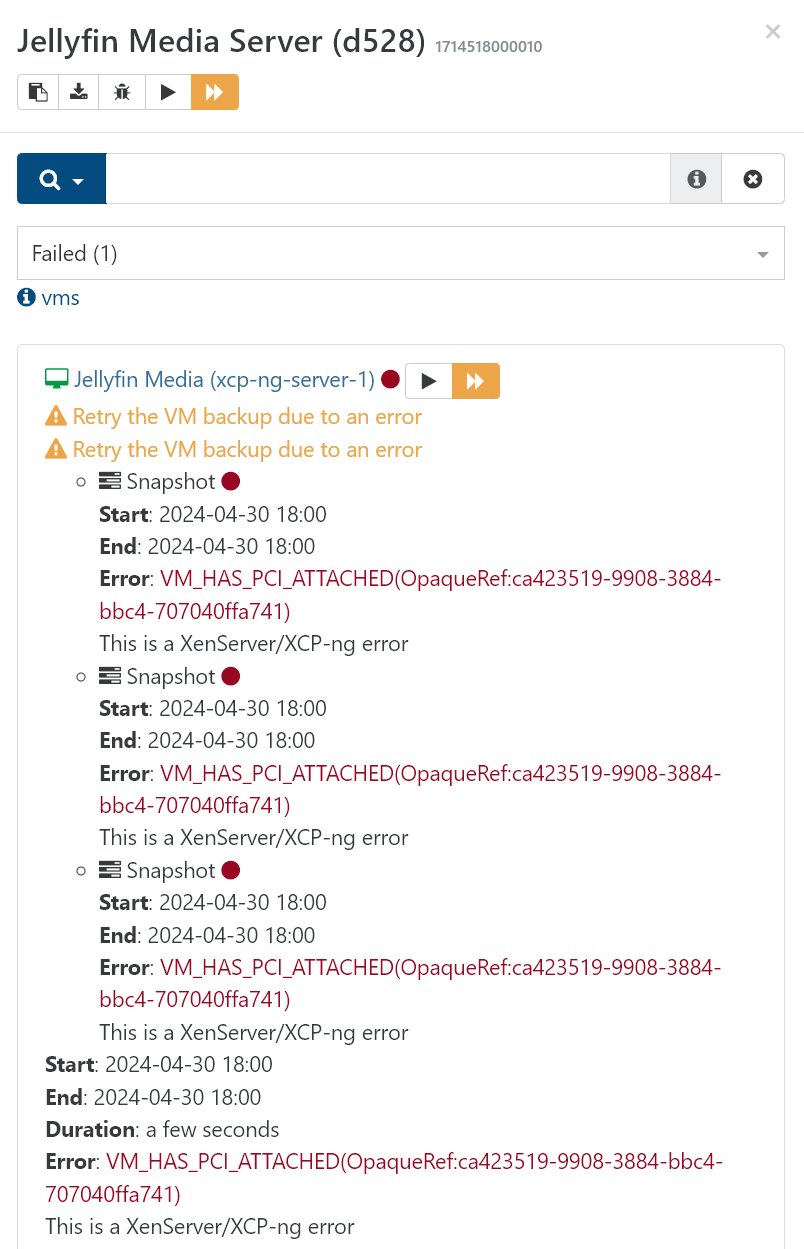
I was able to get things working. Even though it does not show in the GUI on XO, it works for transcoding. However, I cannot complete a backup of that particular VM with this error...
-
- Excellent news for being able to rely on the GPU So the driver accepted to install? What did you change?
- The UI with real PCI passthrough displayed is now available in latest XO.
- Excellent news for being able to rely on the GPU
-
I thought because the nvidia-smi command showed an error that it did not pass through correctly. I went into the Jellyfin app and set it to use Transcoding, and it worked. Now, the only problem is, for some reason, I can't get that particular VM to complete a remote Delta backup. I continue to get the error shown above. I've deleted the job and rebuilt it, but get the same error. Any ideas? I really need to back up this media server. Thanks again.
-
The reason why is written in caps: VM HAS PCI ATTACHED. You can't snapshot live a VM with a PCI device attached. A possible trick: use "Offline snapshot" in your backup job, that might work.
-
@olivierlambert yes, the reason was quite obvious. A solution is what I was looking for. I will definitely try it with offline snapshots. Appreciate the info.
-
Keep us posted!
-
@olivierlambert That worked. I selected an offline snapshot, and the job was completed. Thanks again.
-
\o/ perfect!!
-
 O olivierlambert marked this topic as a question on
-
O olivierlambert has marked this topic as solved on
Hello! It looks like you're interested in this conversation, but you don't have an account yet.
Getting fed up of having to scroll through the same posts each visit? When you register for an account, you'll always come back to exactly where you were before, and choose to be notified of new replies (either via email, or push notification). You'll also be able to save bookmarks and upvote posts to show your appreciation to other community members.
With your input, this post could be even better 💗
Register Login