XCP-ng
    • Categories
    • Recent
    • Tags
    • Popular
    • Users
    • Groups
    • Register
    • Login

    Passing Though a GPU


    Scheduled Pinned Locked Moved Solved Hardware
    26 Posts 3 Posters 13.2k Views 3 Watching
    Loading More Posts
    • Oldest to Newest
    • Newest to Oldest
    • Most Votes
    Reply
    • Reply as topic
    Log in to reply
    This topic has been deleted. Only users with topic management privileges can see it.
    • olivierlambertO
      olivierlambert Vates 🪐 Co-Founder CEO
      last edited by

      That's expected, displaying PCI passed in the UI will come in few days now 🙂

      1 Reply Last reply
      Reply Quote 0
      • olivierlambertO
        olivierlambert Vates 🪐 Co-Founder CEO
        last edited by

        Still, despite the display issue, does it work now?

        D 1 Reply Last reply
        Reply Quote 0
        • D
          Dean50 @olivierlambert
          last edited by

          @olivierlambert Something is still off. When I run the Nvidia-smi command, I get an unknown error after installing the NVIDIA Drivers.

          fedec236-70ea-445e-a7cf-b8ce0e839127-image.png

          D 1 Reply Last reply
          Reply Quote 0
          • olivierlambertO
            olivierlambert Vates 🪐 Co-Founder CEO
            last edited by

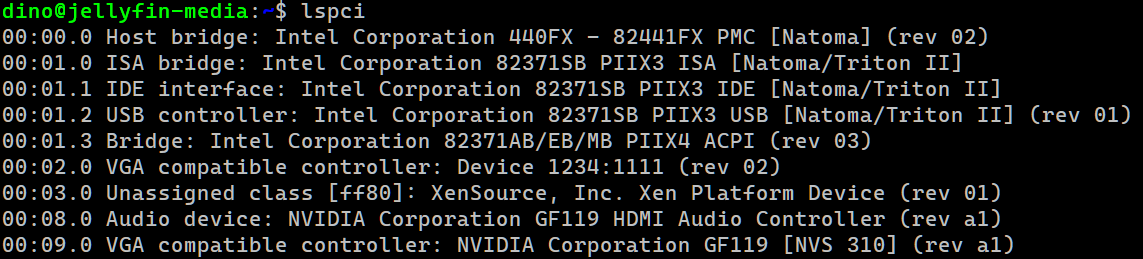
            lspci in the VM shows the 2 nvidia pci devices, right?

            1 Reply Last reply
            Reply Quote 0
            • D
              Dean50 @Dean50
              last edited by

              @Dean50

              Yes....

              03f57684-c41a-46f5-a33f-7dcc3b9c6f90-image.png

              D 1 Reply Last reply
              Reply Quote 0
              • D
                Dean50 @Dean50
                last edited by

                @Dean50 something strange is going on. I turned on transcoding in the Jellyfin console. It seems that the transcoding is working when it is switched on, but it is not providing audio. Regardless, it seems that XCP-ng is passing through the GPU as it is intended. Thanks for all your input. Greatly appreciate the support.

                1 Reply Last reply
                Reply Quote 0
                • olivierlambertO
                  olivierlambert Vates 🪐 Co-Founder CEO
                  last edited by

                  Hey no problem, you are welcome 🙂 Really hope you'll make it!

                  D 1 Reply Last reply
                  Reply Quote 0
                  • D
                    Dean50 @olivierlambert
                    last edited by

                    @olivierlambert

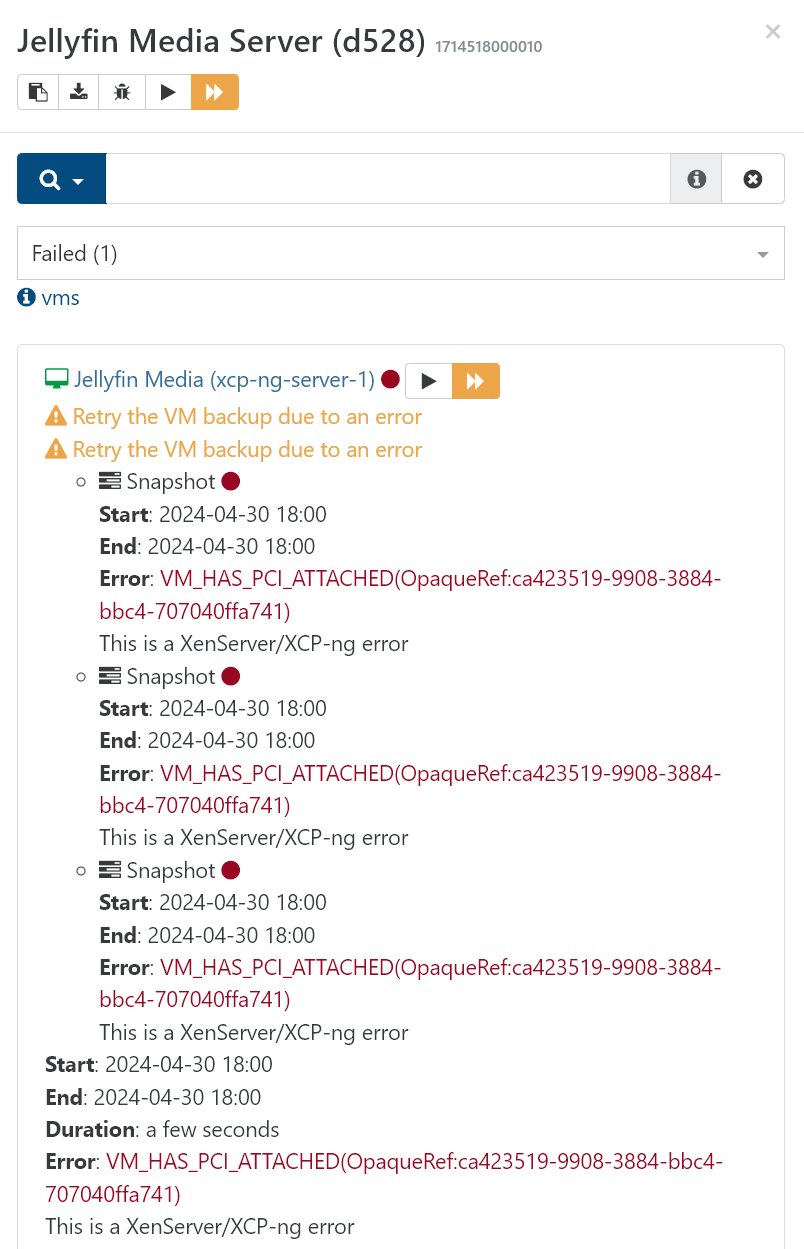
                    I was able to get things working. Even though it does not show in the GUI on XO, it works for transcoding. However, I cannot complete a backup of that particular VM with this error...
                    cfdf5458-dba4-405c-bd86-2367d085b742-image.png

                    1 Reply Last reply
                    Reply Quote 0
                    • olivierlambertO
                      olivierlambert Vates 🪐 Co-Founder CEO
                      last edited by

                      1. Excellent news for being able to rely on the GPU 🙂 So the driver accepted to install? What did you change?
                      2. The UI with real PCI passthrough displayed is now available in latest XO.
                      D 1 Reply Last reply
                      Reply Quote 0
                      • D
                        Dean50 @olivierlambert
                        last edited by

                        @olivierlambert

                        I thought because the nvidia-smi command showed an error that it did not pass through correctly. I went into the Jellyfin app and set it to use Transcoding, and it worked. Now, the only problem is, for some reason, I can't get that particular VM to complete a remote Delta backup. I continue to get the error shown above. I've deleted the job and rebuilt it, but get the same error. Any ideas? I really need to back up this media server. Thanks again.

                        1 Reply Last reply
                        Reply Quote 0
                        • olivierlambertO
                          olivierlambert Vates 🪐 Co-Founder CEO
                          last edited by

                          The reason why is written in caps: VM HAS PCI ATTACHED. You can't snapshot live a VM with a PCI device attached. A possible trick: use "Offline snapshot" in your backup job, that might work.

                          D 1 Reply Last reply
                          Reply Quote 0
                          • D
                            Dean50 @olivierlambert
                            last edited by

                            @olivierlambert yes, the reason was quite obvious. A solution is what I was looking for. I will definitely try it with offline snapshots. Appreciate the info.

                            1 Reply Last reply
                            Reply Quote 1
                            • olivierlambertO
                              olivierlambert Vates 🪐 Co-Founder CEO
                              last edited by

                              Keep us posted!

                              D 1 Reply Last reply
                              Reply Quote 0
                              • D
                                Dean50 @olivierlambert
                                last edited by

                                @olivierlambert That worked. I selected an offline snapshot, and the job was completed. Thanks again.

                                1 Reply Last reply
                                Reply Quote 1
                                • olivierlambertO
                                  olivierlambert Vates 🪐 Co-Founder CEO
                                  last edited by

                                  \o/ perfect!!

                                  1 Reply Last reply
                                  Reply Quote 0
                                  • olivierlambertO olivierlambert marked this topic as a question on
                                  • olivierlambertO olivierlambert has marked this topic as solved on
                                  Hello! It looks like you're interested in this conversation, but you don't have an account yet.

                                  Getting fed up of having to scroll through the same posts each visit? When you register for an account, you'll always come back to exactly where you were before, and choose to be notified of new replies (either via email, or push notification). You'll also be able to save bookmarks and upvote posts to show your appreciation to other community members.

                                  With your input, this post could be even better 💗

                                  Register Login
                                  • First post
                                    Last post

