Debian 12 cloud image SSH key
-
Hi
I have follows the instructions from https://xcp-ng.org/forum/topic/9943/after-days-of-research-and-tinkering-a-working-guide-for-debian-12-template-with-cloud-init-and-dhcp and i cloned a Debian 12 VM and attached the cloud image and created a template. When i add my ed25519 ssh keys from the template and boot the new VM i am refused to login via ssh.
-
@hypernoob I suggest this procedure instead:
- Get the Debian
genericcloudQCOW2 image off of here: https://cdimage.debian.org/images/cloud/ - Convert to VHD:
qemu-img convert -O vpc debian-12-genericcloud-amd64.qcow2 debian-12-genericcloud-amd64.vhd - Import the converted VHD into XO
- Attach to empty Debian VM, set to boot from hard drive and convert to template
- Create new VMs from this template, adding your ssh keys and guest agent in cloud config if desired:
#cloud-config
hostname: {name}
ssh_authorized_keys:
  - ssh-rsa ...
apt:
  sources:
    xen-guest-agent:
      filename: xen-guest-agent.list
      source: deb [trusted=yes] https://gitlab.com/api/v4/projects/xen-project%252Fxen-guest-agent/packages/generic/deb-amd64/ release/
      append: false
packages:
  - xen-guest-agent
The same procedure will work with Ubuntu, Alma and other cloud images.
- Get the Debian
-
Hi dinhngtu
I think i have found the problem. The end of the ssh key has 'bastion production' at the end of the key and i believe this is the wrong format for cloud init, all of the other parts of the configuration file work as xen orchestra indicated that the guest utils are installed. It a bit of a pain to regenerate the keys because i have a lot of devices i connect too.
-
@hypernoob That's just the key's name, I use keys with long complicated names too and had no problem. What did
ssh -vvtell you? -
yeah that would be it. It was logging in as the local machines username, i changed it to debian and it work. My forum username says i all.
Thanks @dinhngtu
-
haha we were all noobs when we started, it's fine

-
I am not sure what i am missing but the VM is stuck in drive not booting pass the BIOs or UEFI mode as if it don't know what to do...
- I convert qcow2 to vhd on windows with the cmd you provide after downloading it from https://cdimage.debian.org/images/cloud/trixie/20260129-2372/
- Import the converted VHD into XO
- Attach to empty Debian VM, set to boot from hard drive and convert to template (UEFI mode)(I also try BIOs)
I think I am missing something. Do you have a complete "#cloud-config" I can paste in and check to make sure it's working. I would expect the console to display something during boot up. I never done cloud-init before... so really curious.
I tried debian 12 and 13 both getting stuck on same place.
In UEFI below (BIOs stuck similar case but different screen):
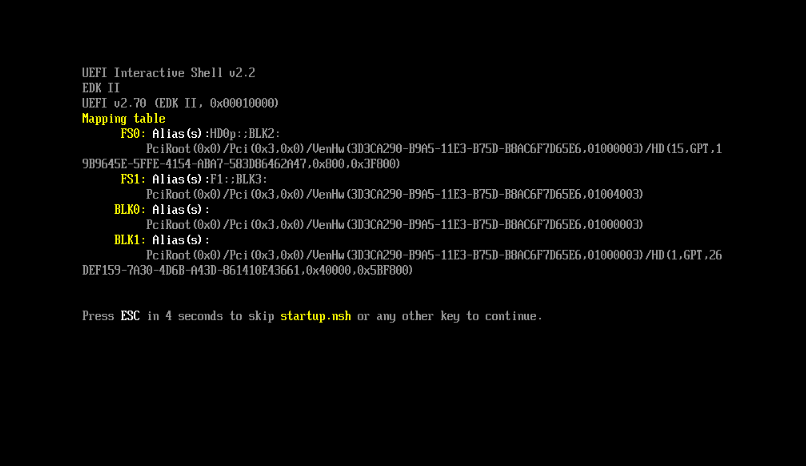
-
@wilsonqanda Make sure to turn off "Network" in boot order. You might also want to increase the VM's root disk size when creating it.
Here's a full cloud config that I used (except the ssh keys):
#cloud-config hostname: {name} ssh_authorized_keys: - ssh-rsa ... disable_root: false apt: sources: xen-guest-agent: filename: xen-guest-agent.list source: deb [trusted=yes] https://gitlab.com/api/v4/projects/xen-project%252Fxen-guest-agent/packages/generic/deb-amd64/ release/ append: false packages: - xen-guest-agent -
@dinhngtu Really appreciate the help
finally got it working. In Debian 12 I was able to boot to it without issues even with 3GB (on both UEFI and BIO) but obviously not recommended for logs etc...Testing for Debian 13 now to see if there is something else affecting it and there is definitely weird issue with UEFI. BIOs boots up fine its the UEFI settings. This seem to affect the display as far as I can tell as I can ssh into the terminal without issue.
I think part of the issue is to use only generic or genericcloud and avoid nocloud as its doesn't come with cloud-init install...
They mention this on the site where we download it. Didn't quite understand until now...:
azure: Optimized for the Microsoft Azure environment
ec2: Optimized for the Amazon EC2
generic: Should run in any environment using cloud-init, for e.g. OpenStack, DigitalOcean and also on bare metal.
genericcloud: Identical to generic but with a reduced set of hardware drivers in the kernel. If it does not work for your use case, you should use the generic images.
nocloud: Does not run cloud-init and boots directly to a root prompt. Useful for local VM instantiation with tools like QEMU. (AVOID as it does not work with cloud init but it boot up so that was extremely deceiving...)

Hello! It looks like you're interested in this conversation, but you don't have an account yet.
Getting fed up of having to scroll through the same posts each visit? When you register for an account, you'll always come back to exactly where you were before, and choose to be notified of new replies (either via email, or push notification). You'll also be able to save bookmarks and upvote posts to show your appreciation to other community members.
With your input, this post could be even better 💗
Register Login