Detached VM Snapshots after Warm Migration

-
@DustyArmstrong ho okay, so old XO is downed.
You could have 2 XO connected to the same pools, as long as they do not have same IP address.
beware, I do not tell you to do that, it is not best practice at all if you ever are in this situation, you must understand what could happen (detached snaps, licence problems, ...)
but I thought this was the case
in your case, did you do snaps/backups BEFORE reverting the XO config of old XO to new XO ?
as far as I understand, this could have get you detached snapshots (snapshots being on VMs but not initiated by the restored version of your current online XO)or do I overthink this too much ?!
keep us informed if you manage to clear the situation, curious about it
-
@Pilow They would have the same IP address, the new XO is just a new Docker container on the same physical host but with a new database (different version of Redis on ARM so couldn't like-for-like re-use). There is only 1 XO running, 100% certain. The snapshots in the audit log now reflect XO as having initiated them, where before it was the host itself (fallback) - this may all be magically resolved now, but I'm not home to look yet.
No, I made a backup of all my VMs before the warm migration, but the backup was made on the new XO instance, successfully, backing up the VMs on the old hosts (XCP1 & XCP2).
So the full process I took was:
- 2 weeks ago, downed old XO
- Brought up brand new XO (fresh Redis DB), imported config, all working
- This weekend, spun up 2 new XCP hosts (lot of drama but we will ignore that) XC1 & XC2
- Created new pool containing the new XCP hosts (XC1 & XC2)
- Initiated a backup of all VMs on old host pool (XCP1 & XCP2) using an existing scheduled backup - manually triggered - backup succeeds
- Warm migrate VMs from pool XCP1/XCP2 to XC1/XC2 - success
- Disable old host pool XCP1/XCP2, VMs working as expected
- Snapshot a warm migrated VM - detached snapshot - snapshotting a VM created natively on XC1/XC2 does not have this issue
- Removed old pool XCP1/XCP2 entirely from XO - this solved the audit logs side of things (I think this is XAPI)
- Logs now show VM info correctly, but frontend still displays a detached snapshot
My guess is that it may think the snapshots were happening on the old pool/old VM, not the warm migrated copy, or something like that.
I will update the thread if I manage to resolve everything, I'll keep an eye out anyway in case someone from Vates knows any more on this!
-
Still not working, blew away my old backups and deleted the job, still getting detached snapshots. Interestingly, of my two hosts, the pool slave isn't actually recording the snapshot properly still. Tested the "revert snapshot" from XO, which works properly - everything works properly except the detached snapshot warning. Probably also worth noting that I did not select the "delete source VM", I deleted them manually later.
Snapshotting a VM on XC2, slave in a pool. Don't know if this is expected or not for a pool slave.
Pool master (Displays the IP of XO):
HTTPS 123.456.789.6->|Async.VM.snapshot R:da375f8192ab|audit] ('trackid=2f566a5e238297cab4efbd4023dba8da' 'LOCAL_SUPERUSER' 'root' 'ALLOWED' 'OK' 'API' 'VM.snapshot' (('vm' 'VM_Name0' 'e0f0 29ec-f0b8-1c14-c654-80c6ecec582c' 'OpaqueRef:f0fae2b6-7729-b539-066f-16a795b0b22f')Pool slave (displays IP of the XCP host itself):
HTTPS 123.456.789.2->:::80|Async.VM.snapshot R:da375f8192ab|audit] ('trackid=f49a8b9396c939d4cd5335542cba3848' 'LOCAL_SUPERUSER' '' 'ALLOWED' 'OK' 'API' 'VM.snapshot' (('vm' '' '' 'OpaqueRef:f0fae2b6-7729-b539-066f-16a795b0b22f')I don't know if this means anything. When I snapshot a VM on XC1 (warm migrated) it also shows in the logs of the pool master, but with the IP of XO (still detached):
HTTPS 123.456.789.6->|Async.VM.snapshot R:cbd3f663c5d7|audit] ('trackid=2f566a5e238297cab4efbd4023dba8da' 'LOCAL_SUPERUSER' 'root' 'ALLOWED' 'OK' 'API' 'VM.snapshot' (('vm' 'VM_Name1 'c7c63201-e25a-a7d5-7e39-394636538866' 'OpaqueRef:72f934a8-bfd6-f01c-5917-234cacdd49d5')When I snapshot a VM I created natively (no warm migration), it looks exactly the same and is not detached:
HTTPS 123.456.789.6->|Async.VM.snapshot R:3e4f5c3dd9f2|audit] ('trackid=2f566a5e238297cab4efbd4023dba8da' 'LOCAL_SUPERUSER' 'root' 'ALLOWED' 'OK' 'API' 'VM.snapshot' (('vm' 'VM_Name2' 'cd95df02-a907-bdaa-2c0e-ca503656460b' 'OpaqueRef:00c31a47-69d9-753d-5481-d5a10e881e13')Looking at another thread, running
xl listshows VMs with a mixture of some with[XO warm migration Warm migration]tagged and some not. My VM that wasn't migrated shows as its normal name (matching output ofxe vm-list), this one snapshots fine. Notably, another VM that was migrated doesn't show the migration tags, but doesn't snapshot properly anyway. I renamed the VMs after migrating. Renaming again doesn't update the output ofxl listbut does update the output ofxe vm-list.If anyone in the know can help me understand what's going on I'd be most appreciative, I doubt I'll be able to backup my VMs until it's resolved. Alternatively, if anyone can confirm what steps I should take to completely rebuild XO such that the data is held correctly so this stops happening. To re-iterate, this only seems to happen on warm migrated VMs.
-
@DustyArmstrong mmmm what do you mean by pool master and pool slave ?
You have one pool with 2 hosts ? one master and one slave ?
could you screenshot the HOME/Hosts page ?
and the SETTINGS/SERVERS page ? -
@Pilow Yes one pool, 2 servers (a master and a secondary/slave).
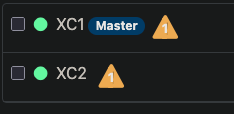

I think I've realised per my last post update, when I warm migrated I didn't select "delete source VM", which has probably broken something since I retired the old hosts afterwards.
I mainly just want to know the best method to wipe XO and start over so it can rebuild the database.
-
@DustyArmstrong said in Detached VM Snapshots after Warm Migration:
I mainly just want to know the best method to wipe XO and start over so it can rebuild the database.
ha, to wipe XO
 , check the troubleshooting section of documentation here :
https://docs.xen-orchestra.com/troubleshooting#reset-configurationit is a destructive command for your XO database ! -
@Pilow Yeah I don't particularly want to, but in the absence of any alternatives! I'll give it a day in case anyone responds, otherwise I'll just wipe it - assuming it leaves the hosts untouched. I just need to do whatever needs to be done to re-associate the VM UUIDs and would hope a total rebuild of XO would do that.
-
Try to deploy XO from sources and connect host to that and see if problem persist.
I use this script for install - https://github.com/ronivay/XenOrchestraInstallerUpdater
Just dont do what i did and connect SR to seperate pools

-
@acebmxer My container is built from the sources, only fairly recently. I may try rebuilding it with the latest commit and deploy completely new, if that would work. I'm just trying to avoid a situation where I end up with even more confusion in the database.
In the end, my ultimate goal is just to re-associate the VMs with XO and the wider XAPI database. Whatever method will achieve that should work here as I'm starting from scratch anyway - for the most part. Whatever way achieves that cleanly really, I'm just a bit unsure how best to do it as moving XO clearly caused me issues, need to understand how to rebuild the VM associations.
-
Looks like I unfortunately blew my chance to do this cleanly.
Decided to plug in my old hosts again, just to see if XO felt the VM - despite being on a new host - was still associated with or on the old host. Turns out that was the right assumption, as when I snapshotted a problem VM, it did not have the health warning. Took that to mean if I removed the old VMs, the references would go with it, but alas, I should've snapshotted all of them before doing that.
Back to square 1, but now the one VM I did snapshot no longer has the health warning. Completely wiped XO, still getting the same problem. Kind of at a loss now.
I would still really appreciate any assistance.
-
Well, scratch the help, I have fixed it.
Bad VM:
xe vm-param-list uuid={uuid} | grep "other-config"other-config (MRW): xo:backup:schedule: one-time; xo:backup:vm: {uuid}; xo:backup:datetime: 20260214T18:13:03Z; xo:backup:job: 97665b6d-1aff-43ba-8afb-11c7455c16ff; xo:backup:sr: {uuid}; auto_poweron: true; base_template_name: Debian Buster 10;Clean VM:
other-config (MRW): auto_poweron: true; base_template_name: Debian Buster 10; [...]Stale references to my old backup job causing the VM to disassociate with the VDI chain. Removing the extra config resolved it. Simple when you know where to look.
xe vm-param-remove uuid={uuid} param-name=other-config param-key=xo:backup:job
xe vm-param-remove uuid={uuid}  param-name=other-config param-key=xo:backup:sr
xe vm-param-remove uuid={uuid}  param-name=other-config param-key=xo:backup:vm
xe vm-param-remove uuid={uuid}  param-name=other-config param-key=xo:backup:schedule
xe vm-param-remove uuid={uuid}  param-name=other-config param-key=xo:backup:datetime
VMs now snapshot clean.
-
@DustyArmstrong I have hard times to understand how the VM is aware of the XOA it is/was attached to...
a VM resides on a host
a Host in in a pool
a Pool is attached to a (or many) XO/XOAhow the hell your VM is aware of its previous XO ?

-
lol your previous post answered my questions. other-config.
-
@Pilow Time for a drink, I think.
-
nice catch
you now know the internal magic of the xo backup . -
@Pilow said in Detached VM Snapshots after Warm Migration:
@DustyArmstrong I have hard times to understand how the VM is aware of the XOA it is/was attached to...
a VM resides on a host
a Host in in a pool
a Pool is attached to a (or many) XO/XOAhow the hell your VM is aware of its previous XO ?
- a running vm has a property resident_on exposed by xapi
- the queries from pools are handled separatly, thus we can decorate all the object of a xapi with a $pool property
- this is the
servercollection that track which server data we know, and which one are connected or not
Mots of the data lives in the xapi, that means that multiple XO can handle multiple pools. The exception are the SDN Controller ( best handled by only one XO) and the backups of the same VM.
-
@florent Thanks, had to put the DFIR hat on.
May as well ask as I thought about a PR for this - would it be feasible/practical/desirable to allow this to be done from XO's UI? I don't know how much of an edge case this was for me, but being able to remove "other-config" data following a migration (e.g. you do what I did and want the VMs to start over independently on a new host) might be beneficial to others.
Obviously it would be quite destructive I imagine, if used inappropriately. Even just reporting those ghostly associations would be nice - again not sure of your overall design ethos so there may be good reasons why it's not a solid idea.
-
I think at least showing them could be a good idea. this is planned ( but low priority)
-
@florent I'd be interested in giving it a shot if you accept PRs, but if you already have it planned and would rather do it yourselves at a later date (and it's too low a priority to review a PR anyway) then that's fair enough. I'll be content enough knowing it's a thing to be aware of under the hood.
-
@DustyArmstrong I think we won't do too much on XO5 for now, and for xo6 we are trying to do everything with a UX designer to ensure coherence, at least until we have a full working app



Hello! It looks like you're interested in this conversation, but you don't have an account yet.
Getting fed up of having to scroll through the same posts each visit? When you register for an account, you'll always come back to exactly where you were before, and choose to be notified of new replies (either via email, or push notification). You'll also be able to save bookmarks and upvote posts to show your appreciation to other community members.
With your input, this post could be even better 💗
Register Login