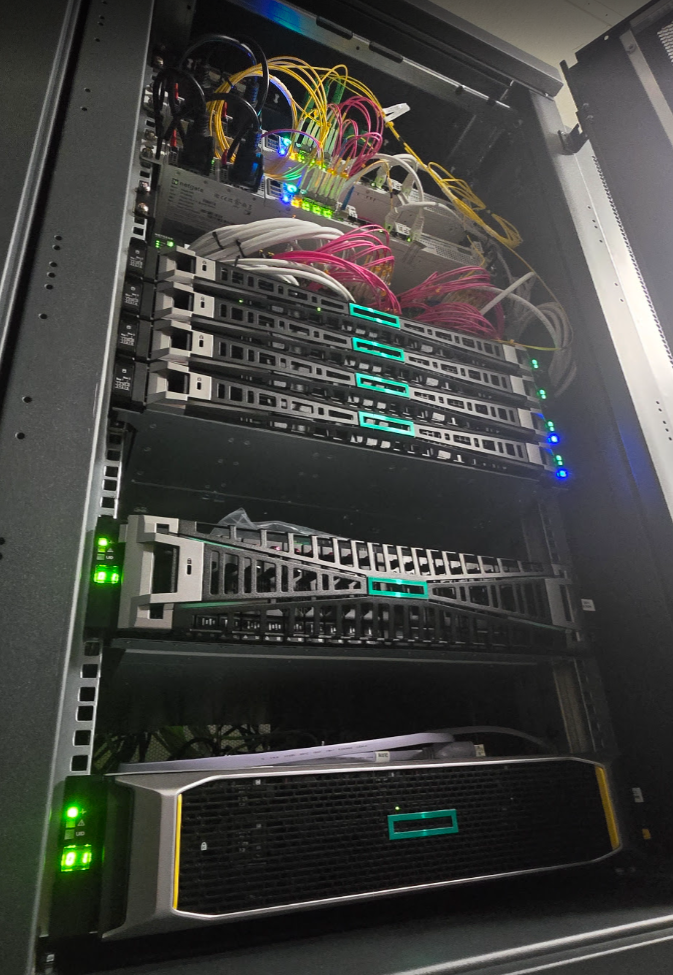
just to #brag

Deploy of worker is okay (one big rocky linux with default settings 6vcpu, 6Gb RAM, 100Gb vdi)
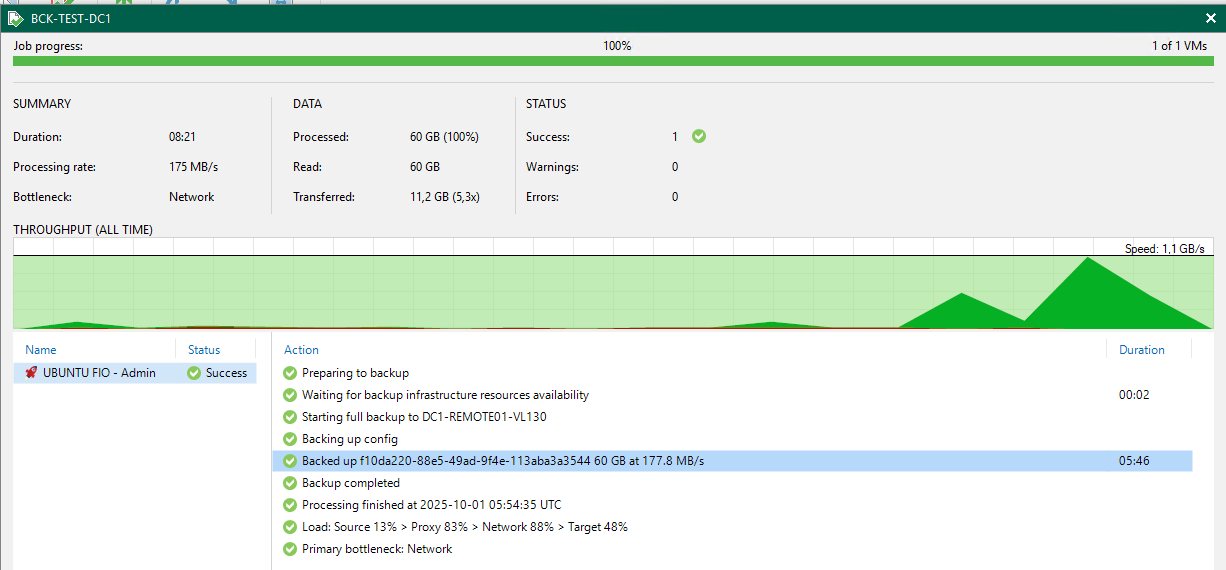
first backup is fine, with decent speed ! (to a xcp hosted S3 minio)
will keep testing
just to #brag

Deploy of worker is okay (one big rocky linux with default settings 6vcpu, 6Gb RAM, 100Gb vdi)
first backup is fine, with decent speed ! (to a xcp hosted S3 minio)
will keep testing

Hey all,
We are proud of our new setup, full XCPng hosting solution we racked in a datacenter today.
This is the production node, tomorrow i'll post the replica node !
XCPng 8.3, HPE hardware obviously, and we are preparing full automation of clients by API (from switch vlans to firewall public IP, and automatic VM deployment).
This needs a sticker "Vates Inside"
#vent
@sluflyer06 and I wish HPE would be added too 
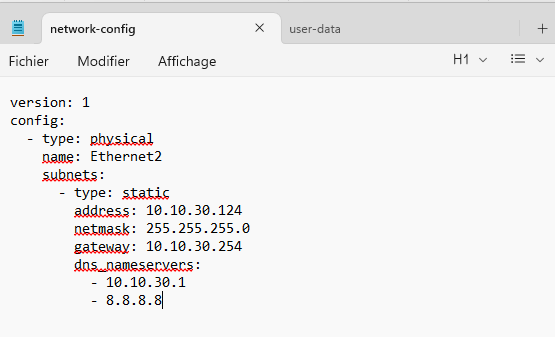
I did stick to version: 1 in my working configuration

Had to rename my "Ethernet 2" nic name to Ethernet2 without the space
You have to put the exact template nic name for this to work.
@MajorP93 throw in multiple garbage collections during snap/desnap of backups on a XOSTOR SR, and these SR scans really get in the way
Hi,
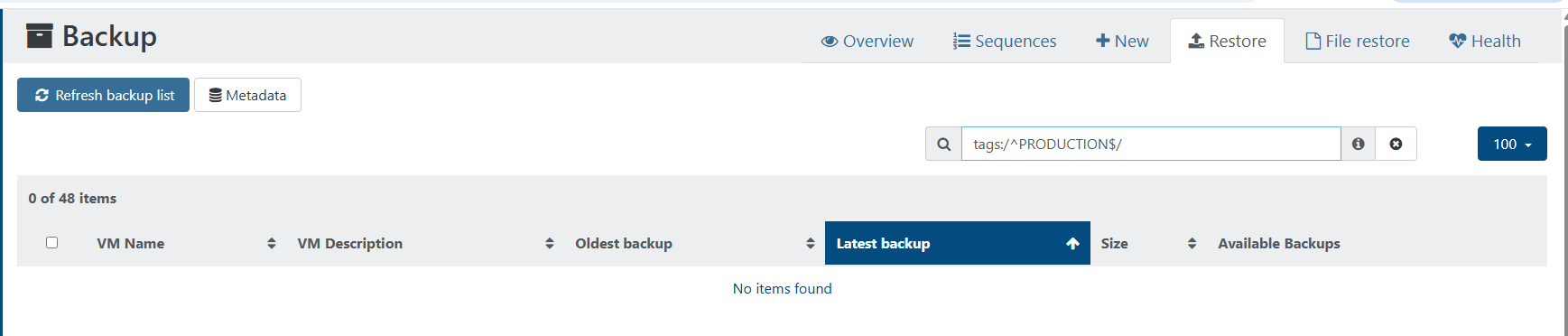
Smart backups are wonderful to manage smart selection of VMs to be backuped.
When we browse the RESTORE section, would be cool to get the TAGs back visually, and possibility to filter them
I'd like to get "all VMs restorable with this particular TAG" type of filter, hope i'm clear.

Perhaps something to add to XO6 ?
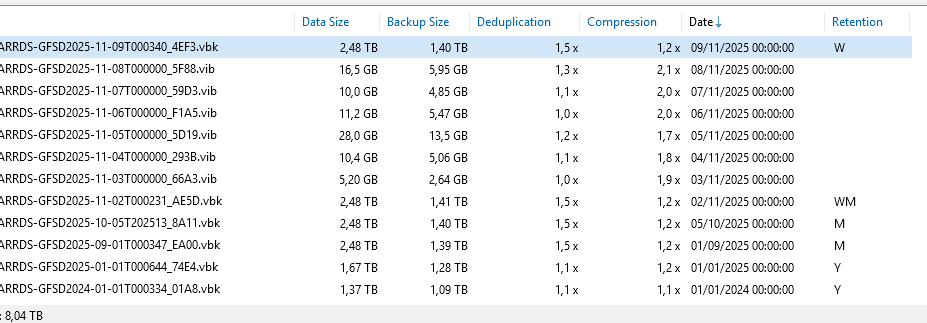
Could we have a way to know wich backup is part of LTR ?
In veeam B&R, when doing LTR/GFS, there is a letter like W(weekly) M(monthly) Y(yearly)to signal the fact in the UI

That's pure cosmectics indeed, but practical.
@Forza I didn't try, as my default Graylog Input was UDP and worked with the hosts...
But guys, that was it. In TCP mode, it's working. Rapidly set up a TCP input, and voila.

is there anywhere where we can check the backlog / work in progress / to be done on XO6 ?
@MK.ultra don't think so
it's working without for me.
@ideal perhaps you could use advantage of dynamic memory
https://docs.xcp-ng.org/vms/#dynamic-memory
to oversubscribe memory and have all 4 VMs up at once... or reduce the allocated memory of your VMs, you seem to have a pretty big VM in terms of memory in comparison to the 2 others on your screenshot
@isdpcman-0 said in Install mono on XCP-ng:
Our RMM tools will run on CentOS but fail to install because they are looking for mono to be on the system. How can I install Mono on an XCP-ng host so we can install our monitoring/management tools?
Reply
I think it is advised to consider hosts as appliances and not install any external packages (repos are disabled for that purpose, that's probably your issue for installing anything)
even in case of clusters of many hosts in a pool, you should deploy same packages on all hosts to expect compliancy between hosts...
better use SNMP to monitor you hosts ? or standard installed packages ?
@ideal you should, yes.
beware of dom0 memory (the host), it consumes memory too

@olivierlambert said in Test results for Dell Poweredge R770 with NVMe drives:
Hang on!
no pun intended ? 
@olivierlambert eager to test this new ISO, we have two XCP clusters in 8.2 that need upgrading in 8.3 with these cards :
Do you think we would be impacted ?
These same servers also have I350 Gigabit Network Connectioncard (quad port)
@MajorP93 throw in multiple garbage collections during snap/desnap of backups on a XOSTOR SR, and these SR scans really get in the way
@olivierlambert I even witnessed something today, on the same thematic :
they were downed on purpose... surprise 
by the way, is this what is expected if the AUTO POWER ON is also checked on the POOL advanced tab ? I supposed it was there only to check auto power on on newly created VMs
@MajorP93 I guess so, if someone from Vates team get us the answer as why so frequently perhaps it will enlighten us
@MajorP93 said in log_fs_usage / /var/log directory on pool master filling up constantly:
will keep monitoring this but it seems to improve things quite substantially!
Since it appears that multiple users are affected by this it may be a good idea to change the default value within XCP-ng and/or add this to official documentation.
Reply
nice, but these SR scans have a purpose (when you create/extend an SR, to discover VDIs and ISOs, ...)
on the legitimacy of reducing the period, and the impact on logs, it should be better documented yeah
xe host-param-set other-config:auto-scan-interval=120 uuid=<Host UUID>
never saw this command line in the documentation, perhaps it should be there with full warnings ?
@denis.grilli My experience with XOSTOR was very similar (3 hosts, 18Tb) on XCP 8.2 at the time
but less VMs... ~20
we had catastrophic failures, with tap-disk locking the VDIs, hard to start/stop VMs (10+ mins to start a VM ? and same VM on local RAID5 storage, or even NFS storage, 5 seconds max)
more problems with large VDIs (1.5Tb) on XOSTOR, and backups where painful to obtain
after many ins and outs with support, we decided to get our VMs off XOSTOR for the time being, back to local RAID5 with replicas inter-hosts. No VM mobility, but redudancy anyway.
I think that the way XOSTOR is implemented is not really the source problem.
the combo DRBD+smapiv1 is ok for small amount of small VMs. at scale is another story.
we still have to upgrade to 8.3 and give it another try.
the more we exfiltrated the VDIs of XOSTOR, the more 'normal' and expected the behavior was.