@sir_alex_leo
I don't know but are they of the same type ??
   Total Width: 128 bits
    Data Width: 64 bits
   Total Width: 64 bits
    Data Width: 64 bits
@sir_alex_leo
I don't know but are they of the same type ??
Total Width: 128 bits Data Width: 64 bits
Total Width: 64 bits Data Width: 64 bits
@gduperrey
Ran updates on my old hosts
i7 gen4 and ryzen5
nothing exploded yet after ~10h of "testing"
@stormi
Did some minor testing and it seems to work fine
Well I was and still is on v0.19.0:
I am running an old AMD Ryzen 5 2400GE homelab with NFS
no XOSTOR or SDN.
Tested NTP Def and dhcp, ssh, wget, cont. repl. ...
all worked fine so far.
updated to f5468 and it seems to work fine in my home lab lab
I will update my homelab "production" later
I have retention of 2
In XO I only see 1 VM and I think this is intended
I get 2 snaps and I can restore 2 different VMs from them
I think You nailed it 
edit: And delta is back
@MathieuRA
Yes, I can confirm if I disable the Secure boot option the VM will start.
After a quick flash of the pxe boot screen, the Debian installer will appear, and I can continue the installation.
The new template for debian 13 is working in XO-Lite 
@ThierryEscande
Ran some tests for 20 min
Seems to work fine
[18:39 x1 ~]# ethtool -i eth0
driver: e1000e
version: 5.10.179
firmware-version: 0.13-3
expansion-rom-version:
bus-info: 0000:00:19.0
supports-statistics: yes
supports-test: yes
supports-eeprom-access: yes
supports-register-dump: yes
supports-priv-flags: yes
Hi, just to be sure, are you saying it is working ok apart one task 8 days ago?
Yes, after I adjusted the time it's working
Another thing to check is the exact time between your XO and your host.
I installed the host with NTP from "static" DHCP (OK according to https://docs.xcp-ng.org/installation/requirements/) not made any manual changes/configs
After I did a RTC adjustment in BIOS 3 days ago, the time now is ~1s ahead
This is the output from timedatectl
[22:04 x2 ~]# timedatectl status
      Local time: tor 2026-07-16 22:06:45 CEST
  Universal time: tor 2026-07-16 20:06:45 UTC
        RTC time: tor 2026-07-16 20:06:42
       Time zone: Europe/Stockholm (CEST, +0200)
     NTP enabled: yes
NTP synchronized: no
 RTC in local TZ: no
      DST active: yes
 Last DST change: DST began at
                  sön 2026-03-29 01:59:59 CET
                  sön 2026-03-29 03:00:00 CEST
 Next DST change: DST ends (the clock jumps one hour backwards) at
                  sön 2026-10-25 02:59:59 CEST
                  sön 2026-10-25 02:00:00 CET
NTP synchronized: no
I thought that the time would be adjusted automatically at reboot
The first NTP sync should allow a bigger step than when it's already synced.
do you make these backup regularly?
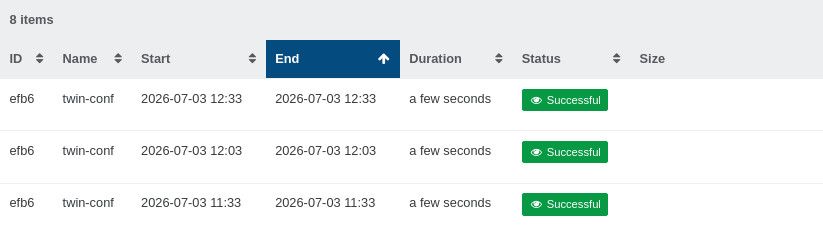
They run once a day @ 03:04 before the normal backup that starts @ 03:10 and they have all run OK since July 8, the failed one reported 8 days ago ( post ~85 )
Maybe you should resync your clock
NTP is enabled but not synced, I don't know the correct way to sync it
In xsconsole/ I tried Use DHCP NTP Servers
It changed the RTC clock to the same as UTC time but time was still 1s ahead and NTP not synced.
I rebooted the host and I got this:
[23:36 x2 ~]# timedatectl status
      Local time: tor 2026-07-16 23:37:17 CEST
  Universal time: tor 2026-07-16 21:37:17 UTC
        RTC time: tor 2026-07-16 21:37:16
       Time zone: Europe/Stockholm (CEST, +0200)
     NTP enabled: yes
NTP synchronized: no
 RTC in local TZ: no
      DST active: yes
 Last DST change: DST began at
                  sön 2026-03-29 01:59:59 CET
                  sön 2026-03-29 03:00:00 CEST
 Next DST change: DST ends (the clock jumps one hour backwards) at
                  sön 2026-10-25 02:59:59 CEST
                  sön 2026-10-25 02:00:00 CET
NTP still not synced, Local time 2s ahead, RTC 1s ahead,
I don't know, If not someone can show me the proper way to manually resync, maybe I should try to reinstall the host
@MajorP93
I'l do that, didn't know about it.
Had a failed job this night (commit 3bc70)
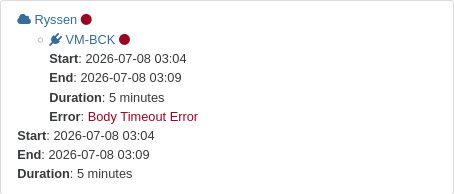
Logged in to my host and saw time was 30-40 sec's off.
The time in XOCE VM was OK
Had a few power outage yesterday.
after starting up the host again. I guess the cmos clock was a little slow.
Could that be the culprit?
Adjusted time and ran a backup manually and it worked fine.
As requested below here are the logs
https://paste.vates.tech/?314d454cd7c52552#4ocXwQksjayBbvUxxxddJRwAQ8YJ3KqvKspJGak8yHF4
On your backup remote, look at the file left behind by the failed run
It's empty
I increased the schedule to every 30 min.
All 3 of them are OK
04:35:13
Jul  3 04:35:13 saruman xapi: [debug||29623 /var/lib/xcp/xapi|post_root|dummytaskhelper] task dispatch:session.slave_login D:d12a36aec5c5 created by task D:823ea5ff66e2
Jul  3 04:35:13 saruman xapi: [ info||29623 /var/lib/xcp/xapi|session.slave_login D:db731796bbe1|xapi_session] Session.create trackid=6d3639a6c690af83677109c2e81b9a61 pool=true uname= originator=xapi is_loca$
Jul  3 04:35:13 saruman xapi: [debug||29624 /var/lib/xcp/xapi|post_root|dummytaskhelper] task dispatch:pool.get_all D:5c79f55ea570 created by task D:db731796bbe1
Jul  3 04:35:13 saruman xapi: [debug||29625 /var/lib/xcp/xapi|post_root|dummytaskhelper] task dispatch:event.from D:bae99b900b1f created by task D:823ea5ff66e2
Jul  3 04:35:13 saruman xapi: [debug||29626 /var/lib/xcp/xapi|post_root|dummytaskhelper] task dispatch:session.logout D:6f544c69ebbe created by task D:823ea5ff66e2
Jul  3 04:35:13 saruman xapi: [ info||29626 /var/lib/xcp/xapi|session.logout D:a524f2308dd2|xapi_session] Session.destroy trackid=6d3639a6c690af83677109c2e81b9a61
Jul  3 04:35:13 saruman xapi: [debug||29627 /var/lib/xcp/xapi|post_root|dummytaskhelper] task dispatch:session.slave_login D:113819379339 created by task D:823ea5ff66e2
Jul  3 04:35:13 saruman xapi: [ info||29627 /var/lib/xcp/xapi|session.slave_login D:da0f565ff5e4|xapi_session] Session.create trackid=fc2ae746311712adae8891823c565fcc pool=true uname= originator=xapi is_loca$
Jul  3 04:35:13 saruman xapi: [debug||29628 /var/lib/xcp/xapi|post_root|dummytaskhelper] task dispatch:pool.get_all D:a50ca0951811 created by task D:da0f565ff5e4
Jul  3 04:35:13 saruman xapi: [ info||29581 :::80|dispatch:VM.snapshot D:059f47467b66|dispatcher] spawning a new thread to handle the current task (trackid=312991ac2a491678ffbd03d423ed0141)
Jul  3 04:35:13 saruman xapi: [debug||29629 HTTPS 192.168.11.104->|Async.VM.snapshot R:23c458eea2f3|audit] VM.snapshot: VM = '9568a891-c547-964e-5efb-9f793ac7fb42 (XO-Sauron)'; new_name = 'xo-backup-temp-sna$
Jul  3 04:35:13 saruman xapi: [ warn||29629 HTTPS 192.168.11.104->|Async.VM.snapshot R:23c458eea2f3|xapi_vm_helpers] VM XO-Sauron could run on any of these hosts: [ saruman; gandalf ]
Jul  3 04:35:13 saruman xapi: [ info||29629 HTTPS 192.168.11.104->|Async.VM.snapshot R:23c458eea2f3|xapi_session] Session.create trackid=fc0856cd8590ab3a2927037d7a81aad7 pool=true uname= originator=xapi is_l$
Jul  3 04:35:13 saruman xapi: [debug||29630 /var/lib/xcp/xapi|post_root|dummytaskhelper] task dispatch:pool.get_all D:948b01cd27d8 created by task R:23c458eea2f3
Jul  3 04:35:13 saruman xapi: [debug||251 |xapi events D:bc2806bdd685|xenops] Event on VM 9568a891-c547-964e-5efb-9f793ac7fb42; resident_here = true
Jul  3 04:35:13 saruman xapi: [debug||29631 /var/lib/xcp/xapi|post_root|dummytaskhelper] task dispatch:event.from D:348ac052a98b created by task D:823ea5ff66e2
Jul  3 04:35:13 saruman xapi: [debug||251 |xapi events D:bc2806bdd685|xenops] xapi_cache: not updating cache for 9568a891-c547-964e-5efb-9f793ac7fb42
Jul  3 04:35:13 saruman xapi: [debug||251 |xapi events D:bc2806bdd685|dummytaskhelper] task timeboxed_rpc D:9ecbd9a624cd created by task D:bc2806bdd685
Jul  3 04:35:13 saruman xapi: [debug||29632 /var/lib/xcp/xapi|post_root|dummytaskhelper] task dispatch:event.from D:c6c1a6c44a42 created by task D:bc2806bdd685
Jul  3 04:35:13 saruman xapi: [debug||29629 HTTPS 192.168.11.104->|Async.VM.snapshot R:23c458eea2f3|xmlrpc_client] stunnel pid: 311291 (cached) connected to 192.168.11.80:443
Jul  3 04:35:13 saruman xapi: [debug||29522 HTTPS 192.168.11.80->:::80|post_root|dummytaskhelper] task dispatch:event.from D:6b6812c25bed created by task D:2339f3bbdbf5
Jul  3 04:35:13 saruman xapi: [debug||29633 HTTPS 192.168.11.80->:::80|post_root|dummytaskhelper] task dispatch:VBD.get_record D:01f767c0ddc0 created by task R:23c458eea2f3
Jul  3 04:35:13 saruman xapi: [debug||29633 HTTPS 192.168.11.80->:::80|post_root|dummytaskhelper] task dispatch:VBD.get_record D:9ffbba29f97f created by task R:23c458eea2f3
Jul  3 04:35:13 saruman xapi: [debug||29633 HTTPS 192.168.11.80->:::80|post_root|dummytaskhelper] task dispatch:VDI.snapshot D:12db600c3fa5 created by task R:23c458eea2f3
Jul  3 04:35:13 saruman xapi: [ info||29633 :::80|dispatch:VDI.snapshot D:12db600c3fa5|taskhelper] task Async.VDI.snapshot R:f18b93d1b960 (uuid:f34cc941-d83b-c870-c5b4-c81f0cb3da85) created (trackid=fc0856cd$
Jul  3 04:35:13 saruman xapi: [ info||29633 :::80|dispatch:VDI.snapshot D:12db600c3fa5|dispatcher] spawning a new thread to handle the current task (trackid=fc0856cd8590ab3a2927037d7a81aad7)
Jul  3 04:35:13 saruman xapi: [debug||29634 HTTPS 192.168.11.80->|Async.VDI.snapshot R:f18b93d1b960|audit] VDI.snapshot: VDI = 'bd106c3a-b734-4daf-9399-d33d49fed36a'
Jul  3 04:35:13 saruman xapi: [debug||29634 HTTPS 192.168.11.80->|Async.VDI.snapshot R:f18b93d1b960|message_forwarding] Marking SR for VDI.snapshot (task=OpaqueRef:f18b93d1-b960-5450-316a-02a3bc69bc46)
Jul  3 04:35:13 saruman xapi: [ info||29634 |OpaqueRef:f18b93d1-b960-5450-316a-02a3bc69bc46|mux] VDI.snapshot dbg:OpaqueRef:f18b93d1-b960-5450-316a-02a3bc69bc46 sr:3a5f09a2-7799-3c91-f85c-beafb7ebaae3 vdi_in$
Jul  3 04:35:13 saruman xapi: [ info||29635 |OpaqueRef:f18b93d1-b960-5450-316a-02a3bc69bc46|Storage_smapiv1_wrapper] VDI.snapshot dbg:OpaqueRef:f18b93d1-b960-5450-316a-02a3bc69bc46 sr:3a5f09a2-7799-3c91-f85c$
Jul  3 04:35:13 saruman xapi: [debug||29635 |OpaqueRef:f18b93d1-b960-5450-316a-02a3bc69bc46|dummytaskhelper] task VDI.snapshot D:13069db1b6de created by task R:f18b93d1b960
Jul  3 04:35:13 saruman xapi: [debug||29635 |VDI.snapshot D:13069db1b6de|dummytaskhelper] task VDI.snapshot D:e03e23e135b6 created by task R:f18b93d1b960
Jul  3 04:35:13 saruman xapi: [debug||29635 |VDI.snapshot D:e03e23e135b6|sm] SM lvmoiscsi vdi_snapshot sr=OpaqueRef:c7e918d2-2b0a-dd0e-2551-1c24c38682bc vdi=OpaqueRef:3e0af3d4-d5fa-7df6-81bb-ed8dd1a022b7 dri$
Jul  3 04:35:13 saruman xapi: [ info||29635 |sm_exec D:23136a3929df|xapi_session] Session.create trackid=d898f150be4e5f82d2ba1092f17d313b pool=false uname= originator=xapi is_local_superuser=true auth_user_s$
Jul  3 04:35:13 saruman xapi: [debug||29633 HTTPS 192.168.11.80->:::80|post_root|dummytaskhelper] task dispatch:task.get_record D:814ed1b104b4 created by task R:23c458eea2f3
Jul  3 04:35:13 saruman xapi: [debug||29636 /var/lib/xcp/xapi|post_root|dummytaskhelper] task dispatch:pool.get_all D:410f573394ff created by task D:23136a3929df
Jul  3 04:35:13 saruman xapi: [debug||29633 HTTPS 192.168.11.80->:::80|post_root|dummytaskhelper] task dispatch:task.get_record D:b07a70dc7e77 created by task R:23c458eea2f3
Jul  3 04:35:13 saruman xapi: [debug||29633 HTTPS 192.168.11.80->:::80|post_root|dummytaskhelper] task dispatch:event.from D:d77f1ed4b011 created by task R:23c458eea2f3
Jul  3 04:35:13 saruman xapi: [debug||29633 HTTPS 192.168.11.80->:::80|post_root|dummytaskhelper] task dispatch:event.from D:23ae4cda51cd created by task R:23c458eea2f3
Jul  3 04:35:13 saruman xapi: [debug||29581 :::80|dispatch:pool.remove_from_other_config D:5c246069b24d|api_effect] pool.remove_from_other_config
Jul  3 04:35:13 saruman xapi: [debug||29581 HTTPS 192.168.11.104->:::80|pool.remove_from_other_config D:7fa1dd1b610d|redo_debug] Write was successful
Jul  3 04:35:13 saruman xapi: [debug||29581 HTTPS 192.168.11.104->:::80|pool.remove_from_other_config D:7fa1dd1b610d|redo_debug] Xapi_database__Redo_log.healthy
Jul  3 04:35:13 saruman xapi: [debug||29581 HTTPS 192.168.11.104->:::80|pool.remove_from_other_config D:7fa1dd1b610d|redo_debug] Xapi_database__Redo_log.can_connect_fn
Jul  3 04:35:13 saruman xapi: [debug||29637 /var/lib/xcp/xapi|post_root|dummytaskhelper] task dispatch:session.logout D:c65ec447c291 created by task D:823ea5ff66e2
Jul  3 04:35:13 saruman xapi: [ info||29637 /var/lib/xcp/xapi|session.logout D:2d8f671dcb46|xapi_session] Session.destroy trackid=fc2ae746311712adae8891823c565fcc
Jul  3 04:35:13 saruman xapi: [debug||29638 /var/lib/xcp/xapi|post_root|dummytaskhelper] task dispatch:session.slave_login D:af04be83537e created by task D:823ea5ff66e2
Jul  3 04:35:13 saruman xapi: [ info||29638 /var/lib/xcp/xapi|session.slave_login D:497d43b949e1|xapi_session] Session.create trackid=ae54891c93c09fd7e250231eed50c45e pool=true uname= originator=xapi is_loca$
Jul  3 04:35:13 saruman xapi: [debug||29639 /var/lib/xcp/xapi|post_root|dummytaskhelper] task dispatch:pool.get_all D:17b025805107 created by task D:497d43b949e1
Jul  3 04:35:13 saruman xapi: [debug||29640 /var/lib/xcp/xapi|post_root|dummytaskhelper] task dispatch:event.from D:1165e4dbb01b created by task D:823ea5ff66e2
Jul  3 04:35:13 saruman xapi: [ info||29581 :::80|dispatch:VM.snapshot D:237ca78655d5|dispatcher] spawning a new thread to handle the current task (trackid=312991ac2a491678ffbd03d423ed0141)
Jul  3 04:35:13 saruman xapi: [debug||29641 HTTPS 192.168.11.104->|Async.VM.snapshot R:c609ded5338f|audit] VM.snapshot: VM = '8353b44b-86cb-475b-e730-97f7fa7bacc6 (2-LMDE7)'; new_name = 'xo-backup-temp-snaps$
Jul  3 04:35:13 saruman xapi: [ warn||29641 HTTPS 192.168.11.104->|Async.VM.snapshot R:c609ded5338f|xapi_vm_helpers] VM 2-LMDE7 could run on any of these hosts: [ saruman; gandalf ]
Jul  3 04:35:13 saruman xapi: [debug||29641 HTTPS 192.168.11.104->|Async.VM.snapshot R:c609ded5338f|xapi_vm_snapshot] Snapshot: begin
Jul  3 04:35:13 saruman xapi: [debug||29642 /var/lib/xcp/xapi|post_root|dummytaskhelper] task dispatch:session.slave_login D:0531ebceddde created by task R:c609ded5338f
Jul  3 04:35:13 saruman xapi: [ info||29642 /var/lib/xcp/xapi|session.slave_login D:d9f6475804cb|xapi_session] Session.create trackid=f0fcb7daa81b6648a27b679090415989 pool=true uname= originator=xapi is_loca$
Jul  3 04:35:13 saruman xapi: [debug||29643 /var/lib/xcp/xapi|post_root|dummytaskhelper] task dispatch:pool.get_all D:8971f156b3c7 created by task D:d9f6475804cb
Jul  3 04:35:13 saruman xapi: [debug||29644 /var/lib/xcp/xapi|post_root|dummytaskhelper] task dispatch:VBD.get_record D:bb6e7e98aae7 created by task R:c609ded5338f
Jul  3 04:35:13 saruman xapi: [debug||29645 /var/lib/xcp/xapi|post_root|dummytaskhelper] task dispatch:VDI.snapshot D:2d335c8f7d98 created by task R:c609ded5338f
Jul  3 04:35:13 saruman xapi: [ info||29645 /var/lib/xcp/xapi|dispatch:VDI.snapshot D:2d335c8f7d98|taskhelper] task Async.VDI.snapshot R:96e11de516db (uuid:9bc12c58-57d1-6b03-3459-1fb7485455e7) created (trac$
Jul  3 04:35:13 saruman xapi: [ info||29645 /var/lib/xcp/xapi|dispatch:VDI.snapshot D:2d335c8f7d98|dispatcher] spawning a new thread to handle the current task (trackid=f0fcb7daa81b6648a27b679090415989)
Jul  3 04:35:13 saruman xapi: [debug||29646 |Async.VDI.snapshot R:96e11de516db|audit] VDI.snapshot: VDI = '35e5b2fd-1999-4705-9523-17ae3d4aeafc'
Jul  3 04:35:13 saruman xapi: [debug||29646 |Async.VDI.snapshot R:96e11de516db|message_forwarding] Marking SR for VDI.snapshot (task=OpaqueRef:96e11de5-16db-4246-a4e7-7f7820adfb7f)
Jul  3 04:35:13 saruman xapi: [debug||29646 |Async.VDI.snapshot R:96e11de516db|message_forwarding] Caught exception while marking SR for VDI.snapshot in message forwarder: OTHER_OPERATION_IN_PROGRESS: [ SR; $
Jul  3 04:35:13 saruman xapi: [debug||29646 |Async.VDI.snapshot R:96e11de516db|helpers] VDI.snapshot locking failed: caught transient failure OTHER_OPERATION_IN_PROGRESS: [ SR; OpaqueRef:c7e918d2-2b0a-dd0e-2$
Jul  3 04:35:13 saruman xapi: [debug||29646 |Async.VDI.snapshot R:96e11de516db|helpers] Waiting for up to 13.900298 seconds before retrying...
Jul  3 04:35:13 saruman xapi: [debug||29647 /var/lib/xcp/xapi|post_root|dummytaskhelper] task dispatch:session.slave_login D:ad14e5bd8c30 created by task R:c609ded5338f
Jul  3 04:35:13 saruman xapi: [ info||29647 /var/lib/xcp/xapi|session.slave_login D:e67c9ff57be0|xapi_session] Session.create trackid=0ee691a0ea54ef4f1d942860027acb03 pool=true uname= originator=xapi is_loca$
Jul  3 04:35:13 saruman xapi: [debug||29648 /var/lib/xcp/xapi|post_root|dummytaskhelper] task dispatch:pool.get_all D:689649238183 created by task D:e67c9ff57be0
Jul  3 04:35:13 saruman xapi: [debug||29649 /var/lib/xcp/xapi|post_root|dummytaskhelper] task dispatch:task.get_record D:f273bee54ab3 created by task R:c609ded5338f
Jul  3 04:35:13 saruman xapi: [debug||29650 /var/lib/xcp/xapi|post_root|dummytaskhelper] task dispatch:task.get_record D:edc7a54cb199 created by task R:c609ded5338f
Jul  3 04:35:13 saruman xapi: [debug||29651 /var/lib/xcp/xapi|post_root|dummytaskhelper] task dispatch:event.from D:3b124fca1598 created by task R:c609ded5338f
Jul  3 04:35:13 saruman xapi: [debug||29652 /var/lib/xcp/xapi|post_root|dummytaskhelper] task dispatch:event.from D:360b9489801a created by task R:c609ded5338f
Jul  3 04:35:13 saruman xapi: [debug||29522 HTTPS 192.168.11.80->:::80|post_root|dummytaskhelper] task dispatch:event.from D:771fb90505ed created by task D:2339f3bbdbf5
Jul  3 04:35:13 saruman xapi: [debug||29653 /var/lib/xcp/xapi|dispatch:VDI.add_to_sm_config D:45c544ac19b4|api_effect] VDI.add_to_sm_config
Jul  3 04:35:13 saruman xapi: [debug||29653 /var/lib/xcp/xapi|VDI.add_to_sm_config D:d290305cac66|redo_debug] Write was successful
Jul  3 04:35:13 saruman xapi: [debug||29653 /var/lib/xcp/xapi|VDI.add_to_sm_config D:d290305cac66|redo_debug] Xapi_database__Redo_log.healthy
Jul  3 04:35:13 saruman xapi: [debug||29653 /var/lib/xcp/xapi|VDI.add_to_sm_config D:d290305cac66|redo_debug] Xapi_database__Redo_log.can_connect_fn
Jul  3 04:35:13 saruman xapi: [debug||29653 /var/lib/xcp/xapi|host.call_plugin R:27058d1c6a7c|audit] Host.call_plugin host = 'aae1f2ab-1f2f-4a38-af90-97d850a2caaf (saruman)'; plugin = 'tapdisk-pause'; fn = '$
Jul  3 04:35:13 saruman xapi: [debug||1420 ha_monitor|HA monitor D:4f75c83bbba0|helpers] about to call script without a timeout: /usr/libexec/xapi/cluster-stack/xhad/ha_query_liveset
Jul  3 04:35:13 saruman xapi: [debug||1420 ha_monitor|HA monitor D:4f75c83bbba0|xapi_ha] Liveset: online 8c67881d-e100-4a02-9e8d-98aac410e6b0 [ L  A ]; aae1f2ab-1f2f-4a38-af90-97d850a2caaf [*LM A ];
Jul  3 04:35:13 saruman xapi: [debug||1420 ha_monitor|HA monitor D:4f75c83bbba0|xapi_ha] Processing warnings
Jul  3 04:35:13 saruman xapi: [debug||1420 ha_monitor|HA monitor D:4f75c83bbba0|xapi_ha] Done with warnings
Jul  3 04:35:13 saruman xapi: [debug||1420 ha_monitor|HA monitor D:4f75c83bbba0|xapi_ha_vm_failover] restart_auto_run_vms called
Jul  3 04:35:13 saruman xapi: [debug||1420 ha_monitor|HA monitor D:4f75c83bbba0|xapi_ha_vm_failover] Setting all VMs running or paused to Halted
Jul  3 04:35:13 saruman xapi: [debug||1420 ha_monitor|HA monitor D:4f75c83bbba0|xapi_ha_vm_failover] Protected VMs: [  ]
Jul  3 04:35:13 saruman xapi: [debug||1420 ha_monitor|HA monitor D:4f75c83bbba0|xapi_ha_vm_failover] Restart plan for non-agile offline VMs: [  ]
Jul  3 04:35:13 saruman xapi: [debug||1420 ha_monitor|HA monitor D:4f75c83bbba0|xapi_ha_vm_failover] Planning configuration for offline agile VMs = { total_hosts = 2; num_failures = 1; hosts = [ 4c084741 (ga$
Jul  3 04:35:13 saruman xapi: [debug||1420 ha_monitor|HA monitor D:4f75c83bbba0|xapi_ha_vm_failover] Computing a specific plan for the failure of VMs: [  ]
Jul  3 04:35:13 saruman xapi: [debug||1420 ha_monitor|HA monitor D:4f75c83bbba0|xapi_ha_vm_failover] Restart plan for agile offline VMs: [  ]
Jul  3 04:35:13 saruman xapi: [debug||1420 ha_monitor|HA monitor D:4f75c83bbba0|xapi_ha_vm_failover] Planning configuration for future failures = { total_hosts = 2; num_failures = 1; hosts = [ 4c084741 (gand$
Jul  3 04:35:13 saruman xapi: [debug||29655 /var/lib/xcp/xapi|post_root|dummytaskhelper] task dispatch:session.slave_login D:56526d9b00fb created by task D:4f75c83bbba0
Jul  3 04:35:13 saruman xapi: [ info||29655 /var/lib/xcp/xapi|session.slave_login D:ebe7eb7e5755|xapi_session] Session.create trackid=19d8ad5280db4cad07e3ce5eefc93c41 pool=true uname= originator=xapi is_loca$
Jul  3 04:35:13 saruman xapi: [debug||29656 /var/lib/xcp/xapi|post_root|dummytaskhelper] task dispatch:pool.get_all D:87450437dafe created by task D:ebe7eb7e5755
Jul  3 04:35:13 saruman xapi: [debug||1420 ha_monitor|HA monitor D:4f75c83bbba0|xapi_ha_vm_failover] Processing 0 parallel groups
Jul  3 04:35:13 saruman xapi: message repeated 2 times: [ [debug||1420 ha_monitor|HA monitor D:4f75c83bbba0|xapi_ha_vm_failover] Processing 0 parallel groups]
Jul  3 04:35:13 saruman xapi: [debug||29657 /var/lib/xcp/xapi|post_root|dummytaskhelper] task dispatch:session.logout D:8c4fce474a86 created by task D:4f75c83bbba0
Jul  3 04:35:13 saruman xapi: [ info||29657 /var/lib/xcp/xapi|session.logout D:3fedf5ebefc4|xapi_session] Session.destroy trackid=19d8ad5280db4cad07e3ce5eefc93c41
Jul  3 04:35:13 saruman xapi: [debug||1420 ha_monitor|HA monitor D:4f75c83bbba0|xapi_ha] Network peers = [8c67881d-e100-4a02-9e8d-98aac410e6b0;aae1f2ab-1f2f-4a38-af90-97d850a2caaf]
Jul  3 04:35:13 saruman xapi: [debug||1420 ha_monitor|HA monitor D:4f75c83bbba0|xapi_ha] Network peers = [8c67881d-e100-4a02-9e8d-98aac410e6b0;aae1f2ab-1f2f-4a38-af90-97d850a2caaf]
04:35:12
Jul  3 04:35:12 saruman xapi: [debug||29579 HTTPS 192.168.11.104->:::80|session.login_with_password D:078b8e80c48d|xapi_session] Success: local auth, user root from HTTP request from Internet with User-Agent$
Jul  3 04:35:12 saruman xapi: [ info||29579 HTTPS 192.168.11.104->:::80|session.login_with_password D:078b8e80c48d|xapi_session] Session.create trackid=312991ac2a491678ffbd03d423ed0141 pool=false uname=root $
Jul  3 04:35:12 saruman xapi: [debug||29580 /var/lib/xcp/xapi|post_root|dummytaskhelper] task dispatch:pool.get_all D:bc2edf3c8615 created by task D:078b8e80c48d
Jul  3 04:35:12 saruman xapi: [debug||29582 /var/lib/xcp/xapi|post_root|dummytaskhelper] task dispatch:session.logout D:69563c555812 created by task D:823ea5ff66e2
Jul  3 04:35:12 saruman xapi: [ info||29582 /var/lib/xcp/xapi|session.logout D:3070e3db5da9|xapi_session] Session.destroy trackid=48e113dd5c7a1d45458e1d2b92601693
Jul  3 04:35:12 saruman xapi: [debug||29583 /var/lib/xcp/xapi|post_root|dummytaskhelper] task dispatch:session.slave_login D:f633debe7850 created by task D:823ea5ff66e2
Jul  3 04:35:12 saruman xapi: [ info||29583 /var/lib/xcp/xapi|session.slave_login D:e9b0235f0e4a|xapi_session] Session.create trackid=ca2803ef4e7083f4747a48db63c177e6 pool=true uname= originator=xapi is_loca$
Jul  3 04:35:12 saruman xapi: [debug||29584 /var/lib/xcp/xapi|post_root|dummytaskhelper] task dispatch:pool.get_all D:26e00eb4d36e created by task D:e9b0235f0e4a
Jul  3 04:35:12 saruman xapi: [debug||29585 /var/lib/xcp/xapi|post_root|dummytaskhelper] task dispatch:event.from D:78809790a29d created by task D:823ea5ff66e2
Jul  3 04:35:12 saruman xapi: [debug||29579 HTTPS 192.168.11.104->:::80|VM.remove_from_blocked_operations R:cbfa771b26b7|audit] VM.remove_from_blocked_operations: self = '9568a891-c547-964e-5efb-9f793ac7fb42$
Jul  3 04:35:12 saruman xapi: [debug||29579 HTTPS 192.168.11.104->:::80|VM.remove_from_blocked_operations R:cbfa771b26b7|xapi_vm] Xapi_vm.remove_from_blocked_operations
Jul  3 04:35:12 saruman xapi: [debug||29581 HTTPS 192.168.11.104->:::80|VM.remove_from_blocked_operations R:59870af6f27b|audit] VM.remove_from_blocked_operations: self = '9568a891-c547-964e-5efb-9f793ac7fb42$
Jul  3 04:35:12 saruman xapi: [debug||29581 HTTPS 192.168.11.104->:::80|VM.remove_from_blocked_operations R:59870af6f27b|xapi_vm] Xapi_vm.remove_from_blocked_operations
Jul  3 04:35:12 saruman xapi: [debug||29586 HTTPS 192.168.11.104->:::80|VM.add_to_blocked_operations R:120f9900abf1|audit] VM.add_to_blocked_operations: self = '9568a891-c547-964e-5efb-9f793ac7fb42 (XO-Sauro$
Jul  3 04:35:12 saruman xapi: [debug||29586 HTTPS 192.168.11.104->:::80|VM.add_to_blocked_operations R:120f9900abf1|xapi_vm] Xapi_vm.add_to_blocked_operations
Jul  3 04:35:12 saruman xapi: [debug||29586 HTTPS 192.168.11.104->:::80|VM.add_to_blocked_operations R:120f9900abf1|redo_debug] Write was successful
Jul  3 04:35:12 saruman xapi: [debug||29586 HTTPS 192.168.11.104->:::80|VM.add_to_blocked_operations R:120f9900abf1|redo_debug] Xapi_database__Redo_log.healthy
Jul  3 04:35:12 saruman xapi: [debug||29586 HTTPS 192.168.11.104->:::80|VM.add_to_blocked_operations R:120f9900abf1|redo_debug] Xapi_database__Redo_log.can_connect_fn
Jul  3 04:35:12 saruman xapi: [debug||29579 HTTPS 192.168.11.104->:::80|VM.add_to_blocked_operations R:c0c78557699e|audit] VM.add_to_blocked_operations: self = '9568a891-c547-964e-5efb-9f793ac7fb42 (XO-Sauro$
Jul  3 04:35:12 saruman xapi: [debug||29579 HTTPS 192.168.11.104->:::80|VM.add_to_blocked_operations R:c0c78557699e|xapi_vm] Xapi_vm.add_to_blocked_operations
Jul  3 04:35:12 saruman xapi: [debug||251 |xapi events D:bc2806bdd685|xenops] Event on VM 9568a891-c547-964e-5efb-9f793ac7fb42; resident_here = true
Jul  3 04:35:12 saruman xapi: [debug||29579 HTTPS 192.168.11.104->:::80|VM.add_to_blocked_operations R:c0c78557699e|redo_debug] Write was successful
Jul  3 04:35:12 saruman xapi: [debug||29579 HTTPS 192.168.11.104->:::80|VM.add_to_blocked_operations R:c0c78557699e|redo_debug] Xapi_database__Redo_log.healthy
Jul  3 04:35:12 saruman xapi: [debug||29579 HTTPS 192.168.11.104->:::80|VM.add_to_blocked_operations R:c0c78557699e|redo_debug] Xapi_database__Redo_log.can_connect_fn
Jul  3 04:35:12 saruman xapi: [debug||29581 HTTPS 192.168.11.104->:::80|VM.remove_from_blocked_operations R:a1c90fe4b993|audit] VM.remove_from_blocked_operations: self = '8353b44b-86cb-475b-e730-97f7fa7bacc6$
Jul  3 04:35:12 saruman xapi: [debug||29587 HTTPS 192.168.11.104->:::80|VM.remove_from_blocked_operations R:864e0196124f|audit] VM.remove_from_blocked_operations: self = '8353b44b-86cb-475b-e730-97f7fa7bacc6$
Jul  3 04:35:12 saruman xapi: [debug||29581 HTTPS 192.168.11.104->:::80|VM.remove_from_blocked_operations R:a1c90fe4b993|xapi_vm] Xapi_vm.remove_from_blocked_operations
Jul  3 04:35:12 saruman xapi: [debug||29587 HTTPS 192.168.11.104->:::80|VM.remove_from_blocked_operations R:864e0196124f|xapi_vm] Xapi_vm.remove_from_blocked_operations
Jul  3 04:35:12 saruman xapi: [debug||251 |xapi events D:bc2806bdd685|xenops] xapi_cache: not updating cache for 9568a891-c547-964e-5efb-9f793ac7fb42
Jul  3 04:35:12 saruman xapi: [debug||251 |xapi events D:bc2806bdd685|dummytaskhelper] task timeboxed_rpc D:49d7209c4cec created by task D:bc2806bdd685
Jul  3 04:35:12 saruman xapi: [debug||29586 HTTPS 192.168.11.104->:::80|VM.add_to_blocked_operations R:b8c16837eac3|audit] VM.add_to_blocked_operations: self = '8353b44b-86cb-475b-e730-97f7fa7bacc6 (2-LMDE7)$
Jul  3 04:35:12 saruman xapi: [debug||29586 HTTPS 192.168.11.104->:::80|VM.add_to_blocked_operations R:b8c16837eac3|xapi_vm] Xapi_vm.add_to_blocked_operations
Jul  3 04:35:12 saruman xapi: [debug||29616 /var/lib/xcp/xapi|post_root|dummytaskhelper] task dispatch:event.from D:41bf54393b78 created by task D:bc2806bdd685
Jul  3 04:35:12 saruman xapi: [debug||29586 HTTPS 192.168.11.104->:::80|VM.add_to_blocked_operations R:b8c16837eac3|redo_debug] Write was successful
Jul  3 04:35:12 saruman xapi: [debug||29586 HTTPS 192.168.11.104->:::80|VM.add_to_blocked_operations R:b8c16837eac3|redo_debug] Xapi_database__Redo_log.healthy
Jul  3 04:35:12 saruman xapi: [debug||29586 HTTPS 192.168.11.104->:::80|VM.add_to_blocked_operations R:b8c16837eac3|redo_debug] Xapi_database__Redo_log.can_connect_fn
Jul  3 04:35:12 saruman xapi: [debug||29581 HTTPS 192.168.11.104->:::80|VM.add_to_blocked_operations R:4f271f2de8d1|audit] VM.add_to_blocked_operations: self = '8353b44b-86cb-475b-e730-97f7fa7bacc6 (2-LMDE7)$
Jul  3 04:35:12 saruman xapi: [debug||29581 HTTPS 192.168.11.104->:::80|VM.add_to_blocked_operations R:4f271f2de8d1|xapi_vm] Xapi_vm.add_to_blocked_operations
Jul  3 04:35:12 saruman xapi: [debug||251 |xapi events D:bc2806bdd685|xenops] Event on VM 9568a891-c547-964e-5efb-9f793ac7fb42; resident_here = true
Jul  3 04:35:12 saruman xapi: [debug||29581 HTTPS 192.168.11.104->:::80|VM.add_to_blocked_operations R:4f271f2de8d1|redo_debug] Write was successful
Jul  3 04:35:12 saruman xapi: [debug||29581 HTTPS 192.168.11.104->:::80|VM.add_to_blocked_operations R:4f271f2de8d1|redo_debug] Xapi_database__Redo_log.healthy
Jul  3 04:35:12 saruman xapi: [debug||29581 HTTPS 192.168.11.104->:::80|VM.add_to_blocked_operations R:4f271f2de8d1|redo_debug] Xapi_database__Redo_log.can_connect_fn
Jul  3 04:35:12 saruman xapi: [debug||251 |xapi events D:bc2806bdd685|xenops] xapi_cache: not updating cache for 9568a891-c547-964e-5efb-9f793ac7fb42
Jul  3 04:35:12 saruman xapi: [debug||251 |xapi events D:bc2806bdd685|dummytaskhelper] task timeboxed_rpc D:606238890c31 created by task D:bc2806bdd685
Jul  3 04:35:12 saruman xapi: [debug||29617 /var/lib/xcp/xapi|post_root|dummytaskhelper] task dispatch:event.from D:aa12a2dc6e7f created by task D:bc2806bdd685
Jul  3 04:35:12 saruman xapi: [debug||29579 HTTPS 192.168.11.104->:::80|VM.remove_from_other_config D:09c0ab21bf75|audit] VM.remove_from_other_config: self = '9568a891-c547-964e-5efb-9f793ac7fb42 (XO-Sauron)$
Jul  3 04:35:12 saruman xapi: [debug||29581 HTTPS 192.168.11.104->:::80|VM.remove_from_other_config D:21199f16e114|audit] VM.remove_from_other_config: self = '9568a891-c547-964e-5efb-9f793ac7fb42 (XO-Sauron)$
Jul  3 04:35:12 saruman xapi: [debug||29588 HTTPS 192.168.11.104->:::80|VM.remove_from_other_config D:a4bd602cbe8e|audit] VM.remove_from_other_config: self = '9568a891-c547-964e-5efb-9f793ac7fb42 (XO-Sauron)$
Jul  3 04:35:12 saruman xapi: [debug||29587 HTTPS 192.168.11.104->:::80|VM.remove_from_other_config D:d1c1276459e6|audit] VM.remove_from_other_config: self = '9568a891-c547-964e-5efb-9f793ac7fb42 (XO-Sauron)$
Jul  3 04:35:12 saruman xapi: [debug||29589 HTTPS 192.168.11.104->:::80|VM.remove_from_other_config D:c0de975ab044|audit] VM.remove_from_other_config: self = '9568a891-c547-964e-5efb-9f793ac7fb42 (XO-Sauron)$
Jul  3 04:35:12 saruman xapi: [debug||29594 :::80|dispatch:VDI.remove_from_other_config D:055791cdfc68|api_effect] VDI.remove_from_other_config
Jul  3 04:35:12 saruman xapi: [debug||29591 HTTPS 192.168.11.104->:::80|VM.remove_from_other_config D:f790effaa602|audit] VM.remove_from_other_config: self = '9568a891-c547-964e-5efb-9f793ac7fb42 (XO-Sauron)$
Jul  3 04:35:12 saruman xapi: [debug||29593 :::80|dispatch:VDI.remove_from_other_config D:2bfdc6504ebb|api_effect] VDI.remove_from_other_config
Jul  3 04:35:12 saruman xapi: [debug||29590 HTTPS 192.168.11.104->:::80|VM.remove_from_other_config D:d79e6e4a5136|audit] VM.remove_from_other_config: self = '9568a891-c547-964e-5efb-9f793ac7fb42 (XO-Sauron)$
Jul  3 04:35:12 saruman xapi: [debug||29592 HTTPS 192.168.11.104->:::80|VM.remove_from_other_config D:8ee15c17ea09|audit] VM.remove_from_other_config: self = '9568a891-c547-964e-5efb-9f793ac7fb42 (XO-Sauron)$
Jul  3 04:35:12 saruman xapi: [debug||29598 :::80|dispatch:VDI.remove_from_other_config D:e3b2d69ca32b|api_effect] VDI.remove_from_other_config
Jul  3 04:35:12 saruman xapi: [debug||29597 :::80|dispatch:VDI.remove_from_other_config D:06d05c0b1461|api_effect] VDI.remove_from_other_config
Jul  3 04:35:12 saruman xapi: [debug||29595 :::80|dispatch:VDI.remove_from_other_config D:db62dc7de8f4|api_effect] VDI.remove_from_other_config
Jul  3 04:35:12 saruman xapi: [debug||29600 :::80|dispatch:VDI.remove_from_other_config D:d03eeab97ea6|api_effect] VDI.remove_from_other_config
Jul  3 04:35:12 saruman xapi: [debug||29599 :::80|dispatch:VDI.remove_from_other_config D:3893de8bae36|api_effect] VDI.remove_from_other_config
Jul  3 04:35:12 saruman xapi: [debug||29596 :::80|dispatch:VDI.remove_from_other_config D:a5bf3ce348ca|api_effect] VDI.remove_from_other_config
Jul  3 04:35:12 saruman xapi: [debug||29579 :::80|dispatch:pool.add_to_other_config D:bdfc9a522f7a|api_effect] pool.add_to_other_config
Jul  3 04:35:12 saruman xapi: [debug||29579 HTTPS 192.168.11.104->:::80|pool.add_to_other_config D:0a47778fa26d|redo_debug] Write was successful
Jul  3 04:35:12 saruman xapi: [debug||29579 HTTPS 192.168.11.104->:::80|pool.add_to_other_config D:0a47778fa26d|redo_debug] Xapi_database__Redo_log.healthy
Jul  3 04:35:12 saruman xapi: [debug||29579 HTTPS 192.168.11.104->:::80|pool.add_to_other_config D:0a47778fa26d|redo_debug] Xapi_database__Redo_log.can_connect_fn
Jul  3 04:35:12 saruman xapi: [debug||29591 HTTPS 192.168.11.104->:::80|VM.remove_from_other_config D:c4766abc27f9|audit] VM.remove_from_other_config: self = '8353b44b-86cb-475b-e730-97f7fa7bacc6 (2-LMDE7)',$
Jul  3 04:35:12 saruman xapi: [debug||29589 HTTPS 192.168.11.104->:::80|VM.remove_from_other_config D:063aa097b84d|audit] VM.remove_from_other_config: self = '8353b44b-86cb-475b-e730-97f7fa7bacc6 (2-LMDE7)',$
Jul  3 04:35:12 saruman xapi: [debug||29593 :::80|dispatch:VDI.remove_from_other_config D:f8726461e0a6|api_effect] VDI.remove_from_other_config
Jul  3 04:35:12 saruman xapi: [debug||29590 HTTPS 192.168.11.104->:::80|VM.remove_from_other_config D:56a1ee681aa1|audit] VM.remove_from_other_config: self = '8353b44b-86cb-475b-e730-97f7fa7bacc6 (2-LMDE7)',$
Jul  3 04:35:12 saruman xapi: [debug||29588 HTTPS 192.168.11.104->:::80|VM.remove_from_other_config D:d0c436e970e0|audit] VM.remove_from_other_config: self = '8353b44b-86cb-475b-e730-97f7fa7bacc6 (2-LMDE7)',$
Jul  3 04:35:12 saruman xapi: [debug||29594 :::80|dispatch:VDI.remove_from_other_config D:b5d6bc3ef534|api_effect] VDI.remove_from_other_config
Jul  3 04:35:12 saruman xapi: [debug||29599 :::80|dispatch:VDI.remove_from_other_config D:03ba46b0e8ef|api_effect] VDI.remove_from_other_config
Jul  3 04:35:12 saruman xapi: [debug||29618 /var/lib/xcp/xapi|post_root|dummytaskhelper] task dispatch:session.logout D:d5f8624586ad created by task D:823ea5ff66e2
Jul  3 04:35:12 saruman xapi: [ info||29618 /var/lib/xcp/xapi|session.logout D:7e639832bcac|xapi_session] Session.destroy trackid=ca2803ef4e7083f4747a48db63c177e6
Jul  3 04:35:12 saruman xapi: [debug||29598 :::80|dispatch:VDI.remove_from_other_config D:96529103281e|api_effect] VDI.remove_from_other_config
Jul  3 04:35:12 saruman xapi: [debug||29595 :::80|dispatch:VDI.remove_from_other_config D:e85d4b89ad38|api_effect] VDI.remove_from_other_config
Jul  3 04:35:12 saruman xapi: [debug||29587 HTTPS 192.168.11.104->:::80|event.from D:be3f60eca8bb|xapi_message] Xapi_message.get_since_for_events.(fun): cache (6778) might not contain all messages since the $
Jul  3 04:35:12 saruman xapi: [debug||29597 :::80|dispatch:VDI.remove_from_other_config D:88fc89495212|api_effect] VDI.remove_from_other_config
Jul  3 04:35:12 saruman xapi: [debug||29600 :::80|dispatch:VDI.remove_from_other_config D:6a674f0efe15|api_effect] VDI.remove_from_other_config
Jul  3 04:35:12 saruman xapi: [debug||29586 HTTPS 192.168.11.104->:::80|VM.remove_from_other_config D:833cf106f19c|audit] VM.remove_from_other_config: self = '8353b44b-86cb-475b-e730-97f7fa7bacc6 (2-LMDE7)',$
Jul  3 04:35:12 saruman xapi: [debug||29596 :::80|dispatch:VDI.remove_from_other_config D:9254480263a9|api_effect] VDI.remove_from_other_config
Jul  3 04:35:12 saruman xapi: [debug||29581 HTTPS 192.168.11.104->:::80|VM.remove_from_other_config D:8c2599ed7ef2|audit] VM.remove_from_other_config: self = '8353b44b-86cb-475b-e730-97f7fa7bacc6 (2-LMDE7)',$
Jul  3 04:35:12 saruman xapi: [debug||29592 HTTPS 192.168.11.104->:::80|VM.remove_from_other_config D:ca1700a7e280|audit] VM.remove_from_other_config: self = '8353b44b-86cb-475b-e730-97f7fa7bacc6 (2-LMDE7)',$
Jul  3 04:35:12 saruman xapi: [debug||29579 HTTPS 192.168.11.104->:::80|VM.remove_from_other_config D:aafbe991c105|audit] VM.remove_from_other_config: self = '8353b44b-86cb-475b-e730-97f7fa7bacc6 (2-LMDE7)',$
Jul  3 04:35:12 saruman xapi: [debug||29619 /var/lib/xcp/xapi|post_root|dummytaskhelper] task dispatch:session.slave_login D:89df7c940b75 created by task D:823ea5ff66e2
Jul  3 04:35:12 saruman xapi: [ info||29619 /var/lib/xcp/xapi|session.slave_login D:59ec45a4596a|xapi_session] Session.create trackid=dc8fda850a7364496d500cdb347f5e29 pool=true uname= originator=xapi is_loca$
Jul  3 04:35:12 saruman xapi: [debug||29620 /var/lib/xcp/xapi|post_root|dummytaskhelper] task dispatch:pool.get_all D:a750749f3208 created by task D:59ec45a4596a
Jul  3 04:35:12 saruman xapi: [debug||29522 HTTPS 192.168.11.80->:::80|post_root|dummytaskhelper] task dispatch:event.from D:40c21b705d99 created by task D:2339f3bbdbf5
Jul  3 04:35:12 saruman xapi: [debug||29621 /var/lib/xcp/xapi|post_root|dummytaskhelper] task dispatch:event.from D:bd4ae306d733 created by task D:823ea5ff66e2
Jul  3 04:35:12 saruman xapi: [debug||29588 :::80|dispatch:pool.remove_from_other_config D:09bc5706ae58|api_effect] pool.remove_from_other_config
Jul  3 04:35:12 saruman xapi: [debug||29588 HTTPS 192.168.11.104->:::80|pool.remove_from_other_config D:b878052f8693|redo_debug] Write was successful
Jul  3 04:35:12 saruman xapi: [debug||29588 HTTPS 192.168.11.104->:::80|pool.remove_from_other_config D:b878052f8693|redo_debug] Xapi_database__Redo_log.healthy
Jul  3 04:35:12 saruman xapi: [debug||29588 HTTPS 192.168.11.104->:::80|pool.remove_from_other_config D:b878052f8693|redo_debug] Xapi_database__Redo_log.can_connect_fn
Jul  3 04:35:12 saruman xapi: [debug||29590 :::80|dispatch:pool.add_to_other_config D:606a7dcff861|api_effect] pool.add_to_other_config
Jul  3 04:35:12 saruman xapi: [debug||29622 /var/lib/xcp/xapi|post_root|dummytaskhelper] task dispatch:session.logout D:40aaae606f44 created by task D:823ea5ff66e2
Jul  3 04:35:12 saruman xapi: [ info||29622 /var/lib/xcp/xapi|session.logout D:015fd09352fd|xapi_session] Session.destroy trackid=dc8fda850a7364496d500cdb347f5e29
Jul  3 04:35:12 saruman xapi: [debug||29590 HTTPS 192.168.11.104->:::80|pool.add_to_other_config D:d8968e8ce182|redo_debug] Write was successful
Jul  3 04:35:12 saruman xapi: [debug||29590 HTTPS 192.168.11.104->:::80|pool.add_to_other_config D:d8968e8ce182|redo_debug] Xapi_database__Redo_log.healthy
Jul  3 04:35:12 saruman xapi: [debug||29590 HTTPS 192.168.11.104->:::80|pool.add_to_other_config D:d8968e8ce182|redo_debug] Xapi_database__Redo_log.can_connect_fn
04:35:11
Jul  3 04:35:11 saruman xapi: [debug||253 scanning_thread|SR scanner D:326d57d887b1|xapi_sr] Automatically scanning SRs = [ OpaqueRef:16725e54-2f51-9bcc-0a1b-31847b9d2bfb ]
Jul  3 04:35:11 saruman xapi: [debug||29568 ||dummytaskhelper] task scan one D:732f75985406 created by task D:326d57d887b1
Jul  3 04:35:11 saruman xapi: [debug||29569 /var/lib/xcp/xapi|post_root|dummytaskhelper] task dispatch:session.slave_login D:eccbbe50488c created by task D:732f75985406
Jul  3 04:35:11 saruman xapi: [ info||29569 /var/lib/xcp/xapi|session.slave_login D:cc07678de121|xapi_session] Session.create trackid=3bd666ff307e18fa86ce028a05437c1b pool=true uname= originator=xapi is_loca$
Jul  3 04:35:11 saruman xapi: [debug||29570 /var/lib/xcp/xapi|post_root|dummytaskhelper] task dispatch:pool.get_all D:0fd564ae5c24 created by task D:cc07678de121
Jul  3 04:35:11 saruman xapi: [debug||29571 /var/lib/xcp/xapi|post_root|dummytaskhelper] task dispatch:SR.scan D:9dd57167ef24 created by task D:732f75985406
Jul  3 04:35:11 saruman xapi: [ info||29571 /var/lib/xcp/xapi|dispatch:SR.scan D:9dd57167ef24|taskhelper] task SR.scan R:30711df16968 (uuid:2a8220fc-6843-ae13-7934-af2faad9d716) created (trackid=3bd666ff307e$
Jul  3 04:35:11 saruman xapi: [debug||29571 /var/lib/xcp/xapi|SR.scan R:30711df16968|message_forwarding] SR.scan: SR = 'fd8042bf-61a9-e2cb-09e8-b6ea67086b15 (T1_ISO_test)'
Jul  3 04:35:11 saruman xapi: [debug||29571 /var/lib/xcp/xapi|SR.scan R:30711df16968|message_forwarding] Marking SR for SR.scan (task=OpaqueRef:30711df1-6968-d3f8-5c29-47cc108f58a5)
Jul  3 04:35:11 saruman xapi: [ info||29571 /var/lib/xcp/xapi|OpaqueRef:30711df1-6968-d3f8-5c29-47cc108f58a5|mux] SR.scan2 dbg:OpaqueRef:30711df1-6968-d3f8-5c29-47cc108f58a5 sr:fd8042bf-61a9-e2cb-09e8-b6ea67$
Jul  3 04:35:11 saruman xapi: [ info||29572 |OpaqueRef:30711df1-6968-d3f8-5c29-47cc108f58a5|Storage_smapiv1_wrapper] SR.scan2 dbg:OpaqueRef:30711df1-6968-d3f8-5c29-47cc108f58a5 sr:fd8042bf-61a9-e2cb-09e8-b6e$
Jul  3 04:35:11 saruman xapi: [debug||29572 |OpaqueRef:30711df1-6968-d3f8-5c29-47cc108f58a5|dummytaskhelper] task SR.scan D:5930d0b18dda created by task R:30711df16968
Jul  3 04:35:11 saruman xapi: [debug||29572 |SR.scan D:5930d0b18dda|sm] SM iso sr_scan sr=OpaqueRef:16725e54-2f51-9bcc-0a1b-31847b9d2bfb
Jul  3 04:35:11 saruman xapi: [ info||29572 |sm_exec D:cdde671c2793|xapi_session] Session.create trackid=603446d3a4f6757a43d68053f52d381d pool=false uname= originator=xapi is_local_superuser=true auth_user_s$
Jul  3 04:35:11 saruman xapi: [debug||29573 /var/lib/xcp/xapi|post_root|dummytaskhelper] task dispatch:pool.get_all D:f3490996e6d0 created by task D:cdde671c2793
Jul  3 04:35:11 saruman xapi: [debug||29574 /var/lib/xcp/xapi|SR.set_virtual_allocation D:1eeb803b2ec7|redo_debug] Write was successful
Jul  3 04:35:11 saruman xapi: [debug||29574 /var/lib/xcp/xapi|SR.set_virtual_allocation D:1eeb803b2ec7|redo_debug] Xapi_database__Redo_log.healthy
Jul  3 04:35:11 saruman xapi: [debug||29574 /var/lib/xcp/xapi|SR.set_virtual_allocation D:1eeb803b2ec7|redo_debug] Xapi_database__Redo_log.can_connect_fn
Jul  3 04:35:11 saruman xapi: [ info||29572 |sm_exec D:cdde671c2793|xapi_session] Session.destroy trackid=603446d3a4f6757a43d68053f52d381d
Jul  3 04:35:11 saruman xapi: [debug||29572 |OpaqueRef:30711df1-6968-d3f8-5c29-47cc108f58a5|dummytaskhelper] task SR.stat D:a6701a0ec320 created by task R:30711df16968
Jul  3 04:35:11 saruman xapi: [debug||29572 |SR.stat D:a6701a0ec320|sm] SM iso sr_update sr=OpaqueRef:16725e54-2f51-9bcc-0a1b-31847b9d2bfb
Jul  3 04:35:11 saruman xapi: [ info||29572 |sm_exec D:ceb705d62eae|xapi_session] Session.create trackid=e3c583021d6b31a31247294476f0db00 pool=false uname= originator=xapi is_local_superuser=true auth_user_s$
Jul  3 04:35:11 saruman xapi: [debug||29575 /var/lib/xcp/xapi|post_root|dummytaskhelper] task dispatch:pool.get_all D:59518d9a8e14 created by task D:ceb705d62eae
Jul  3 04:35:11 saruman xapi: [debug||29522 HTTPS 192.168.11.80->:::80|post_root|dummytaskhelper] task dispatch:event.from D:01634ea2dc87 created by task D:2339f3bbdbf5
Jul  3 04:35:11 saruman xapi: [ info||29572 |sm_exec D:ceb705d62eae|xapi_session] Session.destroy trackid=e3c583021d6b31a31247294476f0db00
Jul  3 04:35:11 saruman xapi: [debug||29571 /var/lib/xcp/xapi|SR.scan R:30711df16968|xapi_sr] Xapi_sr.scan.(fun).scan_rec no change detected, updating VDIs
Jul  3 04:35:11 saruman xapi: [debug||29571 /var/lib/xcp/xapi|SR.scan R:30711df16968|redo_debug] Write was successful
Jul  3 04:35:11 saruman xapi: [debug||29571 /var/lib/xcp/xapi|SR.scan R:30711df16968|redo_debug] Xapi_database__Redo_log.healthy
Jul  3 04:35:11 saruman xapi: [debug||29571 /var/lib/xcp/xapi|SR.scan R:30711df16968|redo_debug] Xapi_database__Redo_log.can_connect_fn
Jul  3 04:35:11 saruman xapi: [debug||29571 /var/lib/xcp/xapi|SR.scan R:30711df16968|message_forwarding] Unmarking SR after SR.scan (task=OpaqueRef:30711df1-6968-d3f8-5c29-47cc108f58a5)
Jul  3 04:35:11 saruman xapi: [debug||29578 /var/lib/xcp/xapi|post_root|dummytaskhelper] task dispatch:session.logout D:a2c2abbfb834 created by task D:732f75985406
Jul  3 04:35:11 saruman xapi: [ info||29578 /var/lib/xcp/xapi|session.logout D:a86923f19a9e|xapi_session] Session.destroy trackid=3bd666ff307e18fa86ce028a05437c1b
Jul  3 04:35:11 saruman xapi: [debug||29568 |scan one D:732f75985406|xapi_sr] Scan of SR fd8042bf-61a9-e2cb-09e8-b6ea67086b15 complete.
the log @ 04:35:11 to 04:35:57 is + 300kb
Is there anything I can sort out
On the pool master, grab /var/log/xensource.log around the failure time
Jul  3 04:30:01 saruman xapi: [ info||29324 /var/lib/xcp/xapi|session.login_with_password D:908fdbb626db|xapi_session] Session.create trackid=41a9bd376a47b30a10d3095904460bd3 pool=false uname=__dom0__vmss or$
Jul  3 04:30:01 saruman xapi: [debug||29325 /var/lib/xcp/xapi|post_root|dummytaskhelper] task dispatch:pool.get_all D:ea7b81b697f8 created by task D:908fdbb626db
Jul  3 04:30:01 saruman xapi: [ info||29324 /var/lib/xcp/xapi|session.logout D:5487db4e0230|xapi_session] Session.destroy trackid=41a9bd376a47b30a10d3095904460bd3
Jul  3 04:30:11 saruman xapi: [debug||253 scanning_thread|SR scanner D:326d57d887b1|xapi_sr] Automatically scanning SRs = [ OpaqueRef:16725e54-2f51-9bcc-0a1b-31847b9d2bfb ]
Jul  3 04:30:11 saruman xapi: [debug||29327 ||dummytaskhelper] task scan one D:087ea22e0ee5 created by task D:326d57d887b1
Jul  3 04:30:11 saruman xapi: [debug||29328 /var/lib/xcp/xapi|post_root|dummytaskhelper] task dispatch:session.slave_login D:8c110ea47053 created by task D:087ea22e0ee5
Jul  3 04:30:11 saruman xapi: [ info||29328 /var/lib/xcp/xapi|session.slave_login D:3e88d5649d68|xapi_session] Session.create trackid=5c51ddc5b8505a581894127d43e2343d pool=true uname= originator=xapi is_loca$
Jul  3 04:30:11 saruman xapi: [debug||29329 /var/lib/xcp/xapi|post_root|dummytaskhelper] task dispatch:pool.get_all D:7b13505bd888 created by task D:3e88d5649d68
Jul  3 04:30:11 saruman xapi: [debug||29330 /var/lib/xcp/xapi|post_root|dummytaskhelper] task dispatch:SR.scan D:d1b242a39442 created by task D:087ea22e0ee5
Jul  3 04:30:11 saruman xapi: [ info||29330 /var/lib/xcp/xapi|dispatch:SR.scan D:d1b242a39442|taskhelper] task SR.scan R:03361ab5f886 (uuid:15b82cce-bf75-992b-da5d-6f04d4e3cfb9) created (trackid=5c51ddc5b850$
Jul  3 04:30:11 saruman xapi: [debug||29330 /var/lib/xcp/xapi|SR.scan R:03361ab5f886|message_forwarding] SR.scan: SR = 'fd8042bf-61a9-e2cb-09e8-b6ea67086b15 (T1_ISO_test)'
Jul  3 04:30:11 saruman xapi: [debug||29330 /var/lib/xcp/xapi|SR.scan R:03361ab5f886|message_forwarding] Marking SR for SR.scan (task=OpaqueRef:03361ab5-f886-e53b-8e84-1eb561e1287c)
Jul  3 04:30:11 saruman xapi: [ info||29330 /var/lib/xcp/xapi|OpaqueRef:03361ab5-f886-e53b-8e84-1eb561e1287c|mux] SR.scan2 dbg:OpaqueRef:03361ab5-f886-e53b-8e84-1eb561e1287c sr:fd8042bf-61a9-e2cb-09e8-b6ea67$
Jul  3 04:30:11 saruman xapi: [ info||29331 |OpaqueRef:03361ab5-f886-e53b-8e84-1eb561e1287c|Storage_smapiv1_wrapper] SR.scan2 dbg:OpaqueRef:03361ab5-f886-e53b-8e84-1eb561e1287c sr:fd8042bf-61a9-e2cb-09e8-b6e$
Jul  3 04:30:11 saruman xapi: [debug||29331 |OpaqueRef:03361ab5-f886-e53b-8e84-1eb561e1287c|dummytaskhelper] task SR.scan D:504e4e1bee7f created by task R:03361ab5f886
Jul  3 04:30:11 saruman xapi: [debug||29331 |SR.scan D:504e4e1bee7f|sm] SM iso sr_scan sr=OpaqueRef:16725e54-2f51-9bcc-0a1b-31847b9d2bfb
Jul  3 04:30:11 saruman xapi: [ info||29331 |sm_exec D:f548aa962a5a|xapi_session] Session.create trackid=044d562d253caff4cbd0d76f8bb65cd9 pool=false uname= originator=xapi is_local_superuser=true auth_user_s$
Jul  3 04:30:11 saruman xapi: [debug||29332 /var/lib/xcp/xapi|post_root|dummytaskhelper] task dispatch:pool.get_all D:b8c1baa8f334 created by task D:f548aa962a5a
Jul  3 04:30:11 saruman xapi: [ info||10797 HTTPS 192.168.11.104->:::80|task.create D:a45084e5a903|taskhelper] task [XO] Export pool metadata R:b7395ffc7ea1 (uuid:f9bb687f-5913-c319-dbd2-18dcb0cef5f2) create$
Jul  3 04:30:11 saruman xapi: [debug||10797 :::80|handler:http/get_pool_xml_db_sync D:301dcbf87ec2|pool_db_sync] received request to write out db as xml
Jul  3 04:30:11 saruman xapi: [ info||10797 :::80|handler:http/get_pool_xml_db_sync D:301dcbf87ec2|taskhelper] task [XO] Export pool metadata R:b7395ffc7ea1 forwarded (trackid=8c3d92d008ac49afc3050fb20e404bb$
Jul  3 04:30:11 saruman xapi: [debug||10797 HTTPS 192.168.11.104->:::80|[XO] Export pool metadata R:b7395ffc7ea1|pool_db_sync] sending headers
Jul  3 04:30:11 saruman xapi: [debug||10797 HTTPS 192.168.11.104->:::80|[XO] Export pool metadata R:b7395ffc7ea1|pool_db_sync] writing database xml
Jul  3 04:30:11 saruman xapi: [debug||10797 HTTPS 192.168.11.104->:::80|[XO] Export pool metadata R:b7395ffc7ea1|pool_db_sync] finished writing database xml
Jul  3 04:30:11 saruman xapi: [debug||29333 /var/lib/xcp/xapi|SR.set_virtual_allocation D:14eb2cb1a835|redo_debug] Write was successful
Jul  3 04:30:11 saruman xapi: [debug||29333 /var/lib/xcp/xapi|SR.set_virtual_allocation D:14eb2cb1a835|redo_debug] Xapi_database__Redo_log.healthy
Jul  3 04:30:11 saruman xapi: [debug||29333 /var/lib/xcp/xapi|SR.set_virtual_allocation D:14eb2cb1a835|redo_debug] Xapi_database__Redo_log.can_connect_fn
Jul  3 04:30:11 saruman xapi: [ info||29331 |sm_exec D:f548aa962a5a|xapi_session] Session.destroy trackid=044d562d253caff4cbd0d76f8bb65cd9
Jul  3 04:30:11 saruman xapi: [debug||29331 |OpaqueRef:03361ab5-f886-e53b-8e84-1eb561e1287c|dummytaskhelper] task SR.stat D:64215b068f3e created by task R:03361ab5f886
Jul  3 04:30:11 saruman xapi: [debug||29331 |SR.stat D:64215b068f3e|sm] SM iso sr_update sr=OpaqueRef:16725e54-2f51-9bcc-0a1b-31847b9d2bfb
Jul  3 04:30:11 saruman xapi: [ info||29331 |sm_exec D:979958d19c70|xapi_session] Session.create trackid=f65cd8f484f76de27013357658c6eb2f pool=false uname= originator=xapi is_local_superuser=true auth_user_s$
Jul  3 04:30:11 saruman xapi: [debug||29335 /var/lib/xcp/xapi|post_root|dummytaskhelper] task dispatch:pool.get_all D:d273946d61f0 created by task D:979958d19c70
Jul  3 04:30:11 saruman xapi: [debug||20788 HTTPS 192.168.11.80->:::80|post_root|dummytaskhelper] task dispatch:event.from D:c9d0729e2ead created by task D:2339f3bbdbf5
Jul  3 04:30:11 saruman xapi: [ info||29331 |sm_exec D:979958d19c70|xapi_session] Session.destroy trackid=f65cd8f484f76de27013357658c6eb2f
Jul  3 04:30:11 saruman xapi: [debug||29330 /var/lib/xcp/xapi|SR.scan R:03361ab5f886|xapi_sr] Xapi_sr.scan.(fun).scan_rec no change detected, updating VDIs
Jul  3 04:30:11 saruman xapi: [debug||29330 /var/lib/xcp/xapi|SR.scan R:03361ab5f886|redo_debug] Write was successful
Jul  3 04:30:11 saruman xapi: [debug||29330 /var/lib/xcp/xapi|SR.scan R:03361ab5f886|redo_debug] Xapi_database__Redo_log.healthy
Jul  3 04:30:11 saruman xapi: [debug||29330 /var/lib/xcp/xapi|SR.scan R:03361ab5f886|redo_debug] Xapi_database__Redo_log.can_connect_fn
Jul  3 04:30:11 saruman xapi: [debug||29330 /var/lib/xcp/xapi|SR.scan R:03361ab5f886|message_forwarding] Unmarking SR after SR.scan (task=OpaqueRef:03361ab5-f886-e53b-8e84-1eb561e1287c)
Jul  3 04:30:11 saruman xapi: [debug||29337 /var/lib/xcp/xapi|post_root|dummytaskhelper] task dispatch:session.logout D:84e563dfc31c created by task D:087ea22e0ee5
Jul  3 04:30:11 saruman xapi: [ info||29337 /var/lib/xcp/xapi|session.logout D:671035149d08|xapi_session] Session.destroy trackid=5c51ddc5b8505a581894127d43e2343d
Jul  3 04:30:11 saruman xapi: [debug||29327 |scan one D:087ea22e0ee5|xapi_sr] Scan of SR fd8042bf-61a9-e2cb-09e8-b6ea67086b15 complete.
Jul  3 04:30:13 saruman xapi: [debug||1420 ha_monitor|HA monitor D:4f75c83bbba0|helpers] about to call script without a timeout: /usr/libexec/xapi/cluster-stack/xhad/ha_query_liveset
Jul  3 04:30:13 saruman xapi: [debug||1420 ha_monitor|HA monitor D:4f75c83bbba0|xapi_ha] Liveset: online 8c67881d-e100-4a02-9e8d-98aac410e6b0 [ L  A ]; aae1f2ab-1f2f-4a38-af90-97d850a2caaf [*LM A ];
Jul  3 04:30:13 saruman xapi: [debug||1420 ha_monitor|HA monitor D:4f75c83bbba0|xapi_ha] Processing warnings
Jul  3 04:30:13 saruman xapi: [debug||1420 ha_monitor|HA monitor D:4f75c83bbba0|xapi_ha] Done with warnings
Jul  3 04:30:13 saruman xapi: [debug||1420 ha_monitor|HA monitor D:4f75c83bbba0|xapi_ha_vm_failover] restart_auto_run_vms called
Jul  3 04:30:13 saruman xapi: [debug||1420 ha_monitor|HA monitor D:4f75c83bbba0|xapi_ha_vm_failover] Setting all VMs running or paused to Halted
Jul  3 04:30:13 saruman xapi: [debug||1420 ha_monitor|HA monitor D:4f75c83bbba0|xapi_ha_vm_failover] Protected VMs: [  ]
Jul  3 04:30:13 saruman xapi: [debug||1420 ha_monitor|HA monitor D:4f75c83bbba0|xapi_ha_vm_failover] Restart plan for non-agile offline VMs: [  ]
Jul  3 04:30:13 saruman xapi: [debug||1420 ha_monitor|HA monitor D:4f75c83bbba0|xapi_ha_vm_failover] Planning configuration for offline agile VMs = { total_hosts = 2; num_failures = 1; hosts = [ 4c084741 (ga$
Jul  3 04:30:13 saruman xapi: [debug||1420 ha_monitor|HA monitor D:4f75c83bbba0|xapi_ha_vm_failover] Computing a specific plan for the failure of VMs: [  ]
Jul  3 04:30:13 saruman xapi: [debug||1420 ha_monitor|HA monitor D:4f75c83bbba0|xapi_ha_vm_failover] Restart plan for agile offline VMs: [  ]
Jul  3 04:30:13 saruman xapi: [debug||1420 ha_monitor|HA monitor D:4f75c83bbba0|xapi_ha_vm_failover] Planning configuration for future failures = { total_hosts = 2; num_failures = 1; hosts = [ 4c084741 (gand$
Jul  3 04:30:13 saruman xapi: [debug||29344 /var/lib/xcp/xapi|post_root|dummytaskhelper] task dispatch:session.slave_login D:30e665d47312 created by task D:4f75c83bbba0
Jul  3 04:30:13 saruman xapi: [ info||29344 /var/lib/xcp/xapi|session.slave_login D:21b46cc8b54f|xapi_session] Session.create trackid=b76a7fa2423b0b14608baee90f15e15e pool=true uname= originator=xapi is_loca$
Jul  3 04:30:13 saruman xapi: [debug||29345 /var/lib/xcp/xapi|post_root|dummytaskhelper] task dispatch:pool.get_all D:fc04a18d7e57 created by task D:21b46cc8b54f
Jul  3 04:30:13 saruman xapi: [debug||1420 ha_monitor|HA monitor D:4f75c83bbba0|xapi_ha_vm_failover] Processing 0 parallel groups
Jul  3 04:30:13 saruman xapi: message repeated 2 times: [ [debug||1420 ha_monitor|HA monitor D:4f75c83bbba0|xapi_ha_vm_failover] Processing 0 parallel groups]
Jul  3 04:30:13 saruman xapi: [debug||29346 /var/lib/xcp/xapi|post_root|dummytaskhelper] task dispatch:session.logout D:7306f43e5ff5 created by task D:4f75c83bbba0
Jul  3 04:30:13 saruman xapi: [ info||29346 /var/lib/xcp/xapi|session.logout D:4f9ee845e8be|xapi_session] Session.destroy trackid=b76a7fa2423b0b14608baee90f15e15e
Jul  3 04:30:13 saruman xapi: [debug||1420 ha_monitor|HA monitor D:4f75c83bbba0|xapi_ha] Network peers = [8c67881d-e100-4a02-9e8d-98aac410e6b0;aae1f2ab-1f2f-4a38-af90-97d850a2caaf]
Jul  3 04:30:13 saruman xapi: [debug||1420 ha_monitor|HA monitor D:4f75c83bbba0|xapi_ha] Network peers = [8c67881d-e100-4a02-9e8d-98aac410e6b0;aae1f2ab-1f2f-4a38-af90-97d850a2caaf]
Jul  3 04:30:15 saruman xapi: [debug||29347 /var/lib/xcp/xapi|post_root|dummytaskhelper] task dispatch:session.logout D:fa553c2ea7a7 created by task D:823ea5ff66e2
Jul  3 04:30:15 saruman xapi: [ info||29347 /var/lib/xcp/xapi|session.logout D:1c60df689263|xapi_session] Session.destroy trackid=fdb713b419cb45f17706d387f842a09b
Jul  3 04:30:15 saruman xapi: [debug||29348 /var/lib/xcp/xapi|post_root|dummytaskhelper] task dispatch:session.slave_login D:0e0359d0b501 created by task D:823ea5ff66e2
Jul  3 04:30:15 saruman xapi: [ info||29348 /var/lib/xcp/xapi|session.slave_login D:c9db255a135f|xapi_session] Session.create trackid=ca5b0ada69a22af5dbb29ca9b62ecff4 pool=true uname= originator=xapi is_loca$
Jul  3 04:30:15 saruman xapi: [debug||29349 /var/lib/xcp/xapi|post_root|dummytaskhelper] task dispatch:pool.get_all D:befeaad605d2 created by task D:c9db255a135f
Jul  3 04:30:16 saruman xapi: [debug||29350 /var/lib/xcp/xapi|post_root|dummytaskhelper] task dispatch:event.from D:3e3548712fe7 created by task D:823ea5ff66e2
Jul  3 04:30:29 saruman xapi: [debug||251 |xapi events D:bc2806bdd685|dummytaskhelper] task timeboxed_rpc D:61f4d39155a3 created by task D:bc2806bdd685
Jul  3 04:30:29 saruman xapi: [debug||29351 /var/lib/xcp/xapi|post_root|dummytaskhelper] task dispatch:event.from D:61f65e9b2fe6 created by task D:bc2806bdd685
Jul  3 04:30:33 saruman xapi: [debug||1420 ha_monitor|HA monitor D:4f75c83bbba0|helpers] about to call script without a timeout: /usr/libexec/xapi/cluster-stack/xhad/ha_query_liveset
Jul  3 04:30:33 saruman xapi: [debug||1420 ha_monitor|HA monitor D:4f75c83bbba0|xapi_ha] Liveset: online 8c67881d-e100-4a02-9e8d-98aac410e6b0 [ L  A ]; aae1f2ab-1f2f-4a38-af90-97d850a2caaf [*LM A ];
Jul  3 04:30:33 saruman xapi: [debug||1420 ha_monitor|HA monitor D:4f75c83bbba0|xapi_ha] Processing warnings
Jul  3 04:30:33 saruman xapi: [debug||1420 ha_monitor|HA monitor D:4f75c83bbba0|xapi_ha] Done with warnings
Jul  3 04:30:33 saruman xapi: [debug||1420 ha_monitor|HA monitor D:4f75c83bbba0|xapi_ha_vm_failover] restart_auto_run_vms called
Jul  3 04:30:33 saruman xapi: [debug||1420 ha_monitor|HA monitor D:4f75c83bbba0|xapi_ha_vm_failover] Setting all VMs running or paused to Halted
Jul  3 04:30:33 saruman xapi: [debug||1420 ha_monitor|HA monitor D:4f75c83bbba0|xapi_ha_vm_failover] Protected VMs: [  ]
Jul  3 04:30:33 saruman xapi: [debug||1420 ha_monitor|HA monitor D:4f75c83bbba0|xapi_ha_vm_failover] Restart plan for non-agile offline VMs: [  ]
Jul  3 04:30:33 saruman xapi: [debug||1420 ha_monitor|HA monitor D:4f75c83bbba0|xapi_ha_vm_failover] Planning configuration for offline agile VMs = { total_hosts = 2; num_failures = 1; hosts = [ 4c084741 (ga$
Jul  3 04:30:33 saruman xapi: [debug||1420 ha_monitor|HA monitor D:4f75c83bbba0|xapi_ha_vm_failover] Computing a specific plan for the failure of VMs: [  ]
Jul  3 04:30:33 saruman xapi: [debug||1420 ha_monitor|HA monitor D:4f75c83bbba0|xapi_ha_vm_failover] Restart plan for agile offline VMs: [  ]
Jul  3 04:30:33 saruman xapi: [debug||1420 ha_monitor|HA monitor D:4f75c83bbba0|xapi_ha_vm_failover] Planning configuration for future failures = { total_hosts = 2; num_failures = 1; hosts = [ 4c084741 (gand$
Jul  3 04:30:33 saruman xapi: [debug||29352 /var/lib/xcp/xapi|post_root|dummytaskhelper] task dispatch:session.slave_login D:256696960225 created by task D:4f75c83bbba0
Jul  3 04:30:33 saruman xapi: [ info||29352 /var/lib/xcp/xapi|session.slave_login D:291846df7632|xapi_session] Session.create trackid=a4bc39aa98c4eb0d44992fdcd6b9ce69 pool=true uname= originator=xapi is_loca$
Jul  3 04:30:33 saruman xapi: [debug||29353 /var/lib/xcp/xapi|post_root|dummytaskhelper] task dispatch:pool.get_all D:26a04c1f2231 created by task D:291846df7632
Jul  3 04:30:33 saruman xapi: [debug||1420 ha_monitor|HA monitor D:4f75c83bbba0|xapi_ha_vm_failover] Processing 0 parallel groups
Jul  3 04:30:33 saruman xapi: message repeated 2 times: [ [debug||1420 ha_monitor|HA monitor D:4f75c83bbba0|xapi_ha_vm_failover] Processing 0 parallel groups]
Jul  3 04:30:33 saruman xapi: [debug||29354 /var/lib/xcp/xapi|post_root|dummytaskhelper] task dispatch:session.logout D:5b5f755054e0 created by task D:4f75c83bbba0
Jul  3 04:30:33 saruman xapi: [ info||29354 /var/lib/xcp/xapi|session.logout D:ef77f285b33b|xapi_session] Session.destroy trackid=a4bc39aa98c4eb0d44992fdcd6b9ce69
Jul  3 04:30:33 saruman xapi: [debug||1420 ha_monitor|HA monitor D:4f75c83bbba0|xapi_ha] Network peers = [8c67881d-e100-4a02-9e8d-98aac410e6b0;aae1f2ab-1f2f-4a38-af90-97d850a2caaf]
Jul  3 04:30:33 saruman xapi: [debug||1420 ha_monitor|HA monitor D:4f75c83bbba0|xapi_ha] Network peers = [8c67881d-e100-4a02-9e8d-98aac410e6b0;aae1f2ab-1f2f-4a38-af90-97d850a2caaf]
Jul  3 04:30:36 saruman xapi: [ info||29355 /var/lib/xcp/xapi|post_cli|cli] xe host-ha-xapi-healthcheck username=root password=(omitted)
Jul  3 04:30:36 saruman xapi: [debug||29355 /var/lib/xcp/xapi|session.slave_local_login_with_password D:39c20ac082e0|xapi_session] Add session to local storage
Jul  3 04:30:41 saruman xapi: [debug||253 scanning_thread|SR scanner D:326d57d887b1|xapi_sr] Automatically scanning SRs = [ OpaqueRef:16725e54-2f51-9bcc-0a1b-31847b9d2bfb ]
Jul  3 04:30:41 saruman xapi: [debug||29357 ||dummytaskhelper] task scan one D:ce353e75a70c created by task D:326d57d887b1
Jul  3 04:30:41 saruman xapi: [debug||29358 /var/lib/xcp/xapi|post_root|dummytaskhelper] task dispatch:session.slave_login D:7c48eaa98a3b created by task D:ce353e75a70c
Jul  3 04:30:41 saruman xapi: [ info||29358 /var/lib/xcp/xapi|session.slave_login D:421b8d42f22d|xapi_session] Session.create trackid=9b0008cddce78be0d1a8a89835965cf6 pool=true uname= originator=xapi is_loca$
Jul  3 04:30:41 saruman xapi: [debug||29359 /var/lib/xcp/xapi|post_root|dummytaskhelper] task dispatch:pool.get_all D:2b5052197a9e created by task D:421b8d42f22d
Jul  3 04:30:41 saruman xapi: [debug||29360 /var/lib/xcp/xapi|post_root|dummytaskhelper] task dispatch:SR.scan D:52cfde4ee7ea created by task D:ce353e75a70c
Jul  3 04:30:41 saruman xapi: [ info||29360 /var/lib/xcp/xapi|dispatch:SR.scan D:52cfde4ee7ea|taskhelper] task SR.scan R:b36a07fe474e (uuid:7c9dcc95-429c-3cbc-6599-87bc66e93af6) created (trackid=9b0008cddce7$
Jul  3 04:30:41 saruman xapi: [debug||29360 /var/lib/xcp/xapi|SR.scan R:b36a07fe474e|message_forwarding] SR.scan: SR = 'fd8042bf-61a9-e2cb-09e8-b6ea67086b15 (T1_ISO_test)'
Jul  3 04:30:41 saruman xapi: [debug||29360 /var/lib/xcp/xapi|SR.scan R:b36a07fe474e|message_forwarding] Marking SR for SR.scan (task=OpaqueRef:b36a07fe-474e-42d9-b3f4-e4cf98cf5381)
Jul  3 04:30:41 saruman xapi: [ info||29360 /var/lib/xcp/xapi|OpaqueRef:b36a07fe-474e-42d9-b3f4-e4cf98cf5381|mux] SR.scan2 dbg:OpaqueRef:b36a07fe-474e-42d9-b3f4-e4cf98cf5381 sr:fd8042bf-61a9-e2cb-09e8-b6ea67$
Jul  3 04:30:41 saruman xapi: [ info||29361 |OpaqueRef:b36a07fe-474e-42d9-b3f4-e4cf98cf5381|Storage_smapiv1_wrapper] SR.scan2 dbg:OpaqueRef:b36a07fe-474e-42d9-b3f4-e4cf98cf5381 sr:fd8042bf-61a9-e2cb-09e8-b6e$
Jul  3 04:30:41 saruman xapi: [debug||29361 |OpaqueRef:b36a07fe-474e-42d9-b3f4-e4cf98cf5381|dummytaskhelper] task SR.scan D:0ff27a344594 created by task R:b36a07fe474e
Jul  3 04:30:41 saruman xapi: [debug||29361 |SR.scan D:0ff27a344594|sm] SM iso sr_scan sr=OpaqueRef:16725e54-2f51-9bcc-0a1b-31847b9d2bfb
Jul  3 04:30:41 saruman xapi: [ info||29361 |sm_exec D:f4b42249db30|xapi_session] Session.create trackid=7d4a7ec966034082d042dbd75476be23 pool=false uname= originator=xapi is_local_superuser=true auth_user_s$
Jul  3 04:30:41 saruman xapi: [debug||29362 /var/lib/xcp/xapi|post_root|dummytaskhelper] task dispatch:pool.get_all D:b21f37b14caf created by task D:f4b42249db30
Jul  3 04:30:41 saruman xapi: [debug||29363 /var/lib/xcp/xapi|SR.set_virtual_allocation D:b15ae3e066f7|redo_debug] Write was successful
Jul  3 04:30:41 saruman xapi: [debug||29363 /var/lib/xcp/xapi|SR.set_virtual_allocation D:b15ae3e066f7|redo_debug] Xapi_database__Redo_log.healthy
Jul  3 04:30:41 saruman xapi: [debug||29363 /var/lib/xcp/xapi|SR.set_virtual_allocation D:b15ae3e066f7|redo_debug] Xapi_database__Redo_log.can_connect_fn
Jul  3 04:30:41 saruman xapi: [ info||29361 |sm_exec D:f4b42249db30|xapi_session] Session.destroy trackid=7d4a7ec966034082d042dbd75476be23
Jul  3 04:30:41 saruman xapi: [debug||29361 |OpaqueRef:b36a07fe-474e-42d9-b3f4-e4cf98cf5381|dummytaskhelper] task SR.stat D:159d91e07fc2 created by task R:b36a07fe474e
Jul  3 04:30:41 saruman xapi: [debug||29361 |SR.stat D:159d91e07fc2|sm] SM iso sr_update sr=OpaqueRef:16725e54-2f51-9bcc-0a1b-31847b9d2bfb
Jul  3 04:30:41 saruman xapi: [ info||29361 |sm_exec D:25319819b26e|xapi_session] Session.create trackid=ec954d74b101b2a193745267c4708e2d pool=false uname= originator=xapi is_local_superuser=true auth_user_s$
Jul  3 04:30:41 saruman xapi: [debug||29364 /var/lib/xcp/xapi|post_root|dummytaskhelper] task dispatch:pool.get_all D:7595297ca928 created by task D:25319819b26e
Jul  3 04:30:41 saruman xapi: [ info||29361 |sm_exec D:25319819b26e|xapi_session] Session.destroy trackid=ec954d74b101b2a193745267c4708e2d
Jul  3 04:30:41 saruman xapi: [debug||29360 /var/lib/xcp/xapi|SR.scan R:b36a07fe474e|xapi_sr] Xapi_sr.scan.(fun).scan_rec no change detected, updating VDIs
Jul  3 04:30:41 saruman xapi: [debug||29360 /var/lib/xcp/xapi|SR.scan R:b36a07fe474e|redo_debug] Write was successful
Jul  3 04:30:41 saruman xapi: [debug||29360 /var/lib/xcp/xapi|SR.scan R:b36a07fe474e|redo_debug] Xapi_database__Redo_log.healthy
Jul  3 04:30:41 saruman xapi: [debug||29360 /var/lib/xcp/xapi|SR.scan R:b36a07fe474e|redo_debug] Xapi_database__Redo_log.can_connect_fn
Jul  3 04:30:41 saruman xapi: [debug||29360 /var/lib/xcp/xapi|SR.scan R:b36a07fe474e|message_forwarding] Unmarking SR after SR.scan (task=OpaqueRef:b36a07fe-474e-42d9-b3f4-e4cf98cf5381)
Jul  3 04:30:41 saruman xapi: [debug||29366 /var/lib/xcp/xapi|post_root|dummytaskhelper] task dispatch:session.logout D:87639fdc3f1b created by task D:ce353e75a70c
Jul  3 04:30:41 saruman xapi: [ info||29366 /var/lib/xcp/xapi|session.logout D:47505cbbd073|xapi_session] Session.destroy trackid=9b0008cddce78be0d1a8a89835965cf6
Jul  3 04:30:41 saruman xapi: [debug||29357 |scan one D:ce353e75a70c|xapi_sr] Scan of SR fd8042bf-61a9-e2cb-09e8-b6ea67086b15 complete.