Attach a Physical HD to a VM?
-
Afternoon, I converted my Red hat 10 desktop server/workstation to the XCP-ng, it had:
- 1x NVMe SSD 1TB (XCP-ng default install + VMs)
- 2x SSD 1TB (SR for VMs)
- 3x WD 2TB (It was used for storage via NFS)
I want to create a NSF VM to manage those WD 2TB HDs. I'm assuming it possible, any cons doing it this would be welcome, I can not find instructions how to attach a drive to a VM in the XCP-ng docs. I don't want to destroy the data on these drives until I get a storage device to transfer them too.
The need to do it this way for now is, I don't have the equipment to setup a full blown network infrastructure. So I want to simulate one until I do. The purpose is to learn and master XCP-ng and Networking. The VMs will be simulating servers, so when I get all the needed equipment, I would know how to setup my network infrastructure.
I have another Redhat 10 server/workstation setup similar and will convert this one a well. It has:
- 1x NVMe SSD 1TB (default install for XCP-ng + VMs)
- 2x SSD 500GB (for VMs)
- 2x ST 2TB (used for storage as well, currently uploading to cloud storage to use for VMs as well)
I will be managing both XCP-ng severs from another workstation (Windows 10 Pro).
Thanks for your feedback!
-
@nasheayahu Hi, you could passthrough the controller hosting these disks if its independant of the disks hosting the XCP itself I guess...
but not really recommended ? perhaps someone has another solution
-
@nasheayahu Hello,
I do this in my homelab with a disk since I imported it from a physical machine:
mkdir /srv/NAS
xe sr-create type=udev device-config:location=/srv/NAS name-label="NAS Disks" host-uuid=<UUID of the host with the disks>
Then you make a symlink to the device:
ln -s /dev/sda /srv/NAS/sda #although it might be better to use a stable identifier if you have multiple disks
xe sr-scan uuid=<UUID of the udev SR>
The disk will appear as a VDI in the SR that you can then plug to a VM.
I also renamed the VDI
[NOSNAP][NOBAK] NAS Drive
[NOSNAP][NOBAK]instruct XO to not snapshot and export the disk in backups (since it can't).It's not passthrough, as in the disk is not directly given to the VM, but tapdisk (the process virtualizing storage) will give access to the whole disk to the guest, so it can mount any FS on it.
The udevSR is usually used for plugging USB from what I could gather from existing code. But users in homelabs have been using it like this for a while.
Though you will likely not have native performance level since it's not exactly passthrough. -
UPDATE: I get this error -
[11:03 xcp-kbbn NAS]# xe sr-create type=udev sm-config:location=/srv/NAS name-label="NAS Disks"
Error code: SR_BACKEND_FAILURE_94
Error parameters: , The request is missing the location parameter,
I inquired help on the command,
Command name            : sr-create
        reqd params     : name-label, type
        optional params : host-uuid, device-config:, shared, physical-size, content-type, sm-config:
        description     : Create an SR, also a PBD. the device-config parameters can be specified by e.g. device-config:foo=baa.
..but I don't understand how to properly execute this to accomplish the task... There must or have a hidden character in the command that causing the error? I copy/pasted your command in Kate to remove any special char's, but I still the error...
-
@nasheayahu Sorry, I made a mistake, it's
device-config:location--'
I'll edit my first post with the correct configuration, you will also likely need to give thehost-uuidof the host the disk is on. -
you will also likely need to give the host-uuid of the host the disk is on
Thanks, and I'm assuming this UUID or Machine ID from:
[14:45 xcp-kbbn NAS]# dmidecode --type SYSTEM
# dmidecode 3.0
Getting SMBIOS data from sysfs.
SMBIOS 3.3.0 present.
# SMBIOS implementations newer than version 3.0 are not
# fully supported by this version of dmidecode.

Handle 0x0001, DMI type 1, 27 bytes
System Information
        Manufacturer: ASUS
        Product Name: System Product Name
        Version: System Version
        Serial Number: System Serial Number
        UUID: E7AE9723-CB08-A278-5C45-7C10C9473BD0
        Wake-up Type: Power Switch
        SKU Number: SKU
        Family: To be filled by O.E.M.
OR
[12:46 xcp-kbbn NAS]# hostnamectl
   Static hostname: xcp-kbbn
         Icon name: computer-desktop
           Chassis: desktop
        Machine ID: c668f529e66c42b9815fe12f3401df82
           Boot ID: dd70b200b25341c688aee9fbc58d20a2
    Virtualization: xen
  Operating System: XCP-ng 8.3
            Kernel: Linux 4.19.0+1
      Architecture: x86-64
the command would look like this correct:
xe sr-create type=udev device-config:location=/srv/NAS name-label="NAS Disks" host-uuid=E7AE9723-CB08-A278-5C45-7C10C9473BD0 or c668f529e66c42b9815fe12f3401df82UPDATE: I tried the new command but I got these error messages:
[14:45 xcp-kbbn NAS]# xe sr-create type=udev device-config:location=/srv/NAS name-label="NAS Disks" host-uuid=E7AE9723-CB08-A278-5C45-7C10C9473BD0
The uuid you supplied was invalid.
type: host
uuid: E7AE9723-CB08-A278-5C45-7C10C9473BD0
[15:14 xcp-kbbn NAS]# ls
[15:19 xcp-kbbn NAS]# xe sr-create type=udev device-config:location=/srv/NAS name-label="NAS Disks" host-uuid=c668f529e66c42b9815fe12f3401df82
The uuid you supplied was invalid.
type: host
uuid: c668f529e66c42b9815fe12f3401df82
then I was successful (I believe with you confirmation) when I left our the host-uuid param:
[15:19 xcp-kbbn NAS]# xe sr-create type=udev device-config:location=/srv/NAS name-label="NAS Disks"
b802722e-67ac-5aba-8d6c-e565d2d7fa0d
and then it was listed as a SR:
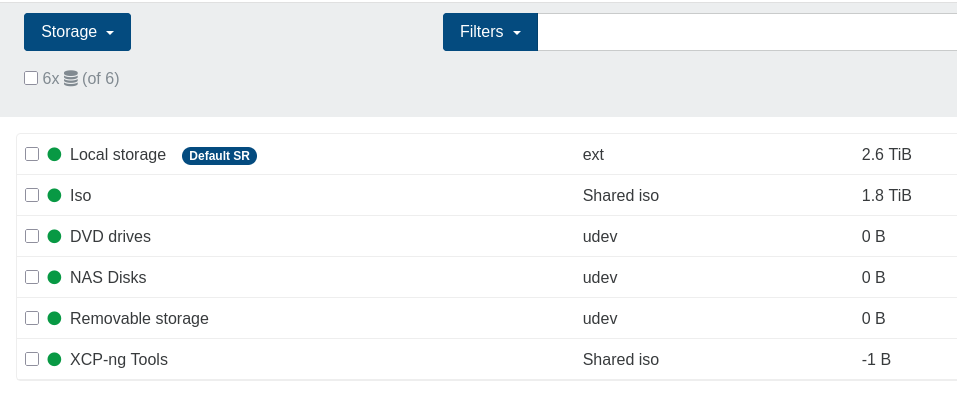
now to the next task command:
xe sr-scan uuid=b802722e-67ac-5aba-8d6c-e565d2d7fa0dwas successful, but I have another Question, the size of the device is not showing, is this normal being that it was done this way?
UPDATE 2.0: I just discovered the xe command:
[15:27 xcp-kbbn NAS]# xe host-list
uuid ( RO)                : 9a5e5bb3-bdb9-41ea-9505-6f6fe630f369
          name-label ( RW): xcp-kbbn
the uuid does not match the ones provided above, do I need to remove the SR and do it over again using this uuid? I will give it a try using another folder....
UPDATE 2.1: I executed the command using the above uuid:
[15:35 xcp-kbbn srv]# xe sr-create type=udev device-config:location=/srv/NAS name-label="NAS Disks" host-uuid=9a5e5bb3-bdb9-41ea-9505-6f6fe630f369
6fc531a0-19a0-b9c1-c78e-c687fce5ff84
and was successful, but now my question for the device size, is it normal or not due to creating it this way?
UPDATE 2.2: I forgot to do:
ln -s /dev/sda /srv/NAS/sda #although it might be better to use a stable identifier if you have multiple disks
xe sr-scan uuid=<UUID of the udev SR>
be right back.....
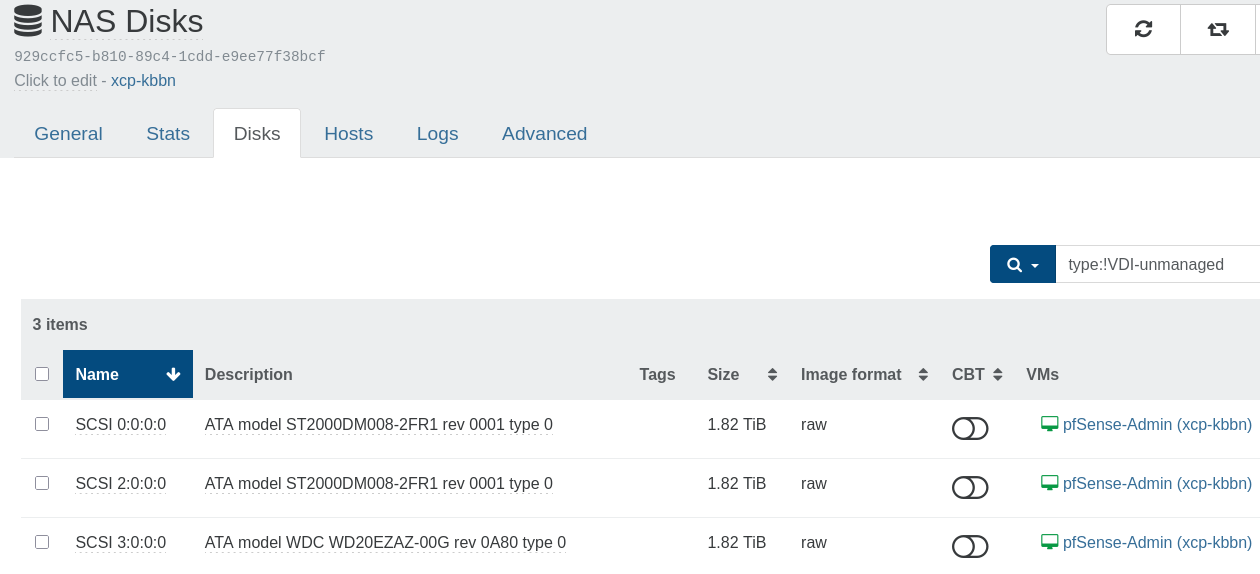
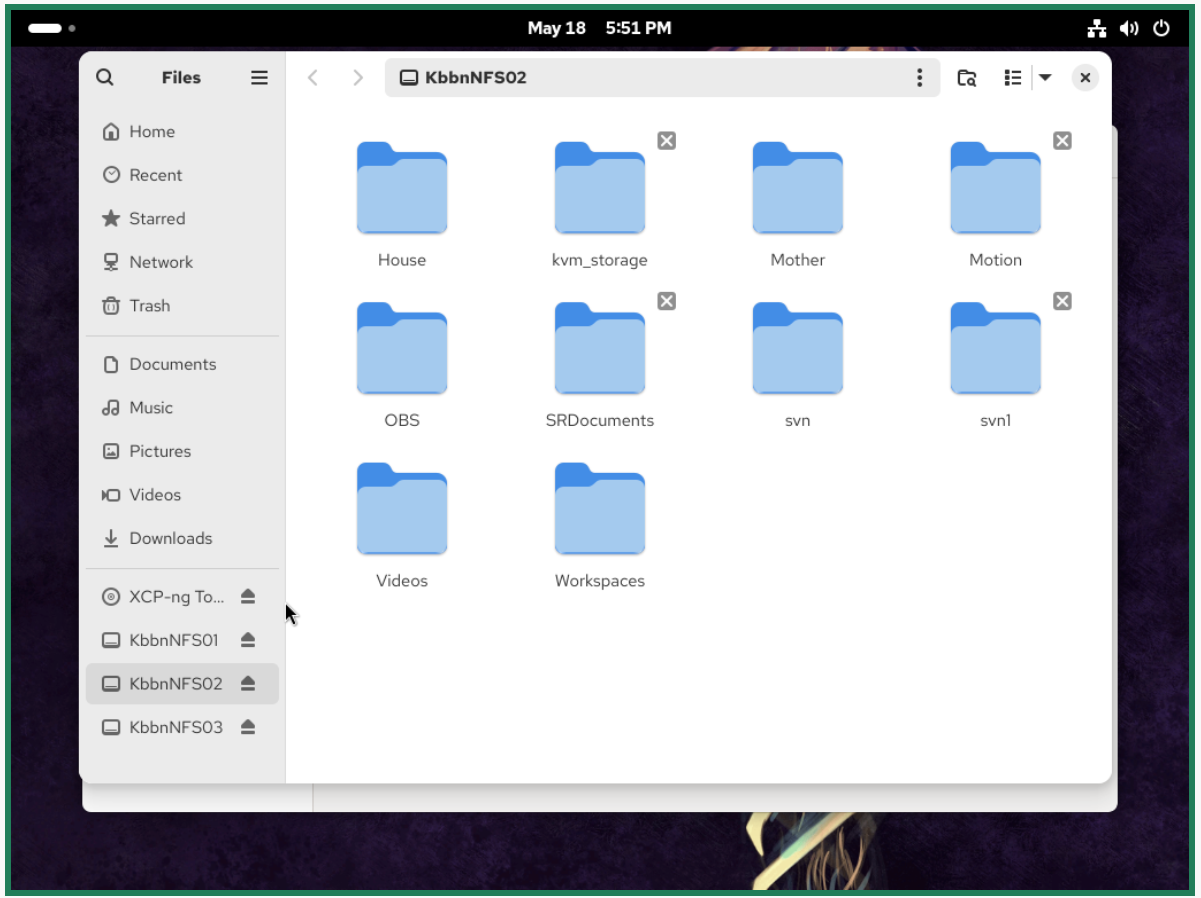
UPDATE 3.0: Success, I have all HDs attached to my VM, access all files and the sizes are reported!

 :
:
List of attached disks:
The VM:
Thanks for your help!...

-
N nasheayahu referenced this topic on

Hello! It looks like you're interested in this conversation, but you don't have an account yet.
Getting fed up of having to scroll through the same posts each visit? When you register for an account, you'll always come back to exactly where you were before, and choose to be notified of new replies (either via email, or push notification). You'll also be able to save bookmarks and upvote posts to show your appreciation to other community members.
With your input, this post could be even better 💗
Register Login