PCIe Pass-through lanes and lane performance
-
A curiosity here...
I've got two (identical) hosts in a pool (2nd Gen Epyc).
Host 1 has an NVidia Tesla P4 GPU passed-through to a VM.
Host 2 has an Intel B50 Pro GPU passed-through to a VM.I've been attempting to get the Intel GPU running properly in a VM.
The NVidia GPU is PCIe Gen3 x16.
The Intel should be PCIe Gen5 x8, but should not have any issues running at PCIe Gen4 x8.The NVidia GPU shows up as PCIe Gen3 x16 lanes.
The Intel GPU shows up as PCIe Gen1 x1 lane (and as such does not work).What determines how many of what generation PCIe lanes gets passed through? Is XCP-ng just not sorting out the Intel GPU properly?
I'm pretty sure the BIOS settings are the same between the two hosts, but I'll see about doing a full comparison between the two.
Thanks!
James
-
Are these GPUs installed in actual servers or consumer motherboards? If the later is the intel gpu in the top most pcie slot?
-
@acebmxer Supermicro server systems. The Eypc CPU's have 128 lanes of PCIe Gen4. The cards are inserted into appropriate slots.
I just updated the BIOS and BMC code on the server with the Intel GPU. I went through and re-enabled all the SR-IOV stuff and made sure ReBAR was enabled.
Still, GPU-Z reports that a Windows guest with the Intel GPU passed-through is linked up with a single lane of PCIe gen 1.
I suppose that could be cosmetic, however passing through the same Intel GPU to a Debian VM has issues when trying to initialize the card on boot and I can't get it to work there at all. It will at least do something in Windows.
-
The intel Arc GPUs have som weird internal pcie bridge setup that lspci shows only the top of so the actual speed is probably not x1...
https://www.intel.com/content/www/us/en/support/articles/000094587/graphics.html -
First, thanks for chiming in. Second...I'll admit that I'm ignorant here. This is not an area that I have any real experience.
The Intel doc reference (paraphrasing here) "magic lspci" options that will truly show you that the GPU isn't really running in Gen1x1 and that deeper down, its truly working as intended. I wish they would have just included the super-secret magic lspci options needed to show this is the case...But they didn't.
The best I can see from lspci -vvxxxx is it still only shows Gen1x1
00:08.0 VGA compatible controller: Intel Corporation Battlemage G21 [Intel Graphics] (prog-if 00 [VGA controller])
	Subsystem: Intel Corporation Device 1114
	Physical Slot: 8
	Control: I/O+ Mem+ BusMaster+ SpecCycle- MemWINV- VGASnoop- ParErr- Stepping- SERR- FastB2B- DisINTx+
	Status: Cap+ 66MHz- UDF- FastB2B- ParErr- DEVSEL=fast >TAbort- <TAbort- <MAbort- >SERR- <PERR- INTx-
	Latency: 0
	Interrupt: pin ? routed to IRQ 79
	Region 0: Memory at f1000000 (64-bit, prefetchable) [size=16M]
	Region 2: Memory at 400000000 (64-bit, prefetchable) [size=16G]
	Expansion ROM at 000c0000 [disabled] [size=128K]
	Capabilities: [40] Vendor Specific Information: Len=0c <?>
	Capabilities: [70] Express (v2) Endpoint, IntMsgNum 0
		DevCap:	MaxPayload 256 bytes, PhantFunc 0, Latency L0s unlimited, L1 unlimited
			ExtTag+ AttnBtn- AttnInd- PwrInd- RBE+ FLReset- SlotPowerLimit 0W TEE-IO-
		DevCtl:	CorrErr- NonFatalErr- FatalErr- UnsupReq-
			RlxdOrd+ ExtTag+ PhantFunc- AuxPwr- NoSnoop+
			MaxPayload 128 bytes, MaxReadReq 512 bytes
		DevSta:	CorrErr- NonFatalErr- FatalErr- UnsupReq- AuxPwr- TransPend-
		LnkCap:	Port #0, Speed 2.5GT/s, Width x1, ASPM L0s L1, Exit Latency L0s <64ns, L1 <1us
			ClockPM- Surprise- LLActRep- BwNot- ASPMOptComp+
		LnkCtl:	ASPM Disabled; RCB 64 bytes, LnkDisable- CommClk-
			ExtSynch- ClockPM- AutWidDis- BWInt- AutBWInt-
		LnkSta:	Speed 2.5GT/s, Width x1
			TrErr- Train- SlotClk- DLActive- BWMgmt- ABWMgmt-
		DevCap2: Completion Timeout: Range B, TimeoutDis+ NROPrPrP- LTR+
			 10BitTagComp+ 10BitTagReq+ OBFF Not Supported, ExtFmt+ EETLPPrefix-
			 EmergencyPowerReduction Not Supported, EmergencyPowerReductionInit-
			 FRS- TPHComp- ExtTPHComp-
			 AtomicOpsCap: 32bit- 64bit- 128bitCAS-
		DevCtl2: Completion Timeout: 50us to 50ms, TimeoutDis-
			 AtomicOpsCtl: ReqEn-
			 IDOReq- IDOCompl- LTR- EmergencyPowerReductionReq-
			 10BitTagReq- OBFF Disabled, EETLPPrefixBlk-
		LnkSta2: Current De-emphasis Level: -6dB, EqualizationComplete- EqualizationPhase1-
			 EqualizationPhase2- EqualizationPhase3- LinkEqualizationRequest-
			 Retimer- 2Retimers- CrosslinkRes: unsupported
	Capabilities: [ac] MSI: Enable+ Count=1/1 Maskable- 64bit+
		Address: 00000000feed7000  Data: 0700
	Capabilities: [d0] Power Management version 3
		Flags: PMEClk- DSI- D1- D2- AuxCurrent=0mA PME(D0-,D1-,D2-,D3hot-,D3cold-)
		Status: D0 NoSoftRst- PME-Enable- DSel=0 DScale=0 PME-
	Kernel driver in use: xe
	Kernel modules: xe
00: 86 80 12 e2 07 04 10 00 00 00 00 03 00 00 00 00
10: 0c 00 00 f1 00 00 00 00 0c 00 00 00 04 00 00 00
20: 00 00 00 00 00 00 00 00 00 00 00 00 86 80 14 11
30: 00 00 00 f2 40 00 00 00 00 00 00 00 ff 00 00 00
40: 09 70 0c 01 0b 00 00 00 00 00 00 00 00 00 00 00
50: c0 f9 00 00 00 00 00 00 00 40 00 00 00 00 00 00
60: 00 00 00 00 00 00 00 00 00 00 00 00 00 00 00 00
70: 10 ac 02 00 e1 8f 00 00 10 29 00 00 11 0c 40 00
80: 00 00 11 00 00 00 00 00 00 00 00 00 00 00 00 00
90: 00 00 00 00 12 08 13 00 00 00 00 00 02 00 00 00
a0: 01 00 00 00 00 00 00 00 00 00 00 00 05 d0 81 00
b0: 00 70 ed fe 00 00 00 00 00 07 00 00 00 00 00 00
c0: 00 00 00 00 00 00 00 00 00 00 00 00 00 00 00 00
d0: 01 00 03 00 00 00 00 00 00 00 00 00 00 00 00 00
e0: 00 00 00 00 00 00 00 00 00 00 00 00 00 00 00 00
f0: c7 21 80 ff 03 00 00 00 00 00 00 00 00 00 00 00
When I ask the system what it thinks the capabilities are, again I get Gen1x1:
cat /sys/bus/pci/devices/0000:00:08.0/current_link_speed
2.5 GT/s PCIe
cat /sys/bus/pci/devices/0000:00:08.0/current_link_width
1
cat /sys/bus/pci/devices/0000:00:08.0/max_link_speed
2.5 GT/s PCIe
cat /sys/bus/pci/devices/0000:00:08.0/max_link_width
1I know I'm a bit out in uncharted territory here. I don't think XCP-ng supports ReBAR via pass-through (I think that's on the road-map for XenServer9 and maybe XCP-ng 9 as well), current gen GPUs all want ReBAR support, Intel GPU's are in a mostly experimental/developmental mode and might be having a murky future anyway...
Anyway...From my completely uninformed and ignorant position, it doesn't look like it's negotiating PCIe properly through XCP-ng.
-
Motherboard = ?
-
@anglerfish27 Supermicro H12SSL-i
I've dabbled with some PCIe settings, but I'm not really getting anywhere.
Here's a link to the manual:
https://www.supermicro.com/manuals/motherboard/EPYC7000/MNL-2314.pdf
Thanks!
-
@anglerfish27 Supermicro H12SSL-i
I've dabbled with some PCIe settings, but I'm not really getting anywhere.
Here's a link to the manual:
https://www.supermicro.com/manuals/motherboard/EPYC7000/MNL-2314.pdf
Thanks!
Enable the SVM option will initialise the virtualisation settings automatically. As well as the SR-IOV settings, there’s going to other things need doing in XOA, to configure the necessary settings so that GPU can be passed through to the VM.
-
I know I'm a bit out in uncharted territory here. I don't think XCP-ng supports ReBAR via pass-through (I think that's on the road-map for XenServer9 and maybe XCP-ng 9 as well), current gen GPUs all want ReBAR support, Intel GPU's are in a mostly experimental/developmental mode and might be having a murky future anyway...
XCP-ng guest firmware have a very "legacy" initial BAR placement (i.e thus no explicit support for Resizable BAR, everything below 4G, ...), but the guest operating system can still replace the location of BAR itself if the hardware allows it (in particular Linux will try it, but I'm not sure Windows does).
In your case, the GPU VRAM BAR is 16 GB, so it's obviously resized. And according to
xe, you should see in dmesg something likeBAR2 resized to 16384MiB -
When I ask the system what it thinks the capabilities are, again I get Gen1x1:
cat /sys/bus/pci/devices/0000:00:08.0/current_link_speed
2.5 GT/s PCIe
cat /sys/bus/pci/devices/0000:00:08.0/current_link_width
1
cat /sys/bus/pci/devices/0000:00:08.0/max_link_speed
2.5 GT/s PCIe
cat /sys/bus/pci/devices/0000:00:08.0/max_link_width
1This information is actually crafted by QEMU, it doesn't represent the actual real device PCI state; you should check this from Dom0 which should be closer to reality.
-
Yes indeed. SVM has been enabled as well as SR-IOV and IOMMU.
That should be all good for full virtualization and support pass-through and SR-IOV features.
-
I haven't cleared the PCI pass-through masking in Dom0, but below is the same lspci command from Dom0. I'm pretty sure I'm running the latest 8.3 with all the current patches. This could just be a kernel issue?
lspci -vvxxxx -s 0000:83:00.0 83:00.0 VGA compatible controller: Intel Corporation Device e212 (prog-if 00 [VGA controller]) Subsystem: Intel Corporation Device 1114 Control: I/O- Mem- BusMaster- SpecCycle- MemWINV- VGASnoop- ParErr- Stepping- SERR- FastB2B- DisINTx- Status: Cap+ 66MHz- UDF- FastB2B- ParErr- DEVSEL=fast >TAbort- <TAbort- <MAbort- >SERR- <PERR- INTx- Region 0: Memory at 20002000000 (64-bit, prefetchable) [disabled] [size=16M] Region 2: Memory at 1f800000000 (64-bit, prefetchable) [disabled] [size=16G] Expansion ROM at f7c00000 [disabled] [size=2M] Capabilities: [40] Vendor Specific Information: Len=0c <?> Capabilities: [70] Express (v2) Endpoint, MSI 00 DevCap: MaxPayload 256 bytes, PhantFunc 0, Latency L0s unlimited, L1 unlimited ExtTag+ AttnBtn- AttnInd- PwrInd- RBE+ FLReset+ SlotPowerLimit 0.000W DevCtl: Report errors: Correctable+ Non-Fatal+ Fatal+ Unsupported- RlxdOrd+ ExtTag+ PhantFunc- AuxPwr- NoSnoop+ FLReset- MaxPayload 256 bytes, MaxReadReq 512 bytes DevSta: CorrErr- UncorrErr- FatalErr- UnsuppReq- AuxPwr- TransPend- LnkCap: Port #0, Speed 2.5GT/s, Width x1, ASPM L0s L1, Exit Latency L0s <64ns, L1 <1us ClockPM- Surprise- LLActRep- BwNot- ASPMOptComp+ LnkCtl: ASPM Disabled; RCB 64 bytes Disabled- CommClk- ExtSynch- ClockPM- AutWidDis- BWInt- AutBWInt- LnkSta: Speed 2.5GT/s, Width x1, TrErr- Train- SlotClk- DLActive- BWMgmt- ABWMgmt- DevCap2: Completion Timeout: Range B, TimeoutDis+, LTR+, OBFF Not Supported DevCtl2: Completion Timeout: 50us to 50ms, TimeoutDis-, LTR-, OBFF Disabled LnkCtl2: Target Link Speed: 2.5GT/s, EnterCompliance- SpeedDis- Transmit Margin: Normal Operating Range, EnterModifiedCompliance- ComplianceSOS- Compliance De-emphasis: -6dB LnkSta2: Current De-emphasis Level: -6dB, EqualizationComplete-, EqualizationPhase1- EqualizationPhase2-, EqualizationPhase3-, LinkEqualizationRequest- Capabilities: [ac] MSI: Enable- Count=1/1 Maskable+ 64bit+ Address: 0000000000000000 Data: 0000 Masking: 00000000 Pending: 00000000 Capabilities: [d0] Power Management version 3 Flags: PMEClk- DSI- D1- D2- AuxCurrent=0mA PME(D0+,D1-,D2-,D3hot+,D3cold-) Status: D0 NoSoftRst+ PME-Enable- DSel=0 DScale=0 PME- Capabilities: [100 v1] Alternative Routing-ID Interpretation (ARI) ARICap: MFVC- ACS-, Next Function: 0 ARICtl: MFVC- ACS-, Function Group: 0 Capabilities: [110 v1] #00 Capabilities: [200 v1] Address Translation Service (ATS) ATSCap: Invalidate Queue Depth: 00 ATSCtl: Enable-, Smallest Translation Unit: 00 Capabilities: [420 v1] #15 Capabilities: [220 v1] #24 Capabilities: [320 v1] Single Root I/O Virtualization (SR-IOV) IOVCap: Migration-, Interrupt Message Number: 000 IOVCtl: Enable- Migration- Interrupt- MSE- ARIHierarchy+ IOVSta: Migration- Initial VFs: 2, Total VFs: 2, Number of VFs: 0, Function Dependency Link: 00 VF offset: 1, stride: 1, Device ID: e212 Supported Page Size: 00000553, System Page Size: 00000001 Region 0: Memory at 0000020000000000 (64-bit, prefetchable) Region 2: Memory at 000001fc00000000 (64-bit, prefetchable) VF Migration: offset: 00000000, BIR: 0 Capabilities: [400 v1] Latency Tolerance Reporting Max snoop latency: 0ns Max no snoop latency: 0ns Kernel driver in use: pciback 00: 86 80 12 e2 00 00 10 00 00 00 00 03 10 00 00 00 10: 0c 00 00 02 00 02 00 00 0c 00 00 00 f8 01 00 00 20: 00 00 00 00 00 00 00 00 00 00 00 00 86 80 14 11 30: 00 00 c0 f7 40 00 00 00 00 00 00 00 ff 00 00 00 40: 09 70 0c 01 0b 00 00 00 00 00 00 00 00 00 00 00 50: c0 f9 00 00 00 00 00 00 00 40 00 00 00 00 00 00 60: 00 00 00 00 00 00 00 00 00 00 00 00 00 00 00 00 70: 10 ac 02 00 e1 8f 00 10 37 29 00 00 11 0c 40 00 80: 00 00 11 00 00 00 00 00 00 00 00 00 00 00 00 00 90: 00 00 00 00 12 08 13 00 00 10 00 00 02 00 00 00 a0: 00 00 00 00 00 00 00 00 00 00 00 00 05 d0 80 01 b0: 00 00 00 00 00 00 00 00 00 00 00 00 00 00 00 00 c0: 00 00 00 00 00 00 00 00 00 00 00 00 00 00 00 00 d0: 01 00 03 48 08 00 00 00 00 00 00 00 00 00 00 00 e0: 00 00 00 00 00 00 00 00 00 00 00 00 00 00 00 00 f0: c7 21 80 ff 03 00 00 00 00 00 00 00 00 00 00 00 100: 0e 00 01 11 00 00 00 00 00 00 00 00 00 00 00 00 110: 00 00 01 20 00 14 00 00 00 00 00 00 00 00 00 00 120: 00 00 00 00 00 00 00 00 00 00 00 00 00 00 00 00 130: 00 00 00 00 00 00 00 00 00 00 00 00 00 00 00 00 140: 00 00 00 00 00 00 00 00 00 00 00 00 00 00 00 00 150: 00 00 00 00 00 00 00 00 00 00 00 00 00 00 00 00 160: 00 00 00 00 00 00 00 00 00 00 00 00 00 00 00 00 170: 00 00 00 00 00 00 00 00 00 00 00 00 00 00 00 00 180: 00 00 00 00 00 00 00 00 00 00 00 00 00 00 00 00 190: 00 00 00 00 00 00 00 00 00 00 00 00 00 00 00 00 1a0: 00 00 00 00 00 00 00 00 00 00 00 00 00 00 00 00 1b0: 00 00 00 00 00 00 00 00 00 00 00 00 00 00 00 00 1c0: 00 00 00 00 00 00 00 00 00 00 00 00 00 00 00 00 1d0: 00 00 00 00 00 00 00 00 00 00 00 00 00 00 00 00 1e0: 00 00 00 00 00 00 00 00 00 00 00 00 00 00 00 00 1f0: 00 00 00 00 00 00 00 00 00 00 00 00 00 00 00 00 200: 0f 00 01 42 20 00 00 00 00 00 00 00 00 00 00 00 210: 00 00 00 00 00 00 00 00 00 00 00 00 00 00 00 00 220: 24 00 01 32 00 f0 07 00 22 0d 00 00 00 00 00 00 230: 00 00 00 00 00 00 00 00 00 00 00 00 00 00 00 00 240: 00 00 00 00 00 00 00 00 00 00 00 00 00 00 00 00 250: 00 00 00 00 00 00 00 00 00 00 00 00 00 00 00 00 260: 00 00 00 00 00 00 00 00 00 00 00 00 00 00 00 00 270: 00 00 00 00 00 00 00 00 00 00 00 00 00 00 00 00 280: 00 00 00 00 00 00 00 00 00 00 00 00 00 00 00 00 290: 00 00 00 00 00 00 00 00 00 00 00 00 00 00 00 00 2a0: 00 00 00 00 00 00 00 00 00 00 00 00 00 00 00 00 2b0: 00 00 00 00 00 00 00 00 00 00 00 00 00 00 00 00 2c0: 00 00 00 00 00 00 00 00 00 00 00 00 00 00 00 00 2d0: 00 00 00 00 00 00 00 00 00 00 00 00 00 00 00 00 2e0: 00 00 00 00 00 00 00 00 00 00 00 00 00 00 00 00 2f0: 00 00 00 00 00 00 00 00 00 00 00 00 00 00 00 00 300: 13 00 01 32 00 00 00 81 00 80 00 00 00 00 00 00 310: 00 00 00 00 00 00 00 00 00 00 00 00 00 00 00 00 320: 10 00 01 40 06 00 00 00 10 00 00 00 02 00 02 00 330: 00 00 00 00 01 00 01 00 00 00 12 e2 53 05 00 00 340: 01 00 00 00 0c 00 00 00 00 02 00 00 0c 00 00 00 350: fc 01 00 00 00 00 00 00 00 00 00 00 00 00 00 00 360: 00 00 00 00 00 00 00 00 00 00 00 00 00 00 00 00 370: 00 00 00 00 00 00 00 00 00 00 00 00 00 00 00 00 380: 00 00 00 00 00 00 00 00 00 00 00 00 00 00 00 00 390: 00 00 00 00 00 00 00 00 00 00 00 00 00 00 00 00 3a0: 00 00 00 00 00 00 00 00 00 00 00 00 00 00 00 00 3b0: 00 00 00 00 00 00 00 00 00 00 00 00 00 00 00 00 3c0: 00 00 00 00 00 00 00 00 00 00 00 00 00 00 00 00 3d0: 00 00 00 00 00 00 00 00 00 00 00 00 00 00 00 00 3e0: 00 00 00 00 00 00 00 00 00 00 00 00 00 00 00 00 3f0: 00 00 00 00 00 00 00 00 00 00 00 00 00 00 00 00 400: 18 00 01 00 00 00 00 00 00 00 00 00 00 00 00 00 410: 00 00 00 00 00 00 00 00 00 00 00 00 00 00 00 00 420: 15 00 01 22 00 f0 07 00 22 0e 00 00 00 00 00 00 430: 00 00 00 00 00 00 00 00 00 00 00 00 00 00 00 00 440: 00 00 00 00 00 00 00 00 00 00 00 00 00 00 00 00 450: 00 00 00 00 00 00 00 00 00 00 00 00 00 00 00 00 460: 00 00 00 00 00 00 00 00 00 00 00 00 00 00 00 00 470: 00 00 00 00 00 00 00 00 00 00 00 00 00 00 00 00 480: 00 00 00 00 00 00 00 00 00 00 00 00 00 00 00 00 490: 00 00 00 00 00 00 00 00 00 00 00 00 00 00 00 00 4a0: 00 00 00 00 00 00 00 00 00 00 00 00 00 00 00 00 4b0: 00 00 00 00 00 00 00 00 00 00 00 00 00 00 00 00 4c0: 00 00 00 00 00 00 00 00 00 00 00 00 00 00 00 00 4d0: 00 00 00 00 00 00 00 00 00 00 00 00 00 00 00 00 4e0: 00 00 00 00 00 00 00 00 00 00 00 00 00 00 00 00 4f0: 00 00 00 00 00 00 00 00 00 00 00 00 00 00 00 00 500: 00 00 00 00 00 00 00 00 00 00 00 00 00 00 00 00 510: 00 00 00 00 00 00 00 00 00 00 00 00 00 00 00 00 520: 00 00 00 00 00 00 00 00 00 00 00 00 00 00 00 00 530: 00 00 00 00 00 00 00 00 00 00 00 00 00 00 00 00 540: 00 00 00 00 00 00 00 00 00 00 00 00 00 00 00 00 550: 00 00 00 00 00 00 00 00 00 00 00 00 00 00 00 00 560: 00 00 00 00 00 00 00 00 00 00 00 00 00 00 00 00 570: 00 00 00 00 00 00 00 00 00 00 00 00 00 00 00 00 580: 00 00 00 00 00 00 00 00 00 00 00 00 00 00 00 00 590: 00 00 00 00 00 00 00 00 00 00 00 00 00 00 00 00 5a0: 00 00 00 00 00 00 00 00 00 00 00 00 00 00 00 00 5b0: 00 00 00 00 00 00 00 00 00 00 00 00 00 00 00 00 5c0: 00 00 00 00 00 00 00 00 00 00 00 00 00 00 00 00 5d0: 00 00 00 00 00 00 00 00 00 00 00 00 00 00 00 00 5e0: 00 00 00 00 00 00 00 00 00 00 00 00 00 00 00 00 5f0: 00 00 00 00 00 00 00 00 00 00 00 00 00 00 00 00 600: 00 00 00 00 00 00 00 00 00 00 00 00 00 00 00 00 610: 00 00 00 00 00 00 00 00 00 00 00 00 00 00 00 00 620: 00 00 00 00 00 00 00 00 00 00 00 00 00 00 00 00 630: 00 00 00 00 00 00 00 00 00 00 00 00 00 00 00 00 640: 00 00 00 00 00 00 00 00 00 00 00 00 00 00 00 00 650: 00 00 00 00 00 00 00 00 00 00 00 00 00 00 00 00 660: 00 00 00 00 00 00 00 00 00 00 00 00 00 00 00 00 670: 00 00 00 00 00 00 00 00 00 00 00 00 00 00 00 00 680: 00 00 00 00 00 00 00 00 00 00 00 00 00 00 00 00 690: 00 00 00 00 00 00 00 00 00 00 00 00 00 00 00 00 6a0: 00 00 00 00 00 00 00 00 00 00 00 00 00 00 00 00 6b0: 00 00 00 00 00 00 00 00 00 00 00 00 00 00 00 00 6c0: 00 00 00 00 00 00 00 00 00 00 00 00 00 00 00 00 6d0: 00 00 00 00 00 00 00 00 00 00 00 00 00 00 00 00 6e0: 00 00 00 00 00 00 00 00 00 00 00 00 00 00 00 00 6f0: 00 00 00 00 00 00 00 00 00 00 00 00 00 00 00 00 700: 00 00 00 00 00 00 00 00 00 00 00 00 00 00 00 00 710: 00 00 00 00 00 00 00 00 00 00 00 00 00 00 00 00 720: 00 00 00 00 00 00 00 00 00 00 00 00 00 00 00 00 730: 00 00 00 00 00 00 00 00 00 00 00 00 00 00 00 00 740: 00 00 00 00 00 00 00 00 00 00 00 00 00 00 00 00 750: 00 00 00 00 00 00 00 00 00 00 00 00 00 00 00 00 760: 00 00 00 00 00 00 00 00 00 00 00 00 00 00 00 00 770: 00 00 00 00 00 00 00 00 00 00 00 00 00 00 00 00 780: 00 00 00 00 00 00 00 00 00 00 00 00 00 00 00 00 790: 00 00 00 00 00 00 00 00 00 00 00 00 00 00 00 00 7a0: 00 00 00 00 00 00 00 00 00 00 00 00 00 00 00 00 7b0: 00 00 00 00 00 00 00 00 00 00 00 00 00 00 00 00 7c0: 00 00 00 00 00 00 00 00 00 00 00 00 00 00 00 00 7d0: 00 00 00 00 00 00 00 00 00 00 00 00 00 00 00 00 7e0: 00 00 00 00 00 00 00 00 00 00 00 00 00 00 00 00 7f0: 00 00 00 00 00 00 00 00 00 00 00 00 00 00 00 00 800: 00 00 00 00 00 00 00 00 00 00 00 00 00 00 00 00 810: 00 00 00 00 00 00 00 00 00 00 00 00 00 00 00 00 820: 00 00 00 00 00 00 00 00 00 00 00 00 00 00 00 00 830: 00 00 00 00 00 00 00 00 00 00 00 00 00 00 00 00 840: 00 00 00 00 00 00 00 00 00 00 00 00 00 00 00 00 850: 00 00 00 00 00 00 00 00 00 00 00 00 00 00 00 00 860: 00 00 00 00 00 00 00 00 00 00 00 00 00 00 00 00 870: 00 00 00 00 00 00 00 00 00 00 00 00 00 00 00 00 880: 00 00 00 00 00 00 00 00 00 00 00 00 00 00 00 00 890: 00 00 00 00 00 00 00 00 00 00 00 00 00 00 00 00 8a0: 00 00 00 00 00 00 00 00 00 00 00 00 00 00 00 00 8b0: 00 00 00 00 00 00 00 00 00 00 00 00 00 00 00 00 8c0: 00 00 00 00 00 00 00 00 00 00 00 00 00 00 00 00 8d0: 00 00 00 00 00 00 00 00 00 00 00 00 00 00 00 00 8e0: 00 00 00 00 00 00 00 00 00 00 00 00 00 00 00 00 8f0: 00 00 00 00 00 00 00 00 00 00 00 00 00 00 00 00 900: 00 00 00 00 00 00 00 00 00 00 00 00 00 00 00 00 910: 00 00 00 00 00 00 00 00 00 00 00 00 00 00 00 00 920: 00 00 00 00 00 00 00 00 00 00 00 00 00 00 00 00 930: 00 00 00 00 00 00 00 00 00 00 00 00 00 00 00 00 940: 00 00 00 00 00 00 00 00 00 00 00 00 00 00 00 00 950: 00 00 00 00 00 00 00 00 00 00 00 00 00 00 00 00 960: 00 00 00 00 00 00 00 00 00 00 00 00 00 00 00 00 970: 00 00 00 00 00 00 00 00 00 00 00 00 00 00 00 00 980: 00 00 00 00 00 00 00 00 00 00 00 00 00 00 00 00 990: 00 00 00 00 00 00 00 00 00 00 00 00 00 00 00 00 9a0: 00 00 00 00 00 00 00 00 00 00 00 00 00 00 00 00 9b0: 00 00 00 00 00 00 00 00 00 00 00 00 00 00 00 00 9c0: 00 00 00 00 00 00 00 00 00 00 00 00 00 00 00 00 9d0: 00 00 00 00 00 00 00 00 00 00 00 00 00 00 00 00 9e0: 00 00 00 00 00 00 00 00 00 00 00 00 00 00 00 00 9f0: 00 00 00 00 00 00 00 00 00 00 00 00 00 00 00 00 a00: 00 00 00 00 00 00 00 00 00 00 00 00 00 00 00 00 a10: 00 00 00 00 00 00 00 00 00 00 00 00 00 00 00 00 a20: 00 00 00 00 00 00 00 00 00 00 00 00 00 00 00 00 a30: 00 00 00 00 00 00 00 00 00 00 00 00 00 00 00 00 a40: 00 00 00 00 00 00 00 00 00 00 00 00 00 00 00 00 a50: 00 00 00 00 00 00 00 00 00 00 00 00 00 00 00 00 a60: 00 00 00 00 00 00 00 00 00 00 00 00 00 00 00 00 a70: 00 00 00 00 00 00 00 00 00 00 00 00 00 00 00 00 a80: 00 00 00 00 00 00 00 00 00 00 00 00 00 00 00 00 a90: 00 00 00 00 00 00 00 00 00 00 00 00 00 00 00 00 aa0: 00 00 00 00 00 00 00 00 00 00 00 00 00 00 00 00 ab0: 00 00 00 00 00 00 00 00 00 00 00 00 00 00 00 00 ac0: 00 00 00 00 00 00 00 00 00 00 00 00 00 00 00 00 ad0: 00 00 00 00 00 00 00 00 00 00 00 00 00 00 00 00 ae0: 00 00 00 00 00 00 00 00 00 00 00 00 00 00 00 00 af0: 00 00 00 00 00 00 00 00 00 00 00 00 00 00 00 00 b00: 00 00 00 00 00 00 00 00 00 00 00 00 00 00 00 00 b10: 00 00 00 00 00 00 00 00 00 00 00 00 00 00 00 00 b20: 00 00 00 00 00 00 00 00 00 00 00 00 00 00 00 00 b30: 00 00 00 00 00 00 00 00 00 00 00 00 00 00 00 00 b40: 00 00 00 00 00 00 00 00 00 00 00 00 00 00 00 00 b50: 00 00 00 00 00 00 00 00 00 00 00 00 00 00 00 00 b60: 00 00 00 00 00 00 00 00 00 00 00 00 00 00 00 00 b70: 00 00 00 00 00 00 00 00 00 00 00 00 00 00 00 00 b80: 00 00 00 00 00 00 00 00 00 00 00 00 00 00 00 00 b90: 00 00 00 00 00 00 00 00 00 00 00 00 00 00 00 00 ba0: 00 00 00 00 00 00 00 00 00 00 00 00 00 00 00 00 bb0: 00 00 00 00 00 00 00 00 00 00 00 00 00 00 00 00 bc0: 00 00 00 00 00 00 00 00 00 00 00 00 00 00 00 00 bd0: 00 00 00 00 00 00 00 00 00 00 00 00 00 00 00 00 be0: 00 00 00 00 00 00 00 00 00 00 00 00 00 00 00 00 bf0: 00 00 00 00 00 00 00 00 00 00 00 00 00 00 00 00 c00: 00 00 00 00 00 00 00 00 00 00 00 00 00 00 00 00 c10: 00 00 00 00 00 00 00 00 00 00 00 00 00 00 00 00 c20: 00 00 00 00 00 00 00 00 00 00 00 00 00 00 00 00 c30: 00 00 00 00 00 00 00 00 00 00 00 00 00 00 00 00 c40: 00 00 00 00 00 00 00 00 00 00 00 00 00 00 00 00 c50: 00 00 00 00 00 00 00 00 00 00 00 00 00 00 00 00 c60: 00 00 00 00 00 00 00 00 00 00 00 00 00 00 00 00 c70: 00 00 00 00 00 00 00 00 00 00 00 00 00 00 00 00 c80: 00 00 00 00 00 00 00 00 00 00 00 00 00 00 00 00 c90: 00 00 00 00 00 00 00 00 00 00 00 00 00 00 00 00 ca0: 00 00 00 00 00 00 00 00 00 00 00 00 00 00 00 00 cb0: 00 00 00 00 00 00 00 00 00 00 00 00 00 00 00 00 cc0: 00 00 00 00 00 00 00 00 00 00 00 00 00 00 00 00 cd0: 00 00 00 00 00 00 00 00 00 00 00 00 00 00 00 00 ce0: 00 00 00 00 00 00 00 00 00 00 00 00 00 00 00 00 cf0: 00 00 00 00 00 00 00 00 00 00 00 00 00 00 00 00 d00: 00 00 00 00 00 00 00 00 00 00 00 00 00 00 00 00 d10: 00 00 00 00 00 00 00 00 00 00 00 00 00 00 00 00 d20: 00 00 00 00 00 00 00 00 00 00 00 00 00 00 00 00 d30: 00 00 00 00 00 00 00 00 00 00 00 00 00 00 00 00 d40: 00 00 00 00 00 00 00 00 00 00 00 00 00 00 00 00 d50: 00 00 00 00 00 00 00 00 00 00 00 00 00 00 00 00 d60: 00 00 00 00 00 00 00 00 00 00 00 00 00 00 00 00 d70: 00 00 00 00 00 00 00 00 00 00 00 00 00 00 00 00 d80: 00 00 00 00 00 00 00 00 00 00 00 00 00 00 00 00 d90: 00 00 00 00 00 00 00 00 00 00 00 00 00 00 00 00 da0: 00 00 00 00 00 00 00 00 00 00 00 00 00 00 00 00 db0: 00 00 00 00 00 00 00 00 00 00 00 00 00 00 00 00 dc0: 00 00 00 00 00 00 00 00 00 00 00 00 00 00 00 00 dd0: 00 00 00 00 00 00 00 00 00 00 00 00 00 00 00 00 de0: 00 00 00 00 00 00 00 00 00 00 00 00 00 00 00 00 df0: 00 00 00 00 00 00 00 00 00 00 00 00 00 00 00 00 e00: 00 00 00 00 00 00 00 00 00 00 00 00 00 00 00 00 e10: 00 00 00 00 00 00 00 00 00 00 00 00 00 00 00 00 e20: 00 00 00 00 00 00 00 00 00 00 00 00 00 00 00 00 e30: 00 00 00 00 00 00 00 00 00 00 00 00 00 00 00 00 e40: 00 00 00 00 00 00 00 00 00 00 00 00 00 00 00 00 e50: 00 00 00 00 00 00 00 00 00 00 00 00 00 00 00 00 e60: 00 00 00 00 00 00 00 00 00 00 00 00 00 00 00 00 e70: 00 00 00 00 00 00 00 00 00 00 00 00 00 00 00 00 e80: 00 00 00 00 00 00 00 00 00 00 00 00 00 00 00 00 e90: 00 00 00 00 00 00 00 00 00 00 00 00 00 00 00 00 ea0: 00 00 00 00 00 00 00 00 00 00 00 00 00 00 00 00 eb0: 00 00 00 00 00 00 00 00 00 00 00 00 00 00 00 00 ec0: 00 00 00 00 00 00 00 00 00 00 00 00 00 00 00 00 ed0: 00 00 00 00 00 00 00 00 00 00 00 00 00 00 00 00 ee0: 00 00 00 00 00 00 00 00 00 00 00 00 00 00 00 00 ef0: 00 00 00 00 00 00 00 00 00 00 00 00 00 00 00 00 f00: 00 00 00 00 00 00 00 00 00 00 00 00 00 00 00 00 f10: 00 00 00 00 00 00 00 00 00 00 00 00 00 00 00 00 f20: 00 00 00 00 00 00 00 00 00 00 00 00 00 00 00 00 f30: 00 00 00 00 00 00 00 00 00 00 00 00 00 00 00 00 f40: 00 00 00 00 00 00 00 00 00 00 00 00 00 00 00 00 f50: 00 00 00 00 00 00 00 00 00 00 00 00 00 00 00 00 f60: 00 00 00 00 00 00 00 00 00 00 00 00 00 00 00 00 f70: 00 00 00 00 00 00 00 00 00 00 00 00 00 00 00 00 f80: 00 00 00 00 00 00 00 00 00 00 00 00 00 00 00 00 f90: 00 00 00 00 00 00 00 00 00 00 00 00 00 00 00 00 fa0: 00 00 00 00 00 00 00 00 00 00 00 00 00 00 00 00 fb0: 00 00 00 00 00 00 00 00 00 00 00 00 00 00 00 00 fc0: 00 00 00 00 00 00 00 00 00 00 00 00 00 00 00 00 fd0: 00 00 00 00 00 00 00 00 00 00 00 00 00 00 00 00 fe0: 00 00 00 00 00 00 00 00 00 00 00 00 00 00 00 00 ff0: 00 00 00 00 00 00 00 00 00 00 00 00 00 00 00 00 -
Not to be a nuisance...But just curious if there are other thoughts on this.
-
@JamesG Can you try having a workload on the GPU (and also checking if the performance is lower, or if it's just display) ?
-
Hello!
Just an idea but maybe the PCI link speed you are seeing is related to some sort of energy saving feature?
Background: I have a Nvidia GPU in my PC and when there is no load the PCIe speed is lowered from PCIe 4.0 to 1.1 due to energy saving feature.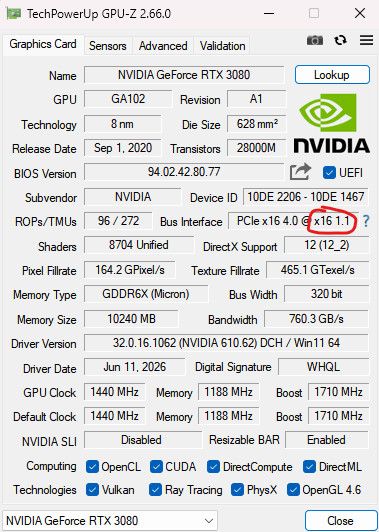
So yeah, I think @teddyastie 's idea is a good approach here. Try how your setup behaves during a workload.
-
I spent quite some time on this when i first got an Arc card and all research i found points to Linux reporting the top of the PCIE chain only. The card has an internal bridge.
The only tool i found that reports the correct info is GPU-Z which is unfortunately windows only.
My A310 which also reports PCIE x 1 in linux reports the correct link speed in GPU-Z (It is in a X4 slot so that is why it is not showing the X8 that the card is...)
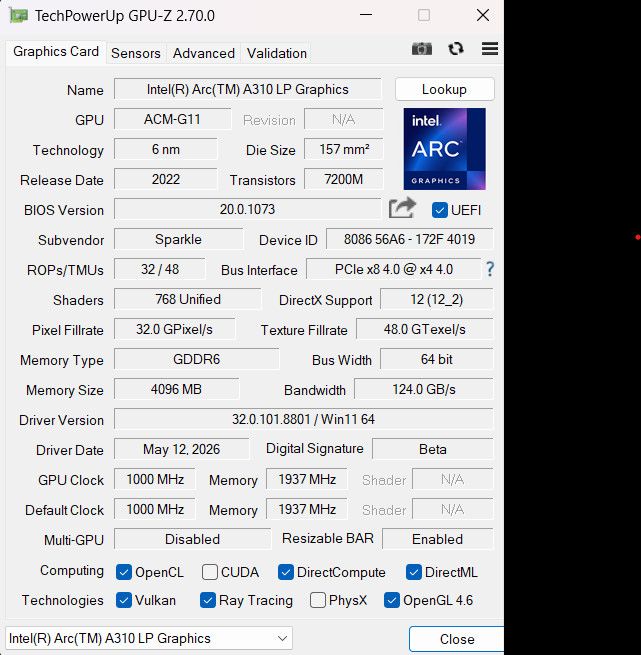
-
Is there anything mentioned in the motherboard or service manuals, about where if one PCIe slot is occupied another is running at reduced speed when occupied?
Something like this is in the manual for a Gigabyte B450 Aorus Elite (Rev 1.0) motherboard, for example. Can be in yours, somewhere written on one of its pages.
-
So I ordered some mini DP dummy plugs and took a look at this further today.
First thought...Just load Windows on the bare metal and see what the card does.
No problem. Loaded Win10, loaded the latest drivers, PCIe Gen4x8 lanes. Sweet. At least that works.
Put the XCP-ng drive back in, booted up, passed-through the GPU to a Win11 guest, updated the drivers, PCIe Gen1x1.
Ultimately I need to install a Linux distro with a really current kernel on the bare metal and see how it sees the GPU. That might be a good project for tomorrow.
I think this just comes down to a combination of too new, not well supported hardware with some quirks and somewhat dated code and support in XCP-ng (ReBAR support in guests for example).
@redakula Is that GPU-z screenshot from a Windows guest VM with the A310 passed through?
-
Maybe let's ping the entire @Team-Hypervisor-Kernel here

-
@yannsionneau I appreciate that. I will gladly provide access to the hardware if anybody in development wants to dig in and see what's going on.



Hello! It looks like you're interested in this conversation, but you don't have an account yet.
Getting fed up of having to scroll through the same posts each visit? When you register for an account, you'll always come back to exactly where you were before, and choose to be notified of new replies (either via email, or push notification). You'll also be able to save bookmarks and upvote posts to show your appreciation to other community members.
With your input, this post could be even better 💗
Register Login