XCP Pulse collects XCP-ng and Xen Orchestra logs
-
While this project is more for myself it is open to others to use. Please use at your own risk. As always review the code before using in a production environment. Please leave any feedback or suggestions. https://github.com/acebmxer/xcp_pulse
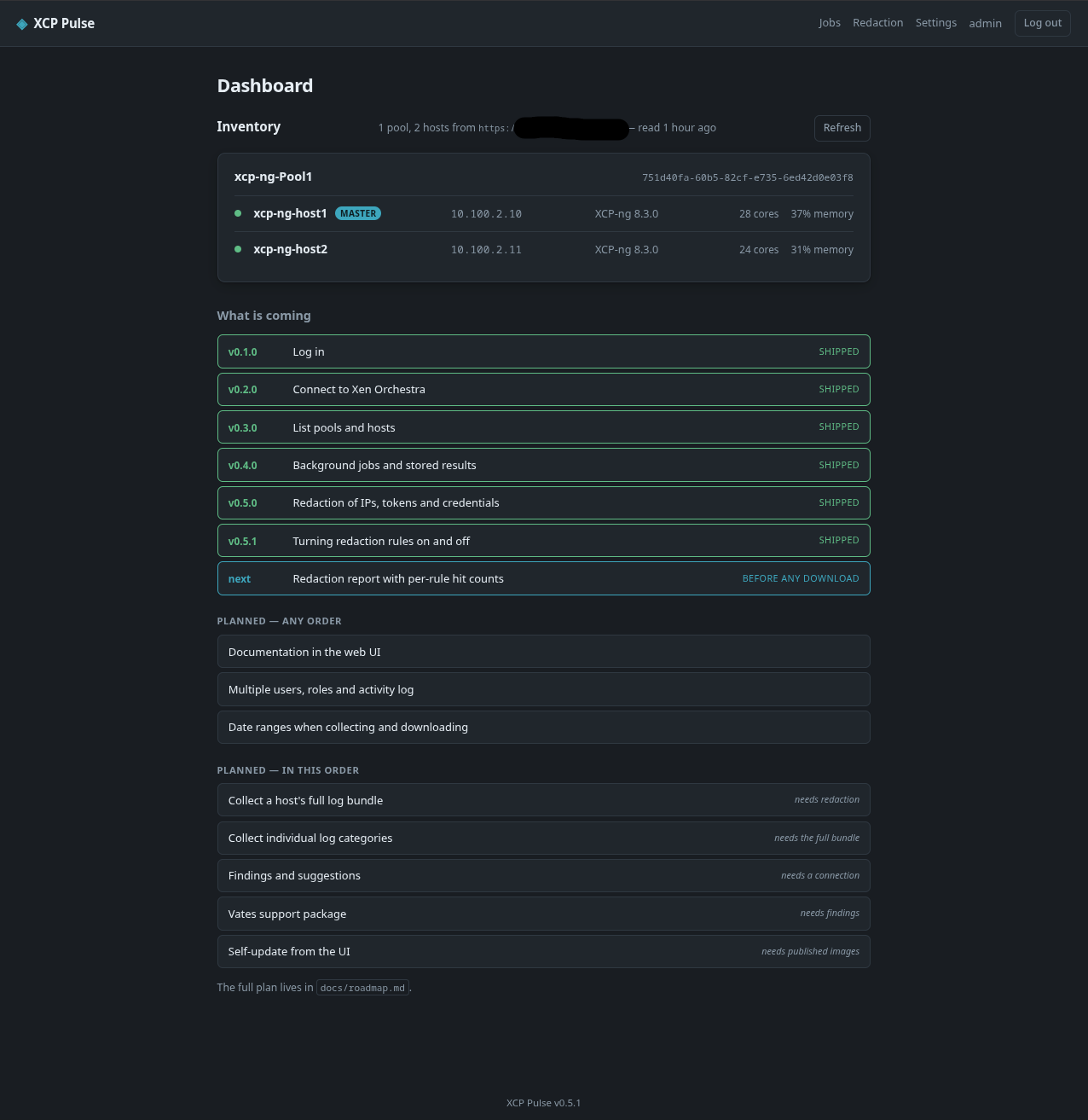
XCP Pulse collects XCP-ng and Xen Orchestra logs, bundles them for download, analyses them, and reports findings — for your own troubleshooting or to attach to a Vates support ticket. Everything goes through the Xen Orchestra REST API — nothing is installed on your hosts, and it only ever reads.
It runs as a container with a web UI. Being built in stages, and v0.5.1 is where it is today — so this is an early look rather than a finished tool. Log collection itself is the next big piece.
What works today
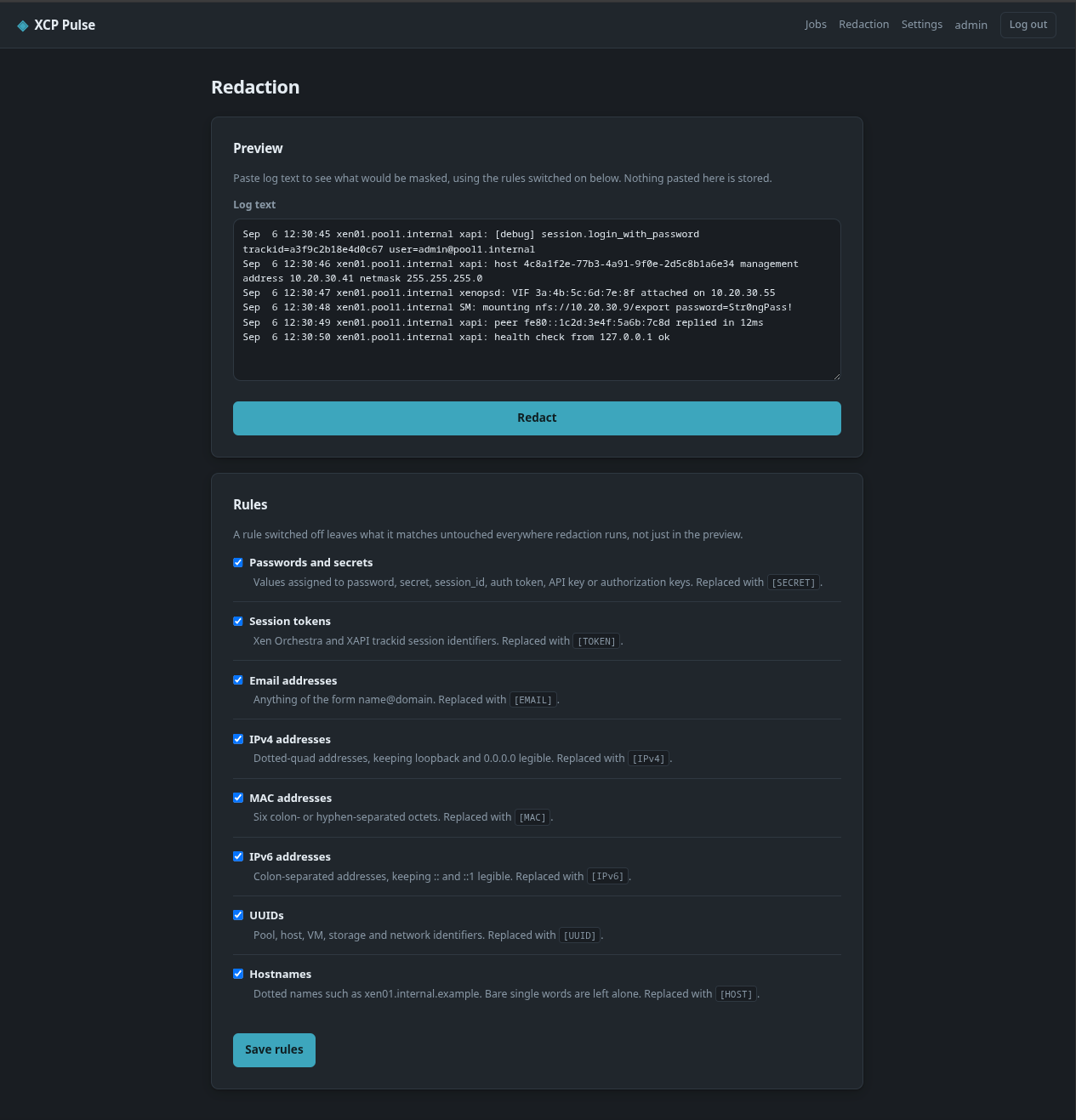
Version What it does v0.1.0 Container, login, sessions, healthcheck v0.2.0 Connect to Xen Orchestra — URL and API token, token encrypted at rest, "Test connection" v0.3.0 Pools and hosts listed on the dashboard, grouped by pool v0.4.0 Background jobs with live progress and history, and stored results v0.5.0 Redaction — masks addresses, tokens and credentials out of log text, with a preview page v0.5.1 Each redaction rule can be switched on or off Redaction came before any download button on purpose. A real log bundle is full of internal addresses, usernames and session tokens, and the point of the download is sending that file to Vates — shipping collection first would have meant a headline feature that leaks credentials. One real
xensource.logI tested against had 8,359 lines matching password, secret or session patterns.What is coming
- Collect the full log bundle per host, as a background job, redacted, with a download. Measured on my own XCP-ng 8.3 pool: about 433 MB and 100 seconds per host, 603 files.
- Collect individual categories — XAPI, storage, audit, security, kernel and the rest — pulled out of the cached bundle instead of downloading again. Current logs only comes to roughly 35 MB instead of 433 MB.
- Date ranges — of that 433 MB, 418 MB is rotated history, so asking for the last three days is a large saving.
- Findings — failed tasks, alarms, missing patches, storage errors, HA fencing, clock skew, with the evidence behind each one.
- A Vates support package — one file with the redacted bundle, findings and a manifest of what was masked.
- Multiple users, docs in the web UI, and self-update.
Full list with status: https://github.com/acebmxer/xcp_pulse/blob/main/docs/roadmap.md
Quick start
No clone and no build — the image is published to GHCR, so the compose file and an env file are the whole deployment:
mkdir xcp-pulse && cd xcp-pulse
curl -o compose.yaml https://raw.githubusercontent.com/acebmxer/xcp_pulse/main/compose.yaml.example
curl -o xcp-pulse.env https://raw.githubusercontent.com/acebmxer/xcp_pulse/main/xcp-pulse.env.example
Generate the admin password hash — XCP Pulse stores a hash, never a password, and refuses to start without one:
docker compose run --rm xcp-pulse python -m app.hashpwPaste the printed
XCP_PULSE_ADMIN_PASSWORD_HASH=...line intoxcp-pulse.env, then:docker compose up -dOpen http://localhost:8080 and sign in with
adminand the password you chose.The env file has to be called
xcp-pulse.envand not.env— compose treats a file of that name as its own variable source and mangles the Argon2 hash.A note on the XO account
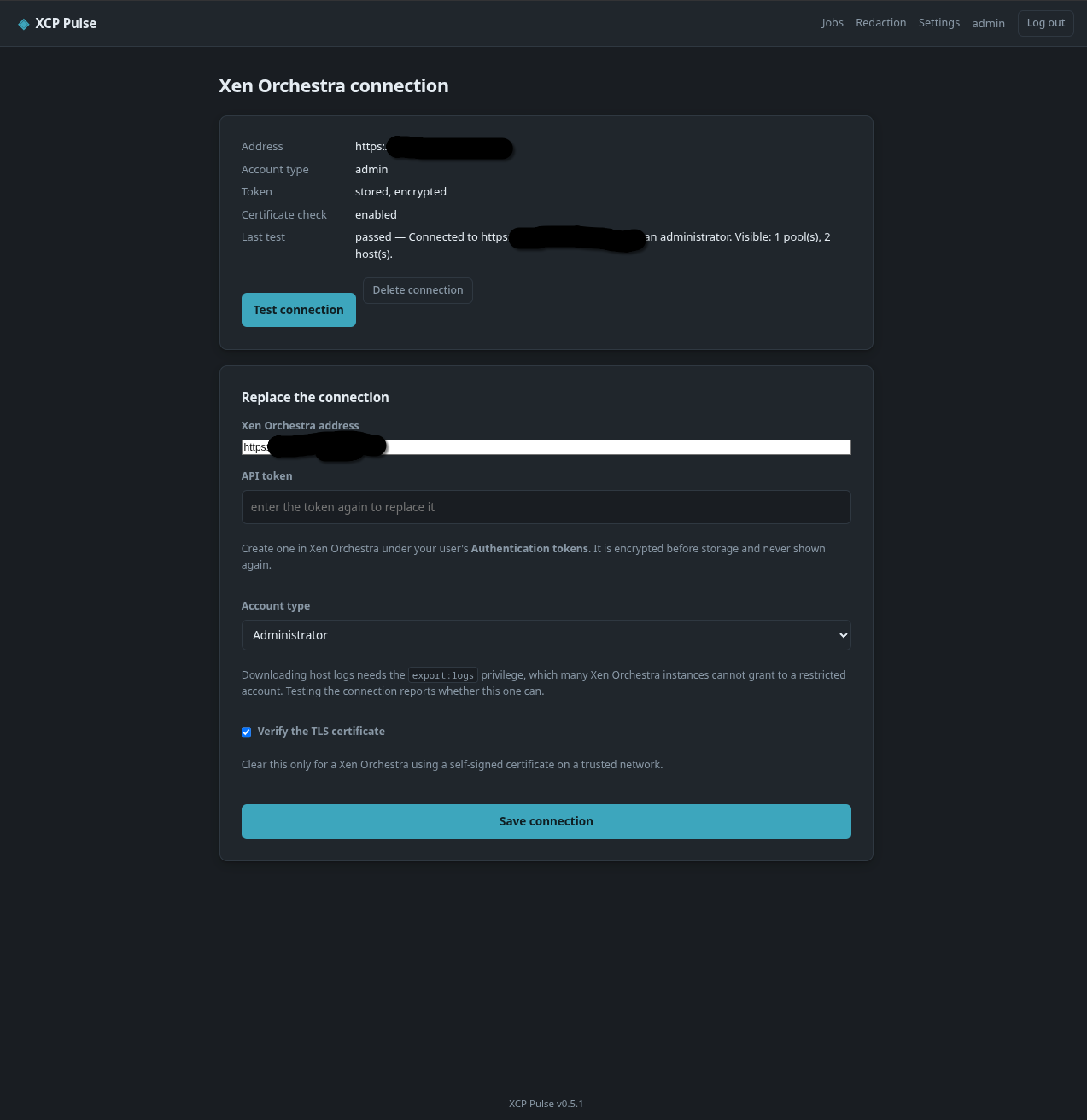
Inventory and API-based findings work fine with a Read only role. Downloading logs does not —
/hosts/{id}/logs.tgzrequiresexport:logson host, and on the instance I measured (XO CE,@xen-orchestra/rest-api0.39.0) that privilege was not in the grantable catalogue at all. The only role that could download logs was Administrator.So for log collection you currently need an admin token. XCP Pulse reads the privilege catalogue from your instance and tells you what it can actually grant, rather than assuming — and asks which account type you gave it so it can name the missing privilege instead of showing a bare 403.
Security
XCP Pulse holds a token that can read every log on your pool, and stores files containing session tokens and internal network topology. Run it on a trusted management network behind a reverse proxy — the compose file binds to
127.0.0.1by default for that reason. Not exposed to the internet.MIT licensed. This is an independent tool and is not affiliated with or endorsed by Vates.
-
v0.6.0 — log collection is in. This was the piece the first post said was next, and it works end to end now.
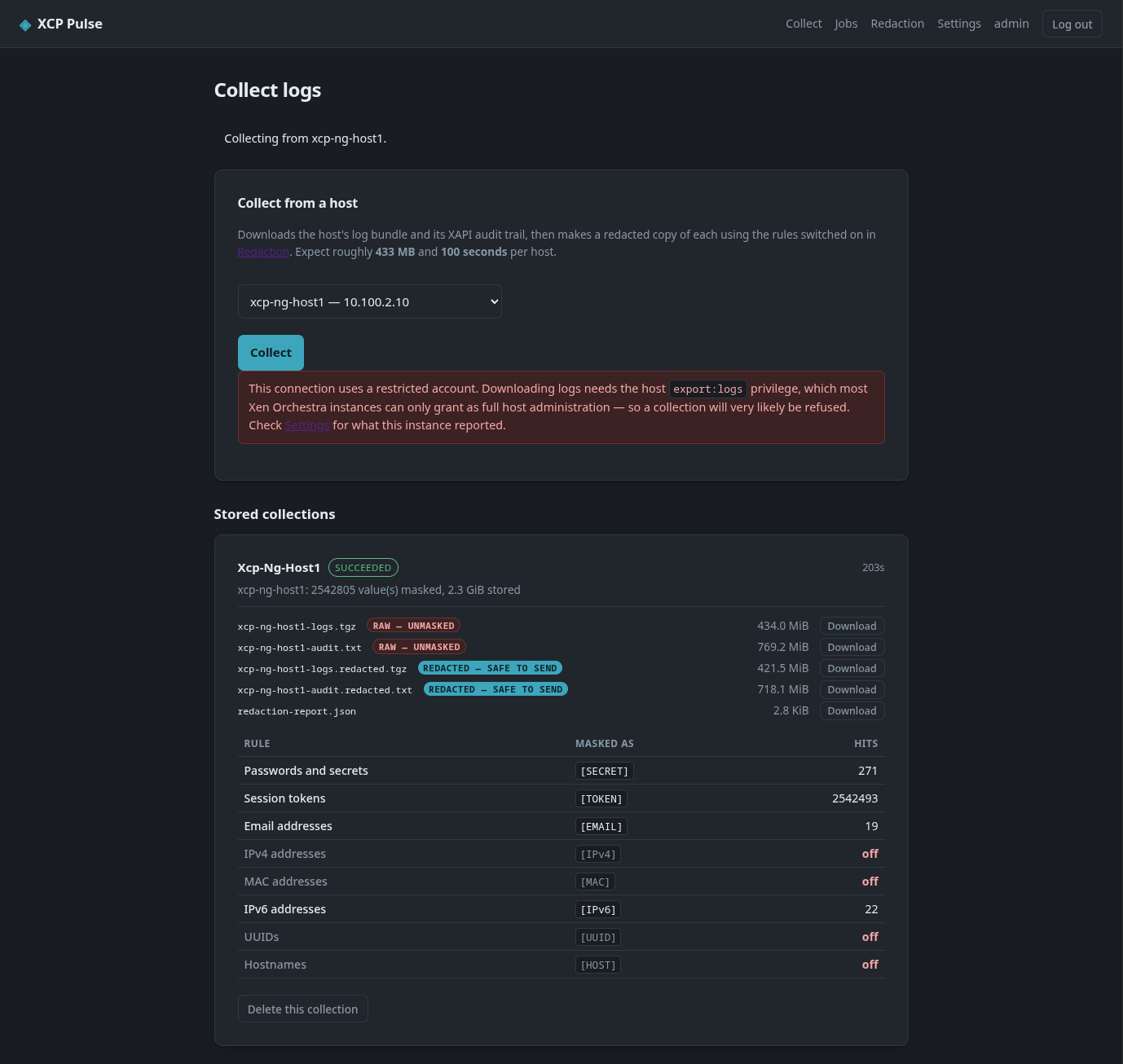
A new Collect page runs a per-host collection as a background job: it pulls
logs.tgzand the XAPI audit trail from Xen Orchestra, keeps the raw copies, and produces a redacted copy of each. On my own XCP-ng 8.3 pool that came to 434 MiB for the bundle and 769 MiB for the audit trail, 2.3 GiB stored across the five files, with 2,542,805 values masked — almost all of them session tokens.The download is streamed a megabyte at a time and never held in memory, and every chunk is a cancellation point, so Cancel actually stops a transfer rather than waiting it out. A failed or cancelled download deletes its partial file instead of leaving a half-written bundle sitting there looking like a collection.
Both copies are kept and marked redacted — safe to send or raw — unmasked. Redaction is lossy, and the raw copy is the only thing that can answer "what did that used to say?" afterwards. Each collection writes the same redaction report the preview page produces, so you can see which rules fired — and which were switched off — before anything leaves the box. In the screenshot I had IPv4, MAC, UUIDs and hostnames turned off, and they show as off rather than as zero hits. That is deliberate: a partly-masked bundle should be obvious before you attach it to a ticket.
There is also a retention policy. The newest n collections are kept whatever their age, and only what is left is judged on age — a long gap in collecting can't empty the store. It shows you what a cleanup would delete and how much space that returns before you press the button.
Expect bugs. This is still very much a work in progress and it has only ever run against my own pool. If you try it in a different environment, assume things will break — please tell me what did. Known issues right now:
- The red "This connection uses a restricted account" warning on the Collect page shows for every connection, including an administrator one. It is a wrong condition in the template, not a real permission check — ignore it if your account is admin. The screenshot below has it, over a collection that succeeded.
- The Collect page says to expect "433 MB and 100 seconds per host". The 100 seconds is the download only; a full collection also fetches the audit trail and redacts both copies, which took 203 seconds on my pool. Budget three to four minutes.
Two more things worth flagging if you try this.
logs.tgzsends noContent-Length, so a reverse proxy that buffers will happily hand you a truncated archive with HTTP 200. Mine did. It now detects that and reports the bundle as cut short rather than as a protocol error, and repacks whatever did arrive instead of throwing the lot away. If you are behind Nginx Proxy Manager,proxy_buffering off;andproxy_max_temp_file_size 0;are what fixed the stall for me.The account requirement from the first post has not changed — the log download needs
export:logson host, and on the instance I measured that is only reachable via Administrator. Inventory still works fine on Read only.Next up: individual log categories pulled out of the cached bundle (~35 MB instead of 434 MiB), date ranges, and then findings.
https://github.com/acebmxer/xcp_pulse
-
v0.7.0 — findings, category extraction, and a Vates support package.
Since the last update, log collection has been through a few fixes and gained three new pieces built on top of it.
Findings, from two sources. A new Findings page reads the XO API (messages, alarms, tasks, missing patches, backup/restore runs) and also scans a collected bundle for storage failures, multipath issues, XAPI exceptions, HA fencing, OOM kills and clock skew — six log-based rules in total now. When both reports describe the same incident (matched by condition and, if both are timestamped, within an hour of each other) each finding gets a small "confirmed by" badge instead of showing up as two unrelated entries.

Individual log categories, pulled out of a bundle already on disk instead of downloading again — XAPI, storage, audit, security, kernel, HA, xenstore, RRD, network, system. Tick categories on the Collect form before collecting, or against an already-stored bundle afterwards.

A Vates support package. One
.tgz— redacted bundle, findings (MD + JSON), redaction report, inventory, and a manifest of what's inside and what was masked — instead of downloading each piece separately.
Dashboard status panels now show findings severity, how many redaction rules are off, storage used, and recent job activity at a glance.

Known issue — still unsolved
The truncated-download-behind-a-reverse-proxy bug from the last post is not fixed.
logs.tgzhas noContent-Length(XCP-ng builds it on the fly), and on my own Nginx Proxy Manager deployment the proxy's connection to XO intermittently closes before the last chunk arrives. Two things tried, neither fixed it:proxy_buffering off/proxy_set_header Connection ""— reduced how often it happened, didn't eliminate it. Identical config, run twice back to back, produced one good download and one truncated at the same offset as before.- Suppressing httpx's
Accept-Encoding: gzip, deflateheader (it was asking the proxy to transport-encode an already-gzipped file) — same result, only reduced frequency, not shipped since it doesn't actually fix anything.
proxy_http_version 1.1;broke the proxy outright when I tried it, for a reason I don't understand — so that's not the next thing to try either.What XCP Pulse now does about it: reads the archive in streaming order and keeps whatever it read before the stream broke, rather than losing the whole analysis to the last few missing bytes, and says on the report when it ended early. If a collection tells you the bundle ended early, the honest advice is to retry it — not that it's fixed. Documented in
docs/installation.mdin case someone with more insight into the Nginx/httpx side of this has a fix.Also fixed since v0.6.0
- The restricted-account warning on the Collect page was showing on every connection, including admin ones — wrong template condition, not a real permission check. Fixed.
- The default collection no longer downloads the XAPI audit trail unless you ask for it —
xen-bugtoolalready includes it in the bundle, so it was 770 MiB of duplicate data on every run. Default collection is now the bundle only, ~870 MB / ~3 minutes. - XO's
/messagesand similar routes were being limited from the oldest end, not the newest — a pool with a lot of history could return findings from a month ago and miss everything recent. Now filtered by time window server-side instead.
-
v0.8.0–v0.9.1 — multi-user accounts, self-update, built-in HTTPS, and date ranges. Three releases since the last update, so bundling them here.
Date ranges. Collections, extractions, findings runs and the support package can now be scoped to a window instead of always covering the whole bundle — last 24h/7d/30d, since last reboot, or a custom range. XO's own routes still have no date filter, so the first download is unchanged size — the range only narrows what gets kept and reported afterwards.
Redact on demand. A collection no longer has to redact immediately with whatever rules happen to be on at that moment. There's now a checkbox to store the raw bundle only, and a "Redact now" button on the card afterwards using whichever rules are switched on when you press it.
Multiple user accounts, roles, and an activity log. This was on the "what is coming" list in the first post and it's in now. Any number of accounts, three roles — admin, operator, viewer (read-only, but can still download what's already stored) — and an Activity page logging logins, settings changes, and job runs.
Optional 2FA. Per-user TOTP, off by default, each account turns it on for itself. QR code setup, backup codes.
Self-update from the UI, opt-in and off by default. Checking needs nothing extra; applying an update needs the Docker socket mounted in explicitly, since that's effectively host root, so it's a separate deliberate step — uncomment the socket mount and
group_addblock indocker-compose.yml, and it needs its own.envfile (justDOCKER_GID=..., next todocker-compose.yml, not the same file asxcp-pulse.env) ordocker compose up -dfails withunable to find group..env.examplehas the one-liner to generate it.Built-in HTTPS, no reverse proxy required. Bundles nginx into the image to terminate TLS — self-signed cert on first start, or upload your own from Settings. A reverse proxy still works fine too.
A user manual in the app itself, under
/help— no need to leave XCP Pulse or check out the repo to read how something works.Fixed
- The account-requirements note from the first two posts was wrong in a way I only found by testing it properly:
export:logs— the privilege log downloads actually need — isn't in any built-in XO role, but it can be granted through a custom role. "Test connection" was reading a catalogue that can't tell you that, and told every restricted account it needed full admin regardless. It now actually probes the download endpoint, and the docs walk through creating the custom role via three REST API calls (no UI for it yet on either XO version). - A real concurrency bug: the shared SQLite connection wasn't locked across fetches, only execute, so two requests landing close together could crash a page reading jobs — reproduced it under the test suite's own concurrency test.
- Base-OS CVEs patched in the image build (perl-base, libc6, others); CI now runs a Trivy scan on every push.
Still not fixed: the truncated-download-behind-a-reverse-proxy issue from the last post. Haven't found the actual cause yet. Also looking for anyone who can test against a remote proxy in a lab setup. Also open to any other suggestions, features, improvements, UI changes, etc...
If any chance someone on Vates would test on their own time. Things like the support bundle and or the logs themselves are not being manipulated in any unwanted ways (for Vates or the project)
- The account-requirements note from the first two posts was wrong in a way I only found by testing it properly:

Hello! It looks like you're interested in this conversation, but you don't have an account yet.
Getting fed up of having to scroll through the same posts each visit? When you register for an account, you'll always come back to exactly where you were before, and choose to be notified of new replies (either via email, or push notification). You'll also be able to save bookmarks and upvote posts to show your appreciation to other community members.
With your input, this post could be even better 💗
Register Login