Internet connectivity - Check XOA failed.
-
The internet check was timing out on the IPv6 address for xen-orchestra.com IPv4 was fine the whole time.
curl -4 -I --max-time 15 https://xen-orchestra.com/ # HTTP/2 200
curl -6 -I --max-time 15 https://xen-orchestra.com/ # couldn't connectWhat fixed it was disabling IPv6 at boot, then rebooting so xo-server starts with it already off:
printf '%s\n' 'net.ipv6.conf.all.disable_ipv6=1' 'net.ipv6.conf.default.disable_ipv6=1' | sudo tee /etc/sysctl.d/99-disable-ipv6.conf
After that, xoa check was green, including internet connectivity and no more check for upgrade issues. I'm hoping this fixes my XO Config Cloud Backup. I will report back if not.
 17/17 - Internet connectivity: Error: HTTP connection has timed out
at ClientRequest.<anonymous> (/usr/local/lib/node_modules/xoa-cli/node_modules/http-request-plus/index.js:61:25)
at ClientRequest.emit (node:events:519:28)
at ClientRequest.patchedError [as emit] (file:///usr/local/lib/node_modules/xoa-cli/index.mjs:31:17)
at TLSSocket.emitRequestTimeout (node:_http_client:927:9)
at Object.onceWrapper (node:events:633:28)
at TLSSocket.emit (node:events:531:35)
at TLSSocket.patchedError [as emit] (file:///usr/local/lib/node_modules/xoa-cli/index.mjs:31:17)
at Socket._onTimeout (node:net:604:8)
at listOnTimeout (node:internal/timers:585:17)
at process.processTimers (node:internal/timers:521:7) {
url: 'https://xen-orchestra.com/',
originalUrl: 'http://xen-orchestra.com/'
}XOA Update sometimes failed too but hitting Refresh a couple times got it going.
10/1/2026, 10:03:28 AM: All up to date
10/1/2026, 10:26:26 AM: Start updating...
10/1/2026, 10:26:32 AM: HTTP connection has timed out
10/1/2026, 10:27:14 AM: Start updating...
10/1/2026, 10:27:14 AM: stable channel selected
10/1/2026, 10:27:14 AM: All up to date -
 P poddingue marked this topic as a question
-
Thanks for posting the fix.

The same thing came up in an older thread, https://xcp-ng.org/forum/topic/9957, where disabling IPv6 also made
xoa checkgo green.@HamiltonWDS explained a likely reason in https://xcp-ng.org/forum/post/87831: Node tries the addresses with a short timeout and can end up on the IPv6 one.

Yourcurl -6test helps a lot here, because it shows IPv6 doesn't connect at all on that network, so it's more than a slow path.Turning it off in XOA seems reasonable if you don't use IPv6 there; if you do, I'd guess the router side is where it really needs fixing, though I could be wrong (still haven't migrated to IPv6 myself
 ).
).Curious whether it sorts out the Cloud Backup too.
-
I had issue with a remote xo proxy.. showed error in xoa untill i disabled ipv6. But only with one of two remote proxies. This was in a support ticket.
-
I had issue with a remote proxy.. showed error in xoa untill i disabled ipv6. But only with one of two remote proxies. This was in a support ticket.
Did you test your full stack IP v6 readiness with one of the online testers? The reason being your local LAN maybe ready even at your router level, but if your ISP doesn’t have full stack (or even dual full stack - v4 and v6) then FQDN addresses which are only on IP v6 only may not work). Also v4 and v6 IP address has to also be associated with the FQDN being contacted.
-
We currently dont use ipv6 internally. No network changes were made at this location other then moving the proxy to the correct network for nbd connections. With that move some how made the ipv6 issue appear. So it was just easy to disable ipv6 in the proxy. I guess if we ever switch to ipv6 (no plans too) then i guess i will have to look back into it.
-
We currently dont use ipv6 internally. No network changes were made at this location other then moving the proxy to the correct network for nbd connections. With that move some how made the ipv6 issue appear. So it was just easy to disable ipv6 in the proxy. I guess if we ever switch to ipv6 (no plans too) then i guess i will have to look back into it.
@acebmxer @zorro If any of your VMs are facing the public internet, completing your IPv6 Readiness compliance is vital. With regional internet registries completely exhausted of free-pool IPv4 space, modern endpoints and cloud architectures are increasingly deploying IPv6-only infrastructure.
If you are referring to an internet access proxy, disabling IPv6 introduces significant architectural risk. If any upstream transit provider, carrier, or edge CDN in the path to your target FQDN transitions to an IPv6-only topology, your access path will break, causing a hard outage. If you are specifically utilizing a transit provider like XO Proxy, transitioning to dual-stack or IPv6-only transport is even more critical to ensure deterministic routing across the wider internet footprint.
From an architecture and security standpoint, IPv6 introduces critical enterprise enhancements:
• SLAAC Privacy Extensions: Enables temporary, rotating addresses to mitigate device fingerprinting and endpoint tracking.
• Native IPSec Integration: While RFC 8200 technically shifted IPSec from a hard protocol requirement to an optional component, it remains a native architectural element of the IPv6 stack. Unlike IPv4—where IPSec must be bolted on as an awkward overlay—IPv6 accommodates encryption headers natively, simplifying the deployment of secure end-to-end transport encryption across enterprise and government domains.If you need to pitch this network-wide transition to leadership for project approval, I highly recommend framing it around business continuity and risk mitigation. Pointing out the looming vulnerability of upstream IPv6-only transit paths—combined with the compliance advantages of native architectural security—should give you the exact leverage needed to get this budgeted, planned, and implemented.
-
I appreciate your thoughts on ipv6. Not trying to hijack @zorro post.
For us we do not use ipv6 internally. Our organization needs are small and simple. I do not expose XOA or either the proxies to the internet directly. They can access the internet but not the reverse without vpn access.
If there is internal communication with the proxies and XOA and that might be a different thing. But again I didnt have this problem untill i tried to move the the proxy to different network to correct a backup issue. Vates tech noticed the error reporting in XOA was possibly do to ipv6 and/or ipv4 issues.
I was just commenting incase there was change in the code that may be linked in any way. In my case i could every well not have any ipv6 issues and could just be down to an issue with the proxie do to other previous issues (NAS releate) that have been resolved.
-
Thanks for posting the fix.
The same thing came up in an older thread, https://xcp-ng.org/forum/topic/9957, where disabling IPv6 also made
xoa checkgo green.@HamiltonWDS explained a likely reason in https://xcp-ng.org/forum/post/87831: Node tries the addresses with a short timeout and can end up on the IPv6 one.
Yourcurl -6test helps a lot here, because it shows IPv6 doesn't connect at all on that network, so it's more than a slow path.Turning it off in XOA seems reasonable if you don't use IPv6 there; if you do, I'd guess the router side is where it really needs fixing, though I could be wrong (still haven't migrated to IPv6 myself
).Curious whether it sorts out the Cloud Backup too.
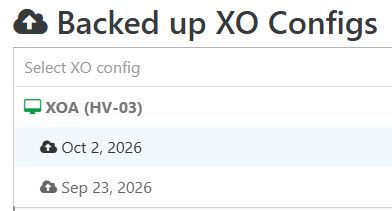
XOA is using our management network where ipv6 is not needed and not enabled. Looks like our cloud backup finally ran for the first time in while too.
-
Z zorro has marked this topic as solved

Hello! It looks like you're interested in this conversation, but you don't have an account yet.
Getting fed up of having to scroll through the same posts each visit? When you register for an account, you'll always come back to exactly where you were before, and choose to be notified of new replies (either via email, or push notification). You'll also be able to save bookmarks and upvote posts to show your appreciation to other community members.
With your input, this post could be even better 💗
Register Login