New Tools 9.2.445 update failure
-
Noticed a new version of the tools had been released however while trying to upgrade we are met with the following error:
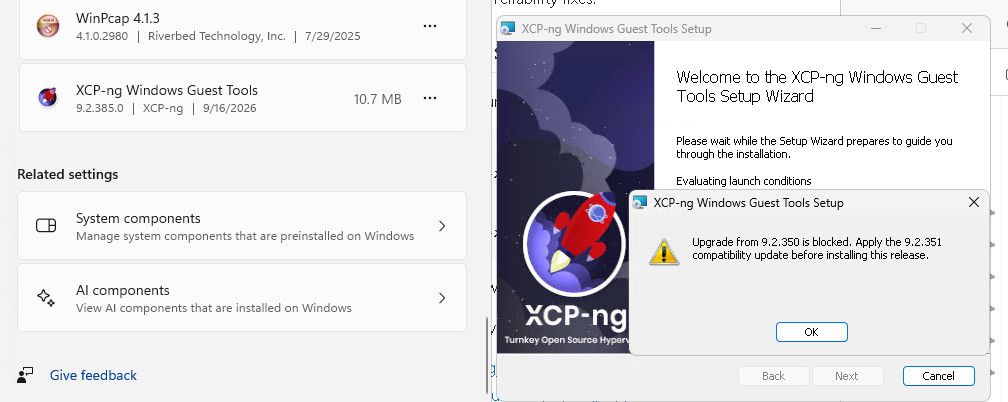
As you can see we are already running a more recent version than we are being prompted to upgrade to before proceeding.
Install log attached:
install.txt -
F flakpyro referenced this topic
-
Looks like we ended up with a corrupt duplicate install in the MSI installer database.
After some googling and learning how the installer determines the currently installed version from the tools github page i was able to come up with a command to check what version windows thought was installed, i noticed on working installs no error was output however on broken servers the command would end with an error.
PS C:\xcpng-winpv-9.2.445.0-Release-x64\xcpng-winpv-9.2.445.0-Release-x64\package> $Installer.ProductsEx("", "", 7) | ForEach-Object {

    [PSCustomObject]@{
        ProductName    = $_.InstallProperty("ProductName")
        ProductVersion = $_.InstallProperty("VersionString")
        ProductCode    = $_.ProductCode()
    }
} | Where-Object { $_.ProductName -like "*XCP-ng*" }

ProductName                ProductVersion ProductCode
-----------                -------------- -----------
XCP-ng Windows Guest Tools 9.2.385.0      {A9CDEFA1-AB19-426F-8065-64331E634A62}
InstallProperty
At line:2 char:5
+     [PSCustomObject]@{
+     ~~~~~~~~~~~~~~~~~~
    + CategoryInfo          : OperationStopped: (:) [], COMException
    + FullyQualifiedErrorId : System.Runtime.InteropServices.COMException
I fed this output to Calude for a bit help and to shed some light on the issue and its solution, it first had me check for duplicate install entries:
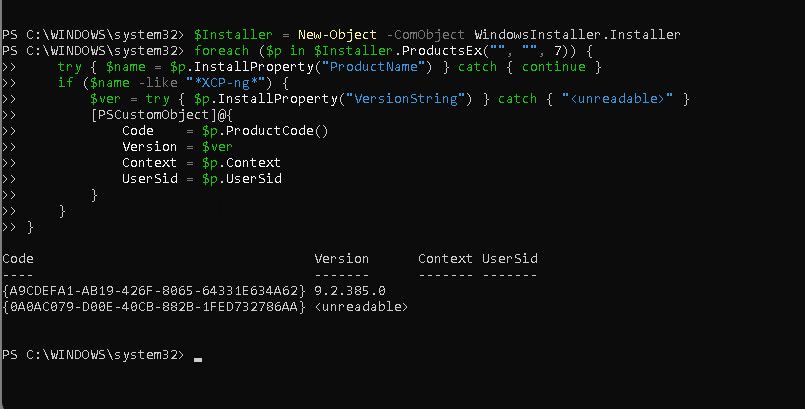
After confirming the presence of a unreadable entry it was able to create a powershell script to remove the bad entry.
From the LLMs output:
This script computes the packed GUID itself (no hand-conversion errors), exports a backup of each key, and does a dry run by default so you can see what it would delete. Run it from an elevated, 64-bit PowerShell. How to use it: Run it as is. It prints the packed GUID (confirm it matches 970CA0A0E00DBC0488B2F1DE377268AA) and lists which keys exist. If the list looks right, set $DryRun = $false and run again. It tries msiexec /x first and only falls back to registry deletion if that fails. Note that on the real run it attempts the msiexec step before any registry work, and the registry section runs even if msiexec fails. Re-run your listing script. Only the 9.2.385.0 row should remain. Caveats: This leaves a few residual references behind, such as entries in ...\Installer\UserData\S-1-5-18\Components and ...\Installer\UpgradeCodes. Windows Installer ignores these once the product keys are gone, so they’re harmless for your purposes. If the bad entry turns out to be a per-user install rather than machine-wide, the keys will live under a user SID instead of S-1-5-18. The “Not present” lines would tell you that. In that case, tell me and I’ll adjust the paths. The backup .reg files let you restore anything with a double-click if something goes wrong.I am by no means anywhere near an expert in powershell as i spend most of my time on Linux, this all AI generated but it was able to remove the entry and get the installer moving along on VMs where it would no proceed prior.
Hello! It looks like you're interested in this conversation, but you don't have an account yet.
Getting fed up of having to scroll through the same posts each visit? When you register for an account, you'll always come back to exactly where you were before, and choose to be notified of new replies (either via email, or push notification). You'll also be able to save bookmarks and upvote posts to show your appreciation to other community members.
With your input, this post could be even better 💗
Register Login