Create VM with XO Lite GUI
-
Hy,
To try this hypervisor solution, I have just installed XO Lite 8.3.0 on an offline server.
This is mandatory for my use case.
Is it possible to create a VM from XO Lite GUI without using XOA?
I can't find the menu.Thanks,
Jeff -
@jsalvo
Inpoolview You will find theNewVM"button"
edit: at the top right corner -
Hello and welcome to the forum.
There is the ability to crate a vm if your xcp-ng host is up to date.
With the pool selected it should be in top right of screen. If still not visible check fo rupdates
yum clean metadata
yum update
reboot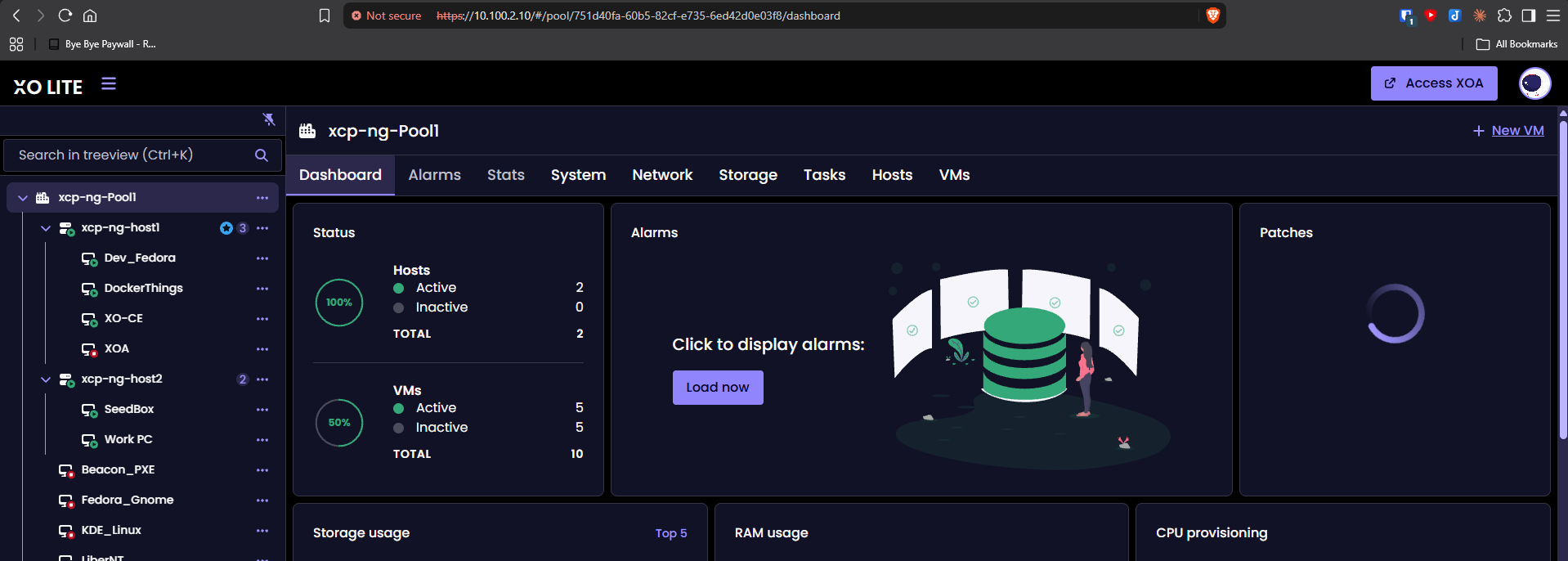
-
Welcome!

As @ph7 and @acebmxer said, the New VM button is at the top right once you select the pool (it's in @acebmxer's screenshot). If it isn't there for you, updating the host is the next step, as he suggested.
Since your server has to stay offline, though, I think
yum updatewill only work against a local mirror of the XCP-ng repositories. The updates page says the dom0 needs either internet access or a local mirror, with thebaseurllines in/etc/yum.repos.d/xcp-ng.repopointed at it (https://docs.xcp-ng.org/management/updates/).I haven't set up a mirror like that myself, so others here may know a simpler way for a single offline host.


Hello! It looks like you're interested in this conversation, but you don't have an account yet.
Getting fed up of having to scroll through the same posts each visit? When you register for an account, you'll always come back to exactly where you were before, and choose to be notified of new replies (either via email, or push notification). You'll also be able to save bookmarks and upvote posts to show your appreciation to other community members.
With your input, this post could be even better 💗
Register Login