Host time and XOA time are not consistent with each other
-
What can I do about this? This happens after every server reboot. I couldn't find any time settings for VMs, and I assumed time was sychronized automatically. Well apparently it doesn't....
-
@Octopuss My understanding is that VMs do NOT automatically synchronize with the XCP-ng hosts. XCP-ng uses chrony (chronyd) to synchronize time over NTP. It switched from ntpd to chrony starting in XCP-ng 8.1 and should be set up on both the servers and any VMs independently. There is documentation on the XCP-ng Website about how to implement this.
-
 P poddingue marked this topic as a question
-
@tjkreidl has it right, I think: the host and the XO VM each keep their own clock, so both of them need a working NTP source. The page he means is probably this one: https://docs.xcp-ng.org/management/hosts-pools#time-synchronization-ntp.
There are two older threads with this warning, and in both it seems to have come down to one side not reaching any NTP server, once because NTP was never set on the host (https://xcp-ng.org/forum/post/86396) and once because DNS broke after an update (https://xcp-ng.org/forum/post/97429).Could you run
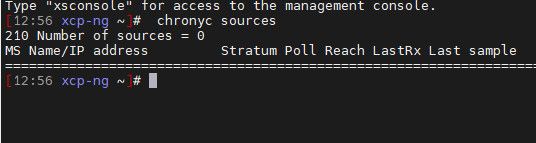
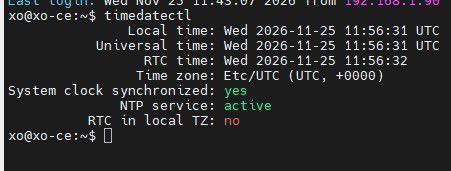
chronyc sourceson the host andtimedatectlon the XO VM right after a reboot, and tell us whether you're on XOA or XO built from sources? Olivier mentioned in one of those threads that XOA comes with an NTP client while a from-sources install leaves that part to you, but I'm not sure that alone explains why it shows up after every reboot. -
Sorry this forum is weird, it says I need reputation to post links. I cannot put the screenshots here

-
Sorry this forum is weird, it says I need reputation to post links. I cannot put the screenshots here
Not at all a problem, the answer here is you need to set up your guests and hosts to use the same time source, normally that might be a NTP or AD server that is on-premise (whatever else the rest of your network uses) rather than a public one like pool.ntp.org.
This way, everything within the network has the same time source as your "source of truth" for your entire private network. That NTP server would then be the only time source that would point to something like pool.ntp.org but you have to set up each VM and system individually.
Ansible might be a good use case here...
-
These two playbooks do what ya need, but change your ntp servers to match.
cat /inventory/group_vars/all.yml
---
ntp_servers:
  - 10.100.20.248 # <replace-with-your-ntp-sources>
  - 10.100.20.249 # <replace-with-your-ntp-sources>
cat playbooks/configure-ntp.yml --- - name: Configure NTP via chrony on Linux targets hosts: rocky gather_facts: true tasks: - name: Install chrony package ansible.builtin.dnf: name: chrony state: present - name: Configure chrony NTP servers ansible.builtin.copy: dest: /etc/chrony.conf owner: root group: root mode: "0644" content: | {% for server in ntp_servers %} server {{ server }} iburst {% endfor %} driftfile /var/lib/chrony/drift makestep 1.0 3 rtcsync notify: Restart chronyd - name: Ensure chronyd service is started and enabled ansible.builtin.systemd: name: chronyd state: started enabled: true handlers: - name: Restart chronyd ansible.builtin.systemd: name: chronyd state: restarted - name: Configure NTP via w32time on Windows targets hosts: windows gather_facts: false tasks: - name: Ensure Windows Time service is running and automatic ansible.windows.win_service: name: w32time state: started start_mode: auto - name: Configure w32time manual NTP peers ansible.windows.win_shell: | $peers = "{{ ntp_servers | join(' ') }}" w32tm /config /manualpeerlist:"$peers" /syncfromflags:MANUAL /reliable:yes /update Restart-Service w32time w32tm /resync /rediscover changed_when: true -
No worries about the screenshots: both commands print plain text, so you can paste the output straight into a code block (three backticks on the line before and after) and no link is needed.

On the host,
chronyc sourcesshould show one line starting with^*, which is the server it actually syncs from; if none starts with^*, I think the host isn't synced at all.On the XO VM,
timedatectlhas aSystem clock synchronized:line that should sayyes. If it's XOA, it usessystemd-timesyncdand you can change its servers withxoa network ntp, as described here: https://docs.xen-orchestra.com/getting-started/configuration#setting-a-custom-ntp-server .@DustinB's idea of pointing the hosts and every VM at the same internal NTP server is the cleaner fix in the long run, but I'd still like to see the two outputs to understand why it only shows up after a reboot.
-
-
These two playbooks do what ya need, but change your ntp servers to match.
cat /inventory/group_vars/all.yml
---
ntp_servers:
  - 10.100.20.248 # <replace-with-your-ntp-sources>
  - 10.100.20.249 # <replace-with-your-ntp-sources>
cat playbooks/configure-ntp.yml --- - name: Configure NTP via chrony on Linux targets hosts: rocky gather_facts: true tasks: - name: Install chrony package ansible.builtin.dnf: name: chrony state: present - name: Configure chrony NTP servers ansible.builtin.copy: dest: /etc/chrony.conf owner: root group: root mode: "0644" content: | {% for server in ntp_servers %} server {{ server }} iburst {% endfor %} driftfile /var/lib/chrony/drift makestep 1.0 3 rtcsync notify: Restart chronyd - name: Ensure chronyd service is started and enabled ansible.builtin.systemd: name: chronyd state: started enabled: true handlers: - name: Restart chronyd ansible.builtin.systemd: name: chronyd state: restarted - name: Configure NTP via w32time on Windows targets hosts: windows gather_facts: false tasks: - name: Ensure Windows Time service is running and automatic ansible.windows.win_service: name: w32time state: started start_mode: auto - name: Configure w32time manual NTP peers ansible.windows.win_shell: | $peers = "{{ ntp_servers | join(' ') }}" w32tm /config /manualpeerlist:"$peers" /syncfromflags:MANUAL /reliable:yes /update Restart-Service w32time w32tm /resync /rediscover changed_when: true[21:57 xcp-ng ~]# cat /inventory/group_vars/all.yml
cat: /inventory/group_vars/all.yml: No such file or directory
[21:57 xcp-ng ~]#

Hello! It looks like you're interested in this conversation, but you don't have an account yet.
Getting fed up of having to scroll through the same posts each visit? When you register for an account, you'll always come back to exactly where you were before, and choose to be notified of new replies (either via email, or push notification). You'll also be able to save bookmarks and upvote posts to show your appreciation to other community members.
With your input, this post could be even better 💗
Register Login