BRAND_CONSOLE error on BOOT, no networking
-
Hey guys!
So we had a power outage here that shutdown our xcp-ng server. Upon returning, it goes through most of the boot process, it shows the splash screen, but then it gets stuck on this error:
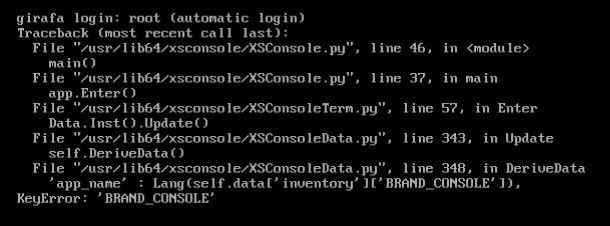
The host has no network connectivity.
Going to another console with alt+right, I saw that emergency mode is "false", and tried network restart, which made no difference. Boots up to the same error.Tried a toolstak restart, and this is what xensource.log looks after that:
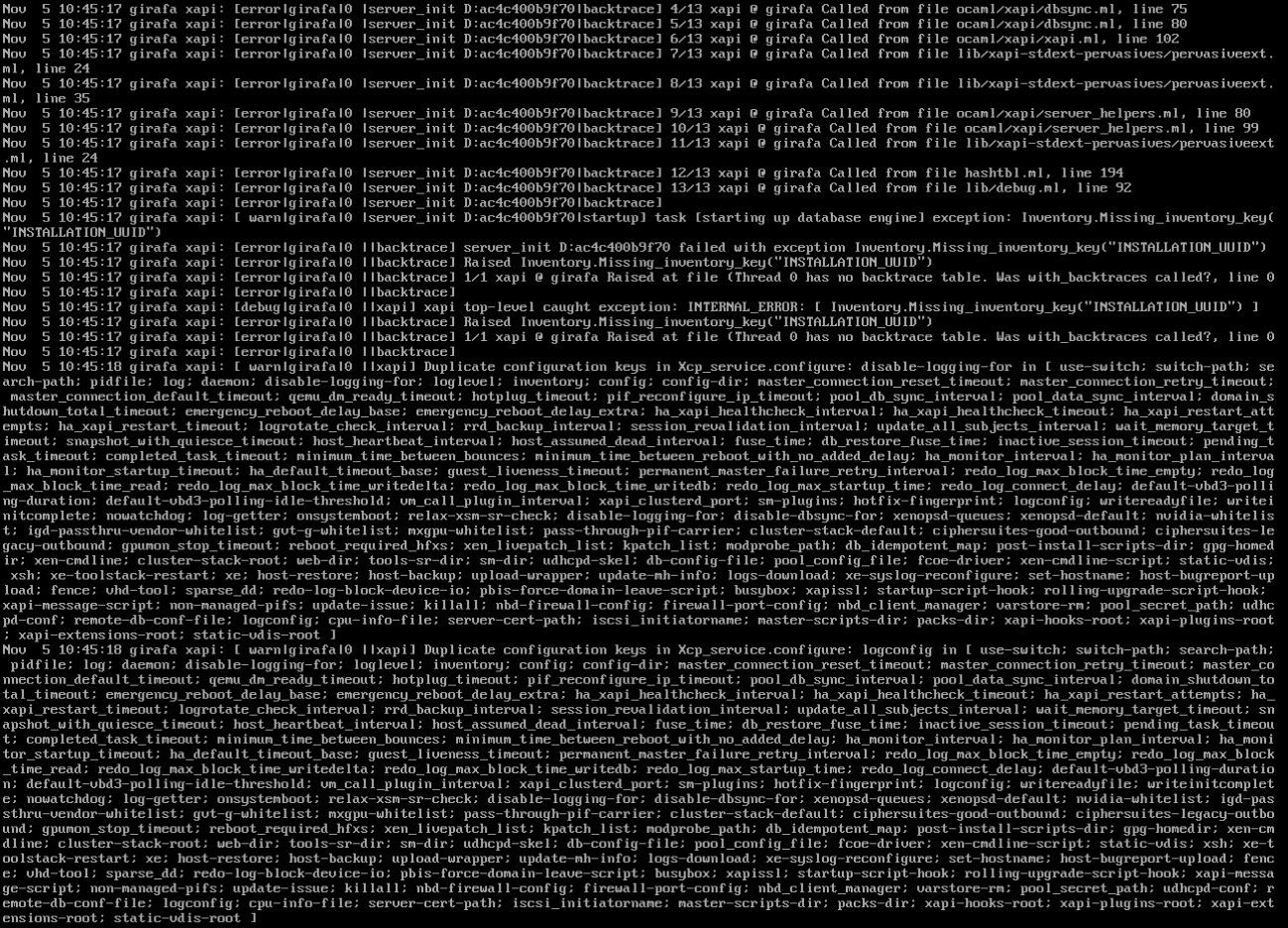
And this is what /etc/xensource-inventory looks like:

Sorry for the print screens. My only access is either the KVM or the iDRAC console which doesn't let me copy anything (afaik).
Any ideas? Did something got corrupted? If it did, can it be rebuilt?
I do have access to USB ports to do a re-install, but well, I would rather not have to redo the entire server.
-
/etc/xensource-inventoryis supposed to have a lot more contents. Here's mine from a test XCP-ng VM:[10:23 xcp-ng-sve-80-dev ~]# cat /etc/xensource-inventory PRIMARY_DISK='/dev/disk/by-id/ata-QEMU_HARDDISK_QM00001' PRODUCT_VERSION='8.0.0' DOM0_VCPUS='2' CONTROL_DOMAIN_UUID='585098b9-5c1e-49d7-875c-e88c105b6ac1' DOM0_MEM='1136' COMPANY_NAME_SHORT='Open Source' MANAGEMENT_ADDRESS_TYPE='IPv4' PARTITION_LAYOUT='ROOT,BACKUP,LOG,BOOT,SWAP,SR' PRODUCT_VERSION_TEXT='8.0' PRODUCT_BRAND='XCP-ng' INSTALLATION_UUID='fc51eb64-b541-4a1a-8cea-2bc39590be81' PRODUCT_VERSION_TEXT_SHORT='8.0' BRAND_CONSOLE='XCP-ng Center' PRODUCT_NAME='xenenterprise' MANAGEMENT_INTERFACE='xenbr0' COMPANY_PRODUCT_BRAND='XCP-ng' PLATFORM_VERSION='3.0.0' BUILD_NUMBER='release/naples/master/45' STUNNEL_LEGACY='false' PLATFORM_NAME='XCP' BRAND_CONSOLE_URL='https://xcp-ng.org' BACKUP_PARTITION='/dev/disk/by-id/ata-QEMU_HARDDISK_QM00001-part2' INSTALLATION_DATE='2019-08-06 15:52:19.379300' COMPANY_NAME='Open Source' -
So, is there a "proper" way to rebuild this?
-
It is created during installation, by this python code: https://github.com/xcp-ng/host-installer/blob/eb796dc6a82a0defdcbba1a0833a3356060c5396/backend.py#L1625
I don't know if there's a way to re-create it.
-
Loaded the 8.0 Install ISO to see if there was some recovery option, but it doesn't even recognize that there's an installation on the disk...
-
@andremartin Yeah, it recognizes existing installations... Based on
/etc/xensource-inventoryif I remember correctly... -
If you had upgraded that host in the past, you should be able to find an
/etc/xensource-inventoryin the backup partition, you could then use after changing the values that depend on the version. -
Another place where you can find a backup, if you have made one before the crash: in the backup file that the
xe host-backupcommand creates. It's also available from XSConsole. XCP-ng Center also offers that feature if I remember correctly. -
I do have a backup partition, but I can't seem to be able to mount it? The filesystem shows up as "Microsoft basic". Which filesystem should I specify to mount it?
-
It's
ext3, unless it's empty. It only gets filled when you upgrade, so that you can fallback to the previous state if anything goes wrong. -
Then I guess it's empty. I guess I'll just redo the server, and chalk this up as a one in a million file corruption, for which we didn't have the proper OS backup to counteract. We do have backups of the VMs anyway.
Thanks for the help! We didn't get this fixed, but I did learn a lot! This is our first Xenserver/XCP host.

Hello! It looks like you're interested in this conversation, but you don't have an account yet.
Getting fed up of having to scroll through the same posts each visit? When you register for an account, you'll always come back to exactly where you were before, and choose to be notified of new replies (either via email, or push notification). You'll also be able to save bookmarks and upvote posts to show your appreciation to other community members.
With your input, this post could be even better 💗
Register Login