Migrating VMs from Xenserver 6.5 to XCP-ng 8.2.1
-
Hello all, looking for feedback as to a challenge I'm experiencing when migrating VMs from Xenserver 6.5 to XCP-ng 8.2.1. The exported vms fail to start and have the error "Boot device:Hard Disk - failure: could not read boot disk".The methods I have used to migrate are taking a snapshot of the VM,create a template from that snapshot, export that template to XCP then create a VM from it. The newly created VM will not start for some VMs. The only common trait that the VMs have is that they are Linux but they are diffrerent distros. I have tried removing xentools then trying the same but the issue still remains.
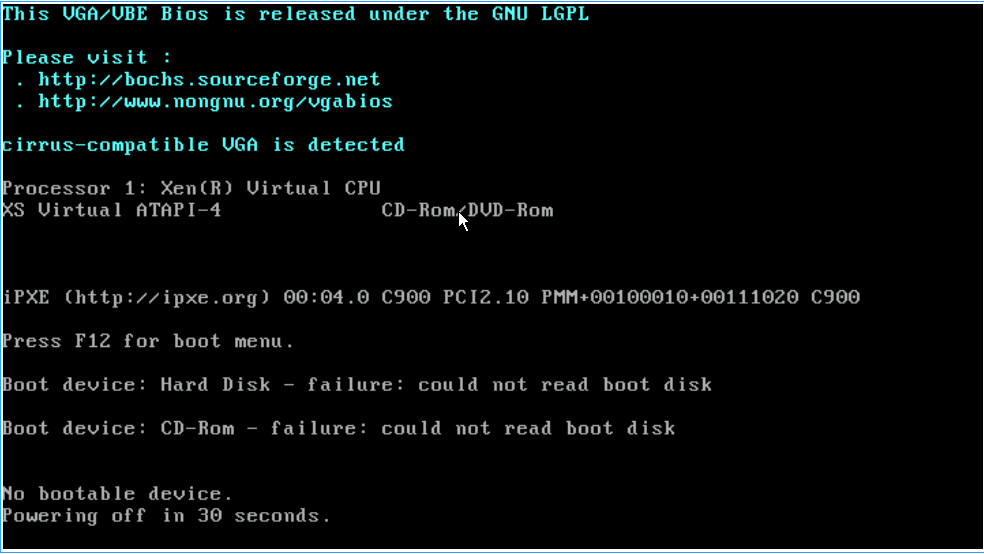
Any insight or alternatives on how to move these VMs will be appreciated -
Without more info it's hard to help.
Those VMs are in HVM mode already in 6.5?
-
@olivierlambert Yes,they are in HVM mode and currently running.
-
I would boot them with a live CD and check if the disks are readable inside the VM.
Alternatively, it's a boot order issue, or something like that.
-
@olivierlambert This was resolved by editing the disk position. The disk position on XenServer was xvda and changing it to 0 resolved this.
-
Ah great news then!

Hello! It looks like you're interested in this conversation, but you don't have an account yet.
Getting fed up of having to scroll through the same posts each visit? When you register for an account, you'll always come back to exactly where you were before, and choose to be notified of new replies (either via email, or push notification). You'll also be able to save bookmarks and upvote posts to show your appreciation to other community members.
With your input, this post could be even better 💗
Register Login