XO NTP
-
Set NTP in 3 places:
- XCP-ng Hardware (Bios & IPMI)
- XCP-ng Hypervisor (xconsole/setup/shell)
- Edit: Xen Orchestra
A) [from sources] (CLI only, this needs to change)
B) XOA [Debian 11, comes with ntpd]
Steps for XO [from sources] (Xen Orchestra VM on Debian 10 Host OS):
- Go to
/etc/systemd/timesyncd.conf - Edit to remove '#' and add your NTP server
- Set
sudo timedatectl set-ntp true - Restart the service
sudo systemctl restart systemd-timesyncd.service - Check your time sync with one of these options:
A)systemctl status systemd-timesyncd.service
B)timedatectl timesync-status
C)timdatectl status
Steps for XCP-ng hypervizor host (CLI easy mode):
- SSH into un/pw
- Type
xsconsole - Self explanatory (IMO)
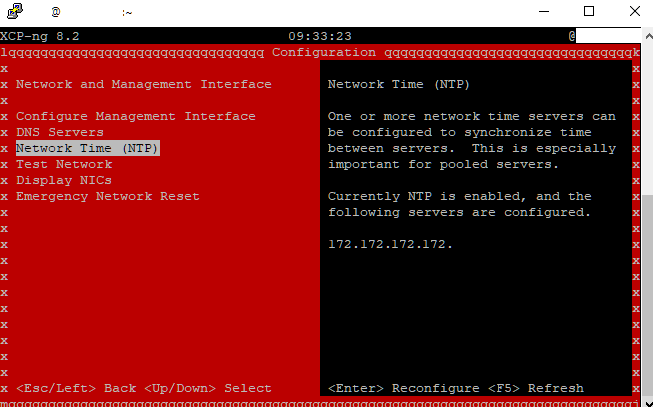
Steps for XCP-ng hardware hypervisor (CLI hard mode) :
- Edit the chrony/timeserver configuration
sudo nano /etc/chrony.conf - Add any time servers you want at the end of the file, along with any options for example:
server pool.ntp.org iburst - Restart chrony
systemctl restart chronyd - Check it is working OK
chronyc tracking
The other NTP posts make no sense.
ntpd -pdoes not work
It wants you to install the NTP package.
No thanks, my XO is offline.
Give me the default NTP service built-in.I have already have XO installed in a Debian 10 built from sources using Tom's video guide.
It is offline. Not gonna put it online to add ntp service.
Installed: xen-tools, ssh keys, tmux, htop, git, cloned xen-xo repo, vim, update, upgrade, ssh.Edited:
I misunderstood difference between XO and XOA. Post updated to reflect that.
XOA contains the NTP package. Mine did not. I'd say most building from sources won't either.
Somewhat useful:
https://www.freedesktop.org/software/systemd/man/timedatectl.html
https://xcp-ng.org/forum/topic/5858/setting-ntp-time-servers-from-terminal-ssh?_=1671025646276Not useful:
https://serverfault.com/questions/913968/ntp-doesnt-seem-to-be-enabled-and-synchronised-in-debian-jessie
https://www.digitalocean.com/community/tutorials/how-to-set-up-time-synchronization-on-debian-10
https://access.redhat.com/documentation/en-us/red_hat_enterprise_linux/6/html/deployment_guide/s1-checking_the_status_of_ntp -
Hi,
XOA is meant only for the version Vates release with everything bundled. Everything else isn't XOA
 (it's just XO from the sources).
Note: current XOA is running on Debian 11.
edit: XOA means "Xen Orchestra virtual Appliance", btw
-
So...
XOA = xen orchestra appliance
XO = xen orchestra (from sources)I just edited my title.
Wouldn't changing NTP for both be the same? XOA just comes with a debian host OS on a virtual drive...? Who cares.
Edit: I guess maybe the XOA version comes with ntp installed?
P.S. FWIW:
The whole ecosystem is confusing and annoying to learn.Need a single page that clearly states everything for newbies. I even forget because I don't do this constantly. Just trying to spend my morning knowledge dumping.
-
Wouldn't changing NTP for both be the same? XOA just comes with a debian host OS on a virtual drive...? Who cares.
I have no control on what you decide to install on your preferred distro. We only control things in XOA, the commercially supported version.
-
We have a public documentation, you know
https://xen-orchestra.com/docs -
@olivierlambert
Yep, thanks.
OP edited to direct link to XOA NTP documentation for those who need that.There was no clear distinction in my mind. Apologies for any confusion caused.


Hello! It looks like you're interested in this conversation, but you don't have an account yet.
Getting fed up of having to scroll through the same posts each visit? When you register for an account, you'll always come back to exactly where you were before, and choose to be notified of new replies (either via email, or push notification). You'll also be able to save bookmarks and upvote posts to show your appreciation to other community members.
With your input, this post could be even better 💗
Register Login