import of Ubuntu
-
Have you checked the VM's Network tab in XO? Is there a VIF present? If so, what network is it configured to use?
-
@Danp Yes ! It is on the same as all other vms that I have. I only have 2 but they work. So dont need to do anything in ubuntu OS to make it work ?
-
And under advance I have tried to change the NIC type to Intel E 1000
Default was RTL8139 that did not help. -
Have you removed the VMware tools? Post the output from
ifconfig. -
@bdacasc said in import of Ubuntu:
And under advance I have tried to change the NIC type to Intel E 1000
This will only have an effect if you don't have the VM tools for XCP installed, which isn't recommended.
-
-
@Danp So the VM tools for XCP isn't recommended ?
Why ?
Is that not recommended for all OS or just Ubuntu?
That was the first thing I did when it was not working. -
@bdacasc I think @Danp meant it is not recommended to not install the XCP guest tools. So installing the XCP guest tools is recommended an all OS. In that case (guest tools installed) you can keep Realtek as the NIC type, which is the default for the Ubuntu template.
-
@Danp I have done the following:
sudo apt remove open-vm-toolssudo rm -r /etc/vmware-tools
sudo rm /etc/systemd/system/open-vm-tools.service
sudo rm /etc/systemd/system/vmtoolsd.service
sudo rm -r /etc/systemd/system/open-vm-tools.service.requires
sudo rm -r /etc/vmware-toolssudo apt autoremove
And still no IP
-
@gskger said in import of Ubuntu:
I think @Danp meant it is not recommended to not install the XCP guest tools.
Correct

@bdacasc So, you've removed the vmware tools and installed the xcp tools? Have you rebooted the VM after uninstalling the vmware version?
-
@bdacasc Are the IPs set static at OS level of the VMs or granted via DHCP?
-
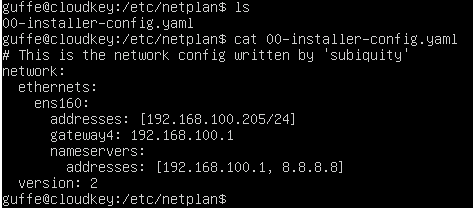
@gskger Fixed IP via netplan
-
@bdacasc
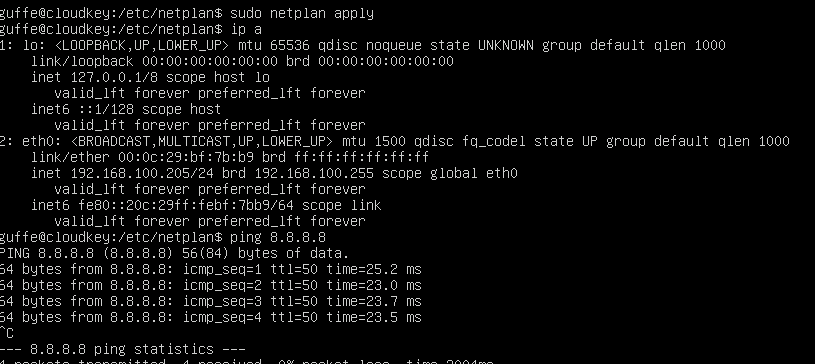
You have to change the interface name from ens160 to eth0 after migrating a Ubuntu VM from ESXi to XCP-NG.The file yopu need to edit is /etc/netplan/00-installer-config.yaml
After that type:
sudo netplan apply
With that the network should work again
-
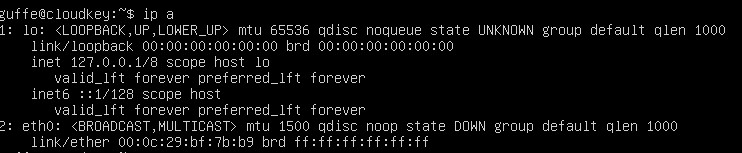
@bdacasc You need to update the interface name to
eth0as shown byip a. -
To slow
 @imaginapix already answered
 -
-
Plenty Thx u all !
I can now ping !
Now You have teached me something !Most greatfull for your help
-
Glad to see everything is working now.
Just as a little background:
This problem is caused by the different way ESXi and XCP-NG handled devices. For Ubuntu this causes a difference in the network interface name, for other Linux variants this causes the disk device name to change from something like /dev/sda to /dev/xvda . -
Another win for our awesome community
 Thanks everyone, I'm really glad to see I'm less and less needed to get threads solved! It's a very good sign
edit: fear not, I'll be always around here
-
 O olivierlambert marked this topic as a question on
-
O olivierlambert has marked this topic as solved on


Hello! It looks like you're interested in this conversation, but you don't have an account yet.
Getting fed up of having to scroll through the same posts each visit? When you register for an account, you'll always come back to exactly where you were before, and choose to be notified of new replies (either via email, or push notification). You'll also be able to save bookmarks and upvote posts to show your appreciation to other community members.
With your input, this post could be even better 💗
Register Login