Health Check Schedule
-
Hi everyone,
I want to set up a backup health check to run weekly or monthly for just a few VMs, but I’m getting stuck on how to properly schedule it.
We currently back up about 90 VMs daily using delta backups, split across multiple jobs. From what I understand, I need to add the health check as another schedule within a job. However, when I try to do this, it asks for a retention setting, which is where I’m getting confused.
Does adding a health check as another schedule in the job actually create an additional backup?
For example, if my backup job runs on Sunday at 9 AM, and I add a health check schedule for Sunday at 2 PM with a retention of 1, what happens?
Does the backup run again at 2 PM before performing the health check?
Does this effectively create two backups on Sundays?
How does the retention setting of 1 affect this process?
Is there a better way to handle this without unintentionally doubling backups?Thanks in advance for any guidance!
-
Yes it will run again at 2 a clock
You can attach a tag to the VMs You want to run the check on, and then "enable" it in the schedule
(edit: in the existing 9 a clock job)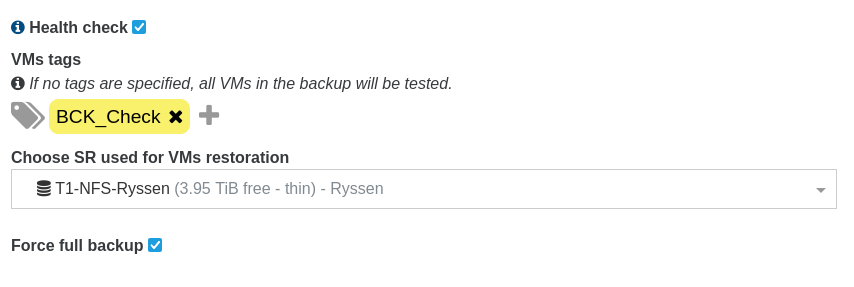
-
@ph7
Wouldn't that run the health check daily though? I have a daily delta backup but only want to run the health check on the weekends or maybe monthly. I think this is where I am misunderstanding how to set it up. -
@mjr99
You can have the existing schedule run Monday - Saturday, and create a new schedule to run on Sunday only, with force full backup and the health check with a check-tag.
Both schedules in the same job. -
@ph7
Thanks for the help...I think that gets me close. I will tinker with it some more. Thanks again for the answers.
Hello! It looks like you're interested in this conversation, but you don't have an account yet.
Getting fed up of having to scroll through the same posts each visit? When you register for an account, you'll always come back to exactly where you were before, and choose to be notified of new replies (either via email, or push notification). You'll also be able to save bookmarks and upvote posts to show your appreciation to other community members.
With your input, this post could be even better 💗
Register Login