XCP-ng Center 25.04 Released
-
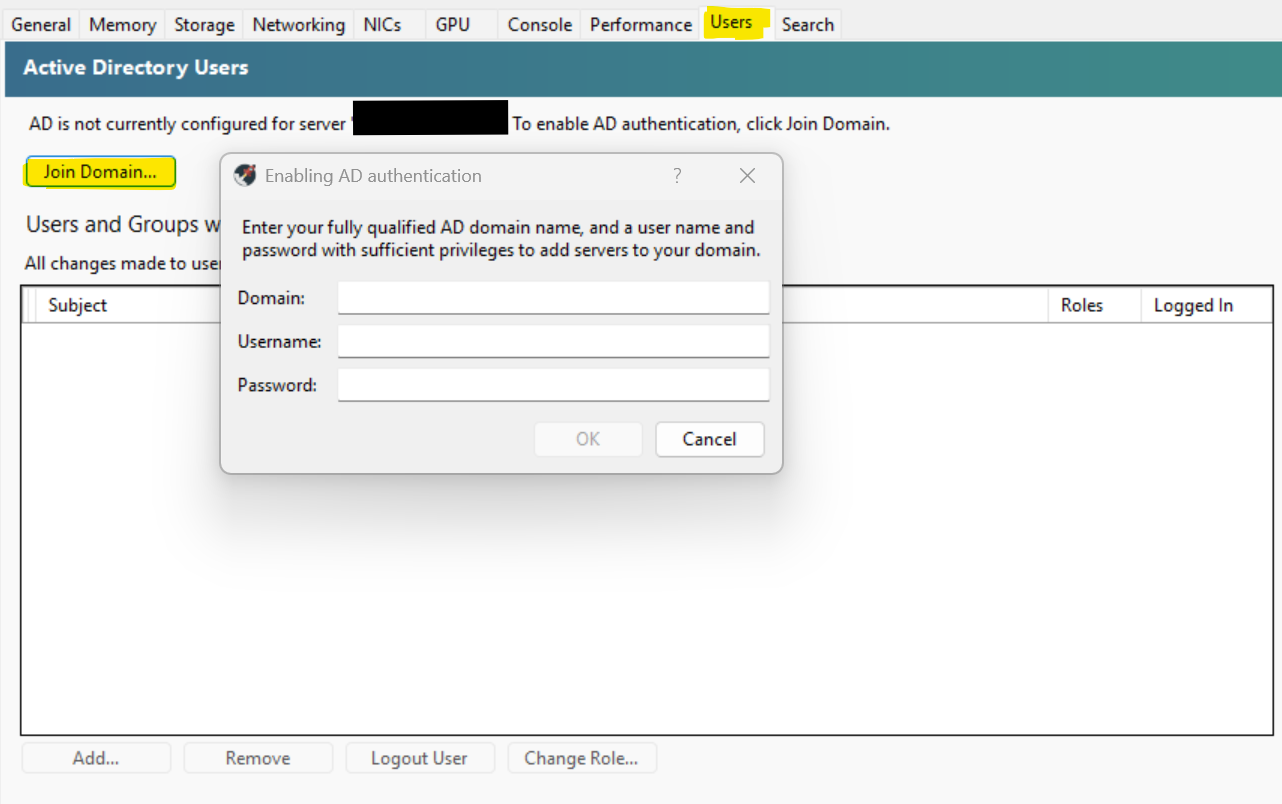
@michael.manley The "Join Domain" option in the Users tab.
Keeping this will be very useful.
-
Hi, with this modification on MainWindow.cs in
private List<TabPage> GetNewTabPages()adding this at the end:
           if (!multi && !SearchMode && (isPoolSelected || isHostSelected && isHostLive))
                newTabs.Add(TabPageAD);
the AD tab appears:
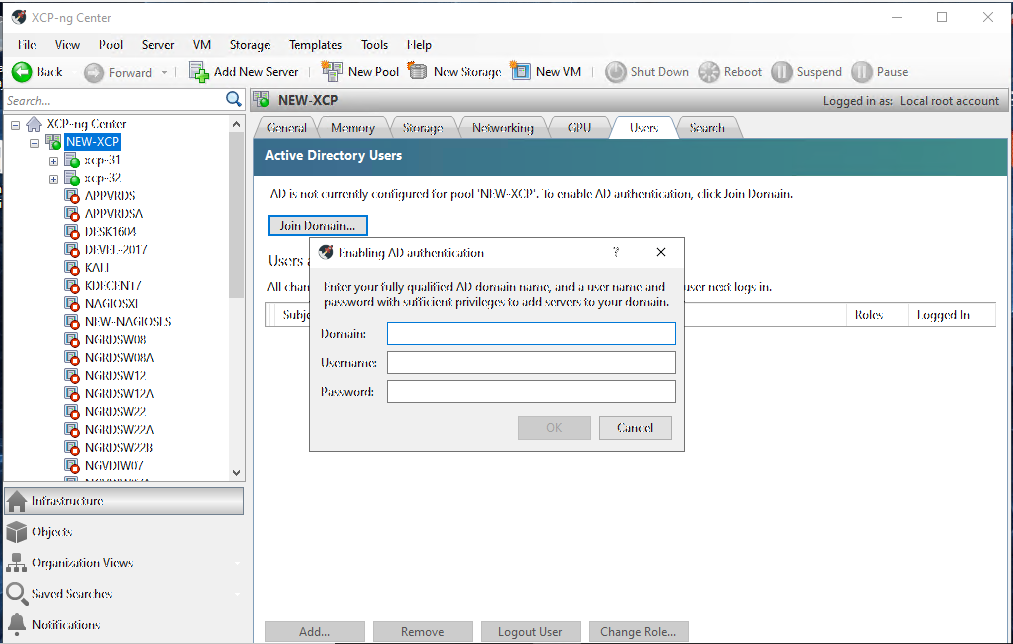
I test this modification and is working.
Maybe @michael.manley can update this and the modification to support attach iSCSI SR without error with gfs2
-
Lovin' this.... thank you for picking it up. Great tool to have.
-
@uberiain said in XCP-ng Center 25.04 Released:
Maybe @michael.manley can update this and the modification to support attach iSCSI SR without error with gfs2
GFS2 isn't supported in XCP-ng at all, and is only supported in Citrix Hypervisor, the fact that it works is pure chance.
-
@DustinB I think I expressed myself poorly; the iSCSI SR creation test does not remove the gfs2 check and does not allow it to be created as LVM.
In LVMoISCSI.cs if you set:
var performSecondProbe = Helpers.KolkataOrGreater(Connection) && !Helpers.FeatureForbidden(Connection, Host.RestrictCorosync);The SR can be created.
-
This post is deleted! -
@michael.manley
Sorry to ask, but I can not find any code/compiled program to download on this page.
I find this github page not user friendly at all - maybe fine for developers, not for users. Maybe I just dont see it...Could you please shed some light on it, that I can download it?
Thanks for your help! -
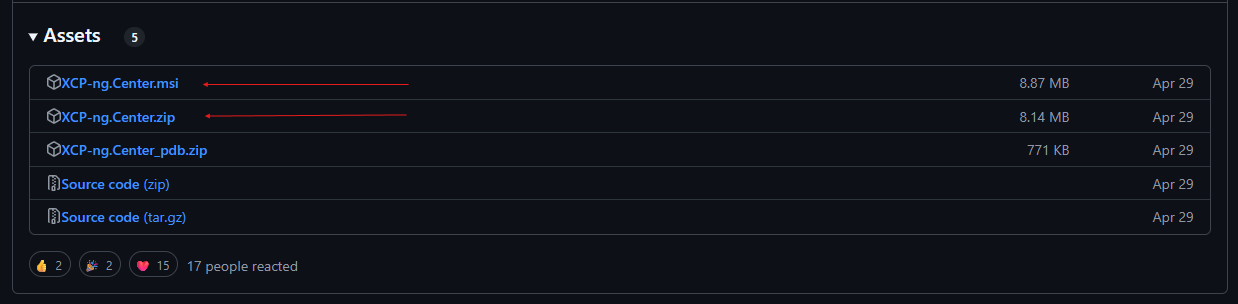
@JBlessing At the bottom of the release page (https://github.com/xcp-ng/xenadmin/releases/tag/v25.04) are the links to download either the MSI installer or a Zip file containing the entire application (if you want a portable package).
-
@kagbasi-ngc Thanks for your help. I found the culprit: Brightcloud Webfilter was blocking parts of the github site - I was wondering why it looked so .. weird...
My fault not checking it beforehand. -
@JBlessing You're welcome!
-
@uberiain said in XCP-ng Center 25.04 Released:
Hi, with this modification on MainWindow.cs in
private List<TabPage> GetNewTabPages()adding this at the end:
This will add the tab back in XCP-ng Center but I don't think it works in XCP-ng 8.3.
I just upgraded from 8.2.1 to 8.3 when I logged into XCP-ng Center I saw the error messageActive Directory authorization is not available","Server 'xcp-ng-TEST' has failed to connect to the Active Directory server. INTERNAL_ERROR: [ Xapi_systemctl.Systemctl_fail(""INTERNAL_ERROR: [ Subprocess exited with unexpected code 1; stdout = [ ]; stderr = [ Job for winbind.service failed because the control process exited with error code. See \""systemctl status winbind.service\"" and \""journalctl -xe\"" for details.\n ] ]"") ]","xcp-ng-TEST","Jul 11, 2025 3:58 PM","# systemctl status winbind.service winbind.service - Samba Winbind Daemon Loaded: loaded (/usr/lib/systemd/system/winbind.service; disabled; vendor preset: disabled) Active: failed (Result: exit-code) since Fri 2025-07-11 16:01:28 AEST; 3min 15s ago Docs: man:winbindd(8) man:samba(7) man:smb.conf(5) Main PID: 9593 (code=exited, status=1/FAILURE) Status: "Starting process..."I haven't figured out what to do yet. None of the users can log into XCP-ng Center using their Active Directory credentials and only root can log in.
EDIT: Actually winbind wasn't even used in XCP-ng 8.2.1, I'm not sure why this service started up in 8.3.
XCP-ng 8.2.1# systemctl status winbind.service
● winbind.service - Samba Winbind Daemon
   Loaded: loaded (/usr/lib/systemd/system/winbind.service; disabled; vendor preset: disabled)
   Active: inactive (dead)
     Docs: man:winbindd(8)
           man:samba(7)
           man:smb.conf(5)
But I can see that windbind is used for XenServer 8.4 https://docs.xenserver.com/en-us/xenserver/8/users
Anyone got suggestions on how to get AD authentication working with XCP-ng Center again? Or add users manaully?SOLUTION:
What I found after following the steps in the in the XenServer page above is that if I disable AD Authentication then re-enable it then it will work.To Disable AD Authentication: xe pool-disable-external-authEnable AD Authentication: xe pool-enable-external-auth auth-type=AD service-name=full-qualified-domain config:user=username config:pass=passwordWithout the Users tab in XCP-ng Center, CLI command is needed to add or remove users. Refer to the XenServer page above.
xe subject-add subject-name=entity_name -
@uberiain at this point, when I am uninstall the old XCP-ng center software, and install the new msi, I just realized the xcp-ng keeps the settings file in Roaming folder. (C:\Users\user\AppData\Roaming\XCP-ng)
When I deleted it I could re-register the servers.
-
News about development of XCP-ng Center?
In particular any way to customize the level of alert to see? I now see level 4 alert that is more or less "info" and I prefere to not see as "alert". -
Adding: is there a possibility to see the vm-export progress in the XCP-ng Center in a next update? Actually we only can see the vm-import progress.
Thanks! -
@michael.manley Would it be possible to backport the XSA-498 fixes? I've tried updating the SDK as a whole but it resulted in a lot of churn and caused errors elsewhere: https://github.com/xcp-ng/xenadmin/pull/271
The fixes to the SDK have been posted here https://github.com/xapi-project/xen-api/pull/7176 and here: https://xenbits.xen.org/xsa/advisory-498.html


Hello! It looks like you're interested in this conversation, but you don't have an account yet.
Getting fed up of having to scroll through the same posts each visit? When you register for an account, you'll always come back to exactly where you were before, and choose to be notified of new replies (either via email, or push notification). You'll also be able to save bookmarks and upvote posts to show your appreciation to other community members.
With your input, this post could be even better 💗
Register Login