-
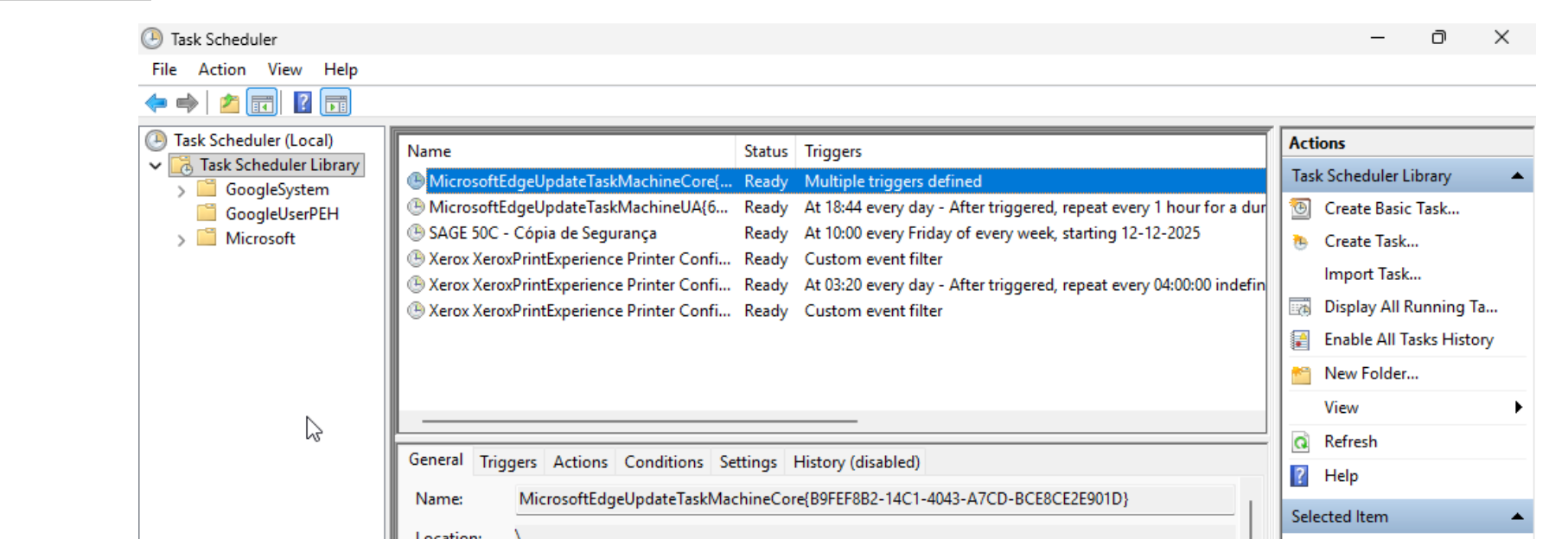
@dinhngtu Noting there:
-
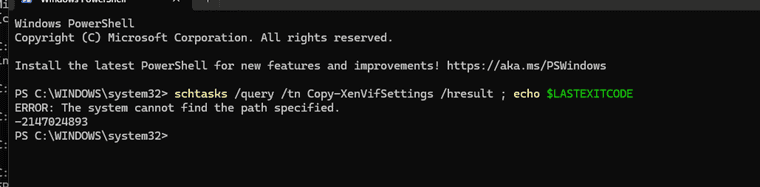
@manilx What do you see when you run this command from PowerShell?
schtasks /query /tn Copy-XenVifSettings /hresult ; echo $LASTEXITCODE -
-
@manilx Interesting... It's checking for "ERROR: The system cannot find the file specified. -2147024894", which is why it's failing. What if you specified the command this way, with a backslash?
schtasks /query /tn \Copy-XenVifSettings /hresult ; echo $LASTEXITCODE -
-
@manilx Try installing the .msi from an elevated powershell prompt. That worked for one of our Windows 11 VMs.
-
@conitrade-as Yes, fixed. Thx!
The issue on this VM was we were installing as non-admin. All others were admin by default.
Good catch
-
Recent Windows patches also changed the exit code of schtasks.
A new package will be released to address this.
-
Hello all,
Version 9.1.146 Release of the Windows PV tools has been released.
Download the latest release here: https://github.com/xcp-ng/win-pv-drivers/releases
It will be integrated into the XCP-ng built-in tools ISO after a test period of 2 weeks.
This is a small revision to fix issues when installing on certain Windows installations. Only the installer and XenClean were changed; the binaries inside stay the same.
If you're already on 9.1.145, upgrading is optional.
Changes since 9.1.145
- Fixed: Fix issues when installing on certain Windows installations.
-
Seems that the 9.1.146 version still reports 9.1.145-77 to XO. It is listed as the correct version in "Installed programs" within the guest (Windows server 2025).
-
@probain Yes, that's expected as there were only changes in the installer and XenClean/XenBootFix, the drivers and guest agent binaries included in 9.1.145 and 9.1.146 are the exact same. As a result, the version information in the guest agent (which does the reporting) was not updated.
-
Just wanted to clarify something.
Prior to installing xcpng-winpv-9.1.100.0-Release-x64.zip, I ran Invoke-XenClean.ps1 that came with the package.
Is is still true that, in order to install (upgrade to) xcpng-winpv-9.1.145.0-Release-x64, I have to run XenClean.exe again and then run the new installer?
Its just a lot of reboots, resetting static ip addresses etc.
-
@archw XenClean is not needed when upgrading; it's only needed when switching tools vendor, or when switching from the old XCP-ng 8.2 tools.
The XCP-ng 9.1 tools installer will block installation and indicate an error whenever XenClean is needed.
-
@dinhngtu
You rock - thank you! -
Hello all,
XenClean 9.1.148 Prerelease is now available with a fix for error 1605 during execution.
This is a XenClean-only prerelease.
https://github.com/xcp-ng/win-pv-drivers/releases/tag/v9.1.148
-
Hello all,
XenClean/XenBootFix 9.1.152 have been released.
This release fixes VSA-2026-012 (DLL sideloading vulnerability in XenClean and XenBootFix).
If your VM is running 9.1.146, you don't need to update. You just need to replace any XenClean and XenBootFix files you downloaded.
The
package\XenCleanandpackage\XenBootFixdirectories contain fixed versions of the aforementioned tools.package\XenTools-x64.msihas not changed from version 9.1.146, and is only provided as a convenience. The installation MSI does not include the fixed XenBootFix.You must use the one from
package\XenBootFixor download the tool directly from GitHub!The next release of the XCP-ng Windows Guest Tools will contain a fixed version of XenBootFix.
Get it here: https://github.com/xcp-ng/win-pv-drivers/releases
-
Hello all,
Version 9.1.200 Release of the Windows PV tools has been released.
Download the latest release here: https://github.com/xcp-ng/win-pv-drivers/releases
It will be integrated into the XCP-ng built-in tools ISO after a test period of 2 weeks.
This release brings bug fixes and improvements to the PV drivers.
Changes since 9.1.146/9.1.152
- Improved: Update XSTDVGA to v0.1.124.1151; add extra resolutions
- Fixed: Better compatibility with Xen block backends with large sector sizes
- Fixed: Fix more network unplug issues
- Improved: Driver optimizations
-
abudef said:
I was thinking more of updating the entire set of the agent and drivers, similar to how XenServer VM Tools for Windows have it implemented. Using a scheduled job, they regularly check whether an update is available, and if so, they carry out the update of both the agent and the drivers themselves.
Hi, how’s it looking regarding a possible automatic update?
-
@abudef An overhaul of the guest agent is coming. We're considering adding some kind of update notifications as part of that overhaul, but it'll take some time to suss out the details. Autoupdating the Xen drivers is potentially disruptive and I'd prefer avoiding outages arising from an update coming at a bad time.
-
Hello all,
Version 9.2.350 Release of the Windows guest tools has been released.
Download the latest release here: https://github.com/xcp-ng/win-pv-drivers/releases
It will be integrated into the XCP-ng built-in tools ISO after a test period of 2 weeks.
This major release brings a new Windows guest agent with many new features, plus multiple other improvements.
To download XenClean, click here. The installer downloads also includes a copy of XenClean and XenBootFix. It is not necessary to run XenClean when upgrading from previous versions of the XCP-ng Windows guest tools, unless prompted by the installer. Remember to carefully read XenClean docs before use.
Note: Always download the latest XenClean/XenBootFix from https://github.com/xcp-ng/win-pv-drivers/releases
Before installing
Thank you for using our Windows PV tools. Please carefully read the instructions below.
- It is not necessary to run XenClean when upgrading from previous versions of the XCP-ng Windows guest tools, unless prompted by the installer.
- Not compatible with the "Manage Citrix PV drivers via Windows Update" option. You must disable this option before installing.
Changes since 9.1.200
- NEW: Overhauled Windows guest agent with many new features:
- Supports configuring guest IP addresses from within the host using
xe vif-configure-ipv4andxe vif-configure-ipv6. - Session agent now gains a tray icon and About dialog.
- Improved clipboard sync stability and accuracy.
- Better reporting of OS versions.
- Time sync is now integrated with W32Time. NTP is now the only recommended setup for time sync on XCP-ng Windows guests.
- Supports configuring guest IP addresses from within the host using
- Improved: Update XSTDVGA to v0.1.211.1039; improve compatibility.
- Improved: Better reporting of IPv6 addresses.
- Fixed: Better network stability during high load.
- Fixed: Storage driver bug fixes.
- Fixed: Better installer resilience when the offboard task is pending.
Help / Community support
If you encounter installation/uninstallation errors, please try again with one of the following commands:
For installing:
msiexec.exe /i XenTools-x64.msi /log install.log

For uninstalling:
msiexec.exe /x XenTools-x64.msi /log uninstall.log
Please include this log along with the file
C:\Windows\INF\setupapi.dev.login your bug report. These files will help us troubleshoot any installation issues.Additionally, please report any errors or BSOD you encounter during testing of this release. Your feedback is very appreciated.
- Discussion: https://xcp-ng.org/forum (preferred)
- Issue Tracker: https://github.com/xcp-ng/xcp/issues
- IRC: #xcp-ng and #xcp-ng-dev on irc.freenode.net
Full Changelog: https://github.com/xcp-ng/win-pv-drivers/compare/v9.1.200...v9.2.350
Original build: https://github.com/xcp-ng/win-pv-drivers/actions/runs/31088530595

Hello! It looks like you're interested in this conversation, but you don't have an account yet.
Getting fed up of having to scroll through the same posts each visit? When you register for an account, you'll always come back to exactly where you were before, and choose to be notified of new replies (either via email, or push notification). You'll also be able to save bookmarks and upvote posts to show your appreciation to other community members.
With your input, this post could be even better 💗
Register Login