XCP-ng
    • Categories
    • Recent
    • Tags
    • Popular
    • Users
    • Groups
    • Register
    • Login

    VM failed and won't start. Displaying "An emulator required to run this VM failed to start"

    Scheduled Pinned Locked Moved XCP-ng
    35 Posts 2 Posters 5.6k Views 2 Watching
    Loading More Posts
    • Oldest to Newest
    • Newest to Oldest
    • Most Votes
    Reply
    • Reply as topic
    Log in to reply
    This topic has been deleted. Only users with topic management privileges can see it.
    • R Offline
      rustylh
      last edited by olivierlambert

      AlmaLinux 8.10. VM failed and won't start. Displaying "An emulator required to run this VM failed to start".
      I have restarted the toolstack on the Host Server. I have attempted to create snapshot and revert. Any help is appreciated.

      I just tried to migrate a test VM to the same host. No getting.

      "Failed","Migrating VM 'AlmaLinux8-Testing' from 'iahost-xcpng-server3' to 'iahost-xcpng-server1'
      Internal error: xenopsd internal error: Xenops_interface.Xenopsd_error([S(Storage_backend_error);[S(SR_BACKEND_FAILURE_46);[S();S(The VDI is not available [opterr=Command ['/sbin/lvs', '--noheadings', '--units', 'b', '-o', '+lv_tags', '/dev/VG_XenStorage-88d7607c-f807-3b06-6f70-2dcb319d97ea'] failed (5): /dev/sdb: open failed: No such device or address
        Volume group "VG_XenStorage-88d7607c-f807-3b06-6f70-2dcb319d97ea" not found
        Cannot process volume group VG_XenStorage-88d7607c-f807-3b06-6f70-2dcb319d97ea]);S()]]])
      Time: 00:09:43","iahost-xcpng-server1","Jun 9, 2025 10:41 AM"
      

      And now attempting to force a reboot on same vm

      "Failed","Rebooting VM 'AlmaLinux8-Testing' on 'iahost-xcpng-server3'
      Internal error: Object with type VM and id dfcdcce6-b6e1-d865-6f2b-472a35b1fae7/config does not exist in xenopsd
      Time: 00:00:01","iahost-xcpng-server3","Jun 9, 2025 11:03 AM"
      
      1 Reply Last reply Reply Quote 0
      • olivierlambertO Offline
        olivierlambert Vates 🪐 Co-Founder CEO
        last edited by olivierlambert

        /dev/sdb: open failed

        That's your issue. Can you check if your SR is correctly connected? Are you using Qcow alpha?

        R 1 Reply Last reply Reply Quote 0
        • R Offline
          rustylh @olivierlambert
          last edited by

          @olivierlambert said in VM failed and won't start. Displaying "An emulator required to run this VM failed to start":

          Qcow alpha

          No Qcow alpha. I do have three other host with no issues that I know of (Hopfully) attached is the Storage Screenshot on that host.SR Image.png

          1 Reply Last reply Reply Quote 0
          • olivierlambertO Offline
            olivierlambert Vates 🪐 Co-Founder CEO
            last edited by

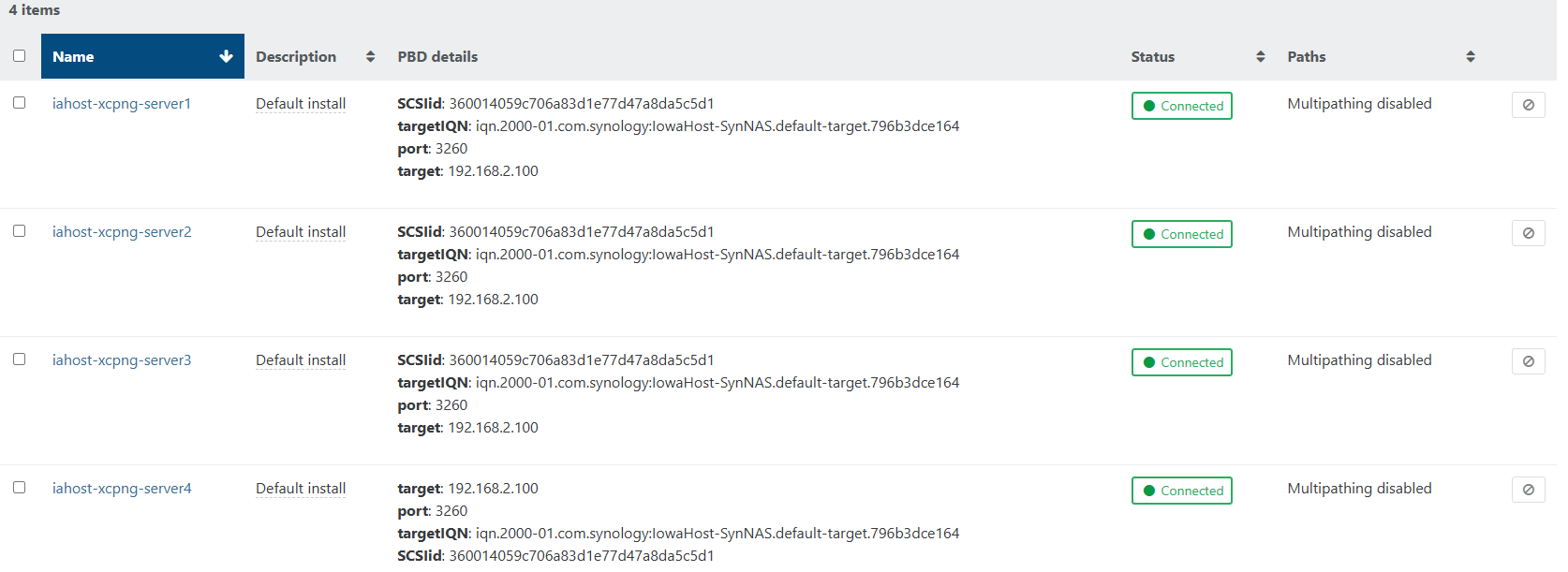
            Check the SR view in XO, hosts tab to see if they are all connected.

            R 1 Reply Last reply Reply Quote 0
            • R Offline
              rustylh @olivierlambert
              last edited by

              @olivierlambert SR View.png

              1 Reply Last reply Reply Quote 0
              • olivierlambertO Offline
                olivierlambert Vates 🪐 Co-Founder CEO
                last edited by

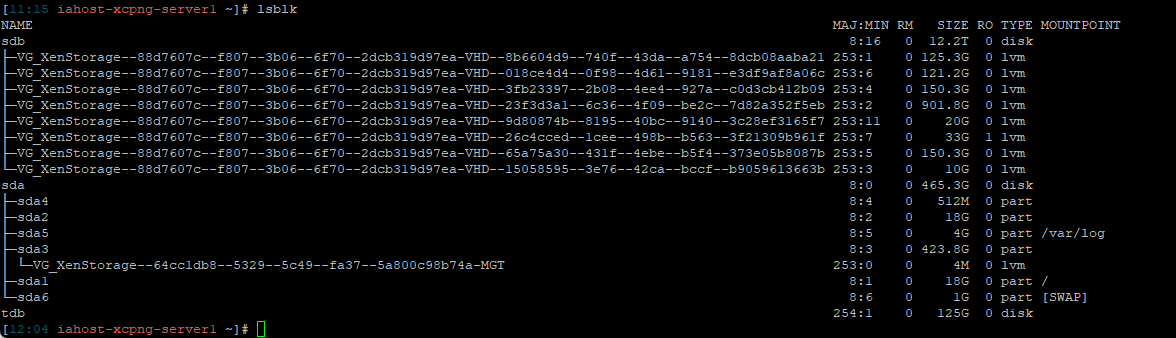
                Do a lsblk on the problematic host, let's see what's /dev/sdb

                R 1 Reply Last reply Reply Quote 0
                • R Offline
                  rustylh @olivierlambert
                  last edited by

                  @olivierlambert lsblk.png

                  1 Reply Last reply Reply Quote 0
                  • olivierlambertO Offline
                    olivierlambert Vates 🪐 Co-Founder CEO
                    last edited by

                    So first, how does "AlmaLinux8-Testing" appear in XO? Like started? If it's the case, you might do a state power reset to it. Then, check the dmesg on the host, I have a feeling there's a connection issue with it.

                    R 1 Reply Last reply Reply Quote 0
                    • R Offline
                      rustylh @olivierlambert
                      last edited by

                      @olivierlambert "Failed","Shutting down VM 'AlmaLinux8-Testing' on 'iahost-xcpng-server3'
                      Internal error: Object with type VM and id dfcdcce6-b6e1-d865-6f2b-472a35b1fae7/config does not exist in xenopsd","iahost-xcpng-server3","Jun 9, 2025 12:28 PM"

                      1 Reply Last reply Reply Quote 0
                      • olivierlambertO Offline
                        olivierlambert Vates 🪐 Co-Founder CEO
                        last edited by

                        That's why you need to power reset it first.

                        Also please check the host dmesg

                        R 1 Reply Last reply Reply Quote 0
                        • R Offline
                          rustylh @olivierlambert
                          last edited by

                          @olivierlambert Oh, I'm sorry. You mean power restart the host server?

                          R 1 Reply Last reply Reply Quote 0
                          • R Offline
                            rustylh @rustylh
                            last edited by

                            [12:52 iahost-xcpng-server3 ~]# xe vm-reset-powerstate vm=dfcdcce6-b6e1-d865-6f2b-472a35b1fae7 --force
                            This operation cannot be completed because the server is still live.
                            host: 6985c3a2-091d-488b-8de6-4bf40985987b (iahost-xcpng-server3)

                            1 Reply Last reply Reply Quote 0
                            • olivierlambertO Offline
                              olivierlambert Vates 🪐 Co-Founder CEO
                              last edited by

                              On the pool master:

                              1. Restart the toolstack
                              2. Immediately after, run the vm reset powerstate command.
                              R 1 Reply Last reply Reply Quote 0
                              • R Offline
                                rustylh @olivierlambert
                                last edited by

                                @olivierlambert Ok. I was able to get that VM started on another Host. Now, I need to figure out what is going on with server1. I appreciate all your help! If you have any suggestions please let me know.

                                1 Reply Last reply Reply Quote 0
                                • olivierlambertO Offline
                                  olivierlambert Vates 🪐 Co-Founder CEO
                                  last edited by

                                  My suggestion stands from previous messages, check the dmesg output from the problematic host 🙂

                                  R 1 Reply Last reply Reply Quote 0
                                  • R Offline
                                    rustylh @olivierlambert
                                    last edited by

                                    @olivierlambert It is full of these:
                                    43342477.643853] sd 7:0:0:1: rejecting I/O to offline device
                                    [43342477.643861] print_req_error: I/O error, dev sdb, sector 0

                                    1 Reply Last reply Reply Quote 0
                                    • olivierlambertO Offline
                                      olivierlambert Vates 🪐 Co-Founder CEO
                                      last edited by

                                      That's exactly what I suspected. You have a connectivity issue with your shared storage.

                                      The device is considered offline because it cannot do any I/O on sector 0

                                      R 1 Reply Last reply Reply Quote 0
                                      • R Offline
                                        rustylh
                                        last edited by

                                        said in VM failed and won't start. Displaying "An emulator required to run this VM failed to start":

                                        rejecting I/O to offline device

                                        I was able to reboot the host. Now things seam fine. Does that make sense? I mean have you seen this happen then a reboot of the host takes care of it?

                                        1 Reply Last reply Reply Quote 0
                                        • R Offline
                                          rustylh @olivierlambert
                                          last edited by

                                          @olivierlambert I had the same issue this morning on one of the hosts I rebooted and was working fine. An emulator required to run this VM Failed to start. sd 7:0:0:1: rejecting I/O to offline device. I am not sure what to check next.

                                          1 Reply Last reply Reply Quote 0
                                          • R Offline
                                            rustylh
                                            last edited by

                                            xcp-ng iscsiadm -m session -P 3 Attached scsi disk sdb State: offline

                                            1 Reply Last reply Reply Quote 0

                                            Hello! It looks like you're interested in this conversation, but you don't have an account yet.

                                            Getting fed up of having to scroll through the same posts each visit? When you register for an account, you'll always come back to exactly where you were before, and choose to be notified of new replies (either via email, or push notification). You'll also be able to save bookmarks and upvote posts to show your appreciation to other community members.

                                            With your input, this post could be even better 💗

                                            Register Login
                                            • First post
                                              Last post