XCP-ng
    • Categories
    • Recent
    • Tags
    • Popular
    • Users
    • Groups
    • Register
    • Login

    Unbootable VHD backups

    Scheduled Pinned Locked Moved XCP-ng
    19 Posts 3 Posters 1.8k Views 2 Watching
    Loading More Posts
    • Oldest to Newest
    • Newest to Oldest
    • Most Votes
    Reply
    • Reply as topic
    Log in to reply
    This topic has been deleted. Only users with topic management privileges can see it.
    • D Offline
      DustinB @Schmidty86
      last edited by DustinB

      @Schmidty86 Try disabling the boot devices under advanced

      https://xcp-ng.org/forum/topic/8357/i-cannot-enter-the-vm-boot-menu/2

      then you'll have more time to see what the options are to get into BIOS.

      It might even be as simple as tapping the Shift Key while the VM starts.... I don't have to do it often enough to commit to memory, but you can definitely get into BIOS on a VM that "isn't posting". You've technically made it past post, and are failing due to a missing boot device.

      S 1 Reply Last reply Reply Quote 0
      • S Offline
        Schmidty86 @DustinB
        last edited by

        @DustinB You cannot disable all the boot devices in xoa.

        S 1 Reply Last reply Reply Quote 0
        • S Offline
          Schmidty86 @Schmidty86
          last edited by

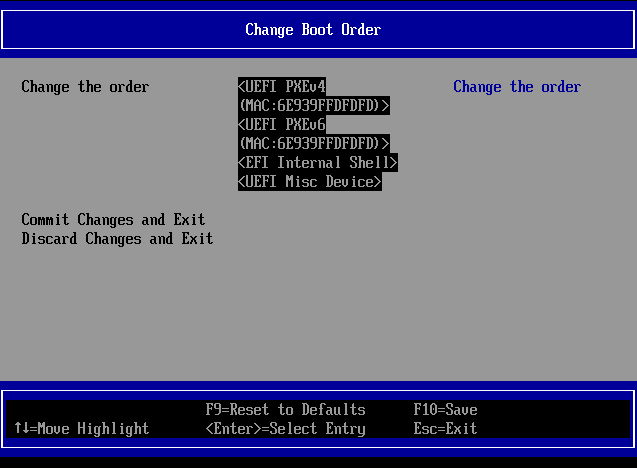
          Got into the boot but, change what now?
          94f2e91d-32e9-4ffe-aa07-7c6a9d95c95b-image.png

          D 1 Reply Last reply Reply Quote 0
          • D Offline
            DustinB @Schmidty86
            last edited by

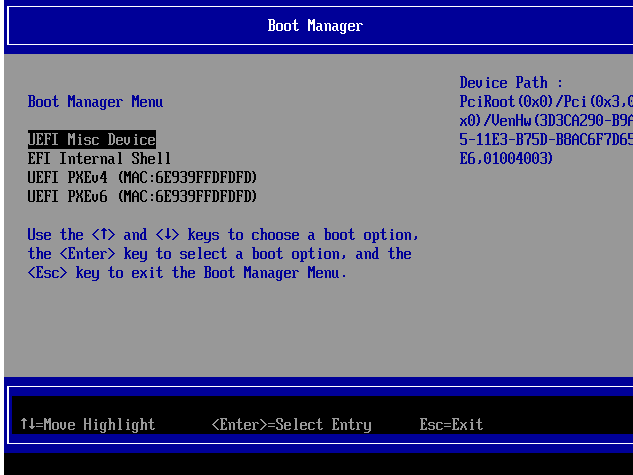
            @Schmidty86 I dont see your disk at all listed, only PXE (network booting) and then the MISC device (which is the questionable item).

            The internal Shell isn't relevant to this conversation.

            D 1 Reply Last reply Reply Quote 0
            • D Offline
              DustinB @DustinB
              last edited by DustinB

              said in Unbootable VHD backups:

              @Schmidty86 I dont see your disk at all listed, only PXE (network booting) and then the MISC device (which is the questionable item).

              The internal Shell isn't relevant to this conversation.

              As a side thought, re-enable the DISK under advanced and then reboot into BIOS and see if the disk is listed.

              S 1 Reply Last reply Reply Quote 0
              • S Offline
                Schmidty86 @DustinB
                last edited by Schmidty86

                @DustinB 87c00940-b25f-46ec-ba09-94e7f99414bf-image.png

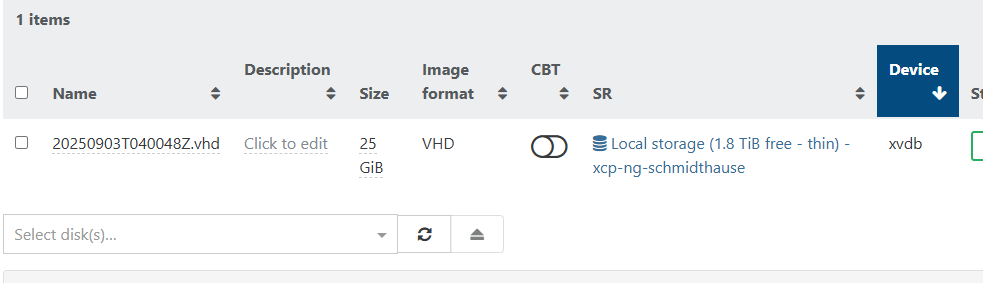
                still nothing. and i do have the vhd attached.
                3428795d-3994-4d14-b41f-ef7bd294dedb-image.png

                D 1 Reply Last reply Reply Quote 0
                • D Offline
                  DustinB @Schmidty86
                  last edited by

                  @Schmidty86 That disk appears to be a secondary disk, is this just a "data volume" and not a boot volume (looking at XO where it shows xvdb)?

                  Hrm as to the fact that it still shows it as a misc disk.... I'm at a loss.

                  S 2 Replies Last reply Reply Quote 0
                  • S Offline
                    Schmidty86 @DustinB
                    last edited by

                    @DustinB To my knowledge this is the bootable volume. all the other backups in the parent folder are just differential backups that are much much smaller.

                    1 Reply Last reply Reply Quote 0
                    • S Offline
                      Schmidty86 @DustinB
                      last edited by

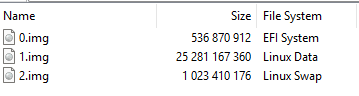
                      @DustinB Also when i look at the VHD in 7zip i can clearly see that it has a boot sector.
                      735e1907-f22a-4393-8070-3c9d9f755d71-image.png

                      AtaxyaNetworkA 1 Reply Last reply Reply Quote 0
                      • AtaxyaNetworkA Offline
                        AtaxyaNetwork Ambassador @Schmidty86
                        last edited by

                        @Schmidty86 Try to detach the disk and reattach, it should be xvda in order to be bootable

                        S D 2 Replies Last reply Reply Quote 0
                        • S Offline
                          Schmidty86 @AtaxyaNetwork
                          last edited by

                          @AtaxyaNetwork Sadly I've done this multiple times as well with no luck of it turning into that format.

                          1 Reply Last reply Reply Quote 0
                          • D Offline
                            DustinB @AtaxyaNetwork
                            last edited by

                            @AtaxyaNetwork said in Unbootable VHD backups:

                            @Schmidty86 Try to detach the disk and reattach, it should be xvda in order to be bootable

                            That's what I was thinking as well, but obviously something is off with this VM.

                            @Schmidty86 is the old host still online? If so you might be able to perform a Live Migration or a replication job to copy it from the old host to the new.

                            1 Reply Last reply Reply Quote 0

                            Hello! It looks like you're interested in this conversation, but you don't have an account yet.

                            Getting fed up of having to scroll through the same posts each visit? When you register for an account, you'll always come back to exactly where you were before, and choose to be notified of new replies (either via email, or push notification). You'll also be able to save bookmarks and upvote posts to show your appreciation to other community members.

                            With your input, this post could be even better 💗

                            Register Login
                            • First post
                              Last post