Host compatibility
-
Having compatibility issues between two host.
Current pool has 2 host. Both host are Dell r640. Previously migrated from vmware which was running now host 2 (slave host). The current Master host was installed and VMs were migrated over. I have fixed all networking and storage configuration on now host 2 and joined to the pool. When I attempt to migrate a VM over i get the following error message (Windows VM).
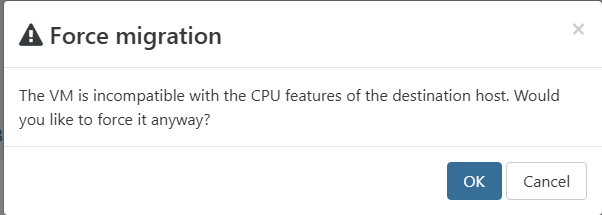
I had a powered off linux Ubuntu server. While it was powered off i migrated to host 2. Powserd up VM and it booted itself on host 1. I then attempted to migrate back to host 2 and it did no issues.
However Windows VM gives the above error still.
Host 1 (Master host) - Intel(R) Xeon(R) Silver 4114 CPU @ 2.20GHz
Host 2 (Slave host) - Intel(R) Xeon(R) Silver 4210 CPU @ 2.20GHzAny other information needed?
-
Created fresh windows 11 vm and it decieded to boot on host 2. After booted to desktop and tools installed I was able to migrate to host 1. I then was able to migrate back to host 2.
Maybe if i shutdown the vms and boot backup all will be good?
-
@acebmxer said in Host compatibility:
Maybe if i shutdown the vms and boot backup all will be good?
This is generally correct. If the VMs haven't been migrated or rebooted since the additional host was added to the pool, then you can encounter this situation due to CPU masking.
See the docs for an explanation of Homogeneous vs Heterogeneous Pools.
-
Yeah found vm i could shutdown and powered it back up it booted on host 2 and was able to migrate back and forth.
I didnt have that issue when building the other two pools.
I have a few old windows server 2012r2 and 2016. I know their old and will work on upgrading them but i was not able to install the tools on i think just the 2012r2.
https://docs.xcp-ng.org/vms/#windows-guest-tools - I see 2016.
Is there way to install the tools or an older version that will work for the time being?
-


Hello! It looks like you're interested in this conversation, but you don't have an account yet.
Getting fed up of having to scroll through the same posts each visit? When you register for an account, you'll always come back to exactly where you were before, and choose to be notified of new replies (either via email, or push notification). You'll also be able to save bookmarks and upvote posts to show your appreciation to other community members.
With your input, this post could be even better 💗
Register Login