After Update XO wont start
-
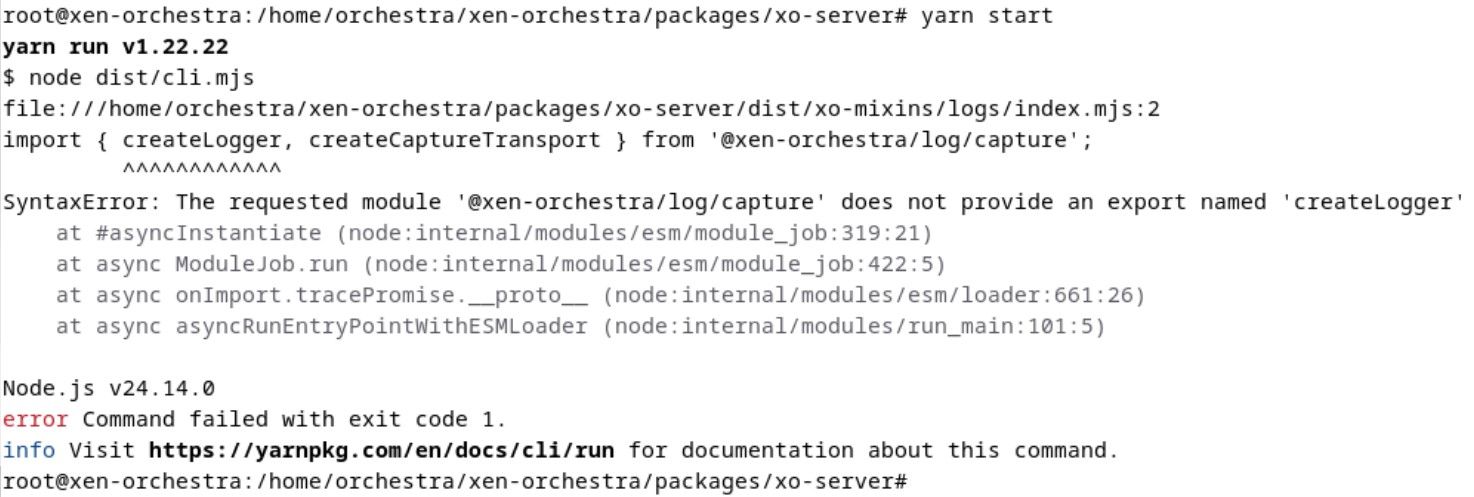
After falling 23 commits behind, I updated my Xo again today. Now, when I try to start it, the following message appears. I’ve already tried a few things, but I’m not getting anywhere.
Can anyone help me?
-
@ElFritto same here. But commit 5bdd76a95 (latest from yesterday) still works.
-
@ElFritto can you do a yarn && yarn build at the root of xen-orchestra ?
edit : found it, we will do a patch
-
patch done by @bastien-nollet
-
@geometry game 2 This usually happens when dependencies are out of sync after pulling updates. Did you try removing node_modules and the lock file and then running yarn install again before starting XO?
-
Hey, that sucks after catching up on 23 commits. Looks like something broke in the log module during the update. I’d try a clean reinstall of the dependencies first, or drop back to an older Node version for a bit since Node 24 can be fussy with these packages. When you need a quick mental break from troubleshooting npm issues, checking out TonyBet is a great way to enjoy some online gaming and sports betting. Hope getting those modules reinstalled gets your build running smoothly again soon!
-
 P poddingue marked this topic as a question on


Hello! It looks like you're interested in this conversation, but you don't have an account yet.
Getting fed up of having to scroll through the same posts each visit? When you register for an account, you'll always come back to exactly where you were before, and choose to be notified of new replies (either via email, or push notification). You'll also be able to save bookmarks and upvote posts to show your appreciation to other community members.
With your input, this post could be even better 💗
Register Login