XCP-ng
    • Categories
    • Recent
    • Tags
    • Popular
    • Users
    • Groups
    • Register
    • Login

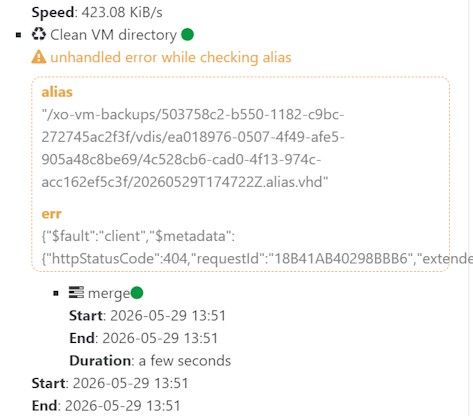
    XO error/warning: Clean VM directory. unhandled error while checking alias.
    Scheduled Pinned Locked Moved Backup
    34 Posts 6 Posters 285 Views 6 Watching
    Loading More Posts
    • Oldest to Newest
    • Newest to Oldest
    • Most Votes
    Reply
    • Reply as topic
    Log in to reply
    This topic has been deleted. Only users with topic management privileges can see it.
    • A Offline
      Andrew Top contributor @pierrebrunet
      last edited by

      @pierrebrunet It's a warning. Backup job is successful.

      P 1 Reply Last reply Reply Quote 0
      • P Offline
        pierrebrunet Vates 🪐 XO Team @Andrew
        last edited by

        @Andrew ok, thank you. This one indeed is not supposed to be triggered indeed.

        1 Reply Last reply Reply Quote 0
        • FagnerMoraesF Online
          FagnerMoraes
          last edited by

          Hello again,

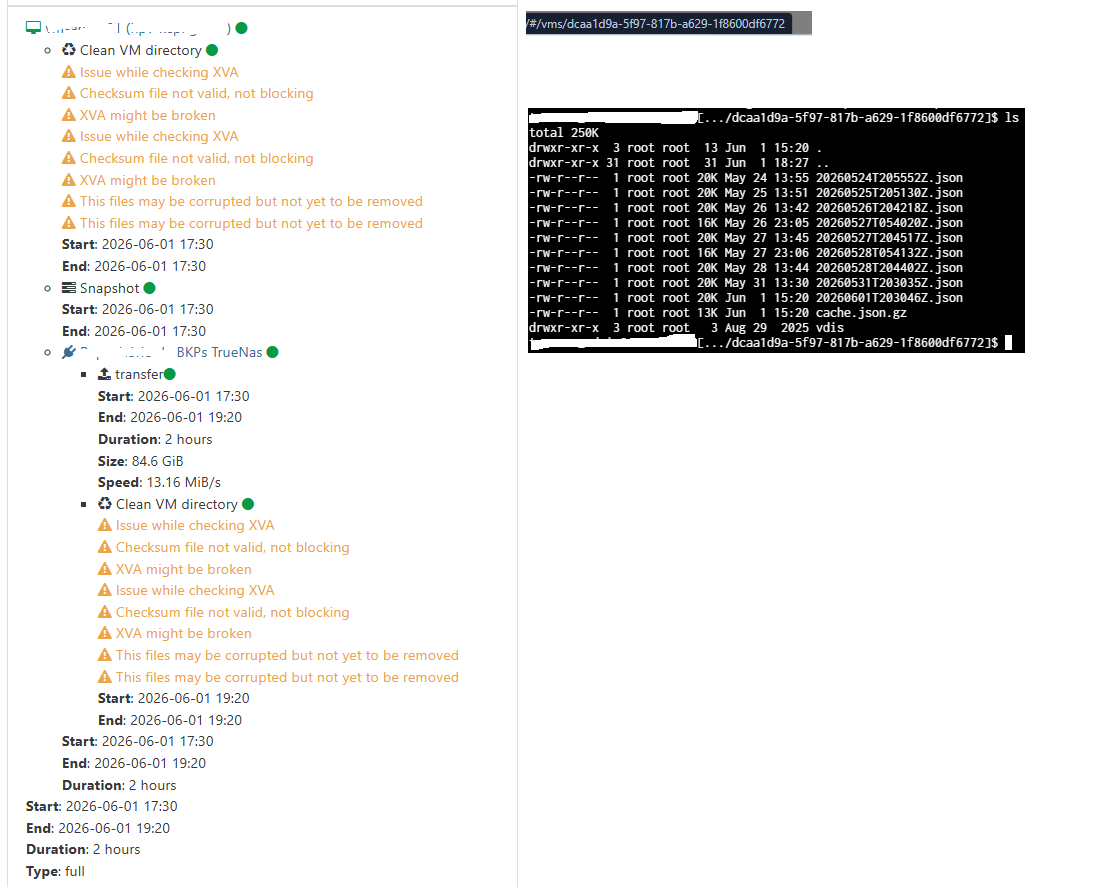
          When running the backup routine to the NAS, it is not saving the file anymore.

          Please check the image showing:

          the backup routine,
          the path it points to on the NAS,
          and the contents of the folder.

          The .XVA file was not saved.

          Erro xcp.png

          P 2 Replies Last reply Reply Quote 0
          • FagnerMoraesF Online
            FagnerMoraes
            last edited by

            On the S3 storage, the backup is being saved correctly and the old files are not being deleted unexpectedly.

            Using the same backup configuration, the directory cleanup process is not executed twice there.
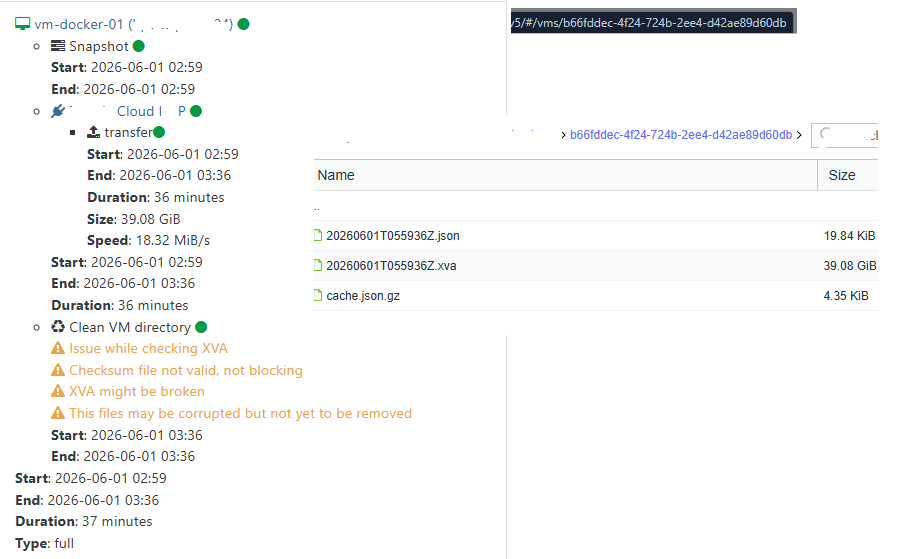
            Erro xcp 02.png

            1 Reply Last reply Reply Quote 0
            • P Offline
              pierrebrunet Vates 🪐 XO Team @FagnerMoraes
              last edited by pierrebrunet

              @FagnerMoraes Hi,
              Can you upload your logs please? It is a bit difficult with only screenshots. You can download them from the very modal you are in this screenshot. You can remove any personal name, I just need the logs to see where this comes from but I suspect you have two broken XVA (indeed, you have more than two json metadata).
              At first glance, I would advise you to use a new folder in your NAS to be sure everything goes well

              P FagnerMoraesF 2 Replies Last reply Reply Quote 0
              • P Offline
                pierrebrunet Vates 🪐 XO Team @pierrebrunet
                last edited by

                Moreover, can you show me one metadata file that is supposed to work please?

                FagnerMoraesF 2 Replies Last reply Reply Quote 0
                • FagnerMoraesF Online
                  FagnerMoraes @pierrebrunet
                  last edited by

                  This post is deleted!
                  1 Reply Last reply Reply Quote 0
                  • FagnerMoraesF Online
                    FagnerMoraes @pierrebrunet
                    last edited by

                    @pierrebrunet
                    thats a metadata backup works fine, no alerts and no clean directory.
                    Metadata works fine.txt

                    P 1 Reply Last reply Reply Quote 0
                    • FagnerMoraesF Online
                      FagnerMoraes @pierrebrunet
                      last edited by

                      @pierrebrunet thats a metadata backup works fine:
                      Metadata works fine.txt

                      1 Reply Last reply Reply Quote 0
                      • P Offline
                        pierrebrunet Vates 🪐 XO Team @FagnerMoraes
                        last edited by

                        @FagnerMoraes Is your backup encrypted?

                        FagnerMoraesF 1 Reply Last reply Reply Quote 0
                        • P Offline
                          pierrebrunet Vates 🪐 XO Team @FagnerMoraes
                          last edited by

                          @FagnerMoraes I just realized you are not listing the same folder that what is backed up in your NAS backup job: on the left, you are listing incremental backups from a given folder, but in the logs I analysed the xva are in another folder

                          1 Reply Last reply Reply Quote 0
                          • FagnerMoraesF Online
                            FagnerMoraes @pierrebrunet
                            last edited by

                            @pierrebrunet yes is encrypted!

                            1 Reply Last reply Reply Quote 0

                            Hello! It looks like you're interested in this conversation, but you don't have an account yet.

                            Getting fed up of having to scroll through the same posts each visit? When you register for an account, you'll always come back to exactly where you were before, and choose to be notified of new replies (either via email, or push notification). You'll also be able to save bookmarks and upvote posts to show your appreciation to other community members.

                            With your input, this post could be even better 💗

                            Register Login
                            • First post
                              Last post