XCP-ng
    • Categories
    • Recent
    • Tags
    • Popular
    • Users
    • Groups
    • Register
    • Login

    XCP-ng GPU Passthrough - No GPU found
    Scheduled Pinned Locked Moved Development
    41 Posts 10 Posters 47.1k Views 10 Watching
    Loading More Posts
    • Oldest to Newest
    • Newest to Oldest
    • Most Votes
    Reply
    • Reply as topic
    Log in to reply
    This topic has been deleted. Only users with topic management privileges can see it.
    • P
      Pejcik
      last edited by Pejcik

      Hello,

      My idea was to passthrough GPU to specific VM. According to many informations from the Internet, I'm doing this like that:

      1. /opt/xensource/libexec/xen-cmdline --set-dom0 "xen-pciback.hide=(03:00.0)(03:00.1)"
        but still even after reboot I see it on lspci
      2. xe vm-param-set other-config:pci=0/0000:03:00.0, 0/0000:03:00.1 uuid=c41704d0-a1f2-6bc1-fe2e-adc26697e636
        for old Nvidia 8600 and GT430 it doesn't work - Windows VM see that device, drivers are installed but all the time I have error 43 and this device is stopped
        for Radeon 7870 it work ok

      Audio and USB is working with that metod also.

      Is this connected with Vbios of this GPU's ?

      1 Reply Last reply
      Reply Quote 0
      • L
        linhnb
        last edited by

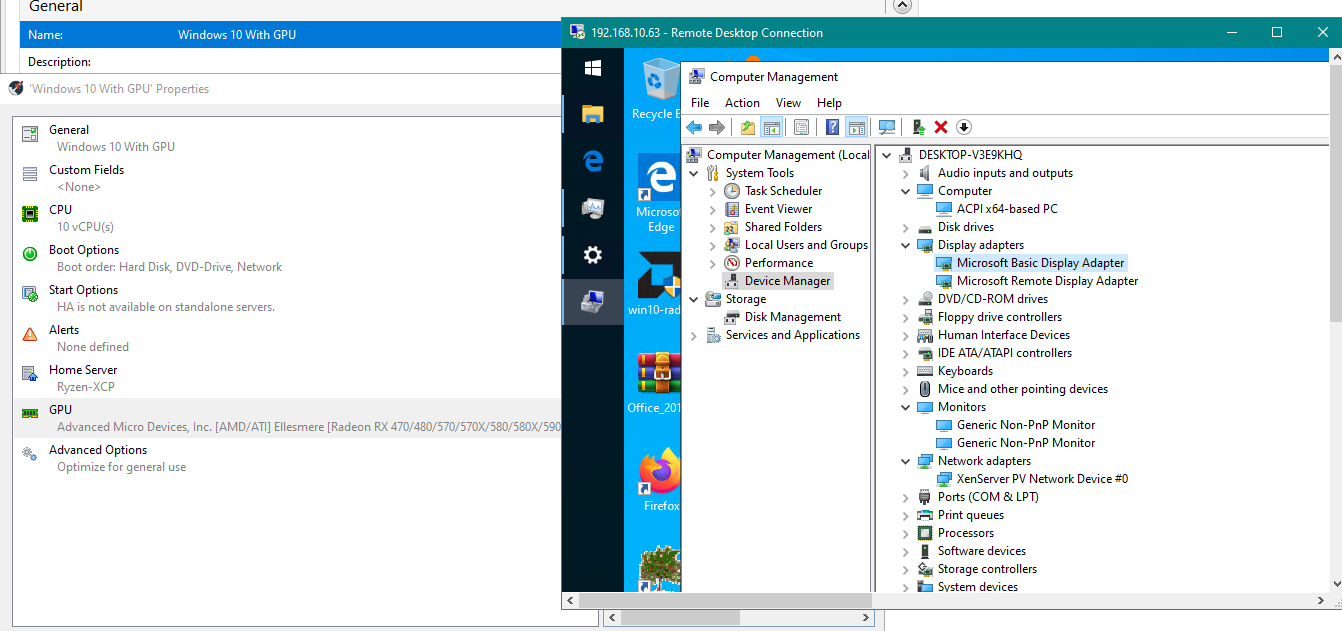
        Finally, we have GPU passthrough in the GUI,
        But it is not working...
        My setup:
        CPU 2700x
        MOBO: x470 Taichi
        RAM: 32GB
        GPU: Rx580 sapphire Nitro 4GB

        Please, I did use CLI and GUI, no work.
        Cannot see it in Windows.
        acc4199c-4b96-4306-b765-e6492841f099-image.png ![alt text](image url)

        J 1 Reply Last reply
        Reply Quote 0
        • A
          anthonyh
          last edited by

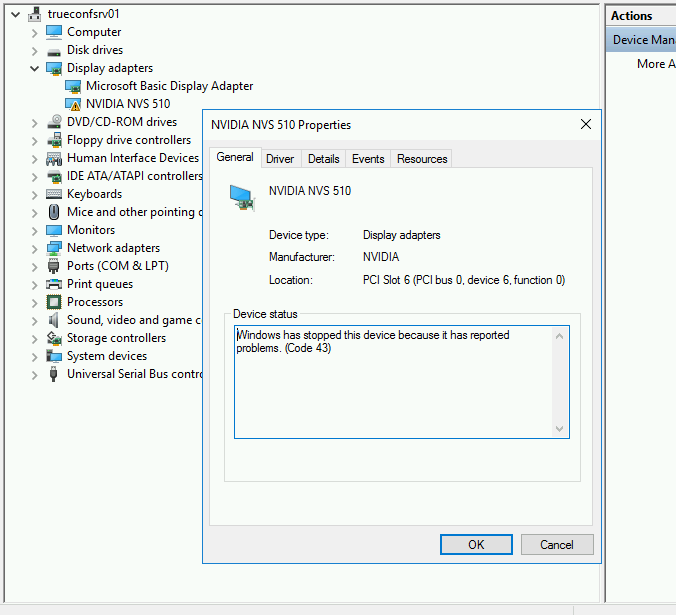
          Ironically, I am trying to do this as well. I put a second graphics card in a host (NVIDIA NVS 510) and made sure the appropriate virtalization settings were enabled in the BIOS. Running up to date XCP-ng 8.0 (yum update as of yesterday afternoon). I can assign the GPU to the Windows Server 2016 guest in XCP-ng Center, and the NVIDIA drivers seem to install fine, but Device Manager reports the following:
          85c90cd3-11ae-49a3-ac29-ff5a07488c81-image.png

          What's also interesting is even though it warns that you must be able to access the VM remotely as there will be no local console, there is still a local console. I don't know if this means anything.

          Any ideas?

          J L 2 Replies Last reply
          Reply Quote 0
          • J
            jmccoy555 @anthonyh
            last edited by

            @anthonyh Google code 43 NVIDIA...... Basic translation is we want to stop you doing this with a consumer card in a VM. There are solutions I believe.

            A 1 Reply Last reply
            Reply Quote 0
            • olivierlambertO
              olivierlambert Vates 🪐 Co-Founder CEO
              last edited by

              Yes, using Nvidia card supporting GPU passthrough 😛

              Otherwise, there's "border line" patches on Windows drivers available on GitHub, but we won't find those for you 😉

              1 Reply Last reply
              Reply Quote 1
              • J
                jmccoy555 @linhnb
                last edited by

                @linhnb don't think you can use the GUI for GPUs, only vGPUs.

                RX580 does work, just follow the PCI passthrough guide.

                1 Reply Last reply
                Reply Quote 0
                • olivierlambertO
                  olivierlambert Vates 🪐 Co-Founder CEO
                  last edited by

                  AMD cards are indeed far better for both vGPU and GPU passthrough: it just works.

                  1 Reply Last reply
                  Reply Quote 0
                  • J
                    jmccoy555
                    last edited by

                    If only they made a LP vGPU card.... Looks like a WX4100 will have to do.

                    1 Reply Last reply
                    Reply Quote 0
                    • L
                      linhnb @anthonyh
                      last edited by

                      @anthonyh yeah, I also got this note in version 8.1. I just don't know why. But my VM can't see Rx580, that's the problem

                      @olivierlambert man, please, I got problem right here with AMD GPU. Please help.

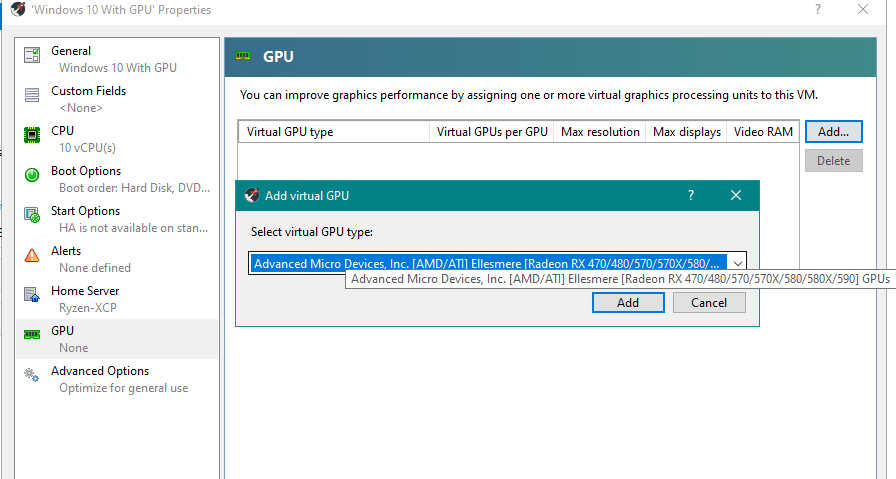
                      @jmccoy555 You can use the GUI. I checked, the code changes as if you do make it in CLI. please check the newest version 8.1
                      b8929c93-4fea-4225-812e-6dbf288f2b5f-image.png
                      6e41aa83-4789-4da5-9ecf-2a77e2ffce6d-image.png

                      olivierlambertO J 2 Replies Last reply
                      Reply Quote 0
                      • A
                        anthonyh @jmccoy555
                        last edited by

                        @jmccoy555 said in XCP-ng GPU Passthrough - No GPU found:

                        @anthonyh Google code 43 NVIDIA...... Basic translation is we want to stop you doing this with a consumer card in a VM. There are solutions I believe.

                        @olivierlambert said in XCP-ng GPU Passthrough - No GPU found:

                        Yes, using Nvidia card supporting GPU passthrough 😛

                        Otherwise, there's "border line" patches on Windows drivers available on GitHub, but we won't find those for you 😉

                        Well, this card is technically in the Quadro family, so I was hoping it'd work. I see solutions for libvirt/KVM, but not Xen. Any "nudge" would be greatly appreciated if anyone is willing. This is just a test environment. If the application works in this setup we'll buy proper hardware and go the AMD route.

                        1 Reply Last reply
                        Reply Quote 0
                        • A
                          anthonyh
                          last edited by

                          I think I might have found the GitHub driver patch @olivierlambert was referring to...

                          I 1 Reply Last reply
                          Reply Quote 1
                          • olivierlambertO
                            olivierlambert Vates 🪐 Co-Founder CEO @linhnb
                            last edited by

                            @linhnb

                            1. I was answering to @anthonyh
                            2. You are on a community forum 😉
                            1 Reply Last reply
                            Reply Quote 0
                            • J
                              jmccoy555 @linhnb
                              last edited by jmccoy555

                              @linhnb said in XCP-ng GPU Passthrough - No GPU found:

                              You can use the GUI. I checked, the code changes as if you do make it in CLI. please check the newest version 8.1

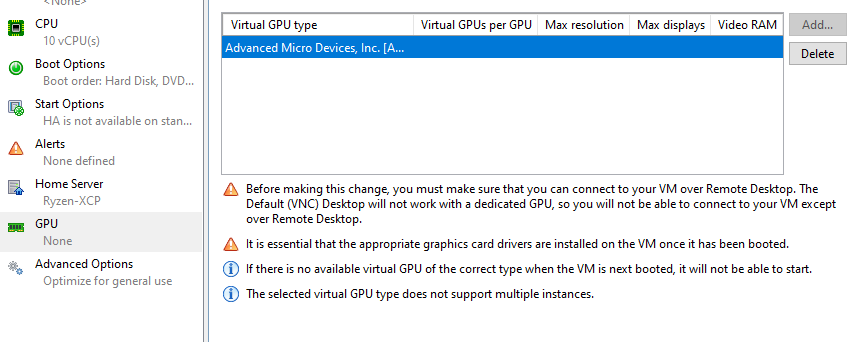
                              Thanks for the tip!! Working in 8.1 in XCP-ng Center and also XO 🙂

                              Also, dont think there is a need to 'hide' the GPU from Dom0 now??

                              edit: Did a fresh install, no need to 'xen-pciback.hide' when assigning via XO or XCP-ng center. This was with AMD as they play nicely, not sure about NVIDIA.

                              I 1 Reply Last reply
                              Reply Quote 0
                              • I
                                imtrobin @anthonyh
                                last edited by

                                This post is deleted!
                                1 Reply Last reply
                                Reply Quote 0
                                • I
                                  imtrobin @jmccoy555
                                  last edited by

                                  @jmccoy555 You got nvidia GPU working in VM?

                                  J 1 Reply Last reply
                                  Reply Quote 0
                                  • J
                                    jmccoy555 @imtrobin
                                    last edited by

                                    @imtrobin No, AMD. Currently a WX4100 (as its LP and fits into a 2U server) but have also had a RX580 working before.

                                    1 Reply Last reply
                                    Reply Quote 0

                                    Hello! It looks like you're interested in this conversation, but you don't have an account yet.

                                    Getting fed up of having to scroll through the same posts each visit? When you register for an account, you'll always come back to exactly where you were before, and choose to be notified of new replies (either via email, or push notification). You'll also be able to save bookmarks and upvote posts to show your appreciation to other community members.

                                    With your input, this post could be even better 💗

                                    Register Login
                                    • First post
                                      Last post