XCP-ng
    • Categories
    • Recent
    • Tags
    • Popular
    • Users
    • Groups
    • Register
    • Login

    XCP-ng GPU Passthrough - No GPU found
    Scheduled Pinned Locked Moved Development
    41 Posts 10 Posters 38.2k Views 10 Watching
    Loading More Posts
    • Oldest to Newest
    • Newest to Oldest
    • Most Votes
    Reply
    • Reply as topic
    Log in to reply
    This topic has been deleted. Only users with topic management privileges can see it.
    • L Offline
      linhnb
      last edited by

      Finally, we have GPU passthrough in the GUI,
      But it is not working...
      My setup:
      CPU 2700x
      MOBO: x470 Taichi
      RAM: 32GB
      GPU: Rx580 sapphire Nitro 4GB

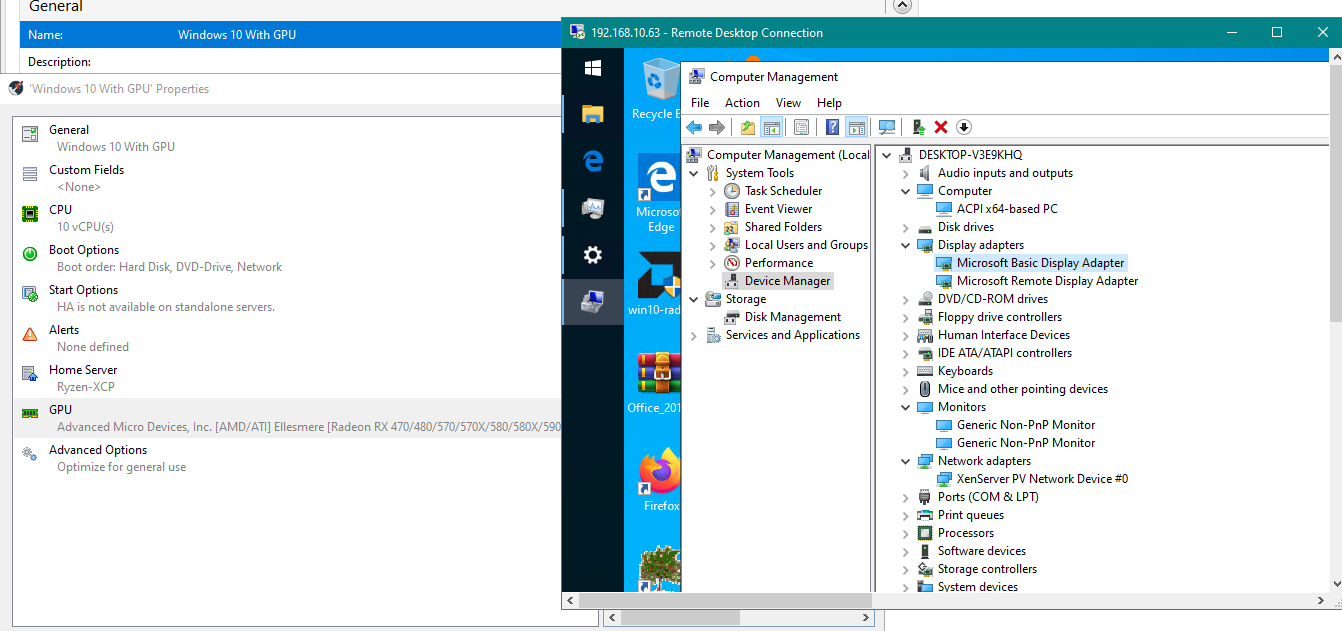
      Please, I did use CLI and GUI, no work.
      Cannot see it in Windows.
      acc4199c-4b96-4306-b765-e6492841f099-image.png ![alt text](image url)

      J 1 Reply Last reply Reply Quote 0
      • A Offline
        anthonyh
        last edited by

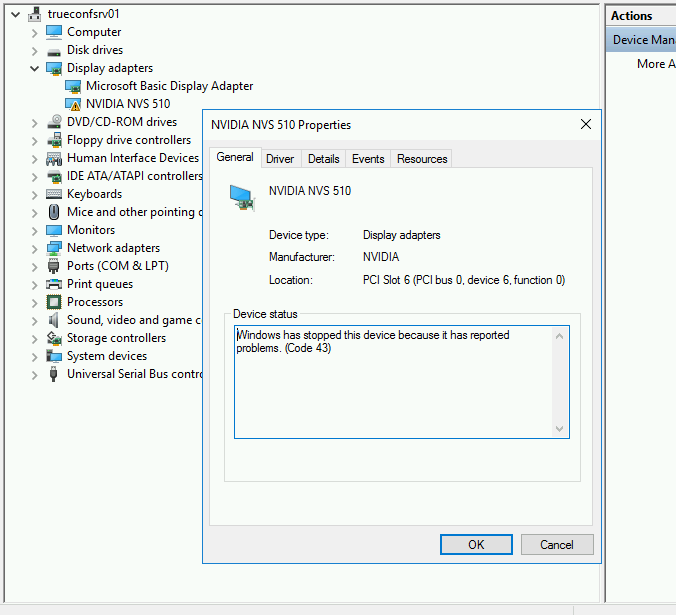
        Ironically, I am trying to do this as well. I put a second graphics card in a host (NVIDIA NVS 510) and made sure the appropriate virtalization settings were enabled in the BIOS. Running up to date XCP-ng 8.0 (yum update as of yesterday afternoon). I can assign the GPU to the Windows Server 2016 guest in XCP-ng Center, and the NVIDIA drivers seem to install fine, but Device Manager reports the following:
        85c90cd3-11ae-49a3-ac29-ff5a07488c81-image.png

        What's also interesting is even though it warns that you must be able to access the VM remotely as there will be no local console, there is still a local console. I don't know if this means anything.

        Any ideas?

        J L 2 Replies Last reply Reply Quote 0
        • J Offline
          jmccoy555 @anthonyh
          last edited by

          @anthonyh Google code 43 NVIDIA...... Basic translation is we want to stop you doing this with a consumer card in a VM. There are solutions I believe.

          A 1 Reply Last reply Reply Quote 0
          • olivierlambertO Offline
            olivierlambert Vates 🪐 Co-Founder CEO
            last edited by

            Yes, using Nvidia card supporting GPU passthrough 😛

            Otherwise, there's "border line" patches on Windows drivers available on GitHub, but we won't find those for you 😉

            1 Reply Last reply Reply Quote 1
            • J Offline
              jmccoy555 @linhnb
              last edited by

              @linhnb don't think you can use the GUI for GPUs, only vGPUs.

              RX580 does work, just follow the PCI passthrough guide.

              1 Reply Last reply Reply Quote 0
              • olivierlambertO Offline
                olivierlambert Vates 🪐 Co-Founder CEO
                last edited by

                AMD cards are indeed far better for both vGPU and GPU passthrough: it just works.

                1 Reply Last reply Reply Quote 0
                • J Offline
                  jmccoy555
                  last edited by

                  If only they made a LP vGPU card.... Looks like a WX4100 will have to do.

                  1 Reply Last reply Reply Quote 0
                  • L Offline
                    linhnb @anthonyh
                    last edited by

                    @anthonyh yeah, I also got this note in version 8.1. I just don't know why. But my VM can't see Rx580, that's the problem

                    @olivierlambert man, please, I got problem right here with AMD GPU. Please help.

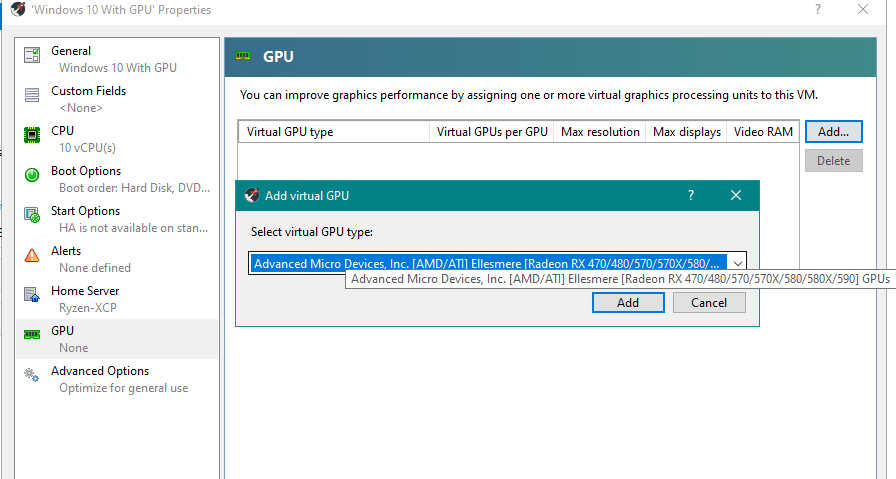
                    @jmccoy555 You can use the GUI. I checked, the code changes as if you do make it in CLI. please check the newest version 8.1
                    b8929c93-4fea-4225-812e-6dbf288f2b5f-image.png
                    6e41aa83-4789-4da5-9ecf-2a77e2ffce6d-image.png

                    olivierlambertO J 2 Replies Last reply Reply Quote 0
                    • A Offline
                      anthonyh @jmccoy555
                      last edited by

                      @jmccoy555 said in XCP-ng GPU Passthrough - No GPU found:

                      @anthonyh Google code 43 NVIDIA...... Basic translation is we want to stop you doing this with a consumer card in a VM. There are solutions I believe.

                      @olivierlambert said in XCP-ng GPU Passthrough - No GPU found:

                      Yes, using Nvidia card supporting GPU passthrough 😛

                      Otherwise, there's "border line" patches on Windows drivers available on GitHub, but we won't find those for you 😉

                      Well, this card is technically in the Quadro family, so I was hoping it'd work. I see solutions for libvirt/KVM, but not Xen. Any "nudge" would be greatly appreciated if anyone is willing. This is just a test environment. If the application works in this setup we'll buy proper hardware and go the AMD route.

                      1 Reply Last reply Reply Quote 0
                      • A Offline
                        anthonyh
                        last edited by

                        I think I might have found the GitHub driver patch @olivierlambert was referring to...

                        I 1 Reply Last reply Reply Quote 1
                        • olivierlambertO Offline
                          olivierlambert Vates 🪐 Co-Founder CEO @linhnb
                          last edited by

                          @linhnb

                          1. I was answering to @anthonyh
                          2. You are on a community forum 😉
                          1 Reply Last reply Reply Quote 0
                          • J Offline
                            jmccoy555 @linhnb
                            last edited by jmccoy555

                            @linhnb said in XCP-ng GPU Passthrough - No GPU found:

                            You can use the GUI. I checked, the code changes as if you do make it in CLI. please check the newest version 8.1

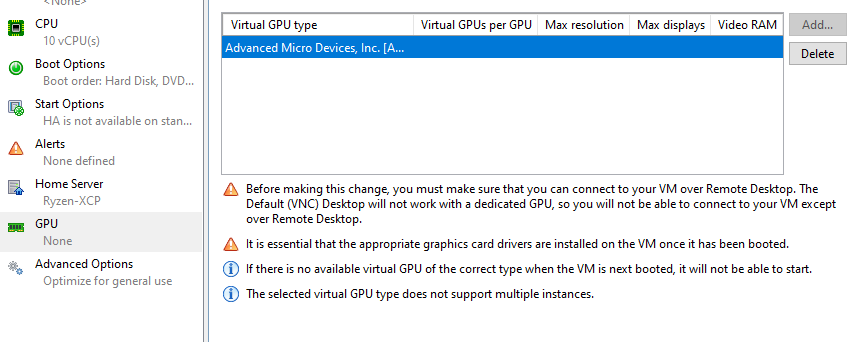
                            Thanks for the tip!! Working in 8.1 in XCP-ng Center and also XO 🙂

                            Also, dont think there is a need to 'hide' the GPU from Dom0 now??

                            edit: Did a fresh install, no need to 'xen-pciback.hide' when assigning via XO or XCP-ng center. This was with AMD as they play nicely, not sure about NVIDIA.

                            I 1 Reply Last reply Reply Quote 0
                            • I Offline
                              imtrobin @anthonyh
                              last edited by

                              This post is deleted!
                              1 Reply Last reply Reply Quote 0
                              • I Offline
                                imtrobin @jmccoy555
                                last edited by

                                @jmccoy555 You got nvidia GPU working in VM?

                                J 1 Reply Last reply Reply Quote 0
                                • J Offline
                                  jmccoy555 @imtrobin
                                  last edited by

                                  @imtrobin No, AMD. Currently a WX4100 (as its LP and fits into a 2U server) but have also had a RX580 working before.

                                  1 Reply Last reply Reply Quote 0

                                  Hello! It looks like you're interested in this conversation, but you don't have an account yet.

                                  Getting fed up of having to scroll through the same posts each visit? When you register for an account, you'll always come back to exactly where you were before, and choose to be notified of new replies (either via email, or push notification). You'll also be able to save bookmarks and upvote posts to show your appreciation to other community members.

                                  With your input, this post could be even better 💗

                                  Register Login
                                  • First post
                                    Last post