is Xo Proxy available in community version
-
Thanks for trying it! This one comes from upstream Xen Orchestra, not the installer. A change in XO's connection library (around 2026-09-09) left servers set to connect through an HTTPS proxy that supports HTTP/2, such as XO Proxy, stuck in
Connecting. Vates fixed it in #10507 and released it in XO 6.9.1 (2026-10-05). That's also why the other project broke the same way.Running
--updateshould pull the fix, since the installer builds frommasterby default. If servers behind the proxy still won't connect after updating, please open an issue with what the Servers page shows and I'll dig in.Side - note the disable license check is no longer needed as that appears not to be gated by the license check.
I have pushed these changes to the Dev branch. You should be able to switch to the dev branch and run the update ...
git fetch origin
git switch dev
./install-xen-orchestra.sh -
Correction to my side note: the license check can still block backups through a proxy. A proxy deployed by
--proxyon a free xen-orchestra.com account updates to 0.31.10 and fails backups withno valid proxy license. The fix that stops gating backups on the license first ships in proxy 0.32.0+. The README now covers registering the proxy and this limit (dev branch).I took this screenshot before the error whent away.
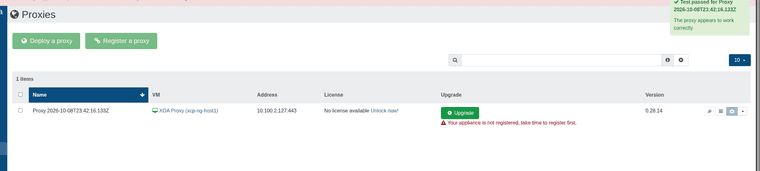
After update.

Backup Remote connected via proxy.

I did not test with host connected via proxy yet. Just not sure why the proxy will not update to 0.33.1.
Also added support for auth token when xo account is using MFA.
-
@acebmxer thank you very much for your detailed answer! Testing things and hoping for the best! Best regards!
-
Got so possible good news... I got the proxy to update to the latest version and was able to do a backup job with it. Still need to test connecting a host via proxy.
-
Update - changes are live in the dev branch now.
So figured out the update / switching branches for the proxy by connecting the proxy to my xoa free account. That triggered the available update to next version. From there I found the command that needs to be ran on the proxy to switch back and forth...

Latest branch

stable branch

Backup job ran sucessful.
2026-10-09T17_48_25.447Z - backup NG.txt
After the proxy has been deployed...
The proxy has been registered with your Xen Orchestra instance.
You can manage it from the Xen Orchestra web interface.Next: register the proxy's updater and move it to the 'latest' channel.
- On the pool master (IP), set a password for the proxy's 'xoa' user
(choose your own) and reboot the proxy VM:
xe vm-param-set uuid=UUID xenstore-data:vm-data/system-account-xoa-password='<your password>'
xe vm-reboot uuid=UUID - SSH to the proxy as 'xoa' (IP) and run:
sudo xoa-updater register- This registers it with your vates account.
sudo xoa-updater configure-channel xo-proxy-appliance-latest- set tolatestorstable
sudo xoa-updater upgrade- This can be ran via the UI or this command. Both need to be done twice to do the upgrade and/or downgrade.
register needs a free xen-orchestra.com account; see the README.
And host connected via proxy.

- On the pool master (IP), set a password for the proxy's 'xoa' user
-
@acebmxer that is awesome work! Looking forqard to duplicating your effort on Monday. Have an aqesome weekend!
-
@acebmxer I tried to replicate the steps but the images in the post are not working and couldn't follow. them. I did deploy a XOA Free instance in my pool and registered the proxy running on my sources server on the xoa appliance. It is now on version 0.31.6 and in the proxies page (of the XOA appliance) it complains about the lacking license and also does not allow upgrade. I must have missed something but will try again from the start later.
-
Try again but if you are stuck on 0.31.6 make sure you ran -
sudo xoa-updater configure-channel xo-proxy-appliance-latestYou should be able to run -
sudo xoa-updater configure-channel xo-proxy-appliance-stableto switch back and forth.@poddingue any idea what happened to the screenshot in the above post not loading? Do i need to find them and reupload again?
-
@acebmxer Success! I followed the steps to the letter and it worked! I did have an issue where the VM lost dns name resolution after running
xoa-updater upgradebut I managed to connect to the VM via the console, restart networking and complete the update from the console tty. I am planning on runningscreennext time - maybe I catch the issue - but all works fine at the time and seeing the green "Your proxy is up-to-date" in the proxies page is so refreshing! Thanx again! Now I just need to redeploy the proxies with the new steps on all remote hosts .
. -
@bogdantomasciuc
Glad to hear. I was hoping it was just something missed or miss typed.If you can replicate the issue let me know. Its possible i might have missed that little nuance or something.

Hello! It looks like you're interested in this conversation, but you don't have an account yet.
Getting fed up of having to scroll through the same posts each visit? When you register for an account, you'll always come back to exactly where you were before, and choose to be notified of new replies (either via email, or push notification). You'll also be able to save bookmarks and upvote posts to show your appreciation to other community members.
With your input, this post could be even better 💗
Register Login